1. Einführung und Endeview
This manual provides essential instructions for the safe and efficient use of your Samsung EC-SH100 Wi-Fi Digital Camera. The EC-SH100 is a 14.2-megapixel digital camera featuring a 5x optical zoom, a 3-inch touchscreen, and integrated Wi-Fi capabilities for easy sharing and connectivity.
Zu den Hauptmerkmalen gehören:
- Wi-Fi technology for direct photo and video uploads to social media (Facebook, YouTube) or email.
- Intuitive 3-inch LCD touchscreen with drag-and-scroll functionality.
- 14.2-megapixel resolution and 5x optical zoom for high-quality images.
- Face, smile, and blink detection for optimal portrait shots.
- Wireless, automatic file backup to your personal computer.

Abbildung 1.1: Vorderseite view of the Samsung EC-SH100 Wi-Fi Digital Camera, showcasing die Linse und den Blitz.
2. Lieferumfang
Bitte überprüfen Sie, ob alle folgenden Artikel in Ihrer Produktverpackung enthalten sind:
- Samsung EC-SH100 Digital Camera
- Netzteil/USB-Kabel
- Wiederaufladbarer Lithium-Ionen-Akku
- Gurt
- Berühren Sie Stift
- User Manual CD-ROM
- Schnellstartanleitung
3. Einrichtung
3.1. Laden des Akkus
- Insert the rechargeable lithium-ion battery into the camera's battery compartment.
- Connect the camera to the AC adapter using the provided USB cable.
- Stecken Sie den Netzadapter in eine Steckdose. Die Ladeanzeige leuchtet auf.
- Lassen Sie den Akku vor dem ersten Gebrauch vollständig aufladen.
3.2. Einlegen einer Speicherkarte
The camera requires a microSD card (up to 8 GB supported) to store photos and videos. A memory card is not included in the box and must be purchased separately.
- Öffnen Sie die Abdeckung des Speicherkartensteckplatzes.
- Setzen Sie die microSD-Karte mit den goldenen Kontakten nach unten ein, bis sie einrastet.
- Schließen Sie die Abdeckung des Speicherkartensteckplatzes sorgfältig.
3.3. Ein-/Ausschalten
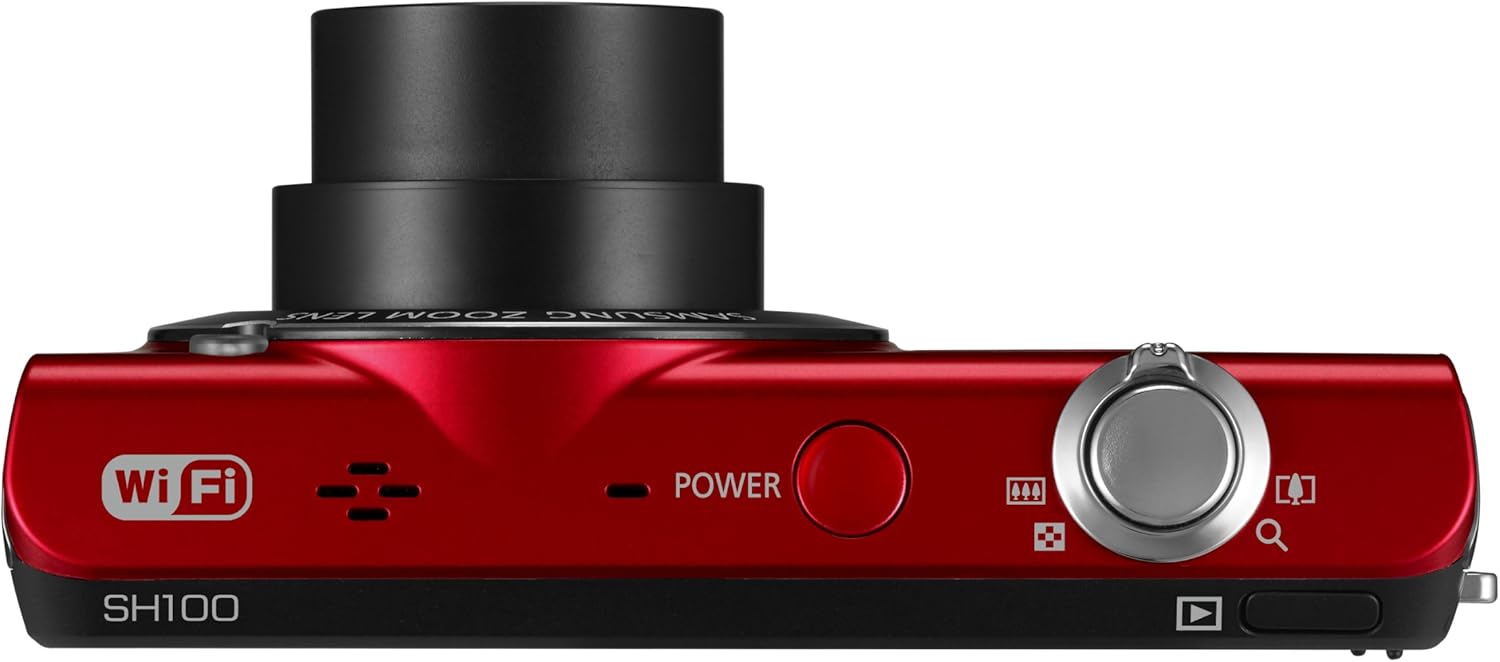
Abbildung 3.1: Oben view der Kamera, wobei der Ein-/Ausschalter hervorgehoben wird.
Drücken Sie die LEISTUNG Oben an der Kamera befindet sich ein Knopf zum Ein- und Ausschalten.
4. Bedienung der Kamera
4.1. Grundlagen der Fotografie
- Schalten Sie die Kamera ein.
- Frame your shot using the 3-inch LCD touchscreen.
- Drücken Sie den Auslöser halb durch, um zu fokussieren, und dann ganz durch, um das Bild aufzunehmen.
4.2. Using the Smart Touch Interface

Abbildung 4.1: Rückseite view of the camera, showing the Smart Touch interface.
The 3-inch LCD touchscreen allows for intuitive navigation similar to a smartphone. Use the included touch pen or your finger to tap icons, drag, and scroll through menus and images. The "Home" icon provides quick access to the main menu.
4.3. Smart Auto 2.0
The Smart Auto 2.0 feature automatically analyzes the scene and selects the most appropriate shooting mode from 17 photo modes and 4 movie modes to ensure optimal image quality.
4.4. Face, Smile, and Blink Detection
This feature detects up to nine faces in a frame, adjusting lighting for optimal results. The camera can be set to automatically capture a photo when subjects smile or laugh, and prevent a shot if anyone's eyes are closed.
4.5. Digital Image Stabilization
Digital Image Stabilization (DIS) helps reduce blur caused by camera shake, especially in low light conditions or when using the zoom. This feature digitally corrects image data before it is recorded.
4.6. Wi-Fi Connectivity and Sharing
The EC-SH100's integrated Wi-Fi allows for direct sharing:
- Soziales Teilen: Upload photos and videos directly to Facebook, Picasa, or YouTube.
- E-Mail: Send photos directly from the camera via email.
- AllShare: Wirelessly connect to a compatible Samsung TV to view Fotos und Videos.
- PC Auto Backup: Automatically transfer photos and videos to your PC when within range of a configured Wi-Fi network. The camera will power off after backup to conserve energy.
4.7. Magic Frame
Use Magic Frame to combine two photos using predefined templates, creating unique visual effects and poster-quality images.
4.8. Fernbedienung ViewFinder
When paired with a compatible Samsung Galaxy Phone, the Remote Viewfinder feature allows you to preview images and control the camera's zoom remotely using your smartphone. This also enables geo-tagging of images if your smartphone has GPS.
5. Wartung
5.1. Reinigung der Kamera
- Verwenden Sie ein weiches, trockenes Tuch, um das Kameragehäuse zu reinigen.
- Verwenden Sie für die Reinigung von Linse und LCD-Bildschirm ein spezielles Linsenreinigungstuch und eine entsprechende Reinigungslösung. Vermeiden Sie aggressive Chemikalien.
5.2. Batteriepflege
- Bewahren Sie den Akku bei Nichtgebrauch an einem kühlen, trockenen Ort auf.
- Setzen Sie den Akku keinen extremen Temperaturen aus.
- Charge the battery regularly, even if the camera is not used frequently, to maintain its lifespan.
5.3. Firmware-Updates
Überprüfen Sie regelmäßig den Samsung-Support. website for available firmware updates for your camera. Firmware updates can improve performance and add new features. Follow the instructions provided by Samsung carefully when performing an update, typically involving connecting the camera to a computer.
6. Fehlerbehebung
- Die Kamera schaltet sich nicht ein: Stellen Sie sicher, dass der Akku vollständig geladen und richtig eingelegt ist.
- Kann keine Fotos/Videos aufnehmen: Verify that a microSD card is inserted and has sufficient free space.
- Unscharfe Bilder: Ensure Digital Image Stabilization is active. Hold the camera steady. In low light, use a tripod if possible.
- Poor video audio: Ensure the microphone is not obstructed. Note that some users have reported limited audio quality in video recordings.
- Probleme mit der Wi-Fi-Verbindung: Check your Wi-Fi network settings and ensure the camera is within range. Re-enter network passwords if necessary.
- Camera turns on by itself: The power button may be accidentally pressed if the camera is stored in a tight space like a purse. Ensure the camera is stored in a way that prevents accidental button presses.
7. Spezifikationen
| Technische Daten | 3.66 x 0.75 x 2.13 Zoll (B x T x H) |
| Artikelgewicht | 3.84 Unzen |
| Bildsensor | 14.2 Megapixels CCD |
| Optischer Zoom | 5x |
| Linse | 26mm Samsung lens, 4.7-23.5mm (35mm equivalent: 26-130mm) |
| Maximale Blendenöffnung | f/3.3-5.9 |
| Anzeige | 3-Zoll-LCD-Touchscreen |
| Bildstabilisierung | Digital, optisch |
| Interner Speicher | 6.9 MB |
| Externer Speicher | microSD-Karte bis 8 GB |
| Batterie | Wiederaufladbarer Lithium-Ionen-Akku (im Lieferumfang enthalten) |
| Unterstützt File Format | MP4 (Video) |
| Konnektivität | WLAN, USB |
| Betriebssystemkompatibilität | Windows 2000, XP, Vista, 7; Mac OS X 10.3 or higher |
8. Garantie und Support
8.1. Eingeschränkte Garantie
The Samsung EC-SH100 Wi-Fi Digital Camera is backed by a one-year limited warranty on parts and labor. Please refer to the warranty card included in your product package for full terms and conditions.
8.2. Kundendienst
For further assistance, technical support, or to download the latest drivers and firmware, please visit the official Samsung support website. You may also refer to the User Manual CD-ROM and Quick Start Manual provided with your camera.


