

DAC TempU07B Temp and RH Data
 Logger Instruction Manual
TempU07B Temp&RH Data Logger Manual

1) Product introduction
TempU07B is a simple and portable LCD screen temperature and humidity data logger. This product is mainly used to monitor and record the temperature and humidity data during transportation and storage. It’s are widely used in all aspects of the warehousing and logistics cold chain, such as refrigerated containers, refrigerated trucks, refrigerated
distribution boxes, and cold storage laboratories. Data reading and parameter configuration can be realized through the USB interface, and the report can be easily and automatically generated after insertion, and there is no need to install any drivers when it’s inserted into the computer.
distribution boxes, and cold storage laboratories. Data reading and parameter configuration can be realized through the USB interface, and the report can be easily and automatically generated after insertion, and there is no need to install any drivers when it’s inserted into the computer.
2) Technical parameters

3) Factory default parameters of device
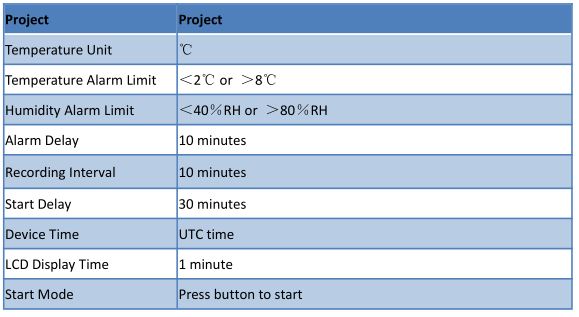
4) Operating instructions
- Start recording
Long press the start button for more than 3s until the screen “►” or the “WAIT” symbol is on, indicating that the device has successfully started recording. - Marking
When the device is in the recording state, long press the start button for more than 3s, and the screen will jump to “MARK” interface, mark number plus one, indicating successful marking. - Stop recording
Long press the stop button for more than 3s until the “■” symbol on the screen lights up, indicating that the device stops recording.
5) LCD display description

1) Short press the start button to switch the display interface in turn
Real time temperature interface → Real time humidity interface → Log interface → Mark number interface → Temperature maximum interface→ Temperature minimum interface → Humidity maximum interface → Humidity minimum interface.
Real time temperature interface → Real time humidity interface → Log interface → Mark number interface → Temperature maximum interface→ Temperature minimum interface → Humidity maximum interface → Humidity minimum interface.


6 Description of battery status display

Notice:
The battery indication status can not accurately represent the battery power in different low temperature & humidity environment.
The battery indication status can not accurately represent the battery power in different low temperature & humidity environment.
Contents
hide
Documents / Resources
 |
DAC TempU07B Temp and RH Data Logger [pdf] Instruction Manual TempU07B, TempU07B Temp and RH Data Logger, TempU07B, Temp and RH Data Logger, RH Data Logger, Data Logger, Logger |