1. Introduktion
This manual provides detailed instructions for the setup, operation, and maintenance of your WOOPKER AK50 Stereo Amplifier. Please read this manual thoroughly before using the product to ensure proper functionality and to extend its lifespan.
1.1 Produkt overview
The WOOPKER AK50 is a multi-function 2-channel stereo amplifier designed for home audio systems. It features Bluetooth 5.0 connectivity, FM radio, USB and SD card playback, and multiple input options for various audio sources. It is suitable for driving passive speakers in home theater, studio, or karaoke setups.

Image 1.1: WOOPKER AK50 Stereo Ampfjernbetjening
This image displays the WOOPKER AK50 stereo amplifier, a compact black unit with blue illuminated knobs, alongside its black remote control. The amplifier features a central LED display, USB and SD card slots, microphone inputs, and controls for volume, bass, and treble.
1.2 Nøglefunktioner
- Udgangseffekt: Provides a maximum output of 400W + 400W, compatible with 4-16 inch passive speakers.
- Alsidige inputmuligheder: Supports Bluetooth, AUX, MIC, USB, and SD card inputs. Connects to external devices such as CD/DVD players, TVs, PCs, smartphones, and projectors.
- Bluetooth 5.0: Integrated Bluetooth 5.0 for stable wireless audio streaming. Optimal connection range is within 30 feet (10 meters) without obstructions.
- Tonekontrol: Independent knobs for adjusting Bass, Treble, Microphone Volume, and Echo effects.
- Fjernbetjening: Includes a remote for convenient adjustment of input modes and volume from a distance.
2. Vigtige sikkerhedsinstruktioner
For at mindske risikoen for elektrisk stød, brand eller personskade, bedes du overholde følgende sikkerhedsforanstaltninger:
- Udsæt ikke dette apparat for regn eller fugt.
- Åbn ikke c'enasing. Overlad al service til kvalificeret personale.
- Sørg for tilstrækkelig ventilation. Bloker ikke ventilationsåbninger.
- Placer enheden på en stabil, flad overflade.
- Hold enheden væk fra direkte sollys, varmekilder og for meget støv.
- Tag netledningen ud af stikkontakten, hvis enheden ikke skal bruges i længere tid.
- Betjen ikke enheden med våde hænder.
3. Pakkens indhold
Bekræft, at alle nedenstående varer er inkluderet i din pakke:
- WOOPKER AK50 Stereo Amplivligere
- Fjernbetjening
- Strømkabel
- FM antenne
- Brugermanual (dette dokument)
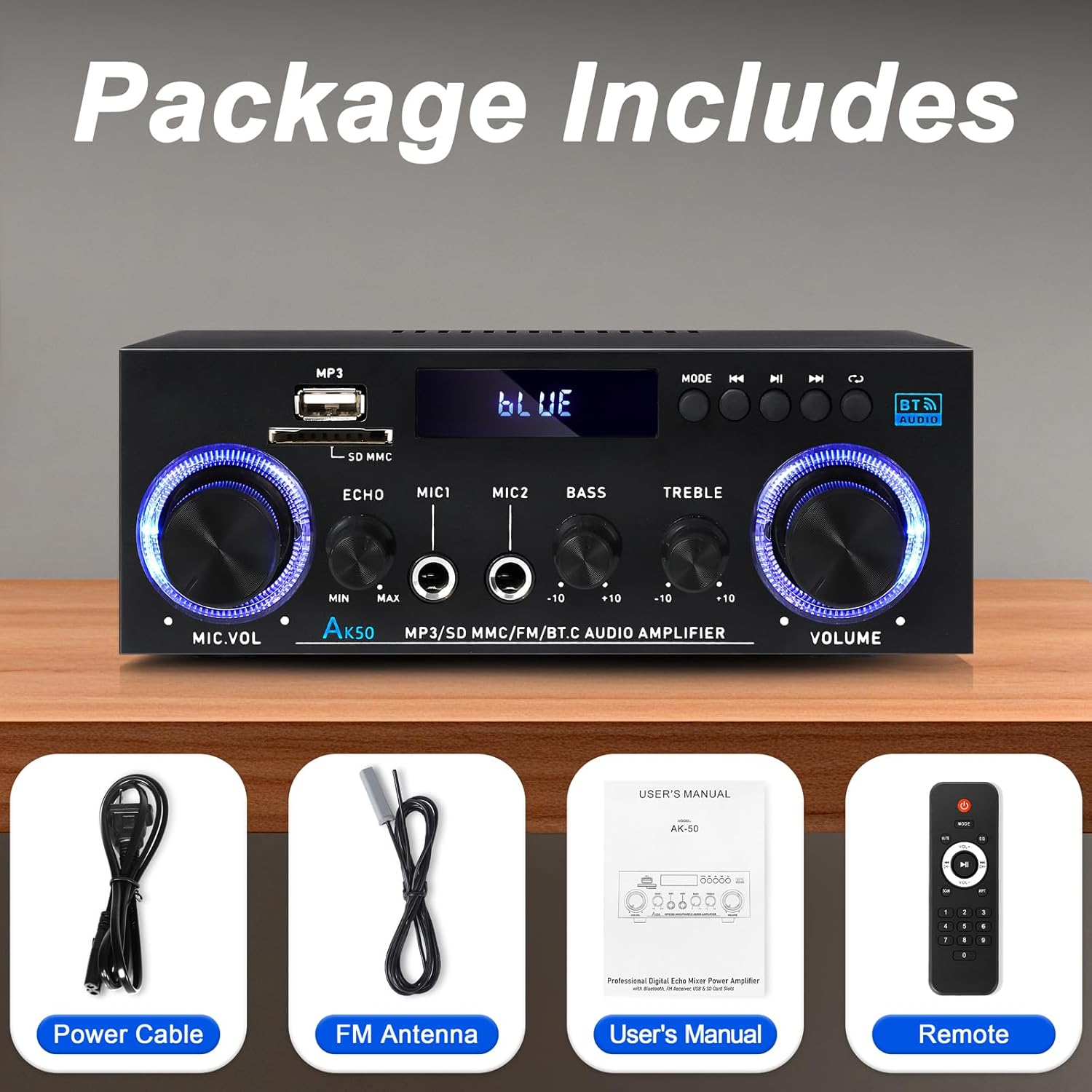
Billede 3.1: Medfølgende tilbehør
This image shows the items included in the WOOPKER AK50 package: the amplifier unit, a power cable, an FM antenna, a user's manual, and a remote control.
4. Produktlayout
4.1 Frontpanel

Image 4.1: Front Panel Controls and Indicators
This diagram illustrates the front panel of the AK50 amplifier, highlighting its various controls and ports. Key features include the USB/SD port, LED display, mode selection buttons, microphone inputs, and rotary knobs for microphone volume, echo, bass, treble, and master volume.
- USB/SD-port: Til afspilning af lyd filefra USB-drev eller SD-kort.
- LED display: Viser den aktuelle tilstand, sporoplysninger og andre statusindikatorer.
- Mode knap: Switches between input modes (Bluetooth, AUX, USB, SD, FM).
- Forrige knap: Navigates to the previous track/station.
- Afspil/pause knap: Styrer afspilning for USB/SD/Bluetooth.
- Næste knap: Navigates to the next track/station.
- Cyklus knap: Repeats playback mode for USB/SD.
- Mikrofonvolumenknap: Justerer lydstyrken på tilsluttede mikrofoner.
- Ekko-knap: Justerer ekkoeffekten for mikrofoner.
- Mic Input Jacks (MIC1, MIC2): 6.35 mm stik til tilslutning af mikrofoner.
- Basknap: Justerer lavfrekvent lydudgang.
- Diskant-knap: Justerer højfrekvent lydudgang.
- Master volumen knap: Styrer den overordnede udgangslydstyrke.
4.2 Bagpanel

Billede 4.2: Tilslutninger på bagpanelet
This diagram details the rear panel of the AK50 amplifier, showing the various input and output terminals. It includes the FM antenna jack, power switch, audio input/output jacks, speaker output terminals, and power input ports.
- FM-antennestik: Connects to the included FM antenna for radio reception.
- Afbryderen: Drejer amplifier ON eller OFF.
- Audio Input Jacks (AUX/LINE): RCA-stik til tilslutning af eksterne lydkilder (f.eks. cd-afspiller, tv).
- Højttalerudgangsterminaler: Connects to passive speakers (4-16Ω impedance).
- DC 12V/5A strømindgang: For DC power supply (if applicable, check model specifications).
- AC 90-240V Power Input: Connects to the main power supply using the provided power cable.
5. Opsætningsvejledning
Follow these steps to set up your AK50 Stereo Amplivligere:
5.1 Højttalertilslutning
- Sørg for ampApparatet er slukket og taget ud af stikkontakten.
- Tilslut dine passive højttalere til Højttalerudgangsterminaler on the rear panel. Ensure correct polarity (red to red, black to black) for each speaker.
- De ampLifier understøtter højttalere med en impedans på 4-16Ω.
5.2 Tilslutning af lydkilde
You can connect various audio sources to the AK50 amplivligere:
- AUX/LINE-indgang: Use RCA cables to connect devices like CD players, DVD players, TVs, or PCs to the Audio Input Jacks på bagpanelet.
- USB/SD-kort: Insert a USB flash drive or SD card (pre-loaded with audio files) into the respective port on the front panel.
- Bluetooth: Se afsnit 6.3 for instruktioner om Bluetooth-parring.
- FM-antenne: Tilslut den medfølgende FM-antenne til FM-antennestik on the rear panel for radio reception. Extend the antenna for better signal.
5.3 Strømtilslutning
- Tilslut det medfølgende strømkabel til AC 90-240V strømindgang på bagpanelet.
- Sæt den anden ende af strømkablet i en passende stikkontakt.
- Sørg for Strømafbryder on the rear panel is in the OFF position before plugging in.

Billede 5.1: Eks.ample Forbindelsesdiagram
This image illustrates various connection possibilities for the AK50 amplifier, including connecting to speakers, a CD player, a DVD player, a PC/laptop, and a TV/Blu-ray player. It also shows the FM antenna and power connections.
6. Betjeningsvejledning
6.1 Tænd/sluk
Når alle forbindelser er foretaget, vend Strømafbryder on the rear panel to the ON position. The LED display on the front panel will illuminate.
6.2 Valg af tilstand
Tryk på Mode knap on the front panel or the remote control to cycle through the available input modes: Bluetooth, AUX, USB, SD, and FM.
6.3 Lydstyrke- og tonekontrol
- Hovedvolumen: Drej på Master volumenknap to adjust the overall sound level.
- Bas/diskant: Brug Bassknop og Diskantknap to fine-tune the low and high frequencies of the audio output.
- Mic Volume/Echo: Hvis der er tilsluttet mikrofoner, skal du bruge Mikrofon volumenknap to adjust their volume and the Ekko-knap to add an echo effect.

Image 6.1: Bass and Treble Controls
This image highlights the Bass and Treble control knobs on the front panel of the AK50 amplifier, indicating their function in adjusting audio frequencies.
6.4 Bluetooth -parring
- Skift til ampskifte til Bluetooth-tilstand ved hjælp af Mode knap. The LED display will show "BLUE" or a similar indicator, and the unit will enter pairing mode.
- Aktiver Bluetooth på din Bluetooth-aktiverede enhed (f.eks. smartphone, tablet) og søg efter tilgængelige enheder.
- Select "AK50" (or similar device name) from the list to pair.
- Når det er parret, vil amplifier will indicate a successful connection, and you can play audio from your device.
- Maintain a distance of within 30 feet (10 meters) for optimal Bluetooth performance.

Image 6.2: Bluetooth Connection
This image demonstrates the Bluetooth pairing process, showing a smartphone displaying available Bluetooth devices and the AK50 amplifier in Bluetooth mode, indicating a successful connection.

Image 6.3: Bluetooth Range
This image illustrates the effective Bluetooth range of the AK50 amplifier, indicating a maximum distance of 32 feet (10 meters) for stable wireless connection between the amplifier and a paired device.
6.5 USB/SD-afspilning
Insert a USB drive or SD card into the corresponding slot. The ampLifier skifter automatisk til USB/SD-tilstand og begynder at afspille lyd files. Brug Tidligere, Afspil/pause, og Næste knapper til at styre afspilning.
6.6 FM-radiofunktion
- Skift til ampskift til FM-tilstand ved hjælp af Mode knap.
- De amplifier will automatically scan and store available FM stations.
- Brug Tidligere og Næste buttons to navigate between stored stations.
- Adjust the FM antenna position for optimal reception.
6.7 Brug af fjernbetjening
Den medfølgende fjernbetjening muliggør bekvem betjening af amplifier from a distance. Ensure the plastic isolation sheet is removed from the battery compartment before first use.

Image 6.4: Remote Control
This image displays the remote control for the AK50 amplifier, showing buttons for power, mode selection, EQ, volume adjustment, track navigation, and numerical input for direct track selection.
7. Vedligeholdelse
Korrekt vedligeholdelse sikrer din bils levetid og optimale ydeevne amplivligere:
- Rensning: Use a soft, dry cloth to clean the exterior of the unit. Do not use liquid cleaners or abrasive chemicals.
- Ventilation: Sørg for, at ventilationsåbningerne er fri for støv og snavs for at forhindre overophedning.
- Opbevaring: Hvis du opbevarer amplifier for an extended period, unplug it from the power outlet and store it in a cool, dry place.
- Strømledning: Regularly inspect the power cord for any damage. If damaged, discontinue use and replace it with an appropriate cord.
8. Fejlfinding
If you encounter issues with your AK50 ampLifier, se følgende almindelige problemer og løsninger:
| Problem | Mulig årsag | Løsning |
|---|---|---|
| Ingen strøm | Strømkabel ikke tilsluttet; Strømafbryder slukket; Strømstik defekt. | Kontroller strømkablets forbindelse; Tænd for strømmen; Test stikkontakten med en anden enhed. |
| Ingen lydudgang | Speakers not connected; Incorrect input mode; Volume too low; Audio source issue. | Check speaker connections and polarity; Select correct input mode; Increase master volume; Verify audio source is playing. |
| Bluetooth forbinder ikke | Amplifier not in Bluetooth mode; Device not in pairing mode; Too far from amplivligere. | Skifte amplifier to Bluetooth mode; Ensure device Bluetooth is ON and searching; Move device closer to amplivligere. |
| Fjernbetjening virker ikke | Battery isolation sheet not removed; Batteries depleted; Obstruction between remote and amplivligere. | Remove plastic sheet; Replace batteries; Ensure clear line of sight to ampliferens IR-modtager. |
| Dårlig FM -modtagelse | FM antenna not connected or positioned incorrectly. | Connect FM antenna securely; Adjust antenna position for better signal. |
Hvis problemet fortsætter efter at have prøvet disse løsninger, bedes du kontakte kundesupport.
9. Specifikationer
| Feature | Specifikation |
|---|---|
| Modelnummer | AK50 |
| Mærke | WOOPKER |
| Udgangseffekt | 400 watt (peak) |
| Surround Sound Kanalkonfiguration | 2.0 kanal |
| Forbindelsesteknologi | Bluetooth 5.0, Auxiliary (RCA), USB, SD Card |
| Kompatible enheder | Speakers, Smartphones, Tablets, PCs, CD/DVD Players |
| Lydudgangstilstand | Stereoanlæg |
| Farve | Sort |
| Varens vægt | 1.98 pund |
| Pakkedimensioner | 8.66 x 7.87 x 3.54 tommer |
10. Garanti og support
For warranty information or technical support, please refer to the documentation provided at the time of purchase or contact WOOPKER customer service through their official channels. Keep your purchase receipt as proof of purchase.