1. Produktet er slutview
The LEFANT M2 Pro is an advanced robot vacuum and mop designed to provide efficient and comprehensive floor cleaning. It features dToF laser navigation for precise mapping, powerful 6000Pa suction, and a smart 2-in-1 sweeping and mopping function. The device also includes an automatic dust collection station for hands-free maintenance and can be controlled via a dedicated app or voice commands.
Nøglefunktioner:
- dToF Laser Navigation & PSD Obstacle Avoidance: Maps your home with high precision and detects obstacles in real-time.
- 6000Pa sugekraft: Effectively removes dust, pet hair, debris, and crumbs from various surfaces.
- 2-i-1 fejning og mopping: Cleans and mops simultaneously with an electronic water tank for adjustable flow.
- Customized Cleaning & Multi-Floor Mapping: Create up to 3 floor maps, set no-go zones, and customize cleaning schedules via the app.
- 2.5L Automatic Dust Emptying Station: Giver op til 90 dages håndfri støvopsamling.
- Smart-app og stemmestyring: Compatible with Alexa, Google Home, and the Lefant app for convenient control.
2. Pakkens indhold
Før opsætning skal du sørge for, at alle dele er til stede i pakken:
- Robotstøvsuger x 1
- Automatic Emptying Station x 1
- Mop Holder x 1
- Strømkabel x 1
- Brugervejledning x 1
- Støvposer x 2
- Washable Mop Cloth x 1
- HEPA-filter x 4
- Dry Mop Cloth x 1
- Rengøringsværktøj x 1
- Sidebørste x 2
- Filter Sponge for Dustbin x 2

3. Opsætningsvejledning
3.1 Første placering og opladning
- Place the automatic emptying station against a wall in an open area, ensuring there are no obstacles within 1 meter to either side and 1.5 meters in front.
- Connect the power cable to the station and plug it into a power outlet.
- Place the robot onto the charging contacts of the station to begin initial charging. Ensure the robot is fully charged before its first use.
3.2 Forbindelse til Lefant-appen
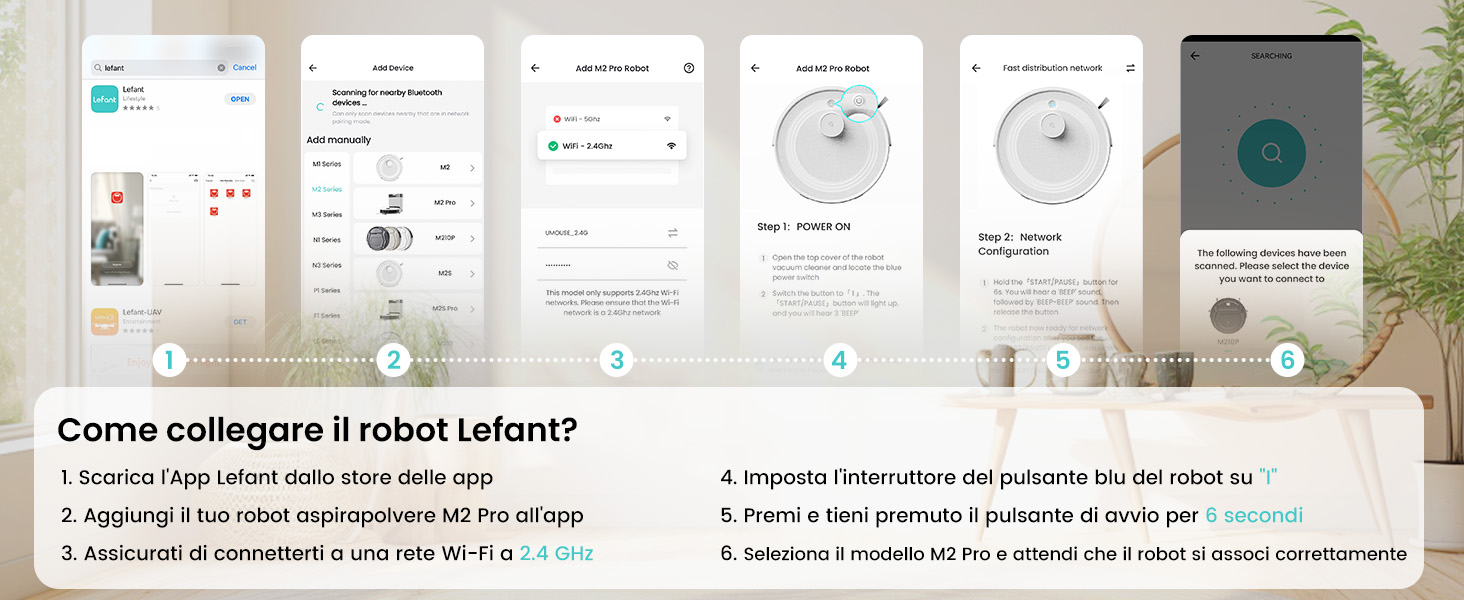
The Lefant app allows for full control and customization of your robot vacuum. Follow these steps to connect:
- Download the 'Lefant' app from your mobile device's app store (App Store for iOS or Google Play Store for Android).
- Åbn appen og tilmeld dig eller log ind på din konto.
- Add your M2 Pro robot vacuum to the app by following the on-screen instructions.
- Ensure your mobile device is connected to a 2.4 GHz Wi-Fi network. The robot only supports 2.4 GHz Wi-Fi.
- Turn on the robot by setting the blue power button to 'I'.
- Press and hold the start button on the robot for 6 seconds until you hear a voice prompt indicating network configuration mode.
- Select the M2 Pro model in the app and wait for the robot to pair successfully.

3.3 Connecting to Voice Assistants (Alexa/Google Home)
For hands-free control, integrate your M2 Pro with Amazon Alexa or Google Home:
- Open the Lefant App. Navigate to Profile > Third-party assistance for voice commands.
- Registrer din stemmekonto og adgangskode i Lefant-appen.
- Open the Alexa App (or Google Home App). Go to 'More' > 'Skills & Games' (or 'Works with Google').
- Søg efter 'Smart liv'.
- Click 'Enable to Use'.
- Vælg din region, og indtast stemmekontoen og adgangskoden fra trin 2.
- Wait for the connection to complete. You can now use voice commands like "Alexa, ask robot to clean."
4. Betjeningsvejledning
4.1 Rengøringstilstande
M2 Pro tilbyder forskellige rengøringstilstande, der passer til dine behov:
- Automatisk rengøring: Robotten navigerer og rengør intelligent hele dit hjem.
- Rengøring af pletter: Fokuserer på et specifikt snavset område for intensiv rengøring.
- Kantrensning: Rengør langs vægge og møbelkanter.
- Planlagt rengøring: Indstil specifikke tidspunkter for robottens automatiske rengøring.
- Zone rengøring: Define specific rooms or areas to be cleaned.

4.2 App kontrol
The Lefant app provides comprehensive control over your M2 Pro:
- Start/Pause Rengøring: Initiate or stop cleaning cycles.
- Juster sugestyrke: Choose from multiple suction levels (Low, Medium, High).
- Juster vandflow: Control the water output for mopping (Low, Medium, High).
- Indstil forbudszoner: Definer områder, som robotten skal undgå.
- View Rengøringskort: Monitor the robot's progress and cleaned areas in real-time.
- Planlæg rengøring: Program daily or weekly cleaning tasks.
- Kortlægning af flere etager: Store maps for up to 3 different floors.

4.3 Stemmekontrol
Once connected to Alexa or Google Home, use simple voice commands:
- "Alexa, ask robot to clean."
- "Alexa, ask robot to recharge."
- "Alexa, ask robot to stop cleaning."

5. Vedligeholdelse
5.1 Automatisk støvtømning
The M2 Pro's automatic emptying station collects dust for up to 90 days, minimizing manual intervention. The station uses 2.5L dust bags for hygienic disposal.

5.2 Rengøring af støvbeholder og filter
While the automatic station handles most dust, regular inspection and cleaning of the robot's internal dustbin and filters are recommended to maintain optimal performance. The M2 Pro's improved dustbin design ensures 98% debris removal during emptying.

5.3 Mop Cloth and Side Brush Maintenance
- Remove and clean the washable mop cloth after each mopping session.
- Regularly check the side brushes for tangled hair or debris and clean or replace them as needed.
6. Fejlfinding
If you encounter issues with your LEFANT M2 Pro, refer to the following common problems and solutions:
| Problem | Mulig årsag | Løsning |
|---|---|---|
| Robotten starter eller reagerer ikke. | Lavt batteri; Strømafbryder slukket; Robot sidder fast. | Ensure robot is charged; Check power switch; Clear any obstructions. |
| Dårlig rengøringsevne. | Full dustbin; Clogged filters; Worn brushes. | Empty dustbin; Clean/replace filters; Clean/replace brushes. |
| Robotten sidder ofte fast. | Obstacles (cables, small items); Uneven surfaces. | Clear floor of obstacles; Use no-go zones for problematic areas. |
| Kan ikke oprette forbindelse til Wi-Fi/app. | Incorrect Wi-Fi band (not 2.4GHz); Incorrect password; Robot not in pairing mode. | Ensure 2.4GHz Wi-Fi; Verify password; Re-enter pairing mode (hold start button for 6s). |
| Automatisk tømning virker ikke. | Dust bag full; Obstruction in emptying duct. | Replace dust bag; Check and clear emptying duct. |
For more detailed troubleshooting, refer to the full user manual or contact customer support.
7. Specifikationer
| Feature | Detalje |
|---|---|
| Mærke | LEFANT |
| Modelnavn | M2 Pro |
| Farve | M2 Pro-black |
| Produktdimensioner | 32 x 32 x 9.4 cm |
| Varens vægt | 6.24 kilo |
| Skraldespandskapacitet | 2.5 Liters (Auto-empty station) |
| Voltage | 19 volt |
| Materiale | Plast |
| Særlige funktioner | Smart Mapping, dToF Laser Navigation, PSD Obstacle Avoidance, Carpet Boost, App/Voice Control |
| Kompatible enheder | Smartphone (2.4GHz Wi-Fi), Alexa, Google Home |
| Anbefalede overflader | Hard floor, Carpet, Parquet, Tiles |
| Max køretid | 140 minutter |
8. Garanti og support
LEFANT products are designed for reliability and performance. For warranty information, please refer to the documentation included with your product or visit the official LEFANT website. If you require technical assistance, have questions about your product, or need to report an issue, please contact LEFANT customer support through the following channels:
- Lefant-appen: Access support features directly within the application.
- Officiel Webwebsted: Besøg www.lefant.com for ofte stillede spørgsmål, fejlfindingsvejledninger og kontaktoplysninger.
- E-mail support: Se din produktemballage eller den officielle webwebstedet for den dedikerede support-e-mailadresse.
Please have your product model number (M2 Pro) and purchase details ready when contacting support to ensure efficient service.


