1. Introduktion
The EPOMAKER Click Lite Wireless Gaming Mouse is designed for precision and versatility across multiple platforms. Featuring tri-mode connectivity, a high-precision PAW3311 sensor, and a lightweight ergonomic design, it offers an enhanced user experience for gaming and productivity.
2. Pakkens indhold
- 1 x Click Lite Wireless Gaming Mouse
- 1 x 2.4GHz Dongle (stored inside the mouse)
- 1 x Detachable USB-A to USB-C Cable
- 1 x Flersproget brugermanual
- Extra PTFE Stickers

3. Produktet er slutview
Nøglefunktioner
- Tri-mode-tilslutning: Supports 2.4GHz wireless, Bluetooth (BT1/BT2), and USB-C wired connections.
- Højpræcisionssensor: Equipped with a PAW3311 sensor, offering adjustable DPI from 800 to 12,000.
- Programmerbare knapper: Features 5 customizable buttons for personalized control.
- Langtidsholdbart batteri: Integrated 500mAh rechargeable battery provides up to 78 hours of continuous use.
- Ultralet design: Weighs only 59 grams for comfortable extended use.
- Høj meningsmålingsrate: Stable 1000Hz polling rate with 1ms latency.
- Ergonomisk design: Shaped for natural fit and fatigue-free operation.

Knapper og indikatorer
- Venstre/højre klikknapper: Standard museknapper.
- Scrollhjul: Til rulning og mellemklikfunktion.
- DPI op/ned-knapper: Located near the scroll wheel for on-the-fly DPI adjustment.
- Sideknapper: Two programmable buttons on the left side.
- Forbindelsesknap: Located on the bottom of the mouse to select 2.4G, BT1, BT2, or USB wired mode.
- Polling Rate Button: Located on the bottom of the mouse to cycle through polling rates.
- LED-indikator: Provides feedback on DPI, polling rate, and connectivity status.

4. Opsætning
Oplader musen
Connect the included USB-A to USB-C cable to the mouse's front USB-C port and to a power source (e.g., computer USB port, USB wall adapter). The LED indicator will show charging status.
Tilslutningstilstande
The Click Lite mouse supports three connection modes: 2.4GHz wireless, Bluetooth, and USB-C wired. Use the switch on the bottom of the mouse to select your desired mode.
- 2.4 GHz trådløs tilstand:
- Remove the 2.4GHz USB dongle from its storage slot on the bottom of the mouse.
- Sæt donglen i en ledig USB-A-port på din computer.
- Slide the switch on the bottom of the mouse to the '2.4G' position. The mouse will automatically connect.
- Bluetooth-tilstand (BT1/BT2):
- Slide the switch on the bottom of the mouse to either 'BT1' or 'BT2' position.
- On your device, search for Bluetooth devices and select 'EPOMAKER Click Lite' to pair. The LED indicator will flash during pairing and become solid once connected.
- You can pair with two different Bluetooth devices using BT1 and BT2.
- USB-C kablet tilstand:
- Connect the USB-A to USB-C cable from your computer to the mouse.
- Musen fungerer som en kablet mus og oplades samtidigt.
5. Betjeningsvejledning
DPI justering
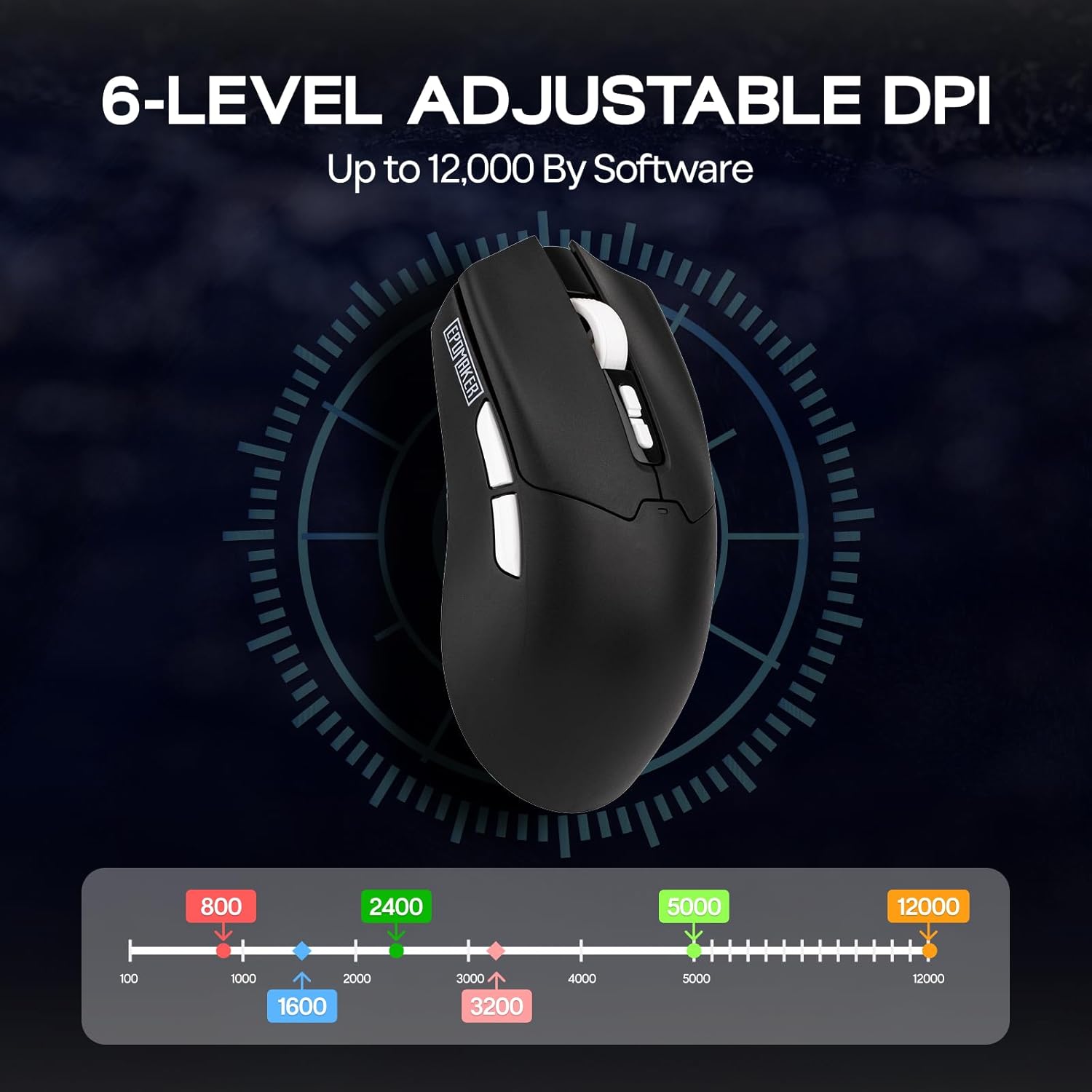
The mouse features adjustable DPI settings from 800 to 12,000. Use the DPI Up/Down buttons located behind the scroll wheel to cycle through the preset DPI levels. The LED indicator will change color to reflect the current DPI setting.
Afstemningshastighedsjustering
The polling rate can be adjusted using the dedicated button on the bottom of the mouse. Cycle through available polling rates (e.g., 125Hz, 250Hz, 500Hz, 1000Hz) to match your preference and optimize responsiveness.
Batteristatus
The mouse is equipped with a 500mAh rechargeable battery, offering up to 78 hours of continuous use on a full charge. The LED indicator will signal low battery status and charging progress.

6. Softwaretilpasning
Enhance your mouse functionality by downloading the official EPOMAKER Click Lite driver software from the EPOMAKER website. The software allows for advanced customization of buttons, DPI, and performance settings.
Nøgleindstillinger
- Change Key Setting: Tildel funktioner til en af de 5 programmerbare knapper.
- Rapid-fire Key: Configure a button for rapid, repeated key presses.
- Combo Keys: Assign complex key combinations to a single button.
- Makroindstillinger: Create and assign custom macros for automated sequences.
- Funktioner: Access a library of predefined functions to assign to buttons.
- Deaktiver nøgle: Deactivate specific buttons to prevent accidental presses.
DPI-indstillinger
Fine-tune your mouse sensitivity by adjusting DPI levels. The software allows for precise control over DPI values and associated LED colors.
Indstillinger for ydeevne
- Move Correction: Enable or disable Straight Correction and Ripple Correction for smoother tracking.
- Søvnindstillinger: Adjust the 2.4G and Bluetooth standby times to conserve battery.
- Mouse Report Rate: Set the polling rate (125Hz, 250Hz, 500Hz, 1000Hz).
- Parameter Settings (Debounce): Adjust the debounce time for click registration.

7. Vedligeholdelse
- Rensning: Brug en blød, tør klud til at rengøre musens overflade. Brug en vatpind, der er let fugtet med den optiske sensor.ampafsluttet med isopropylalkohol.
- Opbevaring: Opbevar musen et køligt, tørt sted væk fra direkte sollys og ekstreme temperaturer.
- Batteripleje: Undgå at aflade batteriet helt for ofte. Oplad musen regelmæssigt for at opretholde batteriets tilstand.
8. Fejlfinding
| Problem | Mulig løsning |
|---|---|
| Mouse not responding in 2.4GHz mode | Ensure the 2.4GHz dongle is securely plugged into a USB port. Check if the mouse switch is set to '2.4G'. Try a different USB port. |
| Problemer med Bluetooth-forbindelse | Ensure the mouse switch is set to 'BT1' or 'BT2'. Make sure Bluetooth is enabled on your device and the mouse is in pairing mode. Remove previous pairings and re-pair. |
| DPI ændrer sig ikke | Press the DPI Up/Down buttons firmly. If using custom software settings, ensure they are applied correctly. |
| Musemarkøren er uregelmæssig eller reagerer ikke | Clean the optical sensor on the bottom of the mouse. Ensure you are using the mouse on a suitable surface (not highly reflective or transparent). |
| Kort batterilevetid | Ensure the mouse is fully charged. Adjust sleep settings in the software to conserve power. |
9. Specifikationer
- Model: Click Lite
- Forbindelse: 2.4 GHz trådløs, Bluetooth, USB-C kablet
- Sensor: PAW3311 Optisk Sensor
- DPI: 800-12,000 (Adjustable)
- Afstemningsfrekvens: 125Hz, 250Hz, 500Hz, 1000Hz
- Knapper: 5 Programmerbare knapper
- Batteri: 500mAh genopladelig
- Batterilevetid: Op til 78 timer (kontinuerlig brug)
- Vægt: Cirka 59g
- Dimensioner: 4.76 x 2.5 x 0.04 tommer
- Acceleration: 35G
- Sporingshastighed: 300 IPS
- Kompatibilitet: PC, Mac, Linux
10. Garanti og support
EPOMAKER products come with a standard manufacturer's warranty. For detailed warranty information, technical support, or service inquiries, please visit the official EPOMAKER webwebstedet eller kontakt deres kundesupportteam. Gem din købskvittering til garantikrav.


