Indledning
This manual provides comprehensive instructions for the setup, operation, and maintenance of your Eversolo DMP-A6 Master Gen 2-Black Hi-Fi Music Streamer. Please read this manual thoroughly before using the device to ensure optimal performance and longevity.
The Eversolo DMP-A6 Master Gen 2-Black is an advanced Hi-Fi music streamer designed for high-fidelity audio playback. It features an upgraded Op-amp Chip OPA1612 for enhanced sound output and a newly designed linear power supply for ultra-low noise operation. It supports a wide range of audio formats and streaming services, offering versatile connectivity options for integration into various audio systems.
Sikkerhedsoplysninger
Følg altid følgende sikkerhedsretningslinjer for at forhindre skader på enheden eller personskade:
- Udsæt ikke enheden for vand eller overdreven fugt.
- Sørg for korrekt ventilation for at forhindre overophedning. Bloker ikke ventilationsåbninger.
- Brug kun det medfølgende strømkabel og tilbehør.
- Forsøg ikke at åbne eller reparere enheden selv. Overlad al service til kvalificeret personale.
- Hold enheden væk fra direkte sollys, varmekilder og stærke magnetfelter.
- Rengør enheden med en blød, tør klud. Undgå at bruge slibende rengøringsmidler eller opløsningsmidler.
Pakkens indhold
Kontroller, at alle varer er til stede i emballagen:
- Eversolo DMP-A6 Master Gen 2-Black Unit
- Strømkabel
- USB kabel
- Screwdriver (for internal storage installation, if applicable)
- Brugervejledning (dette dokument)
- Triggerkabel
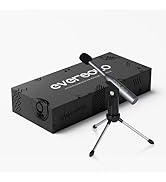
Image: Illustration of the Eversolo DMP-A6 Master Gen 2-Black package contents.
Opsætning
1. Fysisk placering
Place the DMP-A6 Master Gen 2-Black on a stable, flat surface with adequate ventilation. Ensure there is sufficient space around the unit for airflow, especially at the rear and sides where heat dissipation occurs.
2. Strømtilslutning
Connect the provided power cable to the AC inlet on the rear of the unit and then to a suitable power outlet. Ensure the power switch is in the OFF position before connecting.
3. Lydforbindelser
The DMP-A6 Master Gen 2-Black offers various audio input and output options:
- Analoge udgange: Use XLR or RCA outputs to connect to active speakers or power amplivførere.
- Digitale output: Optical, Coaxial, and HDMI (for audio only, no video output).
- Digitale indgange: Coaxial, Optical, Type-C USB, and HD Bluetooth for connecting external digital audio sources.
- HDMI ARC: Connect your TV's HDMI ARC port to the DMP-A6's HDMI ARC input to transmit TV audio directly.

Image: Rear panel connections of the DMP-A6 Master Gen 2-Black.
4. Netværksforbindelse
Connect the unit to your network via Ethernet cable for the most stable connection, or use the built-in Wi-Fi for wireless connectivity. A stable network connection is essential for streaming services and firmware updates.
5. Første opstart
After all connections are made, switch on the power. The device will boot up, and the 6-inch LCD color touchscreen will display the initial setup wizard.
Betjeningsvejledning
1. User Interface and Control
The DMP-A6 Master Gen 2-Black can be controlled via its integrated 6-inch LCD color touchscreen or through the dedicated mobile application for Android and iOS devices.

Image: Front panel and touchscreen display.
2. Mobilapplikation
Download the official Eversolo mobile application from your device's app store. The app provides comprehensive control over the streamer, including music playback, settings adjustment, and personalized playlist management.

Image: Eversolo mobile application interface.
3. Music Playback and Streaming
The device supports a wide array of music services and streaming protocols:
- Integrerede tjenester: Access Amazon Music, TIDAL, Qobuz, HIRESAUDIO, Deezer, Tuneln Radio, and more directly from the device.
- Trådløs streaming: Compatible with Roon Ready, TIDAL Connect, and DLNA for seamless streaming from compatible devices and servers.
- Local/Network Playback: Spil musik files from local drives (USB) or network storage (NAS). The device supports cross-platform addition of music files.
- Understøttede formater: Plays almost all ultra-high sampling master recording formats, including FLAC, WAV, APE, DSD512 (dsf/.dff/.iso/.dst) stereo/multichannel, and MQA.
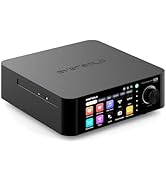
Image: Supported music services and streaming platforms.
4. Avancerede funktioner
- EOS Audio Engine: Utilizes an innovative audio processing engine that bypasses SRC limitations for high-resolution audio direct output.
- HDMI ARC & TRIGGER: HDMI ARC allows direct TV audio transmission. The TRIGGER function enables linked devices to automatically power on/off with the streamer.
- Professional EQ: Fine-tune your audio output with the built-in professional equalizer.
- OPA1612 Op-amp Chip: Features an upgraded Op-amp chip for a warmer voice output and improved audio quality.
- Ultra-Low Noise Linear Power Supply: Ensures a clean audio signal with noise levels below 40uV.

Image: Key technical features and specifications.
Opretholdelse
1. Rensning
Regularly clean the exterior of the unit with a soft, dry, lint-free cloth. Do not use liquid cleaners, aerosols, or solvents, as they may damage the finish or internal components.
2. Firmwareopdateringer
Eversolo frequently releases firmware updates to improve performance, add features, and fix bugs. It is recommended to keep your device's firmware up to date. Updates can typically be performed directly through the device's settings menu when connected to the internet.
3. Opbevaring
Hvis enheden opbevares i længere tid, skal den afbrydes til strømmen og opbevares et køligt, tørt sted, væk fra direkte sollys og ekstreme temperaturer.
Fejlfinding
| Problem | Mulig årsag | Løsning |
|---|---|---|
| Ingen strøm | Strømkabel ikke tilsluttet; Strømafbryder slukket; Problem med stikkontakten. | Ensure power cable is securely connected. Check power switch. Test power outlet with another device. |
| Ingen lydudgang | Incorrect audio output selected; Cables not connected properly; Ampproblem med højttaler/forstærker. | Verify correct output in settings. Check all audio cable connections. Test amplifier/speakers with another source. |
| Kan ikke oprette forbindelse til netværket | Incorrect Wi-Fi password; Router issue; Ethernet cable disconnected. | Re-enter Wi-Fi password. Restart router. Check Ethernet cable connection. |
| Streaming services not loading | Poor internet connection; Service outage; App issue. | Check internet speed. Verify service status online. Restart the streamer and the app. |
| Enheden reagerer ikke | Midlertidig softwarefejl. | Perform a soft reset by holding the power button, or disconnect power for 30 seconds and reconnect. |
If the problem persists after attempting these solutions, please contact Eversolo customer support.
Specifikationer
| Feature | Detalje |
|---|---|
| Modelnavn | DMP-A6 Master Gen 2-Black |
| Dimensioner (L x B x H) | 10.63 x 7.36 x 5.34 tommer (ca.) |
| Vægt | 9.24 pund |
| Operativsystem | Android 11 (deeply tailored system) |
| Vise | 6-inch LCD Color Touchscreen |
| VÆDDER | 4 GB |
| Forbindelse | Bluetooth, Ethernet, HDMI, IR |
| Lydindgange | Coaxial, Optical, Type-C USB, HD Bluetooth |
| Lydudgange | HDMI (audio only), USB, Optical, Coaxial, XLR, RCA |
| Supported Streaming Services | Amazon Music, Deezer, HIRESAUDIO, Qobuz, Tidal, Tuneln Radio, Roon Ready, TIDAL Connect, DLNA |
| Understøttede lydformater | FLAC, WAV, APE, DSD512, MQA, PCM768kHz/32Bit |
| Særlige funktioner | Professional EQ, Roon Ready, Squeezelite, TIDAL Connect, HDMI ARC, TRIGGER, OPA1612 Op-amp, Ultra-Low Noise Linear Power Supply |
Garanti og support
Garantioplysninger
The Eversolo DMP-A6 Master Gen 2-Black typically comes with a 1 års begrænset garanti fra købsdatoen. Denne garanti dækker fabrikationsfejl og udførelse under normal brug. Gem venligst din købsbevis i tilfælde af garantikrav.
The warranty does not cover damage caused by misuse, accident, unauthorized modification, improper installation, or natural disasters. For detailed warranty terms and conditions, please refer to the official Eversolo webwebsted eller kontakt deres kundeservice.
Kundesupport
For technical assistance, troubleshooting, or warranty inquiries, please contact Eversolo customer support through their official channels. You can typically find contact information on the Eversolo website, including support forums, email addresses, or phone numbers.
Eversolo aims to provide monthly firmware updates and encourages users to submit comments or questions via their official service channels (webhjemmesideforum, Facebook, Instagram, or email) for prompt responses.


