1. Introduktion
This manual provides essential instructions for the installation, operation, and maintenance of the SIEMENS POL638.70/DH1 Programmable Controller. This device is designed for industrial control applications, offering 21 inputs/outputs, 4 AMP capacity, and operating on 24 VAC/DC at 50/60 Hz. Please read this manual thoroughly before using the product to ensure safe and efficient operation.
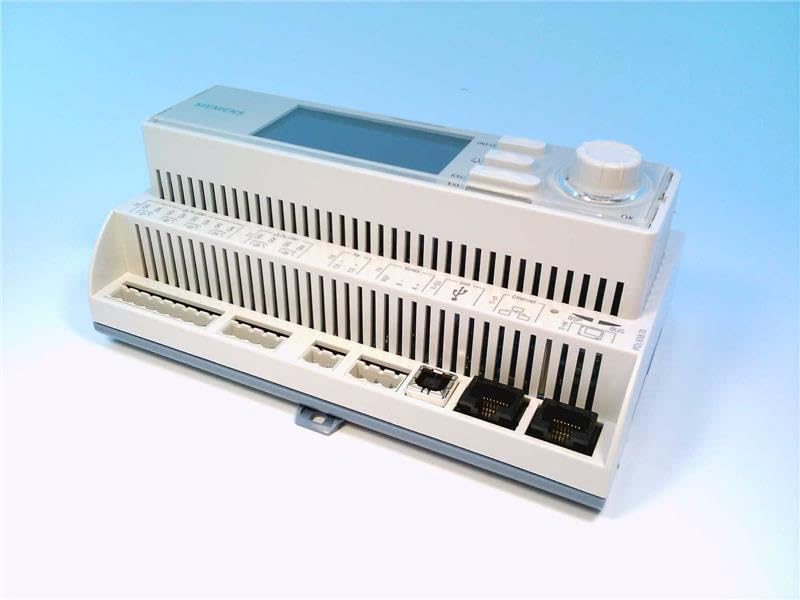
Figur 1: Forside view of the SIEMENS POL638.70/DH1 Programmable Controller. This image shows the compact design of the controller with various connection terminals and indicator lights visible on its front panel, suitable for integration into industrial control systems.
2. Sikkerhedsoplysninger
Overhold altid følgende sikkerhedsforanstaltninger for at forhindre personskade og beskadigelse af enheden:
- Installation og vedligeholdelse må kun udføres af kvalificeret personale.
- Sørg for, at strømforsyningen er afbrudt, før du foretager elektriske tilslutninger eller udfører vedligeholdelse.
- Kontroller, at strømforsyningen voltage and frequency match the specifications of the controller (24 VAC/DC, 50/60 Hz).
- Do not operate the device in environments exceeding its specified temperature and humidity limits.
- Protect the device from moisture, dust, and corrosive substances.
- Use appropriate personal protective equipment (PPE) during installation and servicing.
3. Opsætning
3.1. Montering
Mount the controller in a suitable enclosure that provides adequate ventilation and protection from environmental factors. Ensure sufficient space around the unit for wiring and heat dissipation. Use appropriate mounting hardware to secure the device firmly.
3.2. Strømtilslutning
Connect the 24 VAC/DC power supply to the designated power terminals on the controller. Observe correct polarity for DC connections. Ensure the power source is stable and within the specified voltage rækkevidde.
- Locate the power input terminals (typically marked L+/N- or similar).
- Connect the positive (+) lead of the 24 VDC supply or one AC lead to the L+ terminal.
- Connect the negative (-) lead of the 24 VDC supply or the other AC lead to the N- terminal.
- Tighten all terminal screws securely.
3.3. Input/Output Wiring
The POL638.70/DH1 features 21 inputs/outputs. Refer to the wiring diagram provided with the product documentation for specific terminal assignments. Connect sensors, actuators, and other peripheral devices according to your application requirements. Ensure all wiring is correctly terminated and insulated.
3.4. Første opstart
After all connections are made and verified, apply power to the controller. Observe the status indicator lights. A steady green power LED typically indicates normal operation. If any error indicators illuminate, refer to the Troubleshooting section.
4. Betjening
4.1. Programmering
The SIEMENS POL638.70/DH1 is a programmable controller. Programming is typically performed using SIEMENS-specific software tools on a connected computer. Consult the software's user manual for detailed instructions on creating, downloading, and debugging control programs. The controller executes the loaded program to manage connected inputs and outputs.
4.2. Indikatorlys
The controller features various LED indicators to display its operational status:
- Strøm (PWR) LED: Indicates power supply status. (e.g., Green = On, Off = No Power).
- Run/Stop LED: Indicates the program execution status. (e.g., Green = Running, Orange = Stop/Error).
- I/O Status LEDs: Individual LEDs for each input and output indicate their current state (e.g., On = Active, Off = Inactive).
Refer to the product's technical documentation for a complete list and description of all indicator lights and their meanings.
5. Vedligeholdelse
Regular maintenance ensures the longevity and reliable operation of your controller.
5.1. Rensning
Periodically clean the exterior of the controller with a soft, dry cloth. Do not use abrasive cleaners or solvents. Ensure the power is off before cleaning. Keep ventilation openings clear of dust and debris.
5.2. Inspektion
Regularly inspect all wiring connections for tightness and signs of damage or corrosion. Check for any unusual odors, sounds, or discoloration that might indicate a problem. Ensure the operating environment remains within specified limits.
5.3. Firmwareopdateringer
From time to time, SIEMENS may release firmware updates to improve performance or add new features. Consult the official SIEMENS support website for information on available updates and detailed instructions on how to perform them safely.
6. Fejlfinding
This section provides solutions to common issues. If the problem persists, contact technical support.
| Problem | Mulig årsag | Løsning |
|---|---|---|
| Controlleren tænder ikke. | Ingen strømforsyning; forkert ledningsføring; defekt strømforsyning. | Check power connections and source. Verify voltage. Ensure power switch is on. |
| Input/Output svarer ikke. | Incorrect wiring; faulty sensor/actuator; program error. | Verify I/O wiring. Test sensor/actuator independently. Check program logic. |
| Run/Stop LED indicates error. | Programfejl; hardwarefejl; kommunikationsproblem. | Connect to programming software to diagnose error codes. Check communication cables. |
| Overophedning af enhed. | Insufficient ventilation; ambient temperature too high; excessive load. | Ensure proper airflow. Reduce ambient temperature. Check load on outputs. |
7. Specifikationer
Key technical specifications for the SIEMENS POL638.70/DH1 Programmable Controller:
- Model: POL638.70/DH1 (S55626-C387-A411)
- Type: Programmerbar controller
- Nuværende vurdering: 4 AMP
- Voltage: 24 VAC/DC
- Frekvens: 50/60 HZ
- Strømforbrug: 5 W
- Input/output: 21
- Varens vægt: Cirka 15.2 ounces (0.95 pund)
- Fabrikant: SIEMENS
8. Garanti og support
8.1. Garantioplysninger
SIEMENS products are covered by a standard manufacturer's warranty. For specific warranty terms and conditions applicable to your region and product, please refer to the official SIEMENS website or contact your local SIEMENS representative. Keep your purchase receipt as proof of purchase.
8.2. Teknisk support
For technical assistance, troubleshooting beyond this manual, or spare parts inquiries, please contact SIEMENS customer support. You can find contact information, FAQs, and additional resources on the official SIEMENS webwebsted (www.siemens.com). When contacting support, please have your product model number (POL638.70/DH1) and serial number ready.