Indledning
Welcome to the GOBOULT UFO True Wireless Earbuds user manual. These earbuds are designed to provide a superior audio experience with features like extended playtime, low latency gaming, advanced noise cancellation, and robust bass drivers. Please read this manual carefully to ensure proper use and optimal performance of your device.
Hvad er der i æsken
- GOBOULT UFO True Wireless Earbuds
- Trådløs opladningsetui
- Type-C hurtigopladningskabel
- Ekstra par ørespidser
- Brugermanual
- Garantikort
Produkt overview
The GOBOULT UFO earbuds feature a distinctive design with integrated breathing LEDs on both the earbuds and the charging case. They are equipped with 13mm drivers for rich bass and Quad Mic ENC for clear calls.

Image: GOBOULT UFO Earbuds and Charging Case. This image highlights key features such as Bluetooth 5.3 connectivity, 48 hours of playtime, Quad Mic ENC, 13mm drivers, 45ms low latency, and Type-C fast charging.
Åndende LED'er
The breathing LEDs on the case and earbuds provide visual feedback for various actions, including opening/closing the case, charging, and when buds are connected.

Image: The GOBOULT UFO charging case and earbuds displaying their distinctive breathing LED lights, which indicate various operational states.
Lydkvalitet
Experience high-fidelity sound with precision-tuned 13mm drivers, ensuring clear audio across all frequencies and rich bass. The Quad Mic ENC (Environmental Noise Cancellation) system ensures crystal-clear, interference-free calls.
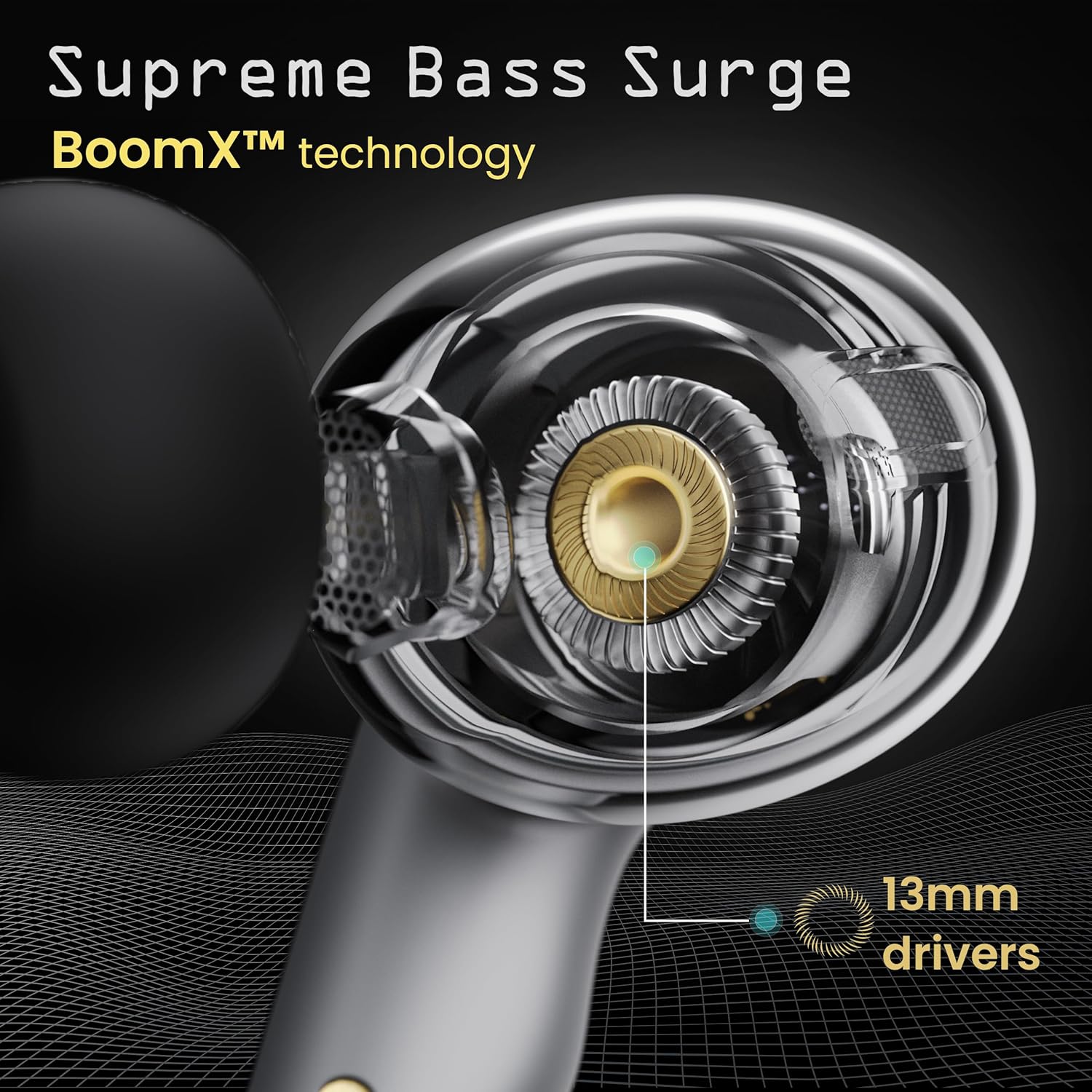
Image: A close-up of a GOBOULT UFO earbud, highlighting the 13mm drivers responsible for supreme bass surge.

Billede: En detaljeret view of a GOBOULT UFO earbud, showcasing the AI-powered Quad Mic AI-ENC technology for high-definition call clarity and Zen™ mode for silence.
Opsætning
Indledende parring
- Åbn opladningsetuiet. Ørepropperne går automatisk i parringstilstand.
- Aktiver Bluetooth på din enhed (smartphone, tablet osv.).
- Søg efter "GOBOULT UFO" in the list of available Bluetooth devices and select it to connect.
- Når der er oprettet forbindelse, hører du en lydmeddelelse, og LED-indikatorerne på ørepropperne ændrer sig.
The earbuds utilize Bluetooth 5.3 for stable and efficient connection, featuring Blink & Pair™ technology for fast pairing.

Image: GOBOULT UFO Earbuds illustrating stable connectivity with Bluetooth 5.3 and fast pairing technology.
App support
Enhance your experience by downloading the dedicated GOBOULT app. The app allows you to:
- Switch between 6 Equalizer Modes.
- Tilpas berøringskontroller.
- Omdøb dine ørepropper.
- Få adgang til yderligere indstillinger og funktioner.
Betjeningsvejledning
Tryk på kontrolelementer
The GOBOULT UFO earbuds feature intuitive touch controls on each earbud.
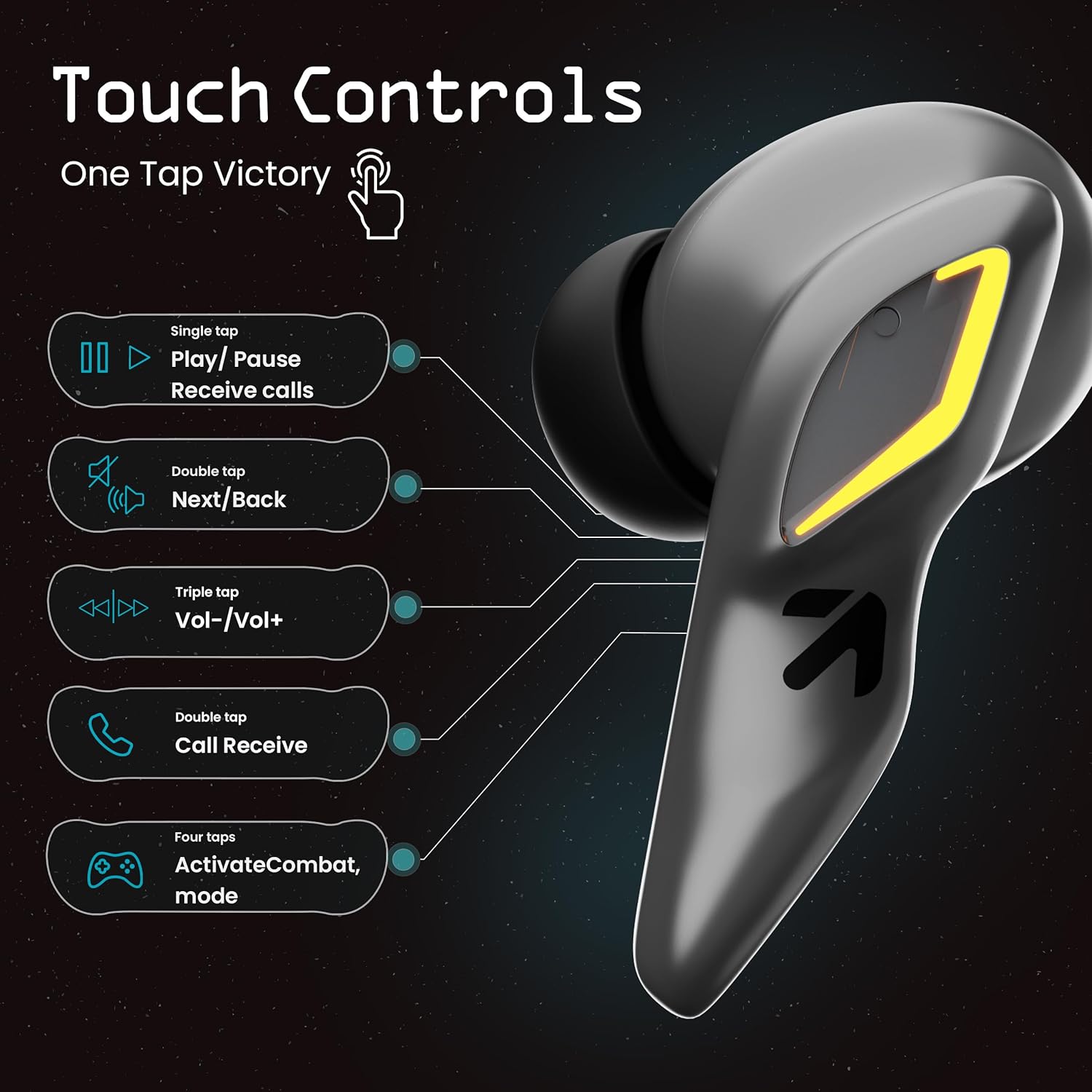
Image: A visual guide to the touch controls on the GOBOULT UFO Earbuds, detailing single, double, triple, and four-tap functions.
- Enkelt tryk: Play/Pause music, Receive calls.
- Dobbeltklik: Next/Back track.
- Tredobbelt tryk: Lydstyrke op/ned.
- Fire tryk: Activate Combat Mode (Gaming Mode).
- Langt tryk: Activate Voice Assistant (Google Assistant, Siri).
Gaming Mode (Combat Mode)
Activate Combat Mode for an ultra-low latency experience of 45ms, ideal for gaming. Tap the earbud four times to toggle this mode.

Image: The GOBOULT UFO Earbuds case open, highlighting the Combat Gaming Mode with 45ms ultra-low latency, activated by four taps.
Stemmeassistent
Long press the touch control area on either earbud to activate your device's voice assistant (e.g., Google Assistant, Siri).

Image: GOBOULT UFO Earbuds demonstrating the long-press gesture to activate the voice assistant feature.
Opladning
The GOBOULT UFO earbuds offer up to 48 hours of total playtime with the charging case.
Opladning af etuiet og øretelefonerne
- Placer ørepropperne i opladningsetuiet. Sørg for, at de sidder korrekt.
- Connect the Type-C fast charging cable to the charging port on the case and to a power source.
- LED-indikatorerne på kabinettet viser opladningsstatus.
- A full charge for the earbuds and case takes approximately 100 minutes.
- With Type-C fast charging, a 10-minute charge can provide up to 1.5 hours of playtime.
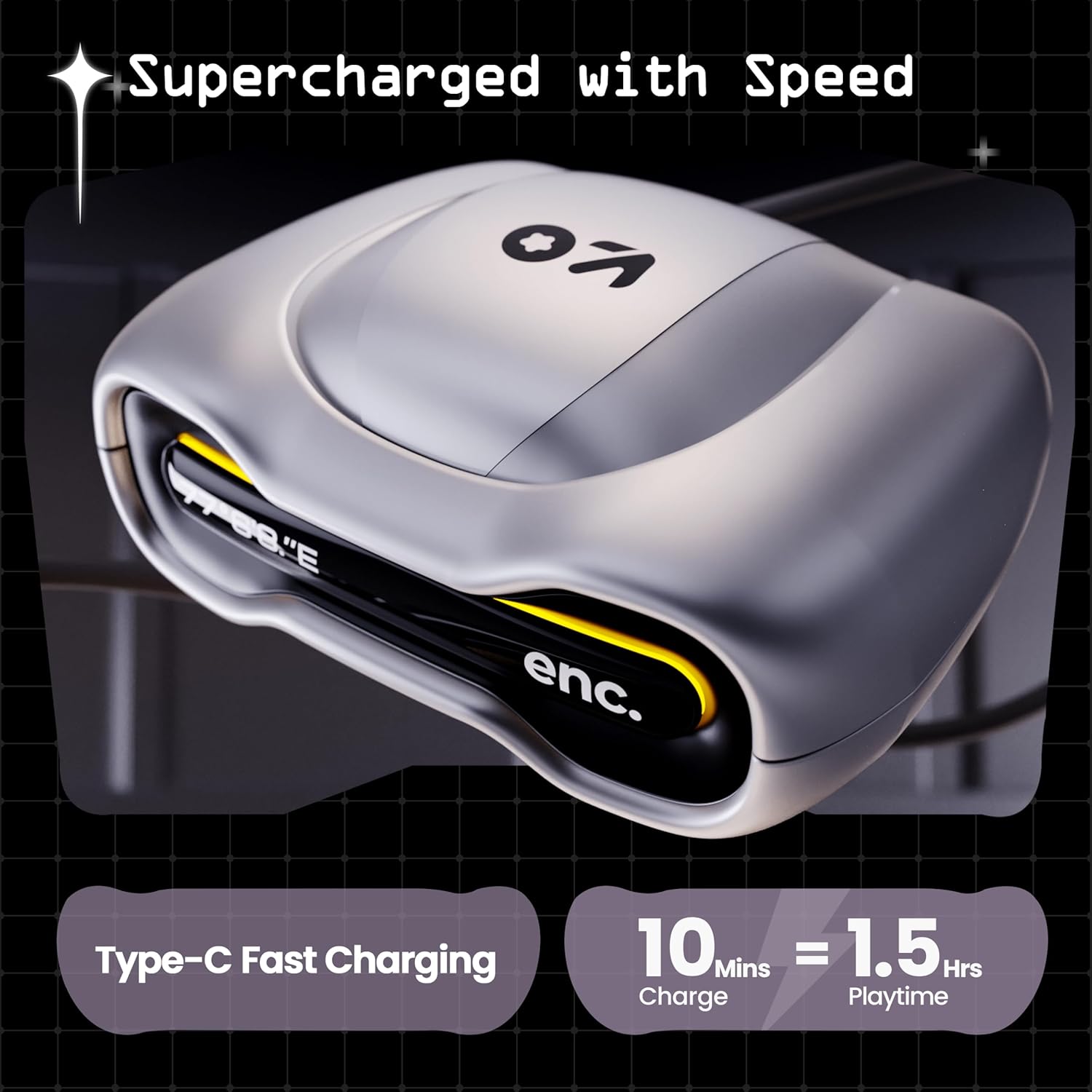
Image: The GOBOULT UFO charging case, illustrating its Type-C fast charging capability, providing 1.5 hours of playtime from a 10-minute charge.
Opretholdelse
Vandmodstand
The GOBOULT UFO earbuds are IPX5 water-resistant, making them sweatproof, rainproof, and splashproof. This protection allows for use during workouts or in light rain.

Image: GOBOULT UFO Earbuds on a metallic surface, indicating their IPX5 water resistance, making them suitable for sweat, rain, and splashes.
Rensning
For at opretholde optimal ydeevne og hygiejne skal du regelmæssigt rengøre dine ørepropper og opladningsetuiet.
- Brug en blød, tør og fnugfri klud til at tørre ørepropperne og etuiet af.
- Til genstridigt snavs, let dampRengør kluden med vand. Undgå at bruge skrappe kemikalier eller slibende materialer.
- Sørg for, at opladningskontakterne på både ørepropperne og etuiet er rene og fri for snavs.
- Allow all components to dry completely before placing earbuds back in the case or charging.
Fejlfinding
If you encounter any issues with your GOBOULT UFO earbuds, please refer to the following common solutions:
- Ingen lyd: Ensure earbuds are charged and properly connected to your device. Check device volume.
- Parringsproblemer: Make sure Bluetooth is enabled on your device. Try forgetting the device in your Bluetooth settings and re-pairing. Ensure earbuds are fully charged.
- Én øretelefon virker ikke: Place both earbuds back in the case, close it, and then open it again. This often resets the connection.
- Dårlig opkaldskvalitet: Ensure microphones are clean. Check for strong Bluetooth connection.
- Berøringskontroller, der ikke reagerer: Sørg for, at dine fingre er rene og tørre. Prøv at genstarte ørepropperne ved at lægge dem i etuiet og tage dem ud.
For further assistance, please contact GOBOULT customer support.
Specifikationer
| Feature | Detalje |
|---|---|
| Modelnavn | UFO (Airbass Earbuds) |
| Bluetooth version | 5.3 |
| Spilletid | Op til 48 timer (med opladningsetui) |
| Lydforsinkelse | 45 millisekunder (spiltilstand) |
| Chauffører | 13 mm dynamiske drivere |
| Mikrofoner | Quad Mic ENC (miljøstøjreduktion) |
| Vandmodstand | IPX5 (svedtæt, regntæt, stænktæt) |
| Opladningsport | Type-C hurtig opladning |
| Opladningstid | Ca. 100 minutter |
| Bluetooth rækkevidde | 10 meter |
| Frekvensrespons | 20 Hz |
| Følsomhed | 115 dB |
| Impedans | 32 Ohm |
| Varens vægt | 60 gram |
| Produktdimensioner | 4.7 x 9 x 10 cm |
| Materiale | Metal |
Garanti og support
Garantioplysninger
The GOBOULT UFO True Wireless Earbuds come with a 1 års producentgaranti from the date of purchase. Please retain your proof of purchase for warranty claims. The warranty covers manufacturing defects. It does not cover damage caused by misuse, accidents, or unauthorized modifications.
Kundesupport
For any questions, technical support, or warranty claims, please contact GOBOULT customer service.
Fabrikant: Exotic Mile Pvt. Ltd.
Adresse: B67 Wazirpur Industrial Area, New Delhi 110052, India.
Please refer to the warranty card included in your product packaging for specific contact details and procedures.


