1. Introduktion
Thank you for choosing the De'Longhi Rivelia EXAM440.35.BG Automatic Coffee Machine. This appliance is designed to provide a premium coffee experience with ease of use and customizable options. Please read this manual carefully before using the appliance to ensure proper operation, maintenance, and safety.
2. Vigtige sikkerhedsinstruktioner
Følg altid grundlæggende sikkerhedsforanstaltninger ved brug af elektriske apparater for at reducere risikoen for brand, elektrisk stød og personskade.
- Læs alle instruktioner før brug.
- Rør ikke ved varme overflader. Brug håndtag eller knopper.
- For at beskytte mod brand, elektrisk stød og personskade må ledning, stik eller apparat ikke nedsænkes i vand eller anden væske.
- Tæt opsyn er nødvendigt, når et apparat bruges af eller i nærheden af børn.
- Træk stikket ud af stikkontakten, når det ikke er i brug, og før rengøring. Lad det køle af, før du sætter dele på eller af, og før du rengør apparatet.
- Betjen ikke noget apparat med en beskadiget ledning eller stik, eller efter at apparatet ikke fungerer korrekt eller er blevet beskadiget på nogen måde. Returner apparatet til det nærmeste autoriserede serviceværksted for undersøgelse, reparation eller justering.
- Brug af tilbehør, der ikke er anbefalet af apparatets producent, kan resultere i brand, elektrisk stød eller personskade.
- Må ikke bruges udendørs.
- Lad ikke ledningen hænge ud over kanten af bordet eller bordpladen eller røre ved varme overflader.
- Må ikke placeres på eller i nærheden af en varm gas- eller elektrisk brænder eller i en opvarmet ovn.
- Sæt altid stikket i apparatet først, og sæt derefter ledningen i stikkontakten. For at afbryde forbindelsen skal du slukke for en vilkårlig knap og derefter tage stikket ud af stikkontakten.
- Brug ikke apparatet til andet end tilsigtet brug.
- Vær yderst forsigtig ved bortskaffelse af varm damp.
3. Produktet er slutview
The De'Longhi Rivelia EXAM440.35.BG is a compact automatic coffee machine featuring a 3.5-inch color touchscreen, a manual milk frother, and the innovative Bean Switch System for easily changing coffee bean varieties.

Figur 3.1: Front view of the De'Longhi Rivelia EXAM440.35.BG coffee machine in Sand Beige.
Nøglekomponenter:
- 3.5" Full-Touch Color Display: For intuitive control and personalized coffee routines.
- Bean Switch System: Two interchangeable 250g bean containers for different coffee varieties.
- Manuel mælkeskummer: For preparing creamy milk foam for lattes and cappuccinos.
- Vandtank: Aftagelig, 1.4 liters kapacitet.
- Drypbakke og kaffegrumsbeholder: For collecting excess water and used coffee grounds.
- Kaffetud: Justerbar højde til forskellige kopstørrelser.

Figur 3.2: The De'Longhi Rivelia series, showcasing various color options including Sand Beige.
4. Indledende opsætning
4.1 Udpakning og placering
- Tag forsigtigt maskinen ud af emballagen.
- Placer maskinen på en stabil, plan overflade, væk fra vandsprøjt og varmekilder.
- Sørg for tilstrækkelig plads omkring maskinen til ventilation og adgang til komponenter.
4.2 Påfyldning af vandtanken
- Fjern vandtanken fra siden af maskinen.
- Fyld tanken med frisk, koldt vand fra hanen op til MAX-niveauindikatoren.
- Sæt vandtanken sikkert tilbage i maskinen.
4.3 Filling the Bean Container (Bean Switch System)
The Rivelia features two interchangeable bean containers. You can switch between them to enjoy different coffee varieties.
- Lift the lid of a bean container.
- Hæld friske kaffebønner i beholderen. Fyld ikke for meget.
- Place the filled bean container onto the machine's bean hopper. Ensure it is seated correctly.
- To switch beans, simply lift the current container, replace it with another filled container, and the machine will detect the change.

Figur 4.1: The Bean Switch System with two interchangeable bean containers.

Figur 4.2: Illustration of filling the bean container with fresh coffee beans.
4.4 Første brug og skyllecyklus
Before making your first coffee, perform a rinsing cycle to clean the internal circuits.
- Sæt maskinen i en stikkontakt.
- Tænd for maskinen ved hjælp af afbryderknappen.
- Follow the on-screen instructions for the initial setup, including language selection and water hardness.
- The machine will automatically perform a rinsing cycle. Place a container under the coffee spouts and hot water spout to collect the water.
- Once the rinsing cycle is complete, the machine is ready for use.
5. Betjening
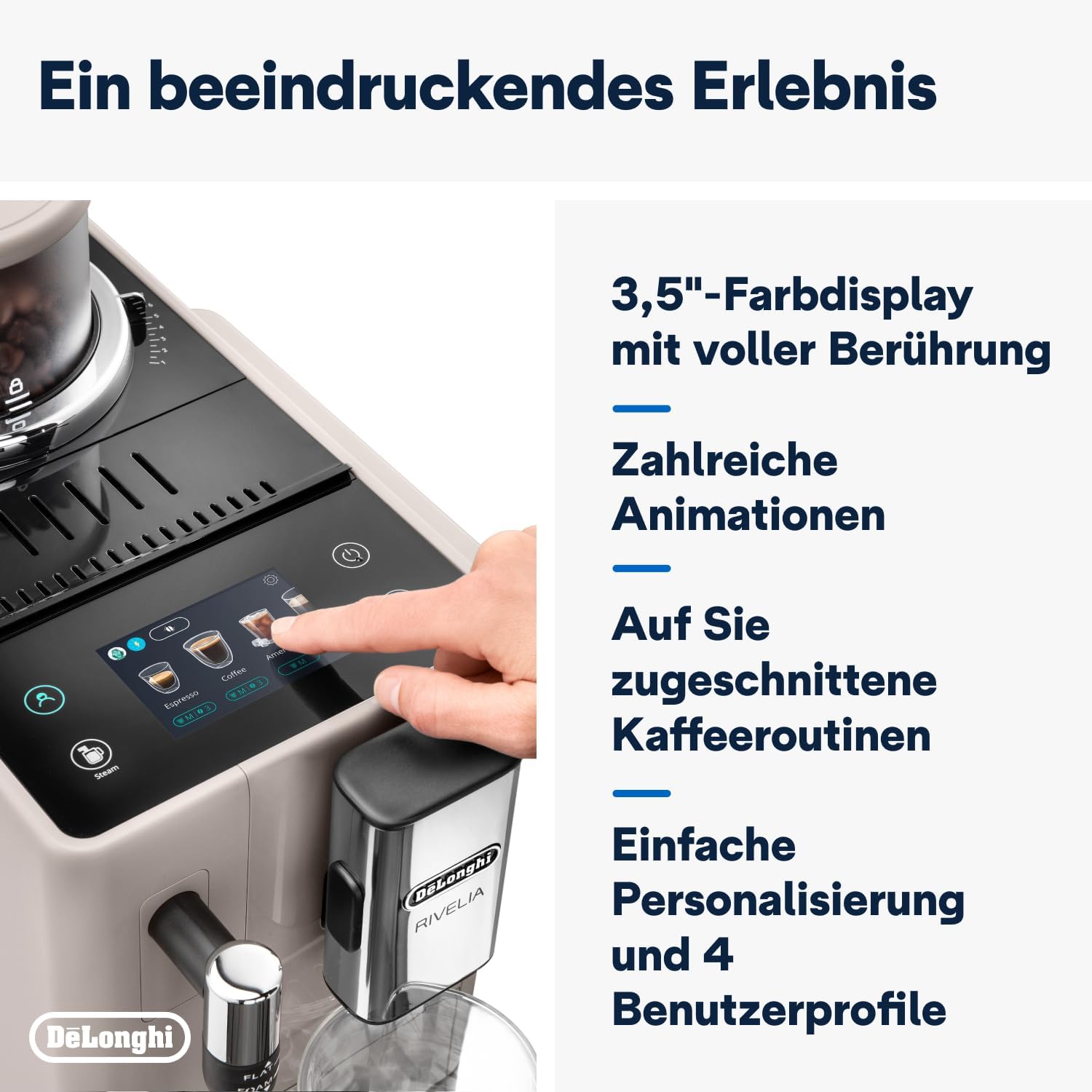
5.1 Using the 3.5" Full-Touch Color Display
The intuitive touchscreen allows you to select beverages, customize settings, and manage user profiles.

Figur 5.1: The 3.5-inch full-touch color display in use, showing beverage selection.
- Beverage Selection: Swipe through the menu to choose from 8 pre-programmed coffee recipes.
- Tilpasning: Adjust coffee strength, temperature, and volume for each drink.
- Bruger Profiles: Create up to 4 personalized user profiles to save your favorite settings. The machine adapts its menu based on your routine.
- Bean Adapt-teknologi: This technology automatically adjusts grinding parameters, dosage, and brewing temperature to optimize extraction for the selected coffee bean variety.
5.2 Tilberedning af kaffedrikke
- Ensure the water tank is filled and a bean container is in place.
- Stil en kop under kaffetudene.
- Vælg den ønskede drik fra menuen på berøringsskærmen.
- Adjust settings (strength, volume) if desired.
- Press the "Start" icon to begin brewing.

Figur 5.2: A selection of coffee drinks, including espresso, americano, and milk-based beverages.
5.3 Brug af den manuelle mælkeskummer
The integrated steam wand allows you to manually froth milk for creamy cappuccinos and lattes.
- Fyld en mælkekande med kold mælk (med eller uden mælk).
- Placer dampdysen i mælken, lige under overfladen.
- Activate the steam function via the touchscreen.
- Move the jug up and down to create desired foam texture.
- Once frothed, turn off the steam function and clean the wand immediately.

Figur 5.3: Demonstrating the manual milk frother for creating creamy milk foam.
5.4 Udlevering af varmt vand
The machine can also dispense hot water for teas or other hot beverages.
- Placer en kop under varmtvandstudsen (normalt dampdysen).
- Select the hot water function from the touchscreen.
- Press "Start" to dispense hot water.
6. Rengøring og vedligeholdelse
Regelmæssig rengøring sikrer optimal ydeevne og forlænger levetiden på din kaffemaskine.
6.1 Daglig rengøring
- Drypbakke og kaffegrumsbeholder: Tøm og skyl dagligt. Maskinen giver dig besked, når grumsbeholderen skal tømmes.
- Vandtank: Skyl dagligt og fyld op med frisk vand.
- Kaffeudløbere: Tør med annonceamp klæde.
- Mælkeskummer: Tør dampdysen af med en sprayflaske efter hver brug.amp klud og damp kortvarigt for at fjerne eventuelle mælkerester.
6.2 Ugentlig rengøring
- Bryggeenhed: Remove the brew unit (refer to the machine's internal instructions for removal) and rinse it thoroughly under running water. Allow it to air dry before reinserting.
- Bean Containers: Empty and clean the bean containers, especially when switching bean types, to prevent oil buildup.
6.3 Afkalkning
The machine will indicate when descaling is required. Use only De'Longhi descaling solution and follow the on-screen instructions precisely. Descaling regularly prevents limescale buildup and maintains coffee quality.
7. Fejlfinding
This section addresses common issues you might encounter with your De'Longhi Rivelia EXAM440.35.BG.
| Problem | Mulig årsag | Løsning |
|---|---|---|
| Maskinen tænder ikke. | Ikke tilsluttet; stikkontakt defekt. | Kontrollér netledningens tilslutning; prøv en anden stikkontakt. |
| "Fill Water Tank" message appears, but tank is full. | Vandtanken er ikke isat korrekt; sensorproblem. | Remove and reinsert the water tank firmly. Ensure the float in the tank moves freely. |
| Kaffen er for svag eller vandig. | Malingsgraden er for grov; utilstrækkelig kaffemængde; gamle bønner. | Adjust grind setting finer; increase coffee strength via menu; use fresh beans. |
| Mælkeskummeren producerer ikke skum. | Dampdysen er blokeret; mælken er ikke kold nok; forkert mælketype. | Rengør dampdysen grundigt; brug kold mælk; sørg for, at mælken er egnet til skumning. |
| Touchscreen unresponsive or scratched. | Midlertidig softwarefejl; fysisk skade. | Restart the machine. If scratched, contact customer support for service options. Avoid abrasive cleaners. |
8. Tekniske specifikationer
| Feature | Detalje |
|---|---|
| Mærke | De'Longhi |
| Modelnummer | EXAM440.35.BG |
| Farve | Sand beige |
| Dimensioner (L x B x H) | 43 x 24.5 x 38.5 cm |
| Vægt | 9.8 kilo |
| Vandtankkapacitet | 1.4 liter |
| Magt | 1450 watt |
| Voltage | 240 volt |
| Materiale | Metal |
| Særlige funktioner | 4 bruger profiles, 8 coffee beverages, Bean Switch System, Integrated steam wand, Coffee routines, Bean Adapt Technology |
| Automatisk sluk | Ja |
Figur 8.1: Product dimensions: 245mm (width) x 430mm (depth) x 385mm (height).
9. Garanti og support
9.1 Garantioplysninger
Your De'Longhi Rivelia EXAM440.35.BG coffee machine comes with a standard manufacturer's warranty. Please refer to the warranty card included in your product packaging for specific terms and conditions, including the warranty period and coverage details. Keep your proof of purchase for warranty claims.
9.2 Kundesupport
For technical assistance, spare parts, or service, please contact De'Longhi customer support. You can find contact information on the official De'Longhi webwebstedet eller i den dokumentation, der fulgte med dit apparat.
- Online support: Besøg den officielle De'Longhi webwebsted med ofte stillede spørgsmål, fejlfindingsvejledninger og produktregistrering.
- Telefonsupport: Contact numbers are typically listed in your warranty booklet or on the brand's webwebsted.


