Indledning
This manual provides comprehensive instructions for the installation, operation, and maintenance of your Vimar 02913 Connected 4G LTE Thermostat. This device allows for local and remote temperature control for heating and air conditioning systems, offering both ON/OFF and PID modes. It features 4G LTE connectivity, compatibility with voice assistants like Amazon Alexa and Google Assistant, and management through the Vimar View app.

Billede: Forside view of the Vimar 02913 Connected 4G LTE Thermostat, displaying a temperature of 21.5 degrees Celsius on its LED screen.
Sikkerhedsoplysninger
Before proceeding with installation or operation, please read all safety warnings and instructions carefully. Improper installation or use can lead to electrical shock, fire, or damage to the product. Installation should only be performed by qualified personnel in accordance with local electrical codes.
- Afbryd altid strømmen ved afbryderen, før du installerer eller servicerer termostaten.
- Ensure all wiring connections are secure and comply with local regulations.
- Udsæt ikke termostaten for vand eller for høj luftfugtighed.
- Keep the device away from direct sunlight or heat sources to ensure accurate temperature readings.
Opsætning
1. Fysisk installation
The Vimar 02913 thermostat is designed for surface mounting. Ensure the installation location is free from drafts, direct sunlight, or other heat sources that could affect temperature accuracy.
- Strømafbrydelse: Turn off the main power supply to your heating/cooling system at the circuit breaker before beginning installation.
- Montering af basen: Secure the thermostat's mounting base to the wall using appropriate screws and anchors. Ensure the base is level.
- Ledningsføring: Connect the electrical wires from your heating/cooling system to the appropriate terminals on the thermostat base. Refer to the wiring diagram provided in the full product manual on the Vimar website for specific connections. The thermostat requires a 100-240 V~ 50/60 Hz power supply.
- Attaching the Thermostat: Once wiring is complete and secure, carefully attach the main thermostat unit to the mounted base.
- Strømgendannelse: Restore power at the circuit breaker. The thermostat display should illuminate.

Image: Diagram illustrating the surface mounting process of the thermostat base to a wall, showing screw placement and cable routing.
For flush-mount installations, ensure the appropriate electrical box is installed in the wall before mounting the thermostat base.

Image: Diagram illustrating the flush mounting process of the thermostat base into a recessed electrical box in a wall.
2. Initial Configuration (Vimar View app)
The Vimar 02913 thermostat is configured and managed primarily through the Vimar View app.
- Download appen: Download the "Vimar View" app from your smartphone's app store (iOS or Android).
- Opret en konto: Åbn appen, og følg instruktionerne på skærmen for at oprette en ny brugerkonto eller logge ind, hvis du allerede har en.
- Tilføj enhed: In the app, select the option to add a new device. The app will guide you through the process of connecting to your thermostat using Bluetooth wireless technology for initial setup.
- Netværks forbindelse: Configure the thermostat's 4G LTE connection within the app. This requires a compatible SIM card (not included) with an active data plan.
- Grundlæggende indstillinger: Set your desired temperature units (Celsius/Fahrenheit), operating modes (heating/cooling), and initial schedule.

Image: Logos for the Vimar View App, IFTTT, Amazon Alexa, and Google Assistant, indicating compatibility.

Image: Three smartphone screens displaying the Vimar View app interface, showing scheduling, current temperature, and settings.
Betjening af termostaten
1. Lokal kontrol
The thermostat features an intuitive LED display and touch controls for basic adjustments directly on the device.
- Temperaturjustering: Brug op (^) og ned (v) arrows on the thermostat's face to manually adjust the desired temperature setpoint.
- Vise: The central LED display shows the current temperature or setpoint. Side LEDs may indicate operational status.
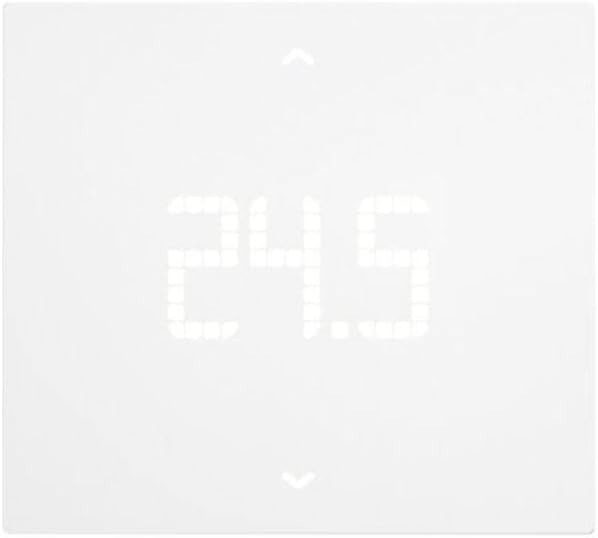
Image: Close-up of the Vimar 02913 Thermostat's LED display showing a temperature of 24.5 degrees Celsius.

Image: The thermostat display showing temperature adjustment, with an arrow indicating a decrease in temperature from 21.0 to 20.5 degrees Celsius.
2. App Control (Vimar View)
Vimaren View app provides comprehensive control and monitoring capabilities for your thermostat from anywhere with an internet connection.
- Fjernjustering af temperatur: Change the setpoint from your smartphone.
- Planlægning: Create and manage custom heating/cooling schedules for different times of the day and week.
- Driftstilstande: Switch between ON/OFF and PID control modes, and select heating or cooling.
- Multi-zone/Multi-home Management: If you have multiple Vimar thermostats, manage them all from a single app interface.
- Energy Section: Monitor thermostat operation time to gain insights into energy consumption.
- Digital Input/Auxiliary Output: Utilize the customizable digital input for alarm signaling via push notifications and control the auxiliary output.
3. Integration af stemmeassistent
The Vimar 02913 thermostat is compatible with Amazon Alexa and Google Assistant, allowing for voice-activated control.
- Aktivér færdighed/handling: In the Alexa or Google Home app, enable the Vimar skill or action.
- Tilknyt konto: Link your Vimar View account to your voice assistant account.
- Stemmekommandoer: Brug kommandoer som:
- "Alexa, indstil [Termostatnavn] til 22 grader."
- "Hey Google, what's the temperature in [Thermostat Name]?"
- "Alexa, tænd for [Termostatens navn]."
Opretholdelse
The Vimar 02913 thermostat requires minimal maintenance.
- Rensning: Gently wipe the thermostat's surface with a soft, dry cloth. Do not use abrasive cleaners, solvents, or spray directly onto the device.
- Softwareopdateringer: Ensure the Vimar View app is updated to the latest version to receive performance improvements and new features. Firmware updates for the thermostat may also be available through the app.
- SIM-kort: Periodically check the status of your 4G LTE SIM card and data plan to ensure continuous remote connectivity.
Fejlfinding
If you encounter issues with your Vimar 02913 thermostat, refer to the following common problems and solutions:
| Problem | Mulig årsag | Løsning |
|---|---|---|
| Thermostat display is off. | Ingen strømforsyning. | Check the circuit breaker and ensure power is restored. Verify wiring connections. |
| Cannot connect to the Vimar View app. | No 4G LTE signal; incorrect app settings; SIM card issue. | Ensure the SIM card is correctly inserted and has an active data plan. Check network coverage. Restart the thermostat and your smartphone. Re-pair the device in the app if necessary. |
| Temperaturmålingerne virker unøjagtige. | Termostatens placering påvirkes af træk, direkte sollys eller varmekilder. | Relocate the thermostat if possible, or shield it from external influences. Allow time for the sensor to stabilize after installation. |
| Stemmekommandoer virker ikke. | Voice assistant skill/action not enabled or account not linked. | Verify that the Vimar skill/action is enabled in your Alexa or Google Home app and that your Vimar View account is correctly linked. Ensure your voice assistant device is connected to the internet. |
For further assistance, please consult the Vimar webwebsted eller kontakt kundesupport.
Specifikationer
| Feature | Detalje |
|---|---|
| Modelnummer | 02913 |
| Mærke | VIMAR |
| Forbindelse | 4G LTE, Bluetooth wireless technology (for setup), Wi-Fi |
| Strømforsyning | 100-240 V ~ 50/60 Hz |
| Kontroltilstande | ON/OFF, PID (Proportional-Integral-Derivative) |
| Temperaturkontrol type | Opvarmning, Køling |
| Stemmeassistentkompatibilitet | Amazon Alexa, Google Assistant |
| App kontrol | Vimar View App |
| Vise | LED backlit display |
| Materiale | Plast |
| Farve | Hvid |
| Dimensioner (L x B x H) | 11.8 x 10.6 x 2.22 cm |
| Vægt | 170 g |
| Hjælpeudgang | 1 relay output 5(2) A 240 V~ |
| Digital indgang | 1 customizable digital input |
| Oprindelse | Italien |

Image: Diagram showing the dimensions of the Vimar 02913 Thermostat: 118 mm width, 106 mm height, and 21.15 mm depth.
Garanti og support
Garantioplysninger: Specific warranty details for the Vimar 02913 thermostat are typically provided at the point of purchase or can be found on the official Vimar webwebsted. Gem venligst din købsbevis til garantikrav.
Kundesupport: For technical assistance, detailed manuals, or further inquiries, please visit the official Vimar website or contact their customer service department. The Vimar website is the primary resource for comprehensive instructions and support.
Online ressourcer:
- Official Vimar Webwebsted: www.vimar.com (for manuals and support)
- Vimar View App Support: Refer to the help section within the Vimar View anvendelse.


