Indledning
The Logitech POP Mouse is a compact, wireless mouse designed for enhanced productivity and personal expression. Featuring SilentTouch Technology for quiet clicks, a customizable top button for emojis or shortcuts, and a SmartWheel that shifts between precision and speed scrolling, it offers a versatile user experience. This mouse supports multi-device connectivity via Bluetooth, allowing seamless switching between up to three devices. It is built with durability in mind, offering up to 24 months of battery life and auto-sleep power-saving features.
Hvad er der i æsken
- Logitech POP-mus
- 1 x AA-batteri (forudinstalleret)
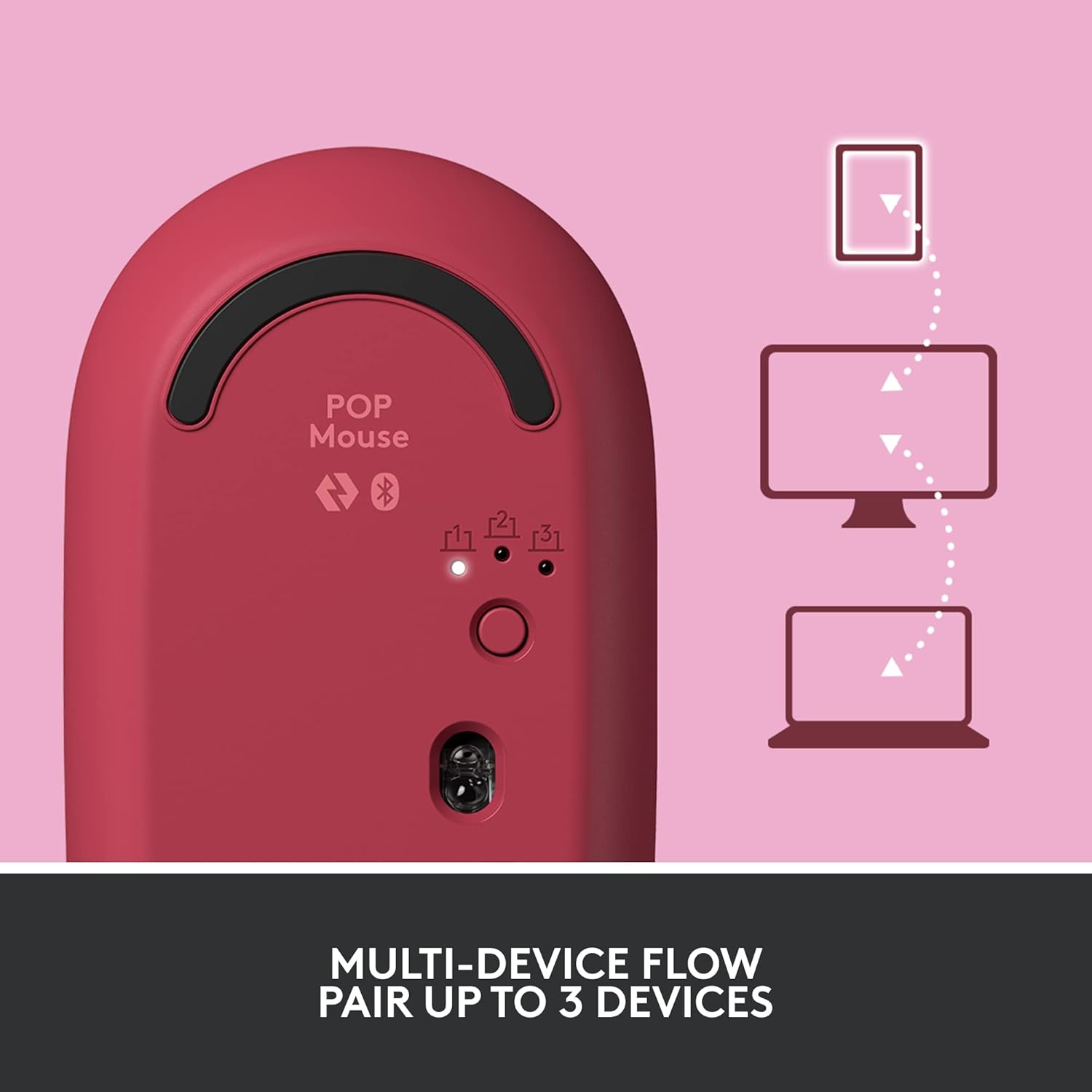
Image: The Logitech POP Mouse and an included AA battery, as typically found in the product packaging.
Opsætning
1. Batteriinstallation
- Find batterirummet på undersiden af musen.
- Gently slide the top cover of the mouse backward to remove it.
- Isæt det medfølgende AA-batteri, og sørg for at polariteten (+/-) vender korrekt.
- Sæt topdækslet på plads ved at justere det og skubbe det fremad, indtil det klikker på plads.
2. Tænd
- Flip the mouse over. Locate the On/Off switch on the bottom of the mouse.
- Slide the switch to the 'On' position (usually indicated by green color).
3. Device Pairing (Bluetooth)
- On the bottom of the mouse, press and hold the Easy-Switch button (labeled with 1, 2, or 3) for 3 seconds until the LED light starts blinking rapidly. This indicates pairing mode.
- On your computer, tablet, or phone, open your Bluetooth settings.
- Vælg "Logitech POP Mouse" fra listen over tilgængelige enheder.
- Follow any on-screen prompts to complete the pairing process. The LED light on the mouse will turn solid for 5 seconds when connected.
4. Skift mellem flere enheder
- The POP Mouse can be paired with up to three devices. To switch between paired devices, simply press the Easy-Switch button on the bottom of the mouse. The corresponding LED (1, 2, or 3) will light up to indicate the active device.
Image: The Logitech POP Mouse can seamlessly connect and switch between up to three different devices, such as a tablet, desktop computer, and laptop.
Betjening af musen
1. Grundlæggende funktioner
- Venstre klik: Primær udvælgelse og interaktion.
- Højreklik: Åbner kontekstmenuer.
- Scrollhjul: Ruller lodret gennem dokumenter og web sider.
2. SmartWheel Technology
- The SmartWheel automatically shifts between high-precision scrolling for detailed work and super-fast scrolling for quickly navigating long documents or web sider.

Image: The SmartWheel on the Logitech POP Mouse dynamically adjusts its scrolling mode for precision or speed.
3. SilentTouch-teknologi
- Enjoy a quiet working environment with SilentTouch Technology, which significantly reduces click noise without compromising tactile feedback.

Image: SilentTouch Technology ensures a quiet and comfortable user experience.
Tilpasning
1. Tilpasselig topknap
- The top button, located below the scroll wheel, is customizable. By default, it opens an emoji menu for quick access to your favorite emojis.

Image: The customizable top button allows for quick access to an emoji menu on your screen.
2. Logi Options+-appen
- Download Logi Options+-appen (Windows and macOS only) to personalize your POP Mouse.
- You can reassign the top button to perform various shortcuts, such as Snip Screen, Mic Mute, Voice-to-Text, or any other function you desire.
- The app also allows you to adjust pointer speed, scroll speed, and enable Flow for cross-computer control.
Opretholdelse
- Rensning: Brug en blød, damp cloth to clean the exterior of the mouse. Avoid harsh chemicals or abrasive materials.
- Udskiftning af batteri: Replace the AA battery when the low battery indicator light appears.
- Opbevaring: When not in use for extended periods, turn off the mouse using the On/Off switch to conserve battery life.
Fejlfinding
- Musen opretter ikke forbindelse: Ensure the mouse is powered on and within range of your device. Check your device's Bluetooth settings to confirm it's enabled and the mouse is paired. Try re-pairing the mouse.
- Forsinkelse eller uregelmæssig bevægelse: Replace the battery if it's low. Ensure there are no obstructions between the mouse and your device. Avoid using the mouse on highly reflective or uneven surfaces.
- Custom button not working: Verify that the Logi Options+ App is installed and running on your computer. Check the button assignments within the app.
Specifikationer
| Mærke | Logitech |
| Modelnummer | 910-006545 |
| Forbindelsesteknologi | Bluetooth 5.1 |
| Wireless Range | 32.81 fod (10 m) |
| Sensor Technology | Logitechs højpræcisionsoptiske sporing |
| Antal knapper | 4 (Left/Right click, Scroll wheel click, Top button) |
| Kan tilpasses knap | Yes (Top button, via Logi Options+ App) |
| Batteritype | 1 x AA batteri |
| Batterilevetid | Op til 24 måneder (kan variere afhængigt af brug) |
| Operativsystemkompatibilitet | Windows 10 eller nyere, macOS 10.15 eller nyere, iPadOS, Chrome OS, Android |
| Varens vægt | 2.89 ounce |
| Produktmål (LxBxH) | 4.3 x 2.6 x 1.7 tommer |
| Materiale | Plastic parts include certified post-consumer recycled plastic (Heartbreaker Rose: 29%) |
Garanti og support
For garantioplysninger og teknisk support, besøg venligst den officielle Logitech-supportside website or refer to the warranty card included with your product. You can find detailed FAQs, troubleshooting guides, and contact options for customer service.
- Online support: Besøg support.logi.com
- Produktregistrering: Registrer dit produkt for at modtage opdateringer og support.


