1. Introduktion
The Blaupunkt BP 4.0 FHD Dash Cam is a compact and robust in-car video recorder designed to capture your journeys in Full HD. Featuring a 140-degree wide-angle lens, an integrated microphone, and an interior camera, it provides comprehensive coverage for your vehicle. This manual provides essential information for the proper installation, operation, and maintenance of your device.
2. Pakkens indhold
Kontroller venligst pakkens indhold for at sikre, at alle varer er til stede:
- Blaupunkt BP 4.0 FHD Dash Cam (Video Recorder)
- Indvendig linse
- Mount (Suction Cup Type)
- Strømkabel (biloplader)
- Brugermanual

Image 2.1: Contents of the Blaupunkt BP 4.0 FHD Dash Cam package.

Image 2.2: The retail packaging for the Blaupunkt BP 4.0 FHD Dash Cam.
3. Produktet er slutview
The BP 4.0 FHD Dash Cam features a main unit with a 2-inch display and a separate interior camera. It is designed for easy installation and discreet operation within your vehicle.
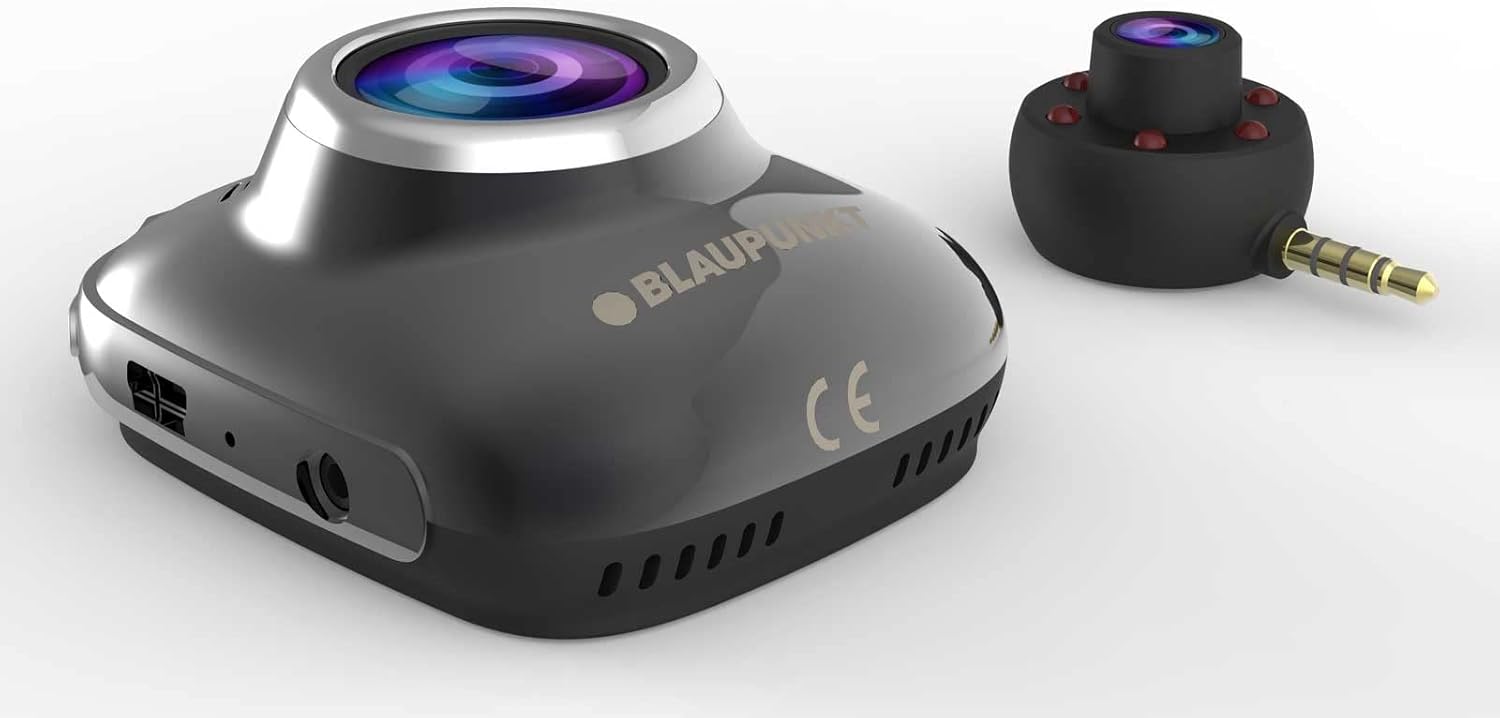
Image 3.1: Main unit and interior camera of the Blaupunkt BP 4.0 FHD Dash Cam.
Nøglefunktioner:
- Dobbelt linse: Records both front and interior views samtidigt.
- Vidvinkel View: 140-graders vandret felt view for omfattende vejdækning.
- Integreret mikrofon: Captures in-cabin audio.
- 2-tommer skærm: Til live view, afspilning og menunavigation.
- G-sensor: Låser automatisk video files upon impact.
- Loop-optagelse: Optager kontinuerligt og overskriver de ældste files når hukommelseskortet er fuldt.
- Holdbart design: Constructed with zinc alloy for robustness.

Image 3.2: Dimensions of the Blaupunkt BP 4.0 FHD Dash Cam.
4. Installation
Følg disse trin for korrekt installation af dit dashcam:
- Forbered monteringsstedet: Vælg et sted på din forrude, der ikke blokerer for din view of the road. Clean the area thoroughly to ensure good adhesion for the suction cup mount.
- Fastgør beslaget: Secure the suction cup mount to the chosen spot on the windshield. Ensure it is firmly attached.
- Monter Dash Cam: Slide the main dash cam unit onto the mount until it clicks into place. Adjust the angle of the camera to ensure the front lens captures the road ahead clearly.
- Indsæt MicroSD-kort: Insert a high-speed MicroSD card (not included) into the designated slot on the dash cam. Ensure it is inserted correctly until it locks.
- Connect Interior Camera: Plug the interior camera's 3.5mm jack into the auxiliary port on the main dash cam unit. Position the interior camera to capture the vehicle's cabin as desired.
- Tilslut strøm: Plug the car charger cable into the dash cam's power input port and then into your vehicle's 12V power outlet (cigarette lighter socket). Route the cable neatly along the windshield and dashboard to avoid interference with driving.
- Tænd og test: Start your vehicle. The dash cam should power on automatically and begin recording. Check the display to confirm both front and interior camera views are visible and recording correctly.
5. Grundlæggende betjening
Understanding the basic functions of your dash cam will ensure optimal performance.
Tænd/sluk:
- Automatisk: Dashcam'et tænder automatisk og begynder at optage, når bilens tænding tændes (og der forsynes strøm til 12V-stikkontakten).
- Manual: Press and hold the power button (usually marked with a power symbol) to manually turn the device on or off.
Optagetilstande:
- Loop-optagelse: The camera records video in continuous loops (e.g., 1, 3, or 5-minute segments). When the memory card is full, the oldest unlocked files overskrives automatisk.
- G-sensor (nødoptagelse): I tilfælde af et pludseligt sammenstød eller en kollision registrerer den indbyggede G-sensor hændelsen og låser automatisk den aktuelle video. file, hvilket forhindrer den i at blive overskrevet af loop-optagelse.
Menu navigation:
Use the buttons located around the 2-inch display to navigate through the menu options. Common settings include video resolution, loop recording duration, G-Sensor sensitivity, date/time stamp, and format MicroSD card.
6. Vedligeholdelse
Regelmæssig vedligeholdelse sikrer dit dashcams lange levetid og optimale ydeevne.
- Rengøring af linser og skærm: Use a soft, lint-free cloth to gently wipe the camera lenses and the display screen. Avoid abrasive materials or chemical cleaners that could scratch or damage the surfaces.
- MicroSD-kortstyring: Periodically format your MicroSD card (at least once a month) to prevent data corruption and ensure smooth recording. Back up any important video files før formatering.
- Temperaturkontrol: Avoid exposing the dash cam to extreme temperatures for extended periods. If your car is parked in direct sunlight on a hot day, consider removing the dash cam to prevent overheating.
- Firmwareopdateringer: Check the official Blaupunkt webwebsted for tilgængelige firmwareopdateringer. At holde dit dashcams firmware opdateret kan forbedre ydeevnen og tilføje nye funktioner.
7. Fejlfinding
If you encounter issues with your Blaupunkt BP 4.0 FHD Dash Cam, refer to the following common problems and solutions:
| Problem | Mulig årsag | Løsning |
|---|---|---|
| Dashcam'et tænder ikke. | No power supply; faulty cable; dead battery. | Check car charger connection and vehicle's 12V outlet. Try a different power source or cable. Ensure the internal battery is charged. |
| Optagelsen stopper eller fryser. | Langsomt MicroSD-kort; fuldt MicroSD-kort; kortfejl. | Use a high-speed (Class 10 or U1/U3) MicroSD card. Format the MicroSD card. Replace the MicroSD card if errors persist. |
| Poor video quality (especially at night). | Dirty lens; low light conditions; windshield glare. | Clean the camera lenses and windshield. Ensure no obstructions. Adjust exposure settings if available. Note that night vision performance can be limited. |
| Interior camera not working. | Loose connection; faulty interior camera. | Ensure the interior camera is securely plugged into the main unit's auxiliary port. If the issue persists, contact support. |
| Knapperne reagerer ikke. | Device frozen; software glitch. | Udfør en soft nulstilling ved at trykke på nulstillingsknappen (hvis tilgængelig) eller ved at holde tænd/sluk-knappen nede i 10-15 sekunder. |
8. Specifikationer
Detailed technical specifications for the Blaupunkt BP 4.0 FHD Dash Cam:
- Mærke: BLAUPUNKT
- Modelnavn: BP 4.0 FHD
- Varemodelnummer: BP 4.0 FHD
- Farve: Zinc Alloy / Black
- Skærmstørrelse: 2 tommer
- Felt af View: 140 grader
- Videooptagelsesopløsning: 1080p, 720p
- Forbindelse teknologi: Hjælpe
- Monteringstype: Sugekopmontering
- Kompatible enheder: Bil, lastbil
- Inkluderede komponenter: Cable, Video Recorder, User Manual, Interior Lens, Mount
- Fabrikant: BLAUPUNKT
- Dato første tilgængelig på Amazon.com.be: 6. juni 2022
- Tilgængelighed af reservedele: Information ikke tilgængelig
- Softwareopdateringer garanteret indtil: Information ikke tilgængelig
9. Garanti og support
For warranty information and customer support, please refer to the warranty card included in your product package or visit the official Blaupunkt webSpecifikke garantivilkår kan variere afhængigt af region og forhandler.


