1. Introduktion
The Garmin Pro 70 Dog Training System, paired with the PT10 Dog Device Blue Collar, offers a comprehensive solution for canine training. This system is designed for intuitive one-hand operation, allowing for effective communication with your dog up to a range of 1 mile. The PT10 dog device is compatible with both the PRO 70 and PRO 550 handhelds, enabling expansion to train multiple dogs.
Nøglefunktioner omfatter:
- PRO 70 handheld with 6 levels of continuous stimulation.
- PT10 additional dog device with remote-operated LED beacon lights for low-light conditions.
- Ability to train up to 6 dogs (additional dog devices required) with a 1-mile range using 27MHz radio frequency.
- Built-in BarkLimiter on both PRO 70 and PT10 with Advanced Bark Correction Technology.
- Rechargeable batteries for both handheld and dog device, eliminating the need for disposable batteries.

Figur 1: Overview of the Garmin Pro 70 Dog Training System components, including the handheld remote, PT10 dog device, and charging accessories.
2. Opsætning
2.1 Opladning af enhederne
Before initial use, fully charge both the PRO 70 handheld and the PT10 dog device. The system includes an AC adapter and a split adapter cable, allowing both units to be charged simultaneously.
- Connect the charging clip to the PT10 dog device.
- Connect the charging clip to the PRO 70 handheld.
- Plug the split adapter cable into the AC adapter.
- Sæt AC-adapteren i en almindelig stikkontakt.
- Allow both devices to charge until the battery indicator shows full. The PT10 dog device has a battery life of approximately 60 hours.
2.2 Attaching the PT10 Dog Device to the Collar Strap
The PT10 dog device comes with a blue 3/4-inch collar strap. Ensure the contact points are securely attached to the device.
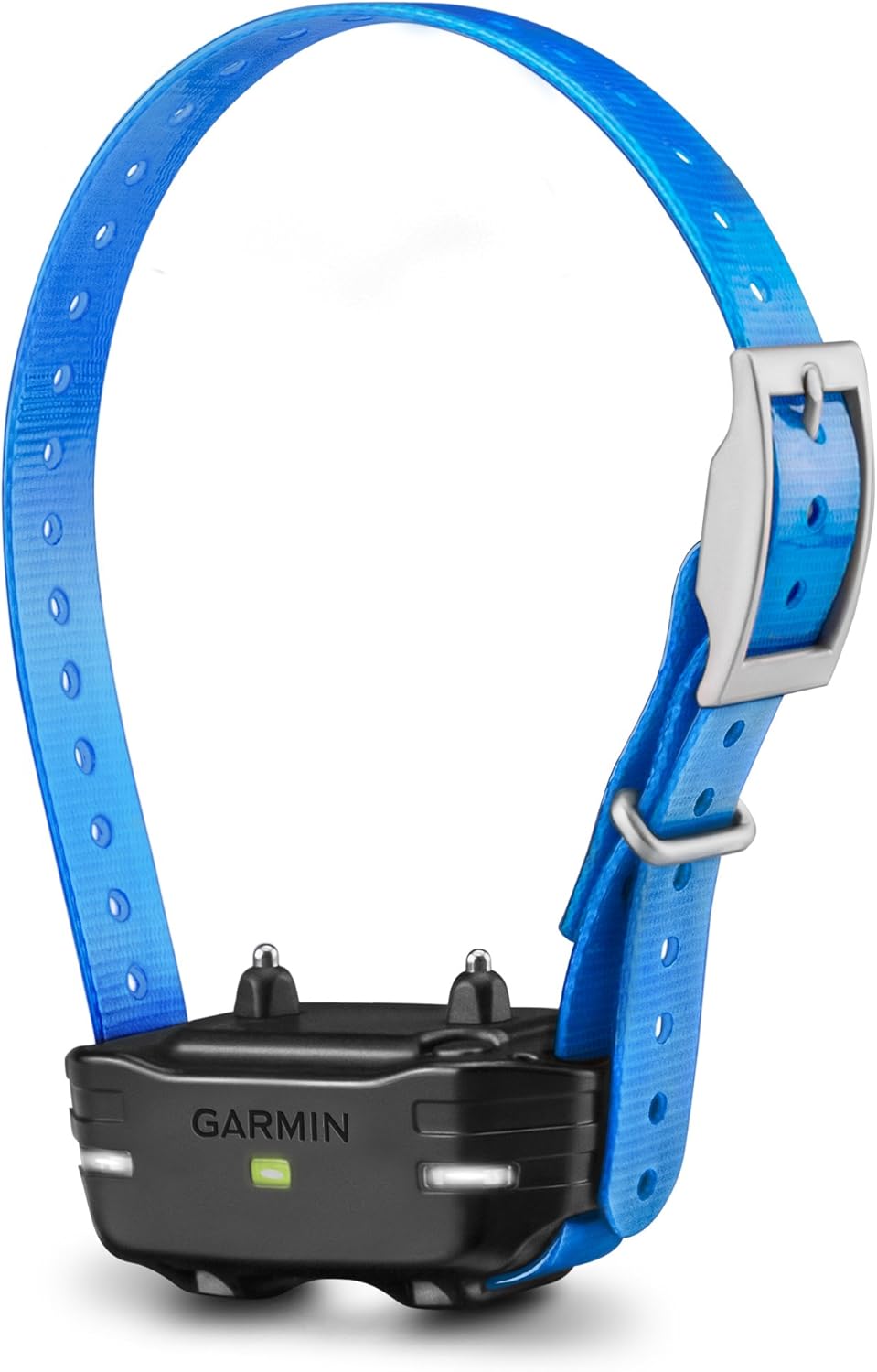
Figure 2: The PT10 Dog Device attached to its blue collar strap, showing the contact points.

Figur 3: En anden view of the PT10 Dog Device on the blue collar, highlighting its robust design.

Figur 4: Top og bund views of the PT10 Dog Device, showing the contact points and the collar buckle.
2.3 Montering af kraven
Proper fit of the dog device is crucial for effective training. The contact points must have direct contact with your dog's skin.
- Place the dog device on the middle of your dog's neck, with the contact points resting on the underside.
- The collar should be snug enough that two fingers can barely fit under the strap.
- Trim eventuelt overskydende remlængde, hvis det er nødvendigt.
3. Betjening af systemet
3.1 Tænd/sluk
- PRO 70 Handheld: Tryk på tænd/sluk-knappen, og hold den nede, indtil enheden tænder/slukker.
- PT10 Dog Device: Press the power button on the device once to turn it on (green light). Press it again to turn it off (red light).
3.2 Selecting Dog Device (Multi-Dog Training)
The PRO 70 handheld allows training up to 6 dogs. Each dog device is assigned a color (black, blue, red) which corresponds to a selection on the handheld's top-mounted dial.
- Rotate the top dial on the PRO 70 handheld to select the desired dog device (e.g., black for the primary dog, blue for the PT10).
3.3 træningstilstande
The PRO 70 offers various training modes:
- Continuous Stimulation: Delivers stimulation for as long as the button is pressed (up to 6 seconds). The intensity can be adjusted via the selection dial (6 levels).
- Momentary Stimulation: Delivers a single, brief pulse of stimulation. The intensity can be adjusted via the selection dial.
- Vibration: Delivers a non-stimulating vibration.
- Tone: Udsender en hørbar tone.
- LED Beacon Lights: Activates LED lights on the dog device for visibility in low-light conditions.
3.4 BarkLimiter Function
The PT10 dog device features a built-in BarkLimiter with Advanced Bark Correction Technology. This function can be activated on the dog device to provide automatic correction for excessive barking.
- Refer to the detailed instructions in the full product manual for specific steps on activating and customizing the BarkLimiter settings.
4. Vedligeholdelse
Regular maintenance ensures the longevity and optimal performance of your Garmin training system.
- Rensning: Regularly clean the dog device and contact points with a damp cloth to remove dirt, debris, and oils. Ensure the device is dry before charging or storing.
- Reminspektion: Periodically inspect the collar strap for wear and tear. Replace if damaged to ensure a secure fit.
- Batteripleje: Avoid fully discharging the batteries frequently. Charge the devices regularly, especially before extended periods of non-use.
- Opbevaring: Store the system in a cool, dry place away from extreme temperatures and direct sunlight.
5. Fejlfinding
If you encounter issues with your Garmin training system, consider the following:
- No Response from Dog Device:
- Ensure both the handheld and dog device are powered on.
- Verify the dog device is properly fitted and the contact points are touching the dog's skin.
- Check battery levels of both devices.
- Confirm the correct dog device is selected on the handheld dial.
- Inconsistent Stimulation:
- Re-check collar fit. Loose collars can lead to inconsistent contact.
- Clean contact points and the dog's neck area.
- Kort batterilevetid:
- Sørg for, at enhederne er fuldt opladet før brug.
- Battery life can decrease over time with prolonged use.
For further assistance, refer to the complete user manual or contact Garmin customer support.
6. Specifikationer
| Feature | Specifikation |
|---|---|
| Modelnumre | Pro 70, PT10 |
| Mærke | Garmin |
| Pakkedimensioner | 8.98 x 5.67 x 3.5 tommer |
| Varens vægt | 1.65 pund (0.75 kilo) |
| Forbindelsesteknologi | Bluetooth |
| Særlige funktioner | Bluetooth, Remote-operated LED beacon lights, Built-in BarkLimiter |
| Human Interface Input | Urskive |
| Farve | Black (System), Blue (PT10 Collar) |
| Fabrikant | Garmin |
| Dato først tilgængelig | 15. april 2020 |
| Korttype | Satellite (if applicable to other Garmin devices, not directly for this training system) |
| Battery Life (PT10) | 60 timer |
| Collar Compatibility | 0.75 inch (1.9 cm) strap |
7. Garanti og support
For warranty information, product registration, and customer support, please visit the official Garmin website or refer to the documentation included in your product packaging. Keep your proof of purchase for warranty claims.
Online resources and FAQs are available to assist with common questions and issues.