1.Overview
The Samsung Galaxy Buds Plus SM-R175 are advanced wireless earbuds designed to deliver a premium audio experience. Featuring a 2-way speaker system tuned by AKG, an adaptive 3-microphone system for crystal clear calls, and long-lasting battery power, these earbuds are built for extended use and superior sound quality. They offer seamless compatibility with Samsung and other Android devices, ensuring a versatile listening experience.
2. Nøglefunktioner
- 2-way speaker system by AKG: Delivers rich treble and bass for a balanced audio profile.
- Adaptive 3-microphone system: Ensures crystal clear call quality by isolating your voice from background noise.
- Langtidsholdbart batteri: Up to 11 hours of playback on a single charge, with additional charges from the case.
- Qi compatible wireless charging: Conveniently charge the case wirelessly.
- Power sharing: Share power directly from compatible Galaxy phones.
- Battery level monitoring: Check individual bud and case battery levels via your smartphone.
- Berøringsknapper: Intuitive media and call control directly from the earbuds.
- Lydisolering: Passive noise isolation for an immersive listening experience.
- Vandtæt: Designet til at modstå stænk og sved.
3. Opsætning
3.1 Udpakning og første opkrævning
Upon unboxing, ensure all components are present: the Galaxy Buds Plus earbuds, charging case, USB-C charging cable, and various ear-wing tips and silicone tips. It is recommended to fully charge the case and earbuds before first use.
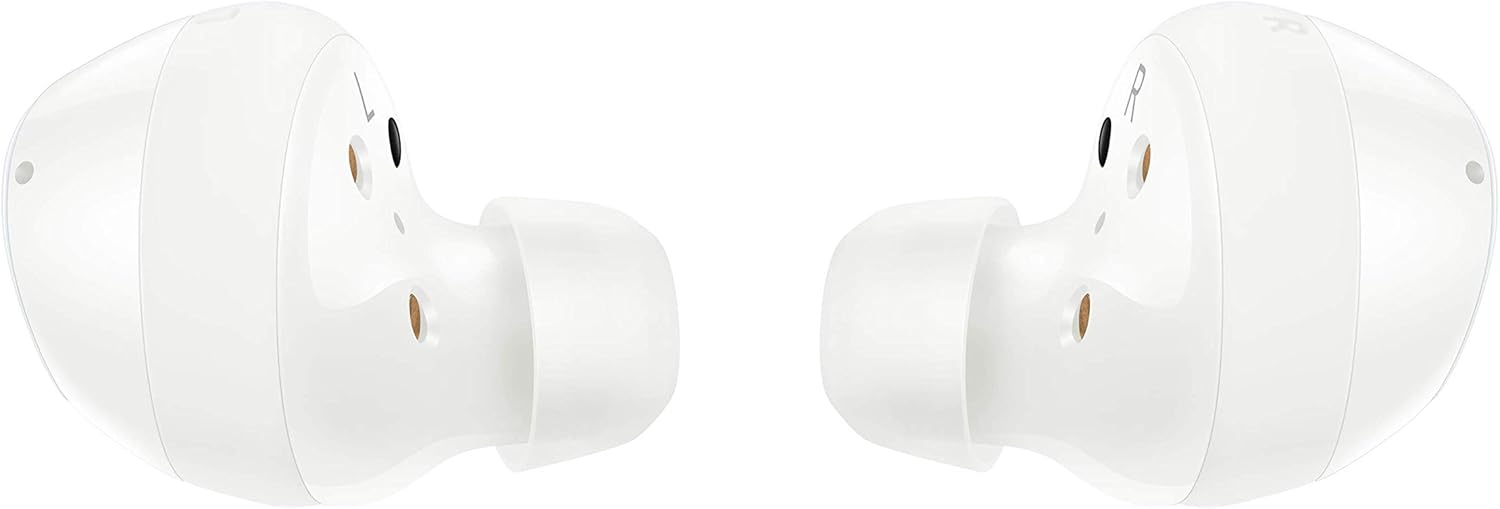
Figure 1: Samsung Galaxy Buds Plus earbuds and charging case, along with included accessories.
3.2 Tilpasning af ørepropperne
Select the ear-wing tips and silicone tips that provide the most comfortable and secure fit for your ears. A proper fit is crucial for optimal sound quality and passive noise isolation. Gently insert each earbud into your ear canal and rotate slightly until it feels snug and stable.

Figure 2: A single white Samsung Galaxy Buds Plus earbud, highlighting its design for a secure fit.
3.3 Parring med en enhed
- Åbn opladningsetuiet med ørepropperne indeni. Ørepropperne vil automatisk gå i parringstilstand.
- On your Samsung or Android device (Android 5.0 or higher with 1.5GB RAM minimum), go to Bluetooth settings.
- Select "Galaxy Buds+ (SM-R175)" from the list of available devices.
- Følg eventuelle anvisninger på skærmen for at fuldføre parringsprocessen.
4. Betjeningsvejledning
4.1 Grundlæggende berøringskontroller
The Galaxy Buds Plus feature intuitive touch controls on the outer surface of each earbud:
- Enkelt tryk: Afspil/pause musik, besvar/afslut opkald.
- Dobbelttryk: Afspil næste sang, Besvar/afslut opkald.
- Tredobbelt tryk: Afspil den forrige sang.
- Tryk og hold: Activate customizable function (e.g., volume control, voice assistant, Ambient Sound mode).
4.2 Opkaldshåndtering
The adaptive 3-microphone system ensures your voice is heard clearly during calls, even in noisy environments. Use the touch controls to answer, end, or reject calls without needing to access your phone.
4.3 Lydafspilning
Enjoy high-fidelity audio with the 2-way speaker system by AKG, delivering rich treble and deep bass. Adjust volume and navigate tracks using the touch controls or your connected device.
Video 1: Officiel produktvideovisningasing the Samsung Galaxy Buds Plus Wireless Earbuds and their features.
5. Vedligeholdelse
5.1 Opladning
Place the earbuds back into the charging case to recharge them. The case itself can be charged via the included USB-C cable or wirelessly using a Qi-compatible wireless charger. You can also use PowerShare from a compatible Galaxy phone.

Figure 3: The open charging case of the Samsung Galaxy Buds Plus, illustrating the charging contacts for the earbuds.
5.2 Batterilevetid
The earbuds offer up to 11 hours of battery life on a single charge. The charging case provides additional charges, extending total listening time. Monitor battery levels for both earbuds and the case using the Samsung Wearable app on your smartphone.
5.3 Rengøring
Regularly clean your earbuds and charging case to maintain performance and hygiene. Use a soft, dry cloth to wipe the earbuds and charging contacts. Remove silicone tips and clean them with mild soap and water, ensuring they are completely dry before reattaching.
5.4 Vandtæthed
The Galaxy Buds Plus are water resistant, making them suitable for workouts and light splashes. However, they are not waterproof. Avoid submerging them in water or exposing them to high-pressure water streams.
6. Fejlfinding
6.1 Forbindelsesproblemer
- Ørepropper parrer ikke: Ensure earbuds are charged and in pairing mode. Check your device's Bluetooth settings and try reconnecting.
- Intermitterende forbindelse: Move closer to your connected device. Avoid obstacles that may interfere with the Bluetooth signal.
6.2 Lydproblemer
- Ingen lyd: Kontrollér lydstyrken på både din enhed og ørepropperne. Sørg for, at ørepropperne sidder korrekt i dine ører.
- Dårlig lydkvalitet: Clean the earbud mesh and silicone tips. Try different sized ear-wing and silicone tips for a better seal.
6.3 Opladningsproblemer
- Øretelefonerne oplader ikke i tilfælde af: Ensure earbuds are correctly placed in the case and charging contacts are clean.
- Etuiet oplader ikke: Verify the USB-C cable and power adapter are working. For wireless charging, ensure the case is correctly positioned on a Qi-compatible charger.
7. Specifikationer
| Feature | Specifikation |
|---|---|
| Mærke | Samsung |
| Modelnavn | Galaxy Buds Plus (SM-R175) |
| Forbindelsesteknologi | Trådløs (Bluetooth 5.0, infrarød) |
| Øreplacering | In Ear |
| Formfaktor | In Ear |
| Støjkontrol | Lydisolering |
| Batterilevetid | 11 timer (ørepropper) |
| Opladningstid | 3 minutter for 1 times spilletid |
| Vandmodstandsniveau | Vandtæt |
| Kontrolmetode | Røre |
| Kompatible enheder | Samsung, other Android devices with Android 5.0+ & RAM 1.5GB+ |
| Varens vægt | 4.9 ounce |
| Pakkedimensioner | 4.72 x 3.39 x 1.65 tommer |
8. Garanti og support
For detailed warranty information and customer support, please refer to the documentation included with your product or visit the official Samsung support website. You can find FAQs, troubleshooting guides, and contact information for technical assistance.


