Produkt overview
The AireMax Portable Air Conditioner (Model APA112C) is designed to provide efficient cooling and dehumidification for rooms up to 400 square feet. This versatile unit features multiple operating modes, a user-friendly LED display, and convenient portability with integrated wheels.
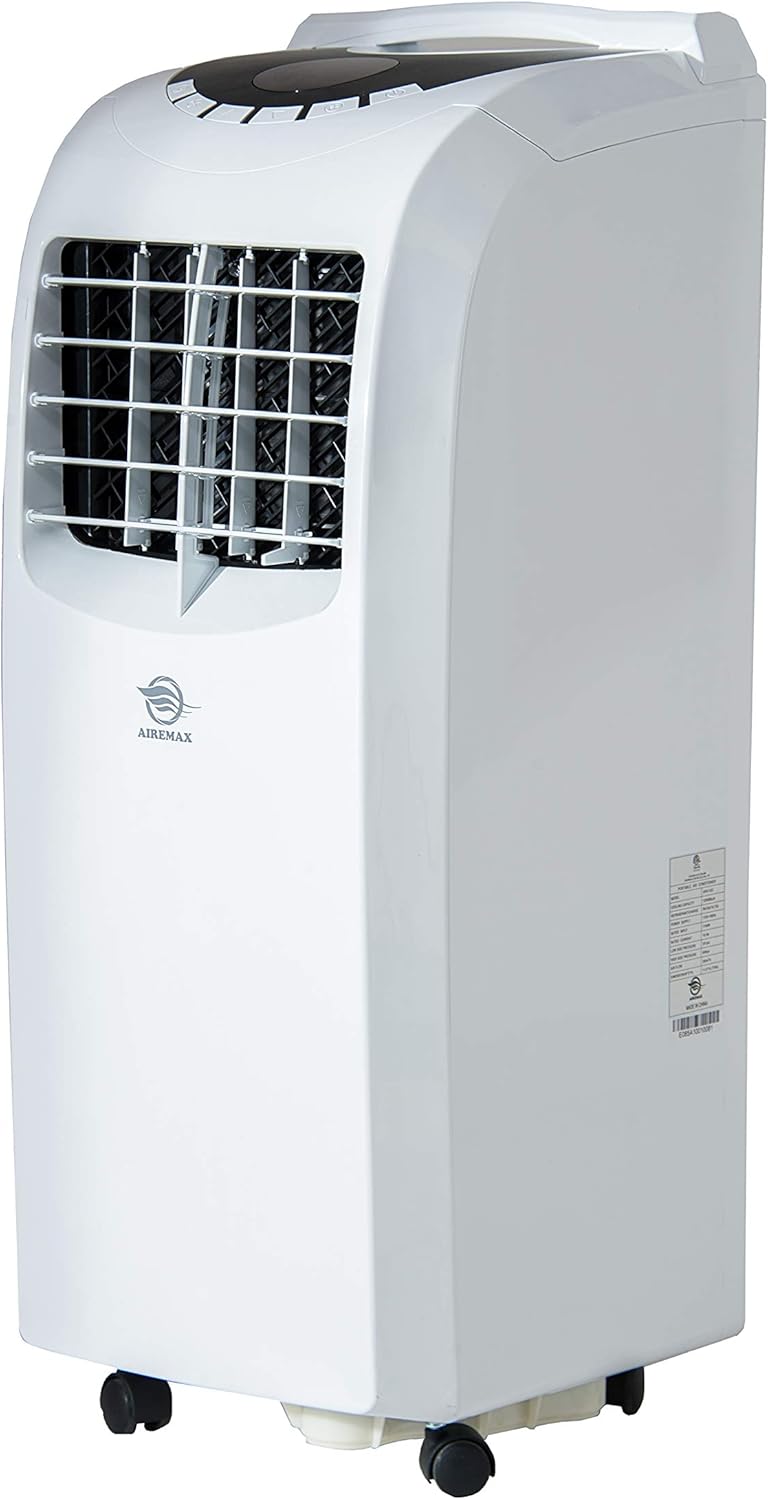
Figur 1: Forside view of the AireMax Portable Air Conditioner, showing its compact design and casters for easy movement.
Inkluderede komponenter
Før installationen påbegyndes, skal du sørge for, at alle komponenter er til stede:
- Bærbar klimaanlægsenhed
- Fjernbetjening
- Udstødningsslange
- Window Venting Kit (adjustable panel)
- Rund stik
- Adapter
- Brugervejledning (dette dokument)

Figure 2: Key accessories for the portable air conditioner, including the exhaust hose and window venting kit.
Opsætning og installation
Følg disse trin for at konfigurere dit bærbare klimaanlæg:
- Placering: Place the unit on a flat, stable surface. Ensure there is at least 20 inches of space around the unit for proper airflow.
- Fastgør udstødningsslange: Connect one end of the exhaust hose to the round connector, then attach the connector to the exhaust outlet on the back of the unit.
- Installer vinduessæt: Insert the adaptor into the other end of the exhaust hose. Adjust the window venting kit to fit your window opening (suitable for both vertical and horizontal windows). Secure the window kit in place.
- Connect Exhaust: Attach the exhaust hose adaptor to the opening in the window venting kit. Ensure a tight seal to prevent hot air from re-entering the room.
- Strømtilslutning: Sæt netledningen i en jordet stikkontakt.
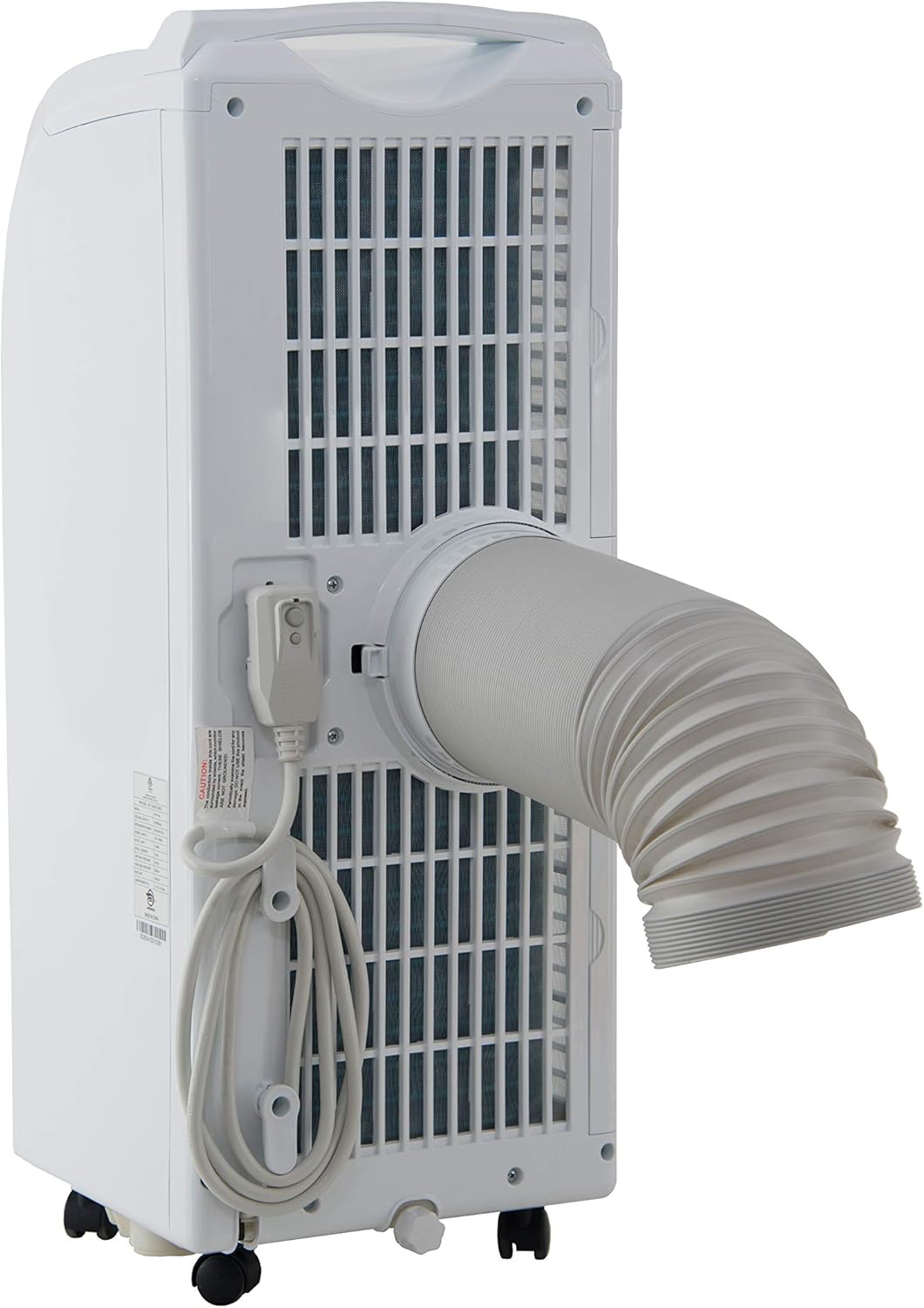
Figur 3: Bagside view of the unit demonstrating the attachment of the exhaust hose for proper ventilation.
Betjeningsvejledning
Your AireMax Portable Air Conditioner features an intuitive LED display and a multifunction remote control for easy operation.
Control Panel (LED Display)
The top-mounted LED display provides clear indications of the current settings and allows for direct control.
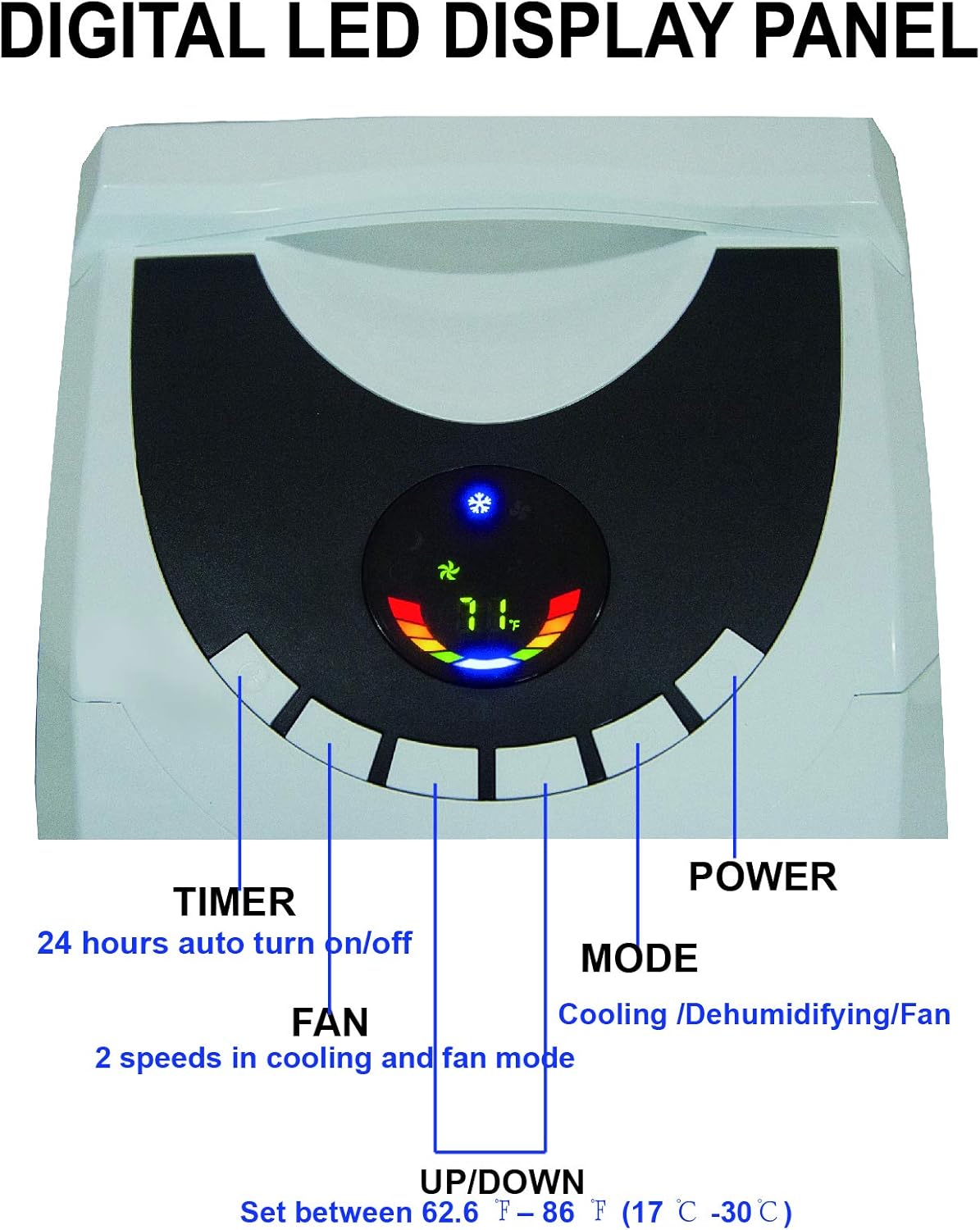
Figure 4: Close-up of the digital LED display panel, showing controls for Timer, Fan, Up/Down temperature, Mode, and Power.
- Power knap: Tænder eller slukker for enheden.
- Mode knap: Cycles through operating modes: Cool, Fan, and Dry (Dehumidify).
- Op/Ned knapper: Adjust the desired temperature setting (between 62.6°F and 86°F / 17°C and 30°C).
- Fan -knap: Selects fan speed (High, Low) in cooling and fan modes.
- Timer knap: Sets the 24-hour auto turn on/off timer.
Fjernbetjening
Den medfølgende fjernbetjening giver nem adgang til alle funktioner på afstand.

Figure 5: The multifunction remote control, allowing adjustment of settings from a distance.
- Alle funktioner, der er tilgængelige på kontrolpanelet, er også tilgængelige via fjernbetjeningen.
- Includes dedicated buttons for High/Low fan speed, Sleep mode, and temperature unit conversion (°C/°F).
Opretholdelse
Regelmæssig vedligeholdelse sikrer optimal ydeevne og levetid for dit klimaanlæg.
Filterrensning
The unit features dual filters to capture pet hair, dust, and other particles. Clean the filters periodically to maintain efficiency.
- Sluk for enheden, og tag stikket ud før rengøring.
- Locate the filter frames on the back of the unit.
- Remove the filter frames.
- Vask filtrene med varmt sæbevand. Skyl grundigt.
- Allow filters to air dry completely before reinserting them.

Figur 6: Bagside view highlighting the double filter frames and the drainage hose connection point.
Vandafløb
The unit features an auto-evaporation system, which typically handles most condensate. However, in highly humid environments, manual drainage may be required.
- When the internal water tank is full, the unit will stop operating and indicate a full tank.
- To drain, turn off and unplug the unit.
- Place a shallow pan or bucket under the drainage hose outlet at the bottom rear of the unit.
- Fjern aftapningsproppen, så vandet kan løbe ud.
- Replace the drain plug once all water has been removed.
- For continuous drainage in very humid conditions, a separate drainage tube (not included) can be connected to the drainage outlet.
Fejlfinding
Se dette afsnit for almindelige problemer og deres løsninger.
| Problem | Mulig årsag | Løsning |
|---|---|---|
| Enheden tænder ikke. | Ingen strøm, netledning frakoblet, fuld vandtank. | Check power connection, ensure outlet is functional. Drain water tank if full. |
| Enheden kører, men køler ikke. | Snavset luftfilter, udstødningsslange ikke korrekt installeret, rum for stort, vinduer/døre åbne. | Clean air filter. Ensure exhaust hose is securely connected and vented outside. Close all windows and doors. Verify room size is within unit's capacity. |
| Water leakage from unit. | Water tank is full, unit is not level, drainage hose is blocked or improperly connected. | Drain the water tank. Ensure the unit is on a level surface. Check drainage hose for kinks or blockages if continuous drainage is used. |
| Enheden er støjende. | Enheden står ikke på en plan overflade, ventilatorhastigheden er for høj. | Place unit on a flat, level surface. Reduce fan speed. |
Specifikationer
Detailed technical specifications for the AireMax Portable Air Conditioner Model APA112C:
| Feature | Detalje |
|---|---|
| Modelnummer | APA112C |
| Kølekapacitet | 12,000 BTU (6,500 BTU DOE) |
| Estimeret køleområde | Op til 400 kvm. Ft. |
| Strømforsyning | 115V / 60Hz |
| Nominelt strømforbrug | 1140W / 10.4 A. |
| Affugtningskapacitet | Up to 78 pints per day |
| Dræning | Automatisk eller manuel fordampning |
| Luftventiler | Manuel 2-vejs retningsbestemt |
| Støjniveau | 55 dB |
| Varens vægt | 60.6 pund |
| Produktmål (B x H x D) | 14.2 x 30 x 11.8 tommer |
| Kølemiddel | R410A |
| Inkluderede komponenter | Air conditioner, remote control, exhaust hose, window venting kit, manual, round connector, adaptor |

Figure 7: Diagram illustrating the dimensions and key specifications of the unit.

Figure 8: Guide to selecting the correct cooling capacity based on room square footage, with adjustment factors.
Garanti og support
The AireMax Portable Air Conditioner comes with a 1 års reservedele og arbejdsgaranti fra købsdatoen.
For technical assistance, troubleshooting beyond this manual, or warranty claims, please contact AireMax customer support. Refer to your purchase documentation for specific contact details or visit the official AireMax webwebsted.
A digital version of this user manual is available for download her.


