Indledning
This manual provides essential information for the safe and effective use of your Canon PowerShot SX420 IS digital camera. Please read this manual thoroughly before using the camera and retain it for future reference. The Canon PowerShot SX420 IS is a compact digital camera featuring a powerful 42x optical zoom, 20.0 Megapixel sensor, and built-in Wi-Fi and NFC connectivity.

Billede: Forside view of the Canon PowerShot SX420 IS digital camera.
Opsætning
1. Udpakning og kontrol af indhold
Sørg for, at alle komponenter er til stede:
- Canon PowerShot SX420 IS Camera Body
- Batteripakke
- Batterioplader
- Håndledsrem
- Lens Cap

Image: Canon PowerShot SX420 IS camera with included battery, charger, wrist strap, and lens cap.
2. Opladning af batteriet
- Sæt batteriet i batteriopladeren.
- Sæt opladeren i en stikkontakt. Opladningsindikatorlampen lyser.
- Once charging is complete, the indicator light will change or turn off (refer to charger specific instructions).
3. Isætning af batteri og hukommelseskort
- Åbn dækslet til batteri-/kortrummet i bunden af kameraet.
- Insert the charged battery pack, ensuring correct orientation.
- Insert an SDHC or SDXC memory card into the card slot until it clicks into place.
- Luk dækslet forsvarligt.
4. Første opstart og grundlæggende indstillinger
- Tryk på ON/OFF knappen for at tænde kameraet.
- Følg vejledningen på skærmen for at indstille dato, klokkeslæt og sprog.
Betjening af kameraet
1. Grundlæggende kontroller
- ON/OFF knap: Tænder eller slukker kameraet.
- Udløserknap: Tryk halvt ned for at fokusere, helt ned for at tage et billede.
- Zoom-greb: Controls the 42x optical zoom for telephoto and wide-angle shots.
- Funktionsvælger: Selects shooting modes such as Auto, Program, Portrait, Landscape, and Movie.
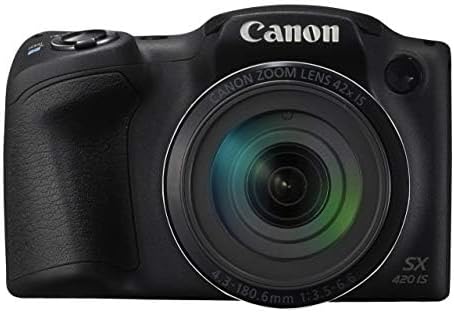
Billede: Forside view of the Canon PowerShot SX420 IS, highlighting the lens and zoom capabilities.
2. Tage billeder
- Turn on the camera and select your desired shooting mode using the mode dial. For general use, select Auto mode.
- Komponer dit billede ved hjælp af den 3.0-tommer LCD-skærm.
- Use the zoom lever to adjust the focal length.
- Press the shutter button halfway down to allow the camera to focus. The focus frame will turn green when focus is achieved.
- Press the shutter button fully to capture the image. The camera's optical image stabilizer helps reduce blur from camera shake.
3. Optagelse af videoer
- Indstil funktionsvælgeren til Film mode.
- Press the dedicated movie button to start recording. The camera records in HD 720p resolution in MP4 format.
- Tryk på filmknappen igen for at stoppe optagelsen.
4. Adviewbilleder og videoer
- Tryk på Afspilning button (usually indicated by a play icon).
- Use the directional buttons to navigate through your captured images and videos.
- Tryk på MENU knappen for at få adgang til afspilningsmuligheder.
5. Wi-Fi- og NFC-forbindelse
The camera features built-in Wi-Fi and NFC for easy sharing and transferring of images and videos.
- Enable Wi-Fi or NFC from the camera's menu.
- Follow the on-screen instructions to connect to a compatible smartphone, tablet, or computer.
- Use the Canon Camera Connect app (available for iOS and Android) for remote shooting and image transfer.
Opretholdelse
1. Rengøring af kameraet
- Kamerahus: Tør af med en blød, tør klud. Til genstridigt snavs, brug en let tør klud.amp klud og tør derefter grundigt.
- Linse: Use a lens brush to remove dust, then gently wipe with a lens cleaning cloth and lens cleaning solution. Avoid touching the lens surface with your fingers.
- LCD skærm: Brug en blød, tør klud. Brug en skærmrens, der er specielt designet til elektronik, til at fjerne snavs.
2. Batteripleje
- Always use genuine Canon battery packs and chargers.
- Undgå at udsætte batteriet for ekstreme temperaturer.
- If not using the camera for an extended period, remove the battery and store it in a cool, dry place.
3. Opbevaring
Store the camera in a dry, well-ventilated area, away from direct sunlight, high temperatures, and humidity. Use a camera bag or case to protect it from dust and physical damage.
Fejlfinding
Hvis du støder på problemer med dit kamera, kan du bruge følgende almindelige løsninger:
| Problem | Løsning |
|---|---|
| Kameraet tænder ikke. | Sørg for, at batteriet er fuldt opladet og isat korrekt. Prøv at bruge et andet opladet batteri, hvis det er muligt. |
| Billeder er slørede. | Check that the lens is clean. Ensure the camera is focusing correctly (press shutter halfway). Use the optical image stabilizer and hold the camera steady. Consider using a tripod in low light. |
| Cannot connect via Wi-Fi/NFC. | Ensure Wi-Fi/NFC is enabled on both the camera and the connecting device. Check network settings and password. Restart both devices. |
| Fejl på hukommelseskort. | Ensure the memory card is inserted correctly. Try formatting the card (this will erase all data). Use a different compatible memory card. |
| Blitzen går ikke ud. | Check flash mode settings. Ensure the flash is not set to 'Off'. The flash may not fire if the battery is low or in certain shooting modes. |
Specifikationer
| Feature | Detalje |
|---|---|
| Modelnavn | PSSX420IS |
| Effektiv stillopløsning | 20 MP |
| Optisk zoom | 42x |
| Billedstabilisering | Optisk |
| Fotosensorteknologi | CMOS |
| Skærmstørrelse | 3 tommer |
| Display Type | LCD |
| Forbindelsesteknologi | NFC, WiFi |
| Understøttet File Format | JPEG, RAW |
| Video opløsning | HD 720p |
| Videooptagelsesformat | MP4 |
| Flash-hukommelsestype | SDHC or SDXC |
| Maksimal blænde | 3.5 f |
| Udvidet ISO-område | 100 - 1600 |
| Varens vægt | 1.5 pund |
| Farve | Sort |
Garantioplysninger
This Canon PowerShot SX420 IS camera comes with a 90 dages begrænset garanti. Please retain your proof of purchase for warranty claims. For detailed terms and conditions, refer to the warranty documentation provided with your product or visit the official Canon webwebsted.
Kundesupport
For further assistance, technical support, or service inquiries, please visit the official Canon support webwebstedet eller kontakt deres kundeservice. Du kan typisk finde kontaktoplysninger og ofte stillede spørgsmål på producentens webwebsted.
Officiel Canon Webwebsted: www.usa.canon.com


