Indledning
This manual provides detailed instructions for the proper use and maintenance of your Canon HS-20TSC Standard Function Calculator. Please read this manual thoroughly before using the calculator to ensure correct operation and to maximize its lifespan. Keep this manual in a safe place for future reference.

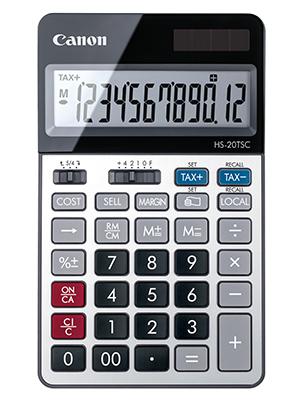
Figur 1: Forside view of the Canon HS-20TSC Standard Function Calculator, showing the 12-digit LCD display and key layout.
Opsætning
Strømkilde
The Canon HS-20TSC calculator operates using both solar power and a replaceable battery. For optimal performance, ensure the solar panel is exposed to sufficient light. The calculator requires one alkaline battery for backup power, which is not included in the package.
Installation af batteri
- Find batteridækslet på bagsiden af lommeregneren.
- Using a small screwdriver, carefully remove the screw securing the battery compartment cover.
- Fjern dækslet.
- Insert one new alkaline battery, ensuring the positive (+) and negative (-) terminals are correctly aligned as indicated inside the compartment.
- Sæt batterirummets dæksel på igen og fastgør det med skruen.
Figur 2: Tilbage view of the Canon HS-20TSC, illustrating the location of the battery compartment.
Betjeningsvejledning
Grundlæggende beregninger
- Tilføjelse (+): Indtast det første tal, tryk på +, enter the second number, press =.
- Subtraktion (-): Indtast det første tal, tryk på -, enter the second number, press =.
- Multiplikation (x): Indtast det første tal, tryk på x, enter the second number, press =.
- Division (÷): Indtast det første tal, tryk på ÷, enter the second number, press =.
- Procenttage (%): Indtast et tal, tryk på % to calculate percentage. F.eksample, to calculate 10% of 200: 200 x 10 %.
- Fri adgang (CE/C): Trykke CE/C once to clear the last entry. Press twice to clear all entries and reset the calculator.
- On/All Clear (ON/CA): Trykke ON/CA to turn on the calculator or clear all calculations and memory.
Hukommelsesfunktioner
- Hukommelse Plus (M+): Tilføjer den viste værdi til hukommelsen.
- Hukommelse Minus (M-): Trækker den viste værdi fra hukommelsen.
- Memory Recall/Clear (RM/CM): Tryk én gang for at genkalde hukommelsesværdien. Tryk to gange for at slette hukommelsen.
Særlige funktioner
- Tax Function (TAX+, TAX-):
- Indstilling af skattesats: Trykke SÆT, indtast derefter skattesatsen (f.eks. 5 for 5%), og tryk derefter på SKAT+.
- Tilføjelse af skat: Indtast beløbet, tryk på SKAT+.
- Fratrækning af skat: Enter the amount including tax, press SKAT-.
- Currency Conversion (LOCAL, RECALL):
- Setting Conversion Rate: Trykke SÆT, then enter the conversion rate, then press LOKAL.
- Converting: Enter the amount in the original currency, press LOKAL to convert to the set currency, or press RECALL LOCAL to convert back.
- Business Calculation (COST, SELL, MARGIN):
- Enter two of the three values (Cost, Selling Price, Margin) and press the third key to calculate it. For example, enter Cost, enter Sell, then press MARGIN to calculate the margin.
Decimal Point and Rounding Selector
The calculator features a slide switch for selecting the decimal point setting and rounding mode. This switch is typically located above the number pad.
- Decimal Point Selector (F, 4, 2, 1, 0): Sets the number of decimal places for the result. 'F' indicates a floating decimal point.
- Rounding Selector (↑, 5/4, ↓):
- ↑ (Up): Rounds up.
- 5/4 (Cut/Round Off): Rounds off at 0.5 and above.
- ↓ (Down): Rounds down.
Opretholdelse
- Rensning: Use a soft, dry cloth to clean the calculator's exterior. For stubborn dirt, lightly dampen the cloth with water and a mild detergent, then wipe dry immediately. Avoid using abrasive cleaners, solvents, or alcohol, as these can damage the surface.
- Opbevaring: Når lommeregneren ikke er i brug i længere perioder, skal den opbevares køligt og tørt, væk fra direkte sollys og ekstreme temperaturer.
- Udskiftning af batteri: Replace the battery when the display becomes dim or erratic, even in sufficient light. Refer to the "Battery Installation" section for instructions. Dispose of used batteries according to local regulations.
- Undgå påvirkning: Protect the calculator from drops and impacts, which can damage internal components or the display.
Fejlfinding
| Problem | Mulig årsag | Løsning |
|---|---|---|
| Skærmen er tom eller svag. | Utilstrækkeligt lys til solenergi, eller batteriet er lavt/afladet. | Move the calculator to a brighter area. Replace the battery if necessary. |
| Forkerte beregningsresultater. | Incorrect input, incorrect decimal/rounding settings, or memory not cleared. | Trykke ON/CA to clear all. Check decimal and rounding switch settings. Re-enter calculation carefully. |
| Tasterne reagerer ikke. | Calculator may be frozen or battery is extremely low. | Trykke ON/CA. If unresponsive, remove and reinsert the battery. |
Specifikationer
- Model: HS-20TSC
- Vise: 12-cifret LCD
- Strømkilde: Solar and Battery (Alkaline, not included)
- Dimensioner (L x B x H): 7.09 x 1.02 x 0.1 cm
- Vægt: Cirka 158.76 g
- Materiale: Plast
- Funktioner: Grundlæggende aritmetik, procenttage, Memory, Tax calculation, Currency conversion, Business calculation (Cost/Sell/Margin), Decimal point selector, Rounding selector.
Garanti og support
For warranty information or technical support, please refer to the official Canon website or contact Canon customer service in your region. The specific terms and conditions of the warranty may vary by country or region.
You can find contact information and support resources on the official Canon webwebsted: www.canon.ca


