1. Introduktion
This manual provides essential information for the safe and efficient operation of your Digi International WR21-L52A-DE1-TB Cellular Wireless Router. Please read this manual thoroughly before installation and use, and retain it for future reference. This device is designed to provide reliable cellular connectivity for various applications.
2. Sikkerhedsoplysninger
- Strømforsyning: Use only the power adapter supplied with the device. Using an incorrect adapter may damage the device and void the warranty.
- Ventilation: Ensure adequate ventilation around the router. Do not block ventilation openings.
- Miljø: Avoid exposing the device to extreme temperatures, humidity, direct sunlight, or corrosive environments.
- Service: Forsøg ikke at åbne eller reparere enheden selv. Overlad al service til kvalificeret personale.
- Antenner: Ensure antennas are securely connected before powering on the device.
3. Pakkens indhold
Bekræft at alle varer er til stede i pakken:
- Digi International WR21-L52A-DE1-TB Cellular Wireless Router
- Strømadapter
- Antennas (quantity may vary)
- Ethernet kabel
- Hurtigstartguide (hvis inkluderet)
Hvis der mangler eller er beskadigede varer, skal du straks kontakte din leverandør.
4. Produktet er slutview
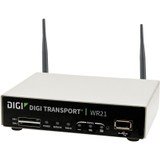
Billede: Forside view of the Digi International WR21-L52A-DE1-TB Cellular Wireless Router. This image displays the compact form factor of the device, likely showing ports for antennas, power, and network connections.
The Digi International WR21-L52A-DE1-TB is a robust cellular wireless router designed for reliable and secure connectivity. It features multiple connectivity options and is suitable for various industrial and enterprise applications requiring remote access and data transfer over cellular networks.
5. Opsætning
5.1. SIM-kort installation
- Sørg for, at routeren er slukket og afbrudt fra strømkilden.
- Locate the SIM card slot(s) on the device. Refer to the device's physical markings for exact location.
- Insert the activated cellular SIM card into the slot with the gold contacts facing down and the notched corner oriented correctly. Push until it clicks into place.
- If applicable, secure the SIM card tray or cover.
5.2. Antennetilslutning
- Identify the cellular antenna ports (typically labeled 'MAIN' and 'DIV' or similar).
- Screw the provided cellular antennas onto the corresponding ports until finger-tight. Do not overtighten.
- Placer antennerne for optimal signalmodtagelse.
5.3. Strømtilslutning
- Tilslut strømadapteren til routerens strømindgang.
- Sæt strømadapteren i en passende stikkontakt.
- The router will power on automatically or may require pressing a power button. Observe the LED indicators for power status.
5.4. Netværksforbindelse (valgfrit)
- To connect a device via Ethernet, plug one end of an Ethernet cable into an available LAN port on the router.
- Plug the other end of the Ethernet cable into the network port of your computer or other network device.
6. Betjeningsvejledning
6.1. Tænd/sluk
- Tænd: Connect the power adapter. The device will typically power on automatically. Observe the power LED.
- Sluk: Disconnect the power adapter from the electrical outlet. For controlled shutdown, refer to the device's web interface or specific documentation for a software shutdown procedure if available.
6.2. Adgang til Web Interface
- Ensure your computer is connected to the router via Ethernet or Wi-Fi (if enabled).
- Åbn a web browser (f.eks. Chrome, Firefox, Edge).
- Enter the router's default IP address (e.g., 192.168.1.1 or 192.168.0.1) into the address bar and press Enter. Refer to the Quick Start Guide or device label for the exact default IP address.
- Enter the default username and password when prompted. These are typically found on a label on the device or in the Quick Start Guide.
- Upon successful login, you will access the router's configuration interface.
6.3. Grundlæggende konfiguration
Inden for web brugerfladen, kan du konfigurere forskellige indstillinger:
- Mobilindstillinger: Verify APN settings, signal strength, and connection status.
- Netværksindstillinger: Configure LAN IP address, DHCP server, and port forwarding.
- Sikkerhed: Change default login credentials, configure firewall rules, and VPN settings.
- Firmwareopdatering: Check for and apply firmware updates to ensure optimal performance and security.
7. Vedligeholdelse
- Rensning: Brug en blød, tør klud til at rengøre routerens yderside. Brug ikke flydende rengøringsmidler eller aerosoler.
- Firmwareopdateringer: Kontroller regelmæssigt producentens webwebsted for firmwareopdateringer. Ved at holde firmwaren opdateret sikrer du de nyeste funktioner, sikkerhedsrettelser og forbedringer af ydeevnen.
- Miljøforhold: Ensure the router is operating within its specified temperature and humidity ranges to prevent overheating or damage.
8. Fejlfinding
8.1. No Cellular Connection
- Verify the SIM card is correctly inserted and activated with your cellular provider.
- Check antenna connections and ensure they are positioned for optimal signal.
- Log ind på web interface to check cellular signal strength and connection status.
- Genstart routeren.
8.2. Kan ikke få adgang Web Interface
- Sørg for, at din computer er direkte forbundet til routeren via Ethernet.
- Verify your computer's IP address is in the same subnet as the router (e.g., if router is 192.168.1.1, computer should be 192.168.1.x).
- Prøv at rydde din browsers cache eller brug en anden browser.
- If you forgot the password, a factory reset might be necessary (refer to specific device documentation for this procedure, as it will erase all configurations).
8.3. Langsom forbindelseshastighed
- Check cellular signal strength in the web interface. Weak signal can lead to slow speeds.
- Sørg for, at antennerne er korrekt placeret og ikke blokeret.
- Verify your cellular data plan has not reached its data cap or is being throttled.
- Restart the router and connected devices.
9. Specifikationer
| Feature | Beskrivelse |
|---|---|
| Model | WR21-L52A-DE1-TB |
| Mærke | Digi International |
| Forbindelsesprotokol | Cellulær |
| Forbindelsesteknologi | USB |
| Kontrolmetode | Fjern |
| Speciel funktion | WPS |
| Kompatible enheder | Personlig computer |
| Anbefalede anvendelser | Hjem |
| UPC | 747356312219 |
10. Garanti og support
For detailed warranty information, please refer to the warranty card included with your product or visit the official Digi International website. Technical support is available through the manufacturer's support channels. Please have your product model number (WR21-L52A-DE1-TB) and serial number ready when contacting support.