1. Introduktion og overview
The Roccat Horde AIMO RGB Gaming Keyboard is designed for optimal gaming performance and user customization. It features a precision key layout, quick-fire macro keys, a configurable tuning wheel, and advanced AIMO intelligent lighting. This manual provides essential information for setting up, operating, maintaining, and troubleshooting your keyboard.
Nøglefunktioner:
- Precision Key Layout: Finger-cap design for enhanced key distinction and dirt resistance.
- AIMO-belysningssystem: Intelligent lighting that synchronizes across multiple compatible devices.
- RGB belysning: Configurable, multi-zone, multi-color illumination.
- Membrane Keys: Engineered for a precise actuation point.
- Configurable Tuning Wheel & Buttons: On-the-fly control for multimedia, lighting, and more.
- Quick-Fire Macros: Lav-profile macro keys designed to prevent accidental activation.
- Enhanced Anti-Ghosting: Ensures every key press is registered accurately.
- Aftagelig håndledsstøtte: Ergonomic design for increased comfort during extended gaming sessions.
- Roccat Swarm: Comprehensive driver and software system for customization.
2. Opsætning
2.1 Tilslutning af tastaturet
Connect the keyboard to your computer using the integrated USB 2.0 cable. Ensure the USB connector is fully inserted into an available USB port on your PC.
2.2 Software Installation (Roccat Swarm)
For full functionality and customization, install the Roccat Swarm software. An internet connection is required for driver installation and software updates.
- Visit the official Roccat website to download the latest version of the Roccat Swarm software.
- Kør installationsprogrammet og følg instruktionerne på skærmen.
- Genstart din computer, hvis du bliver bedt om det.
Systemkrav: The keyboard is compatible with Windows 8 and Windows 10 operating systems.
2.3 Attaching the Palm Rest
The detachable palm rest provides ergonomic support. Align the palm rest with the bottom edge of the keyboard and gently push until it clicks into place. To remove, pull the palm rest away from the keyboard.
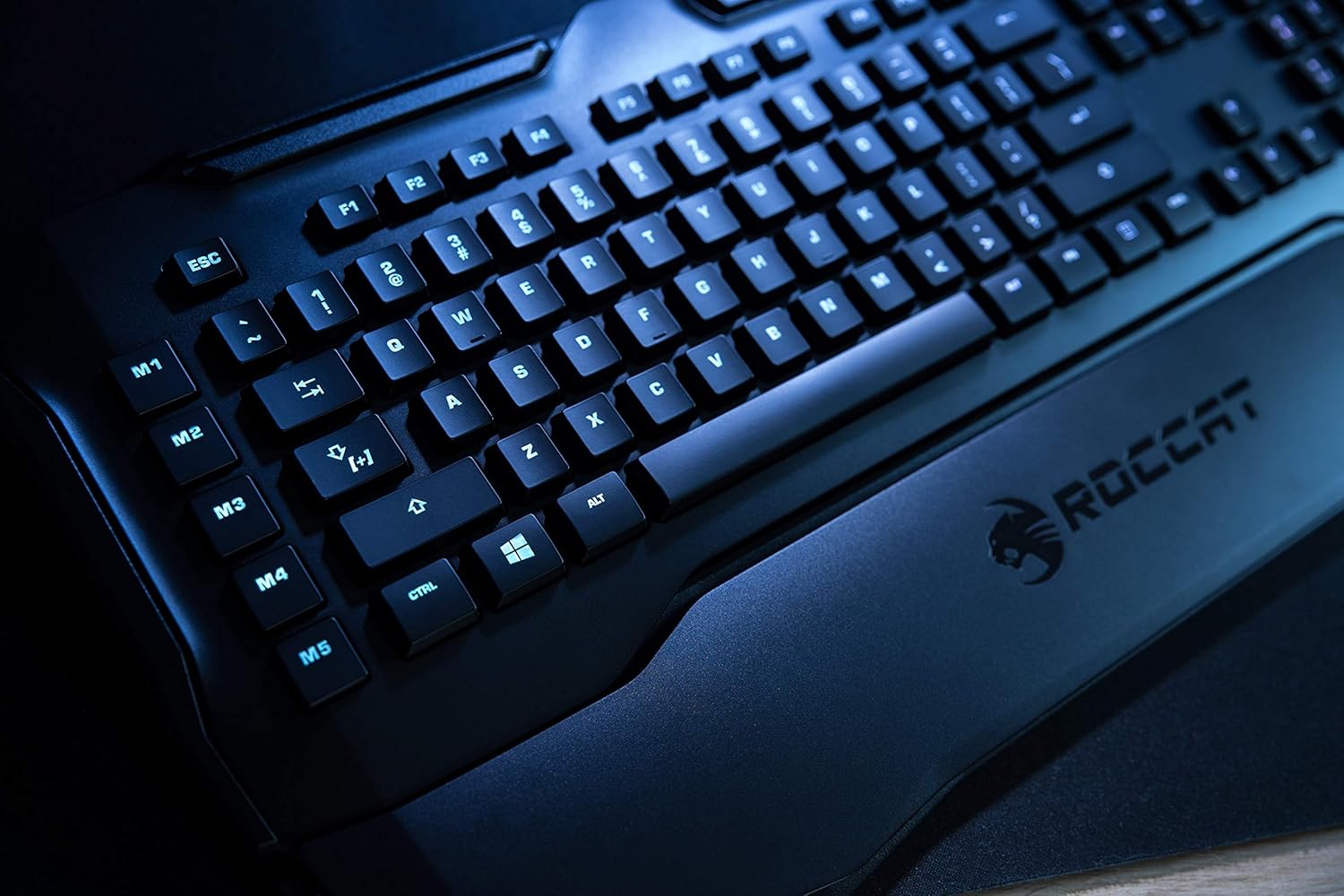
Figure 1: Roccat Horde AIMO keyboard with detachable palm rest.
3. Betjening af tastaturet
3.1 AIMO and RGB Lighting
The AIMO intelligent lighting system provides dynamic, multi-zone RGB illumination. You can customize lighting effects, colors, and synchronization with other AIMO-compatible devices through the Roccat Swarm software.

Figure 2: Roccat Horde AIMO keyboard showcasing RGB-belysning.
3.2 Configurable Tuning Wheel and Buttons
The tuning wheel and dedicated buttons located on the top right of the keyboard allow for quick adjustments without interrupting your workflow or game. These can be configured via Roccat Swarm to control multimedia playback, adjust lighting brightness, switch profiles og mere.

Figure 3: Detail of the tuning wheel and numpad.
3.3 Quick-Fire Macro Keys (M1-M5)
The five dedicated macro keys (M1-M5) on the left side of the keyboard can be programmed for complex commands or frequently used actions. Their low-profile design helps prevent accidental presses during intense gaming. Use the Roccat Swarm software to assign macros.

Figure 4: Macro keys M1-M5 and WASD section.
3.4 Anti-ghosting
The enhanced anti-ghosting feature ensures that all simultaneous key presses are registered accurately, which is crucial for fast-paced gaming scenarios.
4. Vedligeholdelse
4.1 Rengøring af tastaturet
Sådan bevarer du dit tastaturs ydeevne og udseende:
- Frakobl tastaturet fra computeren, før du rengør det.
- Brug en blød, let damp cloth to wipe down the surface of the keyboard and keys.
- Undgå at bruge skrappe kemikalier, slibende rengøringsmidler eller for meget fugt.
- Brug trykluft til støv og snavs mellem tasterne.
4.2 Palm Rest Care
Den aftagelige håndledsstøtte kan rengøres med enamp klud. Sørg for, at den er helt tør, før du sætter den fast på tastaturet igen.
5. Fejlfinding
If you encounter issues with your Roccat Horde AIMO keyboard, please refer to the following common solutions:
- Tastaturet reagerer ikke:
- Sørg for, at USB-kablet er korrekt tilsluttet til både tastaturet og computeren.
- Prøv at tilslutte tastaturet til en anden USB-port.
- Genstart din computer.
- Belysningsproblemer:
- Verify that the Roccat Swarm software is installed and up to date.
- Check lighting settings within the Roccat Swarm software.
- Sørg for, at der ikke kører modstridende software, som kan forstyrre RGB-kontrollen.
- Makroer virker ikke:
- Open Roccat Swarm and confirm that your macros are correctly assigned and saved to the active profile.
- Ensure the software is running in the background.
- Software registrerer ikke tastatur:
- Reinstall the Roccat Swarm software.
- Opdater dit operativsystem til den nyeste version.
For further assistance, please visit the official Roccat support webwebsted.
6. Specifikationer
| Mærke | ROCCAT |
| Modelnavn | Horde AIMO |
| Model Number Item | ROC-12-350-BK |
| Produktdimensioner | 5.5 x 47 x 20 cm; 1.1 kg |
| Farve | Sort |
| Forbindelsesteknologi | USB |
| Antal USB 2.0-porte | 1 |
| Voltage | 5 volt |
| Strømkilde | USB |
| Operativsystem | Windows 10 |
| Understøttet software | Windows 8 |
| Tastaturbeskrivelse | Ergonomisk |
| Anbefalede anvendelser | Gaming, PC / Server |
| Særlige funktioner | Håndledsstøtte |
| Første ledige dato | 15. januar 2020 |
7. Garanti og support
7.1 Produktgaranti
Your Roccat Horde AIMO RGB Gaming Keyboard is covered by a manufacturer's warranty. Please refer to the warranty card included with your product or visit the official Roccat webwebstedet for detaljerede garantivilkår og -betingelser, der er specifikke for din region.
7.2 Teknisk support
For technical assistance, software updates, and frequently asked questions, please visit the Roccat support page on their official website. The Roccat Swarm software also provides access to support resources and ensures your device firmware is up to date.
Roccat Official Webwebsted: www.roccat.com


