Oben VH-R2 Tilt Head for Monopods Instruction Manual
Model: VH-R2 | Brand: Oben
1. Introduktion
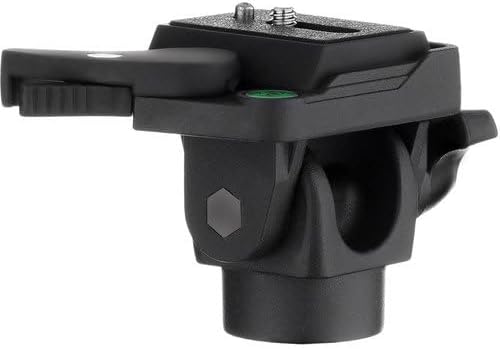
The Oben VH-R2 Swivel/Tilt Monopod Head is a compact and versatile accessory designed to enhance the functionality of your monopod. It provides 180° one-axis movement, allowing precise positioning of your camera for both horizontal and vertical shooting formats. This manual provides detailed instructions for its proper setup, operation, and maintenance to ensure optimal performance and longevity of your equipment.
2. Funktioner
- Easily Rotates Head 180 Degrees for flexible camera positioning.
- Locking Pin Secures Camera to prevent accidental release.
- RP-20 Quick-Release Plate Included for rapid camera mounting and dismounting.
- 3/8"-1/4" Reducer Bushing Included to ensure compatibility with various monopods and tripods.
3. Pakkens indhold
- Oben VH-R2 Tilt Head
- RP-20 Quick Release Plate
- 1/4"-3/8" Reducer Bushing
4. Opsætning
4.1 Attaching the Tilt Head to a Monopod or Tripod
The Oben VH-R2 Tilt Head features a versatile mounting thread at its base. It is compatible with both 1/4"-20 and 3/8" mounting threads. Use the included 1/4"-3/8" reducer bushing if your monopod or tripod has a 3/8" screw. Simply screw the tilt head onto the top of your monopod or tripod until it is securely fastened. Ensure it is tightened firmly to prevent wobbling during use.

The Oben VH-R2 Tilt Head, showcasing its compact design and quick-release plate.
4.2 Attaching Your Camera to the Tilt Head
- Locate the RP-20 Quick Release Plate. This plate attaches directly to your camera.
- Screw the quick release plate onto the 1/4"-20 tripod socket on the bottom of your camera. Tighten it securely, ensuring the plate is flush with the camera body.
- With the quick release plate attached to your camera, align the plate with the receiver on the VH-R2 Tilt Head.
- Press the camera with the attached plate into the receiver until it clicks into place. The locking pin will engage automatically to prevent accidental camera release.
- For added security, ensure the quick-release lever on the side of the head is fully engaged and locked.
Nærbillede view of the RP-20 Quick Release Plate, designed for secure camera attachment.
5. Betjeningsvejledning
5.1 Adjusting Tilt Movement
The Oben VH-R2 allows for 180° of tilt movement. To adjust the tilt angle:
- Locate the large locking knob on the side of the tilt head.
- Loosen the locking knob by turning it counter-clockwise. This will allow the head to tilt freely.
- Adjust your camera to the desired vertical angle.
- Once the desired angle is achieved, tighten the locking knob by turning it clockwise until the head is firmly secured and cannot move.

Side view of the tilt head, highlighting the large locking knob for adjusting the 180° tilt.
5.2 Removing Your Camera
To quickly remove your camera from the tilt head:
- Ensure the camera is held securely to prevent dropping.
- Disengage the quick-release lever on the side of the head.
- Carefully lift the camera with the attached RP-20 Quick Release Plate out of the receiver.
6. Vedligeholdelse
To ensure the longevity and optimal performance of your Oben VH-R2 Tilt Head, follow these maintenance guidelines:
- Rensning: Wipe the head with a soft, dry cloth after each use to remove dust and debris. For stubborn dirt, use a slightly damp kluden og tør den derefter grundigt. Undgå at bruge skrappe kemikalier eller slibende rengøringsmidler.
- Smøring: The internal mechanisms are factory-lubricated. Do not attempt to lubricate moving parts unless specifically instructed by Oben support, as this can attract dust and impair function.
- Opbevaring: Store the tilt head in a clean, dry environment, away from extreme temperatures and humidity. If storing for extended periods, consider placing it in a protective bag.
- Inspektion: Periodically check all screws and knobs to ensure they are tight. Do not overtighten.
7. Fejlfinding
If you encounter any issues with your Oben VH-R2 Tilt Head, refer to the following common troubleshooting tips:
- Head is loose on monopod/tripod: Ensure the base of the tilt head is securely screwed onto the monopod/tripod. If using the reducer bushing, verify it is properly seated and tightened.
- Camera is loose on the head: Check that the RP-20 Quick Release Plate is firmly attached to your camera and that the quick-release lever on the head is fully engaged and locked. The locking pin should be visible and securing the plate.
- Difficulty tilting or locking: Ensure the main locking knob is sufficiently loosened before attempting to tilt and fully tightened to lock. If movement is stiff, check for any obstructions or debris. Do not force the mechanism.
- Usædvanlige lyde: If you hear grinding or unusual sounds, discontinue use and contact customer support.
If these steps do not resolve the issue, please contact Oben customer support for further assistance.
8. Specifikationer
| Feature | Detalje |
|---|---|
| Belastningskapacitet | 11 lb (5 kg) |
| Tilt rækkevidde | 180° |
| Arbejdstemperatur | -4° til 158°F (-20° til 70°C) |
| Hurtigfrigivelsesplade | Yes, RP-20 QR plate included |
| Mount Thread | 1/4" or 3/8" (with included bushing) |
| Varens vægt | 10.2 oz (290 g) / 12 ounces (0.75 Pounds) |
| Produktdimensioner | 5 x 4.3 x 3.3 tommer |
| Modelnummer | VHR2 |
| UPC | 847628016811 |
| Farve | Sort |
| Kompatible enheder | Kamera |
9. Garanti og support
The Oben VH-R2 Tilt Head comes with a 5-Year Limited Manufacture Warranty. For warranty claims, technical support, or any inquiries regarding your product, please contact Oben customer service through their official webwebstedet eller forhandleren, hvor produktet blev købt.
Gem venligst din købsbevis for at validere garantien.


