
Rhagymadrodd
Thank you for choosing the Philips Solar Security Light. This manual provides essential information for the safe and efficient operation of your solar-powered, wall-mounted flood light with PIR motion sensor. Please read these instructions carefully before installation and use, and retain them for future reference.
Gwybodaeth Diogelwch
- Sicrhewch fod yr arwyneb mowntio yn sefydlog ac yn gallu cynnal pwysau'r gosodiad golau.
- Do not attempt to disassemble or modify the product. This may void the warranty and pose safety risks.
- Cadwch y panel solar yn lân i sicrhau'r perfformiad gwefru gorau posibl.
- Avoid looking directly into the light source when it is active, as it may cause eye strain.
- Dispose of the product and its components responsibly according to local regulations at the end of its lifespan.
Cynnwys Pecyn
Gwiriwch fod yr holl gydrannau yn bresennol cyn eu gosod:
- Philips Solar Security Light (1 unit)
- Rheolaeth o Bell (1 uned)
- Braced Mowntio (1 uned)
- Sgriwiau (2 uned)
- Wall Plugs (2 units)
Cynnyrch Drosview
The Philips Solar Security Light is an outdoor, solar-powered flood light designed for enhanced security and illumination. It features a PIR motion sensor, high-brightness LEDs, and multiple lighting modes.

Delwedd: Drosoddview of the Philips Solar Security Light, highlighting its durable design with a solar panel, three LED light heads, and an integrated motion sensor.
Nodweddion Allweddol:
- Disgleirdeb Uchel: 800 lumens with 6500K cool daylight color temperature.
- Synhwyrydd Cynnig PIR: Detects motion up to 49.2 feet with a 180-degree detection angle.
- 3 Modd Goleuo: Customizable illumination settings for various needs.
- Solar Powered: Equipped with an upgraded polycrystalline solar panel and a 2000 mAh high-capacity battery for efficient charging and extended use.
- Gwrth-dywydd: IP65 rated for resistance against heavy rain, humidity, and extreme temperatures.
- Rheolaeth Anghysbell: Allows convenient adjustment of light modes without manual interaction.
Gosod a Gosod
The Philips Solar Security Light is designed for easy wall-mounted installation with no wiring required. It comes pre-assembled.
Camau Gosod:
- Dewiswch leoliad: Select an outdoor location that receives direct sunlight for most of the day to ensure optimal charging of the solar panel. The light should be mounted on a wall.
- Marciwch Bwyntiau Drilio: Hold the mounting bracket against the desired wall location and mark the positions for the two screws.
- Tyllau Dril: Drill two holes at the marked points. Insert the wall plugs into the drilled holes.
- Atodwch Braced Mowntio: Sicrhewch y braced mowntio i'r wal gan ddefnyddio'r sgriwiau a ddarperir.
- Mount the Light: Slide the solar security light onto the mounting bracket until it clicks securely into place.
- Addasu Pennau Goleuadau a Synhwyrydd: Adjust the three light heads and the PIR motion sensor to cover the desired area. The motion sensor has an adjustable angle of 180 degrees.
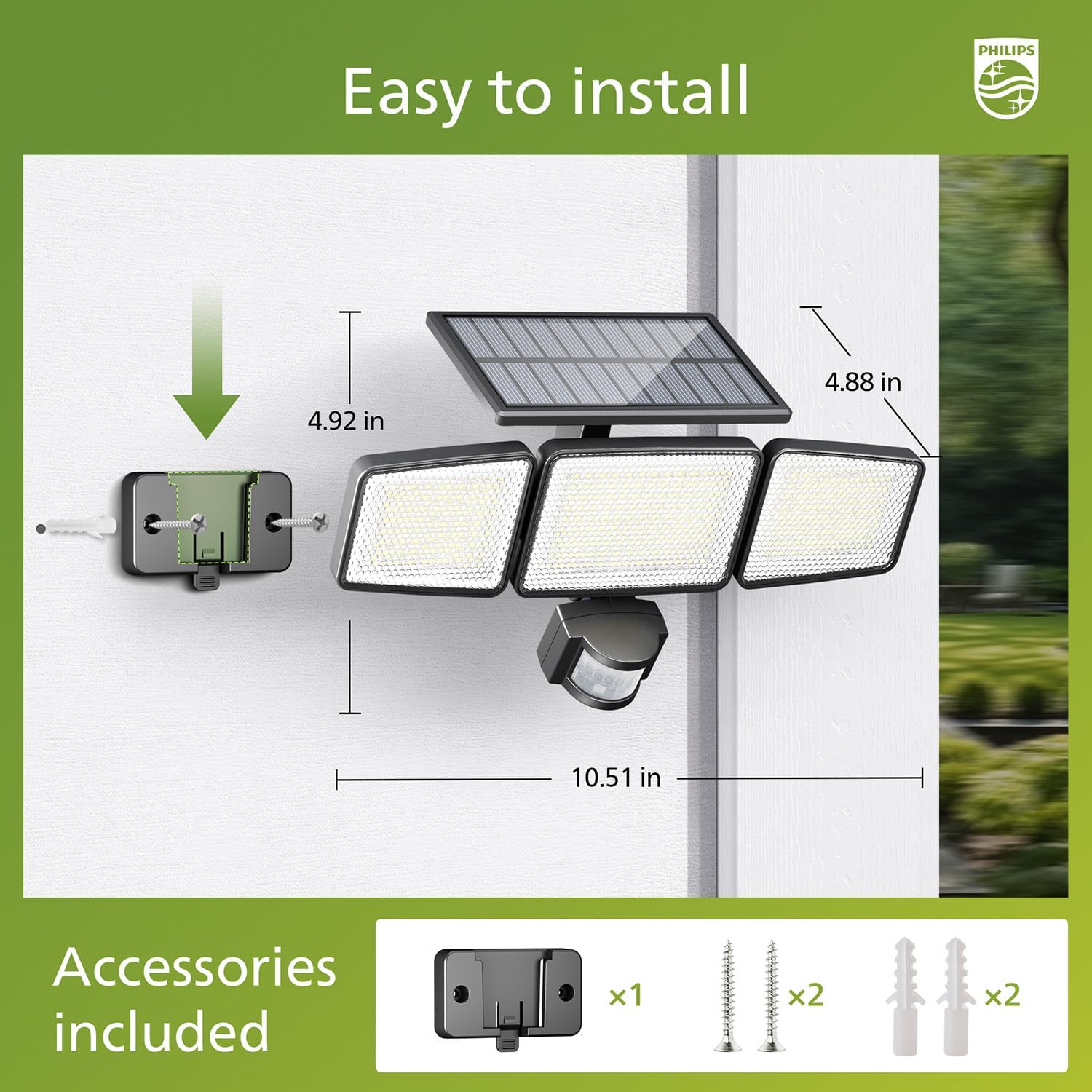
Image: Visual guide for installing the Philips Solar Security Light, including dimensions and the accessories provided for wall mounting.
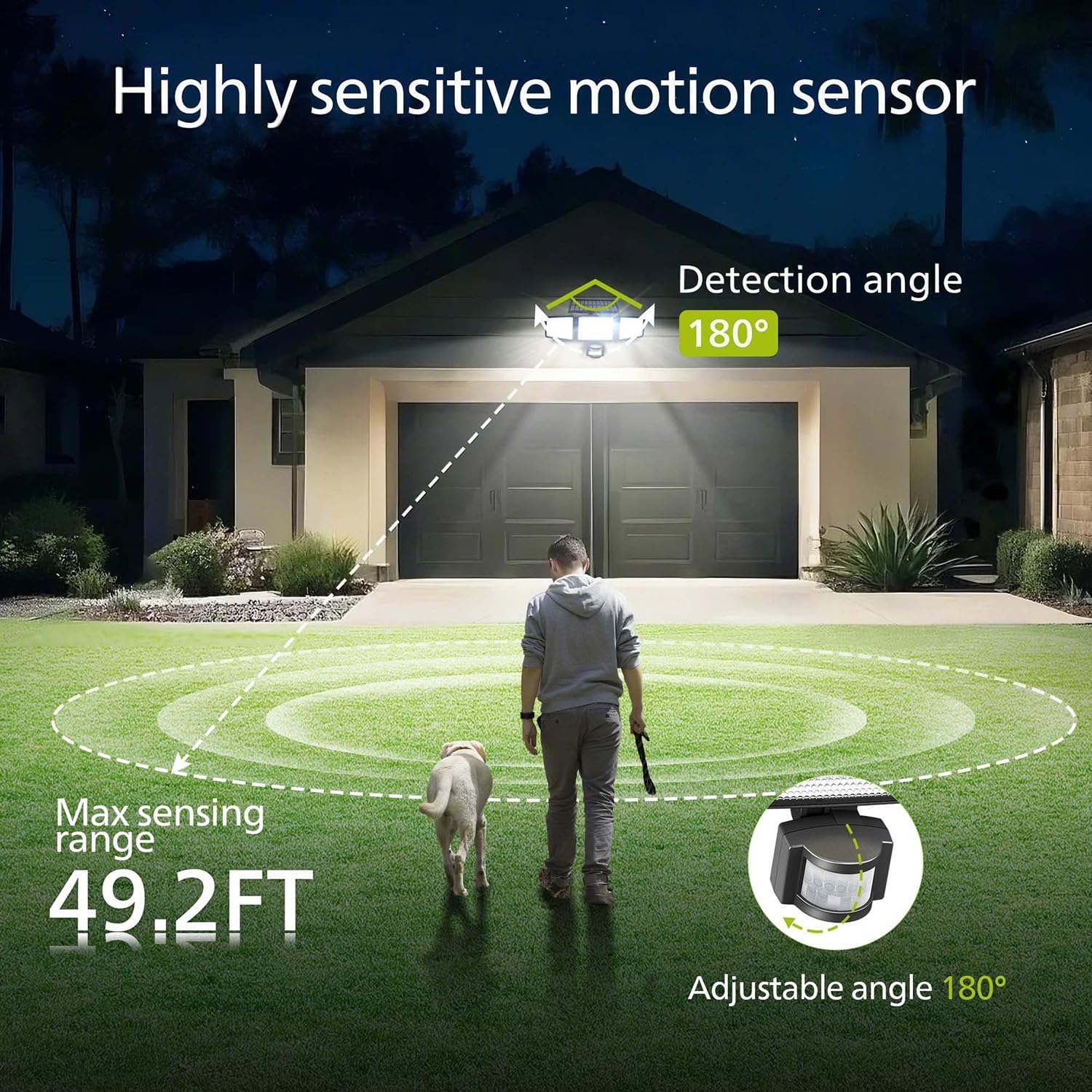
Image: Illustration of the motion sensor's coverage, showing a 180-degree detection angle and a maximum sensing range of 49.2 feet.
Cyfarwyddiadau Gweithredu
The Philips Solar Security Light features three distinct lighting modes, controllable via the included remote control.
Dulliau goleuo:
- Modd Synhwyrydd: The light remains off until motion is detected. Upon detection, it illuminates at 100% brightness (800 lumens) for approximately 25 seconds, then turns off.
- Modd Dim: The light stays on continuously at a low brightness of 10% (80 lumens) throughout the night.
- Modd Pylu + Synhwyrydd: The light stays on continuously at a very low brightness of 2-3% (16-24 lumens). When motion is detected, it brightens to 100% (800 lumens) for approximately 25 seconds, then returns to the dim state.

Image: Detailed explanation of the three operational modes, showing how the light behaves in Sensor, Dim, and Dim + Sensor modes based on motion detection and ambient light.
Use the remote control to switch between these modes as needed. Ensure the remote control has a clear line of sight to the light fixture for proper function.
Cynnal a chadw
Regular maintenance ensures optimal performance and longevity of your Philips Solar Security Light.
- Glanhau paneli solar: Sychwch y panel solar o bryd i'w gilydd gyda lliain meddal, damp cloth to remove dust, dirt, or debris. A clean solar panel ensures maximum sunlight absorption and charging efficiency.
- Glanhau Gosodion: Clean the light fixture with a soft, dry cloth. Avoid using abrasive cleaners or solvents that could damage the finish or electronic components.
- Batri: The integrated high-capacity 2000 mAh battery is designed for long-term use. No user maintenance or replacement is required for the battery.
- Gwrthsefyll Tywydd: The IP65 rating ensures the light is protected against dust and water jets. However, avoid submerging the unit in water.

Image: Focus on the high-quality solar panel, illustrating its role in providing power for 8-10 hours of operation and its 1800mAh high-capacity battery.
Datrys problemau
If you encounter issues with your Philips Solar Security Light, refer to the following common problems and solutions:
- Nid yw'r golau'n troi ymlaen yn y nos:
- Ensure the solar panel is receiving adequate direct sunlight during the day.
- Check if the light is in the correct operating mode (e.g., not in 'off' state if the remote has an off button).
- Verify that the remote control battery is functional.
- Mae'r golau'n pylu neu dim ond yn aros ymlaen am gyfnod byr:
- The solar panel may not be fully charged. Ensure it is clean and exposed to direct sunlight for at least 6-8 hours.
- Ambient temperature can affect battery performance; extreme cold may reduce operating time.
- Nid yw'r synhwyrydd symudiad yn canfod symudiad:
- Gwnewch yn siŵr bod lens y synhwyrydd yn lân ac yn rhydd o rwystrau.
- Verify the light is in a motion-activated mode (Sensor Mode or Dim + Sensor Mode).
- Adjust the angle of the motion sensor to cover the desired detection area.
If problems persist, please contact Philips customer support for further assistance.
Manylebau
| Nodwedd | Manyleb |
|---|---|
| Brand | PHILIPS |
| Model | 929004621403 |
| Lliw | Du |
| Deunydd | Alwminiwm |
| Ffurflen Gosodion Ysgafn | Llifoleuadau |
| Defnydd Dan Do / Awyr Agored | Awyr Agored |
| Ffynhonnell Pwer | Solar Powered |
| Dull Rheoli | Anghysbell |
| Ffynhonnell Golau | LED |
| Nifer y Ffynonellau Golau | 4 |
| Cyftage | 3.7 folt DC |
| Lliw Golau | Gwyn Cwl (6500K) |
| Disgleirdeb | 800 lumens (uchafswm) |
| Lefel Gwrthsefyll Dŵr | IP65 dal dŵr |
| Math Mowntio | Wal Mount |
| Gallu Batri | 2000 mAh |
| Synhwyro Ongl | 180 gradd |
| Ystod Synhwyro | Hyd at 49.2 troedfedd |

Image: A comparison table highlighting key specifications of the Philips solar security light, such as brightness, lighting modes, battery capacity, and waterproof rating.
Gwarant a Chefnogaeth
Am wybodaeth am warant a chymorth i gwsmeriaid, cyfeiriwch at wefan swyddogol Philips websafle neu cysylltwch â'u hadran gwasanaeth cwsmeriaid. Cadwch eich derbynneb prynu fel prawf o brynu.
Am gymorth pellach, ewch i: www.philips.com/cefnogi