1. Úvod a konecview
The Zoom PodTrak P4next is a portable podcast recorder designed for high-quality audio capture and production. This device offers a comprehensive solution for podcasters, featuring multiple inputs, advanced audio processing, and flexible recording options. Its compact design and battery power capability make it suitable for both studio and on-the-go recording environments.
Klíčové vlastnosti:
- Špičková kvalita zvuku: 4 XLR inputs with -125 dBu EIN for professional-grade recordings.
- Vylepšená přenosnost: Lightweight (10.58 oz / 300g) and compact (4.95 x 4.72 x 1.57 inches) for mobile use.
- Prodloužená životnost baterie: Up to 8.5 hours of continuous recording with lithium batteries.
- Robustní odolnost: Sturdy construction for demanding environments.
- Intuitive Ease of Use: Clear 128 x 64 OLED display and user-friendly controls.
- Vestavěné efekty: AI Noise Reduction, Tone, and Compression.
- Všestranná konektivita: Phone input for call-in guests, USB audio interface mode.
- Zvukové podložky: Customizable sound pads for instant playback.
2. Nastavení
2.1 Napájení zařízení
The PodTrak P4next can be powered in multiple ways:
- AA baterie: Insert 2 AA batteries into the battery compartment located on the underside of the device.
- Napájení USB-C: Connect a USB-C cable to the DC 5V port on the side of the unit and to a compatible USB power adapter or power bank.

Obrázek 2.1: Zadní view of the PodTrak P4next, illustrating the battery compartment for 2 AA batteries.

Obrázek 2.2: Strana view of the PodTrak P4next, highlighting the microSD card slot and USB-C power input.
2.2 Připojení mikrofonů
The PodTrak P4next features 4 XLR inputs for connecting microphones. These inputs provide phantom power for condenser microphones.
- Connect your XLR microphones to the corresponding input jacks (1-4) on the top of the device.
- Ensure phantom power is enabled for condenser microphones via the dedicated switches if required.

Obrázek 2.3: Přední strana view of the PodTrak P4next, displaying the four XLR microphone inputs at the top.
2.3 Připojení sluchátek
Four independent headphone outputs are available for monitoring.
- Plug your headphones into the 3.5mm jacks (1-4) located on the front edge of the device.
- Each output has an individual volume control knob.

Obrázek 2.4: Strana view of the PodTrak P4next, illustrating the four headphone output jacks and their respective volume controls.
2.4 Vložení SD karty
The PodTrak P4next records directly to an SD card.
- Open the microSD card slot cover on the side of the device.
- Insert a microSD card (up to 1TB supported) until it clicks into place.
Obrázek 2.5: Strana view of the PodTrak P4next, indicating the microSD card slot for recording media.
2.5 Connecting to Phone/Computer
The device supports external connections for various recording scenarios.
- Telefonní vstup: Use a TRRS cable to connect your smartphone to the dedicated phone input for recording call-in guests.
- USB audio rozhraní: Connect the PodTrak P4next to a computer via USB-C to use it as an audio interface for recording directly to your digital audio workstation (DAW).

Figure 2.6: The PodTrak P4next connected to a smartphone, demonstrating its capability to integrate phone calls into your podcast.
3. Operating the PodTrak P4next
3.1 Základní nahrávání
Chcete-li zahájit nahrávání:
- Ensure microphones and headphones are connected and powered.
- Adjust the gain knobs for each microphone input to achieve optimal levels, avoiding clipping.
- Stiskněte červenou ZÁZNAM button to start recording. The button will illuminate.
- Stiskněte tlačítko ZÁZNAM dalším tlačítkem nahrávání zastavíte.
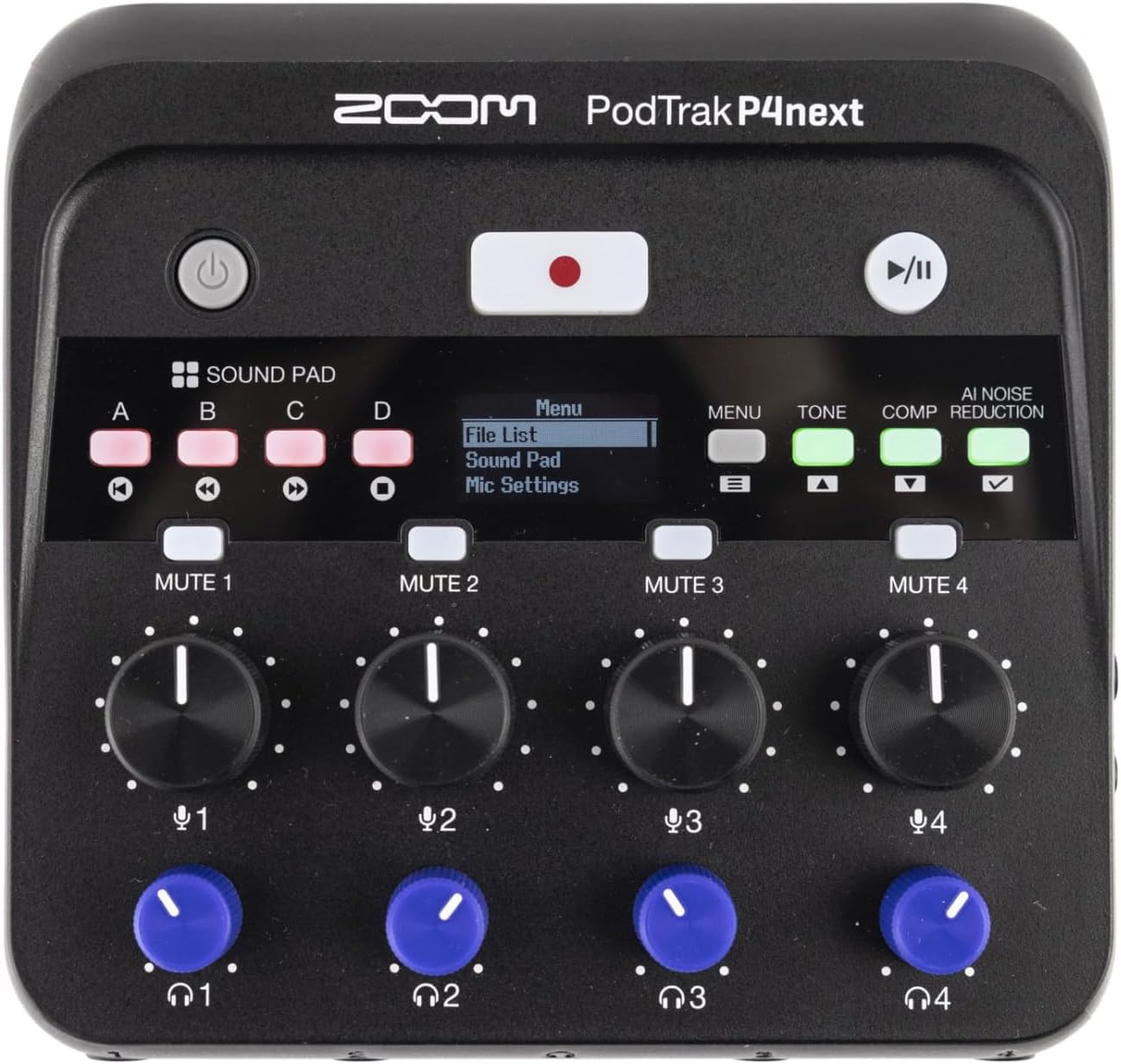
Obrázek 3.1: Shora dolů view of the PodTrak P4next, highlighting the main controls including the record button and input gain knobs.
3.2 Zvukové podložky
The four sound pads (A, B, C, D) can be used to trigger pre-recorded audio clips or sound effects during your podcast.
- Press a sound pad button (A, B, C, or D) to play the assigned sound.
- Adjust the volume of the sound pads using the dedicated knob.
3.3 Tlačítka pro ztlumení zvuku
Each microphone input has a dedicated mute button (MUTE 1-4) to quickly silence a participant.
- Stiskněte tlačítko ZTLUMIT button for the desired channel to mute it. The button will illuminate to indicate it is muted.
- Dalším stisknutím ztlumení zrušíte.
3.4 Audio Effects (AI Noise Reduction, Tone, Comp)
Enhance your audio with built-in effects:
- Redukce šumu AI: Activates intelligent noise cancellation to minimize background distractions.
- Tón: Adjusts the tonal characteristics of the audio.
- Comp (Compression): Applies compression to even out audio levels.
- Press the respective buttons (AI NOISE REDUCTION, TONE, COMP) to toggle these effects on or off.

Obrázek 3.2: Detail view of the PodTrak P4next's control panel, highlighting the AI Noise Reduction, Tone, and Compression effect buttons.
3.5 Recording Phone Calls and USB Audio
The PodTrak P4next allows seamless integration of phone calls and USB audio.
- Connect your phone to the dedicated input using a TRRS cable. The device automatically creates a mix-minus feed to prevent echo for the caller.
- When connected as a USB audio interface, audio from your computer can be routed through the P4next and recorded alongside your microphones.
4. Údržba
Proper maintenance ensures the longevity and optimal performance of your PodTrak P4next.
- Čištění: K čištění vnější strany zařízení používejte měkký, suchý hadřík. Nepoužívejte abrazivní čisticí prostředky ani rozpouštědla.
- Skladování: Přístroj skladujte na chladném a suchém místě mimo dosah přímého slunečního záření a extrémních teplot. Při delším skladování vyjměte baterie, abyste zabránili vytečení.
- Aktualizace firmwaru: Pravidelně kontrolujte oficiální Zoom webweb s aktualizacemi firmwaru, abyste zajistili, že vaše zařízení bude mít nejnovější funkce a opravy chyb.
5. Řešení problémů
If you encounter issues with your PodTrak P4next, refer to the following common solutions:
- Bez napájení: Ensure batteries are correctly inserted and charged, or that the USB-C power source is functioning.
- Žádný zvukový vstup: Check microphone connections, ensure phantom power is on for condenser mics, and verify gain levels are appropriately set.
- No Headphone Audio: Confirm headphones are plugged in correctly and individual headphone volume knobs are turned up.
- Problémy s nahráváním: Check if the SD card is properly inserted and has sufficient free space. Ensure the card is formatted correctly (FAT32).
- Echo on Phone Calls: The P4next features automatic mix-minus. Ensure your phone is connected via a TRRS cable to the dedicated phone input.
6. Specifikace
| Funkce | Specifikace |
|---|---|
| Hmotnost položky | 12 unce (340 g) |
| Rozměry produktu | 4.95 x 4.72 x 1.57 palce (12.57 x 11.99 x 3.99 cm) |
| Číslo modelu položky | P4next/230EU |
| Mikrofonní vstupy | 4 x XLR (with -125 dBu EIN) |
| Sluchátkové výstupy | 4 x 3.5mm stereo mini jack (with individual volume control) |
| Záznamová média | microSD/microSDHC/microSDXC card (up to 1TB) |
| Životnost baterie | Up to 8.5 hours (with lithium batteries) |
| Audio Interface Mode | Podporováno přes USB-C |
7. Oficiální video produktu
Video 7.1: An official introduction to the Zoom PodTrak P4next, showcasinjeho design a hlavní vlastnosti.
8. Záruka a podpora
For warranty information, technical support, and additional resources, please visit the official Zoom webnebo se obraťte na jejich zákaznický servis. Uschovejte si doklad o koupi pro případ reklamace.
- Online podpora: Visit the Zoom Store on Amazon
- Registrace výrobku: Zaregistrujte si svůj produkt online a získejte aktualizace a podporu.


