Zavedení
This manual provides essential information for the safe and efficient use of your Philips Smart TV Ambilight THE ONE 55 inch 4K 144 Hz, model 55PUG8929/78. Please read these instructions carefully before operating the device and retain them for future reference.
Your Philips TV features Ambilight technology, a P5 processor for enhanced image quality, Dolby Vision and Dolby Atmos for immersive audiovisual experiences, a 144Hz refresh rate with VRR and AMD FreeSync Premium for gaming, and the Titan OS smart TV platform.
Nastavení
1. Vybalení a obsah balení
Carefully remove all components from the packaging. Ensure all items are present before discarding packaging materials.
- 1 Smart TV Philips 55"
- 1 Dálkové ovládání
- 2 AAA baterie
- 1 Napájecí kabel
- 1 Stručná příručka
- 1 Legal and safety leaflet
- 1 Stojan na stůl
Note: The product does not include installation services. For apartment delivery, lifting, or wall mounting, the customer is responsible. Philips is not responsible for installation or assembly.
2. Sestavení stojanu nebo nástěnného držáku
If using the included table stand, follow the instructions in the quick start guide to securely attach it to the TV. Ensure all screws are tightened properly. If wall mounting, use a VESA-compatible wall mount (sold separately) and consult a professional for installation to ensure safety and proper alignment. The TV supports VESA 30cm mounting.

Obrázek: Přední strana view of the Philips 55 inch Smart TV with its table stand assembled.
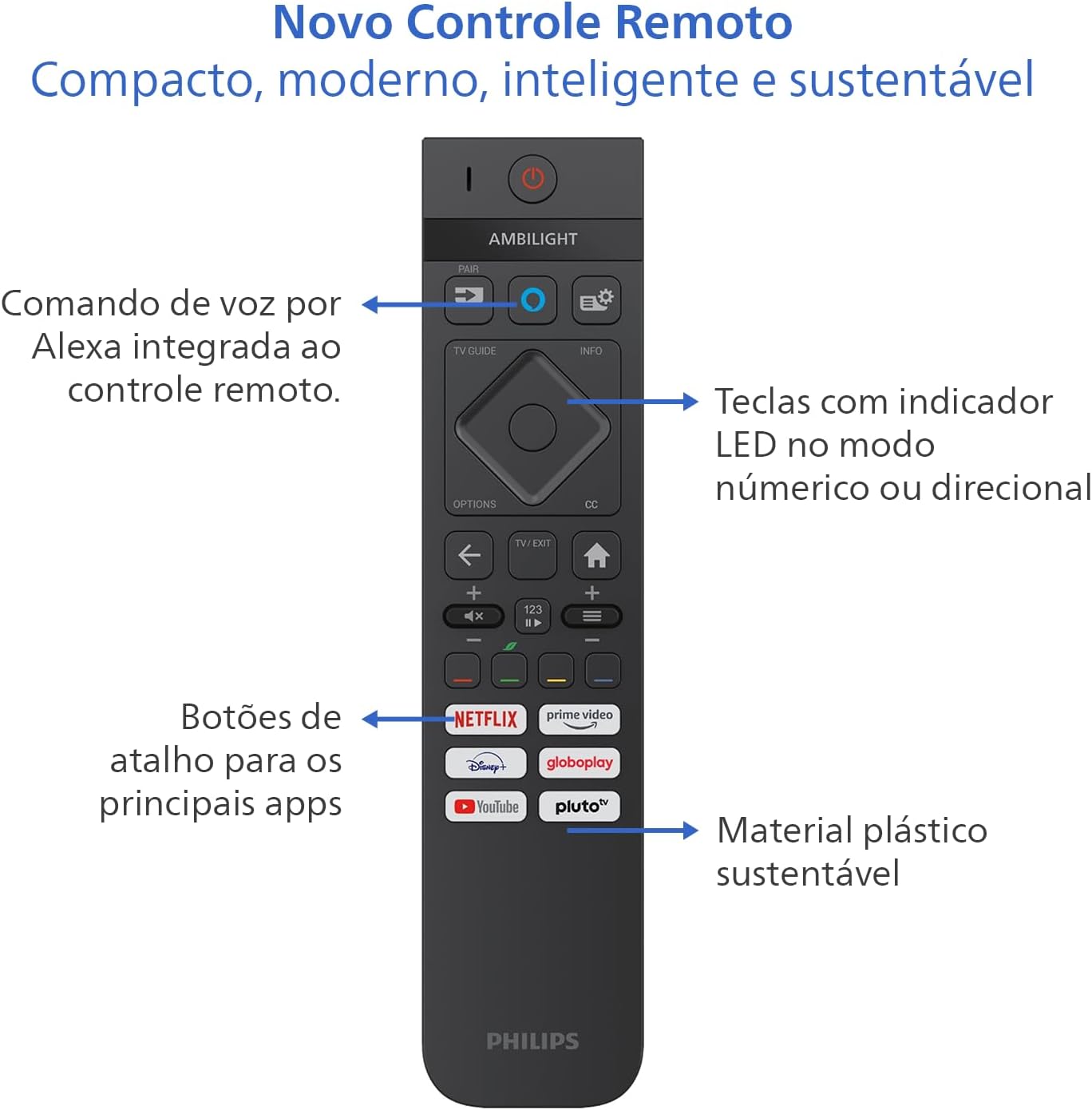
Image: Diagram showing the dimensions of the Philips 55 inch Smart TV with and without the stand, including VESA wall mount specifications (30cm).
3. Připojení periferií
Connect your devices to the TV's ports. Refer to the back and side views for port locations.
- Moc: Connect the power cable to the TV and a suitable electrical outlet (110V/220V compatible).
- HDMI: Use HDMI 2.1 ports for high-definition devices like gaming consoles, Blu-ray players, or set-top boxes. There are 4 HDMI ports available.
- USB: Connect USB drives for media playback or external devices. There are 2 USB ports.
- Antenna/RF: Connect your antenna cable for terrestrial TV reception.
- Ethernet (RJ-45): Pro kabelové připojení k internetu.
- Audio L-R: Analogový audio vstup.
- SPDIF (Optical Audio): Pro digitální audio výstup do soundbarů nebo systémů domácího kina.
- Sluchátkový výstup: Pro připojení sluchátek.

Obrázek: Side profile of the Philips 55 inch Smart TV, highlighting the accessible USB ports and other side connections.

Obrázek: Zadní view of the Philips 55 inch Smart TV, displaying the full array of input and output ports for various connections.
4. Počáteční zapnutí a nastavení sítě
After connecting the power cable, press the power button on the remote control. Follow the on-screen instructions to complete the initial setup, including language selection, country, and network connection (Wi-Fi or Ethernet). The TV supports Wi-Fi Dual Band and Bluetooth 5.2 for wireless connectivity.
Návod k obsluze
1. Funkce dálkového ovládání
The included remote control is designed for intuitive navigation and features voice command with integrated Alexa. Insert the two AAA batteries into the remote control before use.

Obrázek: Podrobný view of the Philips Smart TV remote control, highlighting the voice command button (Alexa), LED indicator keys, and dedicated shortcut buttons for popular streaming applications.
- Vypínač: Zapíná nebo vypíná televizor.
- Voice Command (Alexa): Press and hold to use voice commands for searching content, controlling smart home devices, and more.
- Navigační podložka: Pomocí směrových tlačítek se můžete pohybovat v nabídkách a vybírat možnosti.
- Tlačítka zkratek: Direct access to popular streaming apps like Netflix, Prime Video, YouTube, and Pluto TV.
- Hlasitost/Kanál: Upravte hlasitost a přepněte kanály.
- LED Indicator Keys: Keys with LED indicators for numeric or directional mode.
2. Funkce chytré televize (operační systém Titan)
Your TV runs on Titan OS, offering a user-friendly interface and quick access to various applications. The home screen is customizable, allowing you to prioritize your favorite apps and content.

Image: The Philips Smart TV's home screen, showing a selection of streaming applications and a personalized content layout.
- Personalized Home Screen: Access your favorite content and applications with recommendations tailored to your preferences.
- Intuitivní rozhraní: Organize your home screen by prioritizing frequently used applications for easy daily access.
- Objevování obsahu: Easily find new content with agile navigation and smart search functions.
3. Technologie Ambilight
Ambilight projects colors from the screen onto the surrounding wall, enhancing immersion. Your TV features three-sided Ambilight with 8 illumination modes.

Image: A Philips Ambilight TV displaying dynamic backlighting that extends the on-screen colors onto the wall, creating an immersive viewzkušenosti.
- Přírodní: Softer colors and brightness for visual comfort.
- Živý: Stronger, more vibrant Ambilight colors to create a sense of expanded imagery.
- Lounge: Can be active even when the TV is off, creating a cozy ambient atmosphere.
- Hra: Adapts lights to dark and dynamic scenes, enhancing gaming immersion.
- Hudba: Ambilight follows the rhythm of music, ideal for creating a festive home environment.
- AmbiWake Up: Simulates sunrise with soft Ambilight, gentle music, and weather forecast.
- Ambi-sleep: With the screen off, Ambilight emits an orange light and nature sounds to promote sleep.
- Aurora: Transforms the TV into a decorative piece, displaying continuous animations for a pleasant ambiance.

Image: Comparison of Ambilight's Natural mode (soft, comfortable lighting) and Vivid mode (strong, vibrant lighting for expanded imagery).

Image: Comparison of Ambilight's Lounge mode (ambient lighting when TV is off) and Game mode (dynamic lighting for gaming immersion).

Image: Comparison of Ambilight's Music mode (lights synchronize with music) and AmbiWake Up mode (simulates sunrise).

Image: Comparison of Ambilight's Ambi-sleep mode (orange light and nature sounds for sleep) and Aurora mode (decorative animations).
4. Kvalita obrazu a zvuku
The TV features a P5 processor, 4K resolution, Dolby Vision, and HDR10+ for exceptional image quality. The audio system includes 40W RMS, Dolby Atmos, and DTS Play-Fi for immersive sound.

Image: Explanation of the Philips P5 Perfect Picture Engine, illustrating how it optimizes colors, contrasts, and movements for realistic images.

Image: Visual comparison demonstrating the enhanced detail and richness of images with Dolby Vision and HDR compared to standard display.
- P5 Processor: Optimizes colors, contrasts, and movements in real-time for vivid and realistic images.
- Dolby Vision a HDR10+: Provides cinematic visual experience with impressive brightness, contrast, and color detail in 4K resolution.
- 40W RMS Audio: Powerful sound output that fills the environment with clarity and intensity.
- Dolby Atmos a DTS:X Advanced audio technologies creating a three-dimensional sound effect for an immersive experience.
- Intellisound with AI: Automatic audio adjustment based on content, ensuring clear and balanced sound from subtle dialogues to intense soundtracks.
5. Herní funkce
Designed for gamers, this TV offers a fluid and responsive gaming experience.

Image: The Philips Smart TV's Game Bar interface, showing various settings for optimizing the gaming experience, including VRR, ALLM, and FreeSync Premium.
- 144Hz VRR: Variable Refresh Rate ensures ultra-fast, tear-free, and stutter-free motion.
- AMD FreeSync Premium: Provides stable, fluid, and lag-free gaming.
- Herní lišta: Rychlý přístup k nastavením specifickým pro hry.
- ALLM (automatický režim nízké latence): Automatically switches to low-latency mode for responsive gaming.
- Cloudové hry: Compatible with cloud gaming services like Blacknut.
Údržba
1. Čištění televizoru
- Obrazovka: Jemně otřete obrazovku měkkým hadříkem, který nepouští vlákna. V případě odolných skvrn lehceampOtřete hadřík vodou nebo specializovaným čističem obrazovek. Nikdy nestříkejte tekutinu přímo na obrazovku.
- Skříň: K čištění televizní skříňky používejte měkký, suchý hadřík. Nepoužívejte abrazivní čisticí prostředky ani rozpouštědla.
- Dálkové ovládání: Otřete měkkým suchým hadříkem.
2. Aktualizace softwaru
Periodically check for software updates to ensure optimal performance and access to the latest features. You can usually find this option in the TV's settings menu under "System" or "About TV". Ensure your TV is connected to the internet for updates.
Odstraňování problémů
Pokud narazíte na problémy s televizorem, před kontaktováním podpory si přečtěte následující běžné kroky pro řešení potíží.
Žádná síla
- Ujistěte se, že je napájecí kabel bezpečně připojen k televizoru i k elektrické zásuvce.
- Zkontrolujte, zda zásuvka funguje připojením jiného zařízení.
- Zkuste stisknout tlačítko napájení na samotné televizi, ne jen na dálkovém ovladači.
Žádný obraz nebo špatná kvalita obrazu
- Ověřte, zda je vybrán správný vstupní zdroj (např. HDMI 1, TV).
- Zkontrolujte všechna kabelová připojení (HDMI, anténa), zda nejsou uvolněná nebo poškozená.
- Upravte nastavení obrazu (jas, kontrast, barvy) v nabídce televizoru.
- If using an external device, try connecting it to a different HDMI port or another TV to rule out device issues.
Žádný zvuk nebo špatná kvalita zvuku
- Ujistěte se, že hlasitost není ztlumená a je nastavená na vyšší úroveň.
- Check audio settings in the TV menu, ensuring the correct audio output is selected (e.g., TV speakers, external audio system).
- If using external speakers or a soundbar, check their power and connections.
Dálkové ovládání nefunguje
- Vyměňte baterie za nové baterie typu AAA.
- Ujistěte se, že mezi dálkovým ovladačem a infračerveným senzorem televizoru nejsou žádné překážky.
- If the remote uses Bluetooth, try re-pairing it with the TV (refer to the TV's settings for pairing instructions).
Network/Internet Connection Issues
- Zkontrolujte router a modem, zda jsou zapnuté a fungují správně.
- Restartujte router a modem.
- If using Wi-Fi, ensure the TV is within range of your router. Try connecting via Ethernet cable if possible.
- Verify Wi-Fi password if prompted.
Specifikace
| Funkce | Detail |
|---|---|
| Značka | Philips |
| Model | 55PUG8929/78 |
| Velikost obrazovky | 55 palce |
| Technologie displeje | 4K UHD, LED, IPS |
| Rezoluce | 3840 x 2160 pixelů (4K) |
| Obnovovací frekvence | 144 Hz |
| Doba odezvy | 8 milisekund |
| Viewúhel | 178 stupňů |
| Poměr stran | 16:9 |
| Kontrastní poměr | 1:200,000 |
| Operační systém | OS Titan |
| Kapacita paměti | 8 GB |
| Speciální funkce | Dolby Atmos / DTS-X, HDR10+/HLG/HDR10, Titan OS, Ambilight |
| Zvukový výstupní výkon | 40 W (RMS) |
| Kanály prostorového zvuku | 2.0 |
| Technologie připojení | HDMI, USB, Wi-Fi, Bluetooth |
| HDMI porty | 4 (kompatibilní s HDMI 2.1) |
| USB porty | 2 |
| Další připojení | 1 Audio L-R, 1 RF (Antenna), 1 SPDIF (Optical Audio), 1 Headphone Output, 1 Ethernet RJ-45 |
| Bezdrátové připojení | Bluetooth 5.2, Wi-Fi Dual Band |
| svtage | 110 V, 220 V |
| Štítek energetické účinnosti | A (ENCE) |
| Rozměry produktu (bez stojanu) | 123 x 8.1 x 72 cm (Š x H x V) |
| Hmotnost produktu (bez stojanu) | 14.2 kg |
| Hmotnost produktu (s podstavcem) | 14.6 kg |
| Barva | Černý |
| Osvědčení | INMETRO |
| Rok | 2025 |
Informace o záruce
Your Philips Smart TV model 55PUG8929/78 comes with a 1letá záruka výrobce. This warranty covers defects in materials and workmanship under normal use. Please retain your proof of purchase for warranty claims. For detailed terms and conditions, refer to the legal and safety leaflet included in your package.
Zákaznická podpora
For further assistance, technical support, or warranty claims, please contact Philips customer service. You can find contact information on the Philips official webwebu nebo v dokumentaci dodané s vaším televizorem.
Oficiální Philips Webmísto: www.philips.com