1. Důležité bezpečnostní pokyny
Please read this user manual carefully before using the Bagotte Robot Vacuum and Mop Model A21. Keep this manual for future reference.
- Tento spotřebič mohou používat děti ve věku 8 let a starší a osoby se sníženými fyzickými, smyslovými nebo duševními schopnostmi nebo nedostatkem zkušeností a znalostí, pokud jsou pod dohledem nebo jsou poučeny o používání spotřebiče bezpečným způsobem a chápou související nebezpečí. .
- Děti si se spotřebičem nesmějí hrát. Čištění a uživatelskou údržbu nesmějí provádět děti bez dozoru.
- Používejte pouze originální napájecí adaptér dodaný výrobcem.
- Nepoužívejte robota v prostředí s otevřeným ohněm nebo křehkými předměty.
- Ensure the charging station is placed on a level surface against a wall, with no obstacles within 1 meter on either side and 2 meters in front.
- Before cleaning, remove power cords, small objects, and any items that could entangle the robot.
- Do not immerse the robot or its electronic components in water.
- Před prováděním jakékoli údržby nebo čištění robota vypněte a odpojte nabíjecí stanici ze zásuvky.
2. Obsah balení
Po vybalení ověřte, zda jsou všechny součásti přítomny a v dobrém stavu.

Image: All items included in the Bagotte Robot Vacuum A21 package.
- A21 Robot Vacuum Cleaner * 1
- Charging Station * 1
- Remote Control (2 AAA batteries included) * 1
- Napájecí adaptér * 1
- 2-in-1 Water Tank * 1
- Boční kartáče * 2
- Mop Holder * 1
- Mop Cloth * 2
- Hepa Filters * 1
- Čisticí kartáč * 1
- Návod k použití * 1
3. Konec produktuview
The Bagotte A21 is a 3-in-1 robot vacuum designed for vacuuming, sweeping, and mopping. It features a slim design, powerful suction, and multiple control options.

Image: Bagotte Robot Vacuum A21 main unit and accessories.
Součásti hlavní jednotky
- Horní kryt: Power button, Wi-Fi indicator.
- Přední nárazník: Kolizní senzory.
- Boční kartáče: For sweeping edges and corners.
- Hnací kola: For movement.
- Popelnice/nádrž na vodu: Integrated unit for dry and wet cleaning.
- Kontakty pro nabíjení: For automatic recharging.
- Spodní senzory: Cliff sensors to prevent falls.
4. Nastavení
4.1 Umístění nabíjecí stanice
Place the charging station against a wall on a hard, level surface. Ensure there are no obstacles within 1 meter (3.3 feet) to the left and right, and 2 meters (6.6 feet) in front of the charging station. This allows the robot to return for charging without obstruction.

Image: Robot vacuum returning to its charging station.
4.2 Počáteční nabíjení
Connect the power adapter to the charging station and plug it into a wall outlet. Place the robot onto the charging station, ensuring the charging contacts align. For first-time use, charge the robot for at least 6 hours to ensure the battery is fully conditioned.
4.3 Instalace bočních kartáčů
Attach the side brushes to the corresponding posts on the bottom of the robot until they click into place. Ensure the brushes are securely fastened.
4.4 Installing the 2-in-1 Water Tank/Dustbin
To use the mopping function, fill the water tank with clean water. Attach the mop cloth to the mop holder, then slide the mop holder onto the water tank. Insert the combined 2-in-1 water tank/dustbin unit into the back of the robot until it clicks securely.

Image: Components for 3-in-1 cleaning functionality.
5. Návod k obsluze
5.1 Zapnutí/vypnutí
- Zapnutí: Press and hold the power button on the robot for a few seconds until the indicator light turns on.
- Vypnout: Press and hold the power button for a few seconds until the indicator light turns off.
5.2 Režimy čištění
The robot offers four cleaning modes to suit different needs:

Image: Illustration of different cleaning modes.
- Automatické čištění: Robot automaticky uklízí systematicky.
- Bodové čištění: Robot čistí specifickou oblast ve spirálovitém vzoru pro koncentrované čištění.
- Čištění hran: Robot čistí podél zdí a hran nábytku.
- Ruční čištění: Ovládejte směr robota pomocí dálkového ovladače nebo aplikace.
5.3 Ovládání aplikací (Tuya Smart App)
Download the Tuya Smart app from your smartphone's app store. Follow the in-app instructions to connect your robot to your home's 2.4GHz Wi-Fi network. The app allows for advanced control and scheduling.
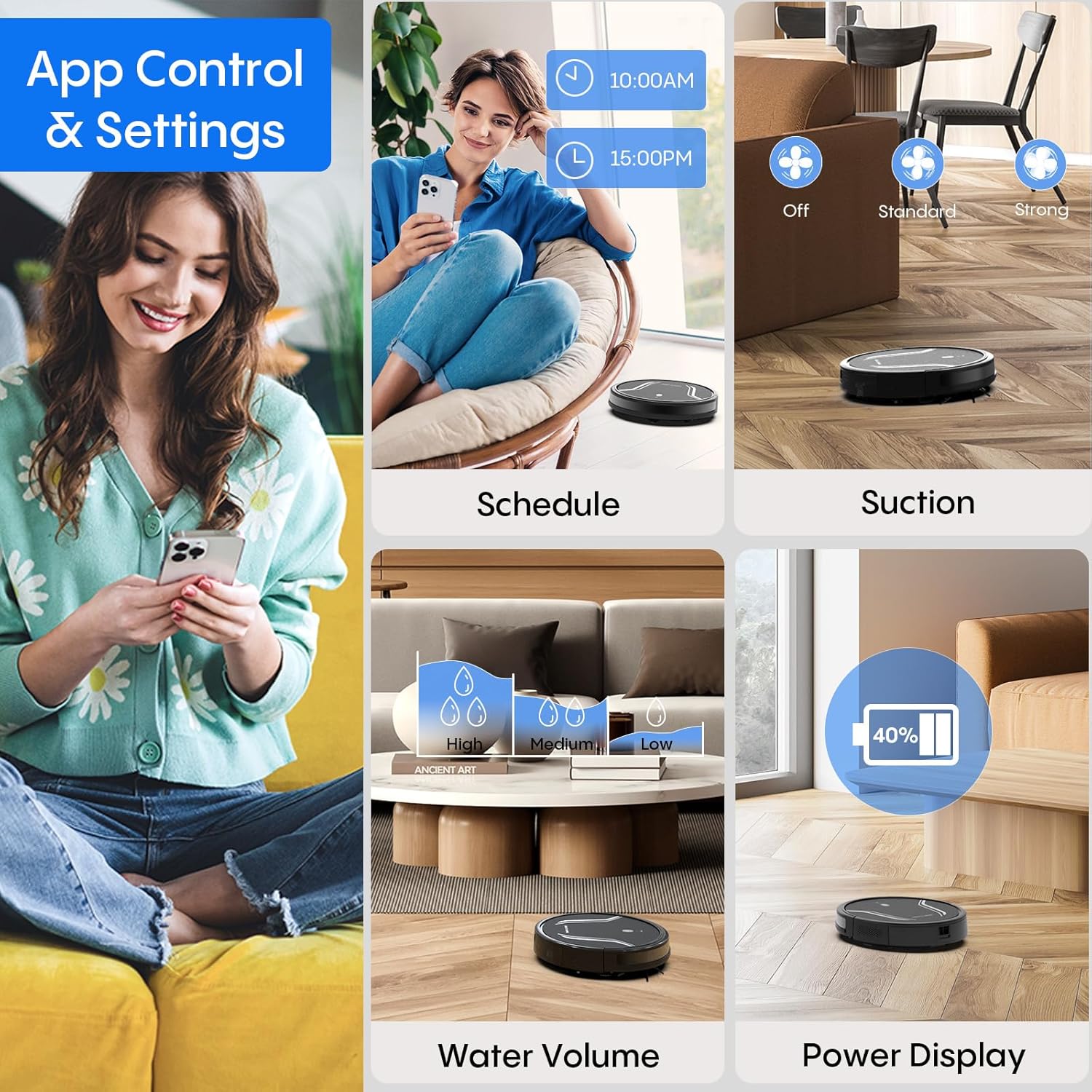
Image: App control interface for the robot vacuum.
- Plánování: Nastavte konkrétní časy, kdy bude robot automaticky čistit.
- Čisticí režimy: Select desired cleaning modes.
- Sací výkon: Adjust suction levels (e.g., Standard, Strong).
- Objem vody: Control water flow for mopping (e.g., Low, Medium, High).
- Stav baterie: Monitor the robot's battery level.
- Find My Robot: Locate the robot if it gets stuck or lost.
5.4 Dálkové ovládání
Use the included remote control to manually direct the robot, start/pause cleaning, select cleaning modes, and send it back to the charging station.
5.5 Hlasové ovládání (Alexa/Google Assistant)
Once connected to the Tuya Smart app, you can link your robot to Amazon Alexa or Google Assistant for voice commands. For example, say "Alexa, turn on the robot."

Image: Robot vacuum controlled via voice command.
5.6 Automatické dobíjení
When the battery level is low, the robot will automatically return to its charging station to recharge. You can also manually send it back using the app or remote control.
6. Údržba
Pravidelná údržba zajišťuje optimální výkon a prodlužuje životnost vašeho robotického vysavače.
6.1 Vyprázdnění odpadkového koše
Press the release button to remove the 2-in-1 water tank/dustbin unit. Open the dustbin cover and empty its contents into a trash bin. It is recommended to empty the dustbin after each cleaning cycle.
6.2 Čištění filtrů
Remove the HEPA filter and sponge filter from the dustbin. Tap them gently to remove dust. The filters are not washable and should be replaced every 3-6 months, depending on usage.
6.3 Čištění bočních kartáčů
Periodically check the side brushes for tangled hair or debris. Carefully remove any obstructions. If brushes are worn or damaged, replace them with new ones.
6.4 Čištění senzorů
Wipe the cliff sensors (located on the bottom of the robot) and the charging contacts (on both the robot and charging station) with a clean, dry cloth. This ensures proper navigation and charging.
6.5 Cleaning Mop Cloth and Water Tank
After each mopping session, remove the mop cloth and wash it thoroughly. Allow it to air dry completely before reattaching. Empty any remaining water from the water tank and rinse it out. Ensure the water tank is dry before storage.
7. Řešení problémů
Pokud se s robotickým vysavačem setkáte s problémy, podívejte se na následující běžné problémy a jejich řešení:
| Problém | Možná příčina | Řešení |
|---|---|---|
| Robot se nezapne | Slabá baterie; Tlačítko napájení nebylo správně stisknuto | Charge the robot; Press and hold the power button until the indicator lights up. |
| Robot se nenabíjí | Charging contacts are dirty; Charging station not powered | Clean charging contacts on both robot and station; Ensure power adapter is plugged in. |
| Robot se často zasekává | Too many obstacles; Cliff sensors are dirty | Clear the cleaning area of loose cables and small objects; Clean cliff sensors. |
| Špatný čisticí výkon | Dustbin full; Filters clogged; Side brushes worn | Empty dustbin; Clean or replace filters; Clean or replace side brushes. |
| Funkce mopování nefunguje | Water tank empty; Mop cloth not attached; Water flow setting too low | Fill water tank; Attach mop cloth correctly; Adjust water flow setting in the app. |
| Nelze se připojit k Wi-Fi | Incorrect Wi-Fi password; Not 2.4GHz network; Robot too far from router | Verify password; Ensure router is 2.4GHz; Move robot closer to router during setup. |
8. Specifikace
| Funkce | Detail |
|---|---|
| Číslo modelu | A21 |
| Rozměry produktu | 15 x 12.5 x 4 palce |
| Hmotnost položky | 7.24 libry |
| Sací výkon | Až 5000 Pa |
| Kapacita prachového boxu | 250mL (integrated with water tank) |
| Kapacita vodní nádrže | 200mL (integrated with dust box) |
| Kontrolní metody | App, Remote Control, Voice Control (Alexa/Google Assistant) |
| Wi-Fi kompatibilita | pouze 2.4 GHz |
| Automatické funkce | Auto-recharge, Obstacle avoidance, Fall prevention |
9. Záruka a podpora
Bagotte provides a 12-month service warranty for the Robot Vacuum and Mop Model A21. For technical support, warranty claims, or any questions regarding your product, please contact Bagotte customer service through the official webweb nebo vaše nákupní platforma.
Než budete kontaktovat podporu, mějte prosím připravené číslo modelu (A21) a informace o nákupu.


