Zavedení
This user manual provides detailed instructions for the FJFJOPK 4K Video Camera Camcorder, Model HDV-3051L. Please read this manual thoroughly before operating the device to ensure proper usage and to maximize its performance. Keep this manual for future reference.

Figure 1: FJFJOPK 4K Video Camera Camcorder with included accessories like external microphone, handheld stabilizer, and remote control.
Obsah balení
Ověřte, zda jsou všechny níže uvedené položky součástí balení. Pokud některé položky chybí nebo jsou poškozené, kontaktujte zákaznickou podporu.
- 4K videokamera
- Ruční stabilizátor
- Dálkové ovládání
- Mikrofon
- Sluneční clona objektivu
- 32GB SD karta
- 2 x dobíjecí baterie
- Nabíjecí kabel
- Uživatelská příručka
- Bag kamery
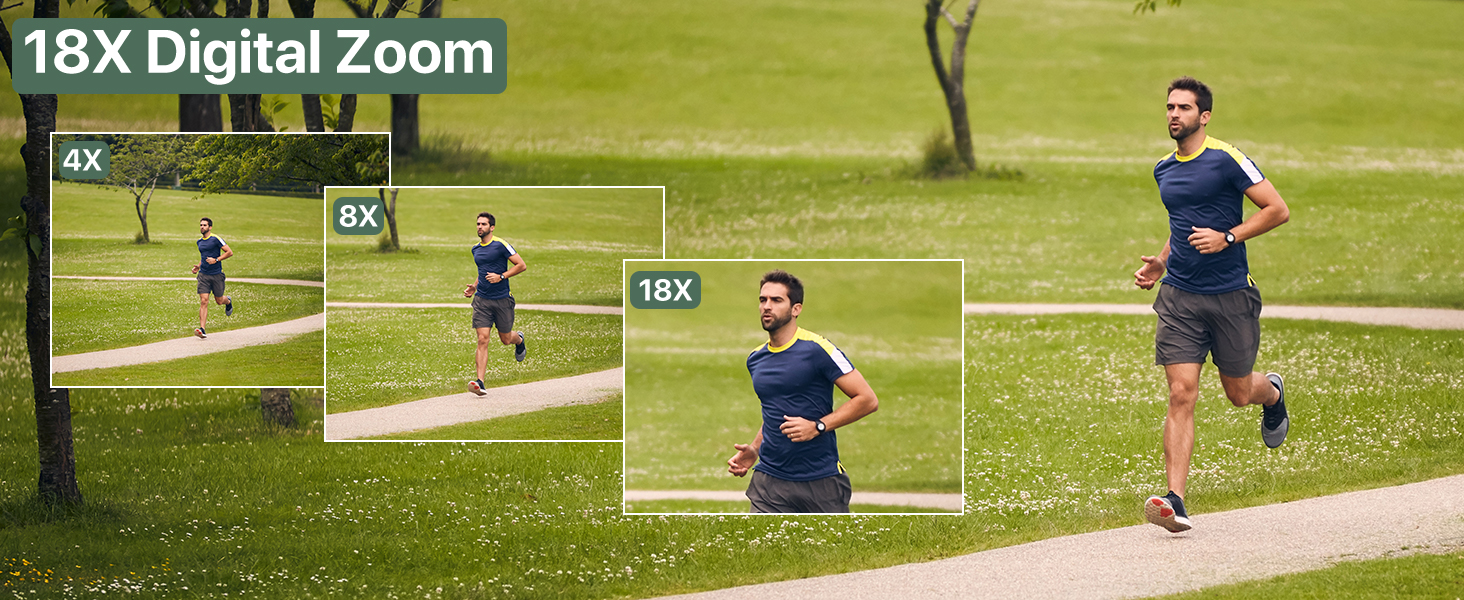
Figure 2: Visual representation of the complete packing list for the camcorder.
Průvodce nastavením
1. Instalace baterie
The camcorder uses two long-lasting rechargeable batteries. Ensure batteries are fully charged before first use.
- Vyhledejte přihrádku na baterii na videokameře.
- Otevřete kryt bateriového prostoru.
- Insert the charged batteries according to the polarity indicators inside the compartment.
- Bezpečně zavřete kryt bateriového prostoru.

Figure 3: Proper insertion of batteries into the camcorder.
2. Instalace SD karty
A 32GB SD card is included for immediate use. The camcorder supports SD cards for storing your videos and photos.
- Vyhledejte slot pro SD kartu, obvykle poblíž prostoru pro baterii.
- Vložte SD kartu kovovými kontakty dolů, dokud nezacvakne na místo.
- Chcete-li kartu vyjmout, jemně na ni zatlačte, dokud nevyskočí.
3. Připevnění příslušenství
Enhance your recording experience by attaching the included accessories.
- External Stereo Microphone: Attach the microphone to the hot shoe mount on top of the camcorder. Connect the microphone cable to the designated audio input port. This ensures clear audio capture.
- Ruční stabilizátor: The anti-shake handheld stabilizer can be attached to the bottom tripod mount of the camcorder. This accessory helps in achieving smooth and steady shots, especially during movement.
- Sluneční clona: Screw the lens hood onto the front of the camcorder's lens. The lens hood is designed to reduce glare and lens flare, improving image quality in bright outdoor conditions.

Figure 4: Handheld stabilizer attached for improved stability.

Figure 5: External microphone for enhanced audio recording.

Figure 6: The lens hood reduces glare for clearer outdoor shots.
Návod k obsluze
1. Zapnutí/vypnutí
To power on the camcorder, open the LCD screen. To power off, close the LCD screen or press and hold the Power button.
2. Using the 3.0-inch Touch Screen
The camcorder features a 3.0-inch IPS touch screen that is 270° rotatable, allowing for versatile viewing angles, including selfie-angle recording.
- Navigace: Tap on-screen icons to navigate menus and settings.
- Otáčení: Gently rotate the screen to your desired angle for comfortable viewing or self-recording.

Figure 7: The 270° rotatable touch screen provides flexible viewing and recording options.
3. Nahrávání videí a pořizování fotografií
The camcorder supports 4K Ultra HD video recording and 64MP still image capture.
- Nahrávání videa: Press the Record button to start and stop video recording. The camcorder captures every detail with stunning clarity.
- Fotografování: Switch to photo mode and press the Shutter button to take 64MP high-definition photos.
- 18x digitální zoom: Use the zoom controls to magnify your subject up to 18 times. This feature allows for clear footage even from a distance.
- IR noční vidění: Activate IR Night Vision mode for clear recording in low-light conditions or complete darkness.

Figure 8: Experience superior image and video quality with 4K UHD and 64MP resolution.

Figure 9: The 18X digital zoom allows for detailed capture of distant subjects.

Figure 10: IR Night Vision provides clear visibility in low-light or dark environments.
4. Pokročilé funkce
- Anti-Shake: The built-in anti-shake function, complemented by the handheld stabilizer, ensures smooth and stable footagi během dynamických pohybů.
- Časově omezená fotografie: Capture stunning time-lapse videos by setting the desired interval in the camera settings.
- Detekce obličeje: The camcorder can detect faces in the frame, optimizing focus and exposure for portraits and group shots.
- One-Click Live Streaming: Připojte videokameru k počítači přes USB, abyste ji mohli používat jako webcam for live streaming.
- Nahrávání při nabíjení: The camcorder supports recording while connected to a power source, ideal for extended shooting sessions.
- Bezdrátové dálkové ovládání: Use the included remote control for convenient wireless operation, perfect for self-recording or group shots.

Figure 11: Explore various shooting modes including anti-shake, slow motion, and time-lapse.

Figure 12: Continuous recording is possible while the camcorder is charging.
Údržba
- Čištění: K čištění těla fotoaparátu používejte měkký, suchý hadřík. Na objektiv použijte speciální hadřík a roztok na čištění objektivů. Nepoužívejte abrazivní materiály.
- Skladování: Videokameru skladujte na chladném a suchém místě mimo dosah přímého slunečního záření a extrémních teplot. Pokud ji skladujete delší dobu, vyjměte baterie.
- Péče o baterie: Fully charge batteries before storage and recharge them every few months to maintain their lifespan.
Odstraňování problémů
Pokud se s videokamerou setkáte s problémy, podívejte se na následující běžná řešení:
| Problém | Možná příčina | Řešení |
|---|---|---|
| Fotoaparát se nezapne. | Low or uncharged battery; incorrectly inserted battery. | Charge batteries fully. Ensure batteries are inserted correctly. |
| Špatná kvalita obrazu/videa. | Znečištěný objektiv; nedostatečné osvětlení; nesprávné nastavení. | Clean the lens. Use IR Night Vision in low light. Adjust exposure settings. |
| Chyba SD karty. | SD card full; incorrectly inserted; incompatible card. | Vymazat files or use a new SD card. Reinsert card correctly. Ensure card is compatible (up to 32GB). |
| Žádný zvukový záznam. | External microphone not connected properly or turned off. | Check microphone connection and ensure it is powered on if applicable. |
Specifikace
| Funkce | Detail |
|---|---|
| Značka | FJFJOPK |
| Číslo modelu | HDV-3051L |
| Rozlišení záznamu videa | 4K |
| Technologie fotosenzoru | CMOS |
| Maximální ohnisková vzdálenost | 64 milimetrů |
| Maximální clona | 7.36 f |
| Typ paměti Flash | SD karta (32 GB součástí balení) |
| Formát záznamu videa | AVI |
| Velikost obrazovky | 3 Inches (270° Rotatable IPS Touch Screen) |
| Speciální funkce | Anti-Shake, Image Stabilization, IR Night Vision, 18X Digital Zoom, External Microphone Support, Webcam Function, Time-Lapse, Face Detection, Recording While Charging, Wireless Remote Control |
| Hmotnost položky | 2.05 libry |
| Rozměry balení | 7.48 x 5.87 x 4.21 palce |
Záruka a podpora
For warranty information and customer support, please refer to the warranty card included in your package or contact FJFJOPK customer service directly. Optional protection plans are available for purchase to extend coverage beyond the standard manufacturer's warranty.
- Dvouletý ochranný plán: K dispozici pro rozšířené krytí.
- Dvouletý ochranný plán: K dispozici pro rozšířené krytí.
- Kompletní ochrana: Měsíční tarif pokrývající vybrané minulé i budoucí nákupy.


