1. Úvod
This manual provides detailed instructions for the installation, operation, and maintenance of your MiBOXER Y1 Remote and TRI-C1WR WiFi Triac Dimmer Set. This system is designed to provide smooth brightness control for AC lights, offering versatile control options via a dedicated remote, a wall push button, or a smartphone application. Please read this manual thoroughly before installation and use to ensure proper function and safety.

Image 1.1: The MiBOXER Y1 Remote and TRI-C1WR WiFi Triac Dimmer. The remote features a sleek black design with touch controls for brightness and zone selection. The dimmer module is a compact white unit with clearly labeled input and output terminals.
2. Bezpečnostní informace
VAROVÁNÍ: To prevent electric shock, fire, or death, turn off power at the circuit breaker or fuse box and test that the power is off before wiring. Always consult a qualified electrician if you are unsure about any part of the installation process.
- Neinstalujte výrobek, pokud se jeví poškozený.
- Ujistěte se, že všechna kabelová připojení jsou bezpečná a správná.
- Do not exceed the maximum load capacity of the dimmer.
- Toto zařízení je určeno pouze pro vnitřní použití.
- Uchovávejte mimo dosah dětí.
3. Komponenty produktu
The MiBOXER Y1 Remote and TRI-C1WR WiFi Triac Dimmer Set includes the following main components:
- 1x MiBOXER Y1 Brightness Remote
- 1x MiBOXER TRI-C1WR AC Triac Dimmer Module
This system supports dimmable AC lights up to 200W (150W at 110V, 300W at 220V) and is designed for seamless dimming with easy setup.
4. Specifikace
4.1. TRI-C1WR AC Triac Dimmer
| Parametr | Hodnota |
|---|---|
| Model č. | TRI-C1WR |
| Vstupní objemtage | AC 100-240V ~ 50/60Hz |
| Výstupní objemtage | AC 100-240V ~ 50/60Hz |
| Maximální výstupní proud | 1.36A (max.) |
| Maximální výstupní výkon | 150W@110V, 300W@220V |
| Pracovní teplota | -10~40°C |
| Kontrolní metody | Remote, App (WiFi), Wall Push Button (2.4G) |
4.2. Y1 Brightness Remote
| Parametr | Hodnota |
|---|---|
| Model č. | Y1 |
| Kontrolní zóny | 3 zóny |
| Typ ovládání | Stmívání jasu |

Image 4.1: Dimensions of the MiBOXER Y1 Remote. The remote measures approximately 143mm in height, 57mm in width at the base, and 44mm in depth. The packaging box dimensions are also shown for reference.

Image 4.2: The TRI-C1WR dimmer utilizes trailing edge (ELV) phase-cut technology for smooth dimming. It also incorporates over-heat and over-load protection mechanisms to ensure safe operation.
5. Nastavení a instalace
Důležité: Ensure power is disconnected at the main circuit breaker before proceeding with any wiring.
5.1. Wiring the TRI-C1WR Dimmer
Follow the connection diagram carefully. Incorrect wiring can damage the dimmer or connected lights.

Image 5.1: Connection Diagram for the TRI-C1WR AC Triac Dimmer. The diagram illustrates connections for AC input (N, L), output to the dimmable LED light (N, L1), and optional push switch inputs (S1, S2).
- Connect the AC input wires (Neutral 'N' and Live 'L') to the corresponding 'INPUT' terminals on the dimmer.
- Connect the dimmable AC light (e.g., Triac dimming LED light, filament lamps, halogen lamps) to the 'OUTPUT' terminals (Neutral 'N' and Live 'L1').
- For optional wall push button control, connect the push switch to the 'S1' and 'S2' terminals.
- Ensure all cable connections are secure and have 7mm wire preparation.
Pozor: Double-check all connections before restoring power. Incorrect wiring may lead to damage.
5.2. Pairing the Y1 Remote with the Dimmer
The Y1 remote typically comes pre-paired with the TRI-C1WR dimmer in a kit. If re-pairing is needed or for new devices:
- Ensure the dimmer is powered on.
- On the Y1 remote, press and hold the 'ON' button for the desired zone (1, 2, or 3) within 3 seconds of powering on the dimmer.
- The connected light should flash to indicate successful pairing.
5.3. App Setup (Tuya Smart)
The TRI-C1WR dimmer supports control via a smartphone app, typically the Tuya Smart app. Refer to the Tuya Smart app's instructions for adding new devices and connecting to your WiFi network.

Image 5.2: The MiBOXER TRI-C1WR dimmer module integrated into a smart home lighting setup, controllable via a smartphone app. The app interface shows a brightness slider for precise control.
6. Návod k obsluze
6.1. Y1 Remote Control
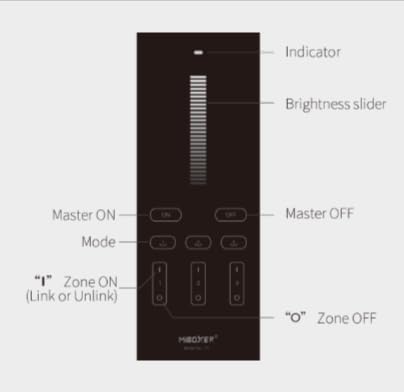
Image 6.1: Layout and functions of the MiBOXER Y1 Remote. It features a brightness slider, master ON/OFF buttons, and individual ON/OFF buttons for three zones.
- Hlavní ON/OFF: Use the 'ON' and 'OFF' buttons at the top to control all linked lights simultaneously.
- Posuvník jasu: Touch and slide your finger along the vertical bar to adjust the brightness level.
- Zone ON/OFF: Use the 'I' (ON) and 'O' (OFF) buttons for each of the three zones (1, 2, 3) to control specific groups of lights.
- Tlačítko režimu: (If applicable, refer to specific remote model for advanced modes).
6.2. Ovládání pomocí aplikace v chytrém telefonu
The Tuya Smart app provides comprehensive control over your connected lights.

Image 6.2: The Tuya Smart app interface for controlling the dimmer. Features include stepless dimming brightness control, setting minimum brightness, and push dimming functionality.
- Plynulé stmívání: Adjust brightness smoothly using the in-app slider.
- Set Minimum Brightness: Configure a minimum brightness level to prevent lights from flickering at very low settings.
- Stmívání stisknutím: Utilize the push button functionality if connected, which can also be reflected or configured within the app.
6.3. Breaker Mode
The dimmer features a 'Breaker Mode' which, when activated, allows the device to only turn lights ON/OFF and disables dimming functionality. This can be useful for specific applications where only simple switching is required.

Image 6.3: The Breaker Mode interface within the control app. When activated, the dimmer will only support ON/OFF functionality, and dimming will be disabled.
To Activate Breaker Mode: Short press the 'SET' button (if available on the dimmer, or refer to app instructions) 5 times quickly. The indicator will blink 3 times quickly to confirm activation.
To Deactivate Breaker Mode: Short press the 'SET' button 5 times quickly. The indicator will flash 3 times slowly to confirm deactivation.
7. Údržba
- Clean the remote and dimmer module with a soft, dry cloth. Do not use abrasive cleaners or solvents.
- Ensure the dimmer module has adequate ventilation and is not covered.
- Replace remote batteries as needed (battery type not specified, typically coin cell).
8. Řešení problémů
8.1. Lights Not Responding
- Check if the dimmer has power.
- Verify all wiring connections are secure and correct according to the diagram.
- Ensure the remote batteries are not depleted.
- Re-pair the remote with the dimmer if necessary.
- Check if 'Breaker Mode' is accidentally activated.
8.2. Dimming Not Working
- Confirm that the connected lights are dimmable.
- Check if 'Breaker Mode' is active. If so, deactivate it.
- Zajistěte celkový watttage of connected lights does not exceed the dimmer's maximum load capacity.
8.3. Problémy s připojením aplikací
- Ensure your smartphone is connected to a 2.4GHz WiFi network (5GHz networks are often not supported by smart home devices).
- Verify the dimmer is within range of your WiFi router.
- Restart the dimmer and your WiFi router.
- Follow the app's specific troubleshooting steps for device connection.
9. Záruka a podpora
Informace o záruce a technickou podporu získáte na oficiálních stránkách MiBOXERu. webnebo se obraťte na prodejce. Uschovejte si účtenku jako doklad o koupi.


