1. Úvod
This manual provides detailed instructions for the installation, operation, and maintenance of your SINOTIMER DC/AC 24V Digital Programmable Timer Switch, Model 24VDC. This device is designed for precise, programmable control of electrical circuits, offering up to 28 ON/OFF events per day across a 7-day cycle. Please read this manual thoroughly before use to ensure proper function and safety.

Image 1.1: The SINOTIMER 7 Day Digital Programmable Timer Switch.
2. Bezpečnostní informace
- Elektrické nebezpečí: Installation and wiring should only be performed by qualified personnel. Ensure power is disconnected before any installation or maintenance.
- svtage Kompatibilita: This device operates on DC/AC 24V. Connecting to an incorrect voltage supply may damage the unit and pose a safety risk.
- Kapacita zatížení: Do not exceed the maximum load rating of 10A at 250VAC (2000 watts). For higher loads, use an external contactor or relay.
- Prostředí: Install the timer in a dry, protected environment. While the unit has some dustproof features, direct exposure to water or extreme temperatures should be avoided.
- Baterie: The internal battery is for memory backup only. Do not attempt to charge or replace it unless specified in the maintenance section.
3. Obsah balení
Ověřte, zda jsou v balení přítomny všechny položky:
- 1x SINOTIMER Digital Programmable Timer Switch (Model: 24VDC)
- 1x montážní držák
- 1x Protiprachový kryt
- 1x CR2032 Battery (pre-installed or separate)
- 1x Disassembly Tool (small screwdriver)
- 2x montážní šrouby
- 5x Spade Connecting Wires
- 1x Uživatelská příručka (tento dokument)
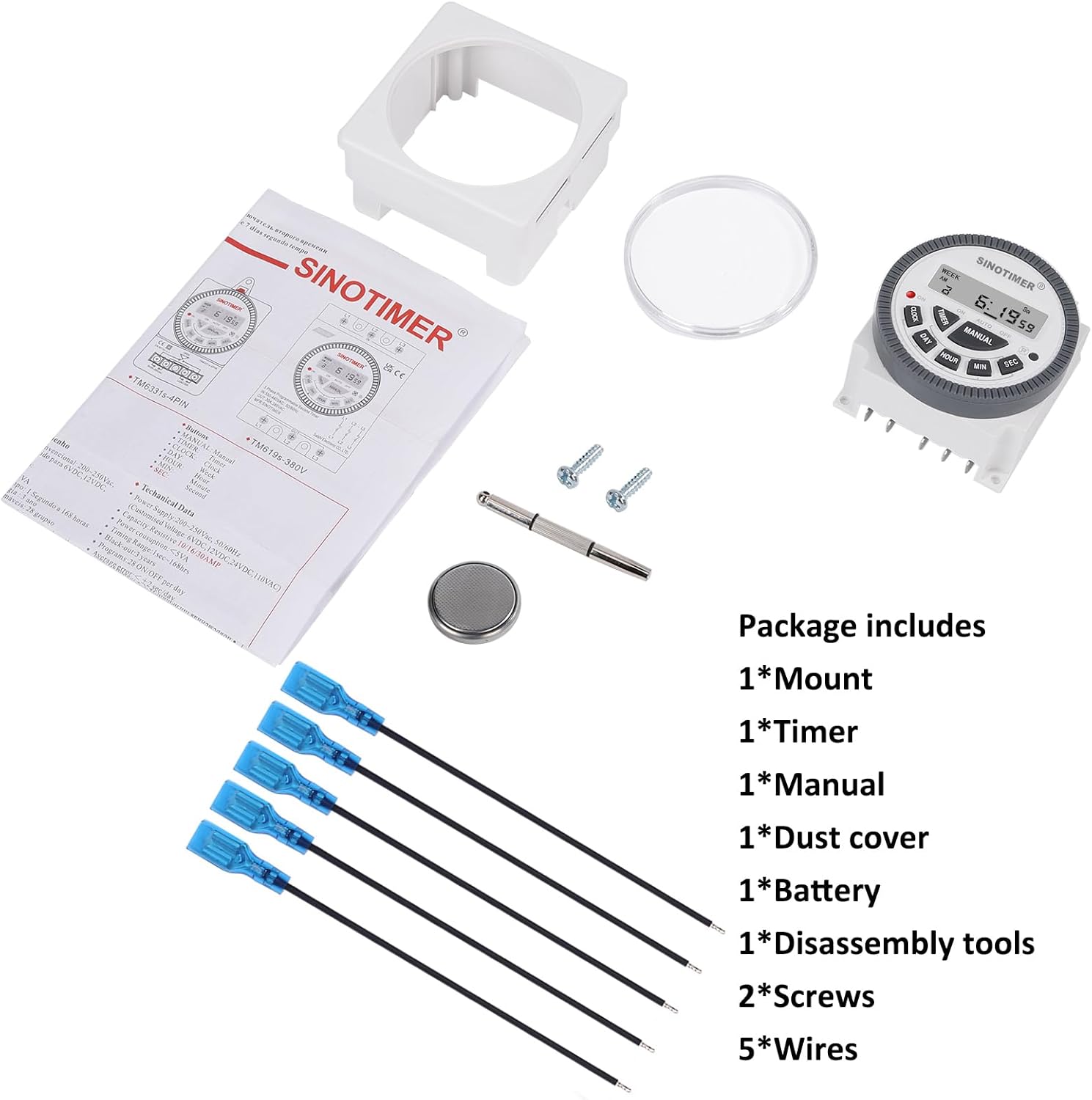
Image 3.1: Visual representation of the package contents, including the timer, mount, manual, dust cover, battery, disassembly tool, screws, and wires.
4. Konec produktuview & Funkce
The SINOTIMER DC/AC 24V Digital Programmable Timer Switch is a versatile device designed for automating various electrical applications. Its compact design and digital display ensure ease of use and integration into control panels.
Klíčové vlastnosti:
- 7denní programovatelnost: Allows for up to 28 ON/OFF events per day, with flexible programming blocks for daily, weekly, or custom schedules.
- Digitální displej: Clear LCD for time, day, and program status.
- Internal Battery Backup: Retains program settings during power outages.
- SPDT Output: Single Pole Double Throw relay output (1 Normally Open + 1 Normally Closed contact).
- Vysoká nosnost: Rated for up to 10A at 250VAC, 2000 watts.
- 12/24hodinový formát: User-selectable time display format.
- Prachotěsný design: Enhanced durability for various environments.

Obrázek 4.1: Konecview of the timer's key features, including its robust design and advanced functionality.
5. Specifikace
| Funkce | Specifikace |
|---|---|
| Model | 24VDC (TM-619) |
| Vstupní objemtage | DC/AC 24V |
| Typ výstupu | SPDT (1NO+1NC) |
| Maximální zatěžovací proud | 10A @ 250VAC, 2000W |
| Programovatelné události | Up to 28 ON/OFF per day |
| Formát času | 12-hour / 24-hour selectable |
| Zálohování baterie | Internal CR2032 (for program memory) |
| Rozměry (D x Š x V) | 1.77" × 2.83" × 2.83" (45 mm × 72 mm × 72 mm) |
| Hmotnost | 5.3 unce (přibližně 150 g) |
| Materiál | Kov, Plast |

Image 5.1: Dimensional drawing and terminal layout of the timer switch.
6. Instalace a zapojení
VAROVÁNÍ: Disconnect all power before installation to prevent electric shock or equipment damage.
6.1 Montáž
- Select a suitable location for mounting, ensuring it is protected from moisture and excessive heat.
- Attach the mounting bracket to a flat surface using the provided screws.
- Slide the timer switch into the mounting bracket until it clicks securely into place.
- Optionally, install the clear dust cover over the timer face for added protection.
6.2 Pokyny pro zapojení
The timer switch features 5 spade connecting terminals. Refer to the wiring diagram below and the labels on the back of the unit for correct connections.
- Terminály 1 a 2: Power Input (DC/AC 24V). Connect your 24V power supply here.
- Terminál 3: Common (COM) for the relay output.
- Terminál 4: Normally Open (NO) contact for the relay output. The circuit connected here will be ON when the timer is active.
- Terminál 5: Normally Closed (NC) contact for the relay output. The circuit connected here will be OFF when the timer is active.

Image 6.1: Simplified wiring diagram for the timer switch.

Obrázek 6.2: Příkladample of spade connectors attached to the timer terminals.
7. Návod k obsluze
After successful installation and power connection, the timer display should illuminate. If not, ensure power is supplied correctly and the internal battery is properly seated.
7.1 Počáteční nastavení (první použití)
- Resetovat: Press the 'R' (Reset) button with a pointed object (e.g., the provided disassembly tool) to clear all previous settings. The display will show '0:00'.
- Nastavit aktuální čas:
- Stiskněte tlačítko HODINY tlačítko.
- Stiskněte DEN to select the current day of the week (Mo, Tu, We, Th, Fr, Sa, Su).
- Stiskněte HODINA pro nastavení aktuální hodiny.
- Stiskněte MIN pro nastavení aktuální minuty.
- Stiskněte SEC to set the current second (optional, for precise synchronization).
- To switch between 12-hour (AM/PM) and 24-hour format, press HODINY a DEN zároveň.
7.2 Programování událostí ZAP/VYP
Časovač podporuje až 28 programů ZAP/VYP. Každý program se skládá z času ZAP a času VYP.
- Stiskněte tlačítko ČASOVAČ button. The display will show '1 ON'. This is the first ON program.
- Stiskněte DEN to select the day(s) for this program. You can choose a single day, weekdays, weekends, or various combinations. Keep pressing DEN pro procházení možností.
- Stiskněte HODINA pro nastavení požadované hodiny zapnutí.
- Stiskněte MIN pro nastavení požadované minuty zapnutí.
- Stiskněte ČASOVAČ again. The display will show '1 OFF'. This is the first OFF program.
- Repeat steps 2-4 to set the desired OFF day(s), hour, and minute for this program.
- Pokračujte v stisknutí ČASOVAČ pro cyklické přepínání mezi „2 ZAP“, „2 VYP“ až po „28 ZAP“, „28 VYP“ a nastavování každého programu dle potřeby.
- Po nastavení všech požadovaných programů stiskněte tlačítko HODINY button to return to the current time display. The programs are now saved.
7.3 Ruční ovládání
The MANUÁL button allows you to override the programmed schedule temporarily or permanently.
- Stiskněte MANUÁL pro cyklické přepínání mezi následujícími režimy:
- NA: Output is continuously ON, ignoring programs.
- AUTO ON: Output is currently ON, following programs.
- AUTOMATICKÉ VYPNUTÍ: Output is currently OFF, following programs.
- OFF: Output is continuously OFF, ignoring programs.
- Vybrat AUTO ON or AUTOMATICKÉ VYPNUTÍ to resume programmed operation.
8. Údržba
8.1 Čištění
Otřete přístroj měkkým, suchým hadříkem. Nepoužívejte abrazivní čisticí prostředky ani rozpouštědla.
8.2 Výměna baterie
The internal CR2032 battery provides backup for program memory. If the display becomes dim or programs are lost during power outages, the battery may need replacement.
- VAROVÁNÍ: Disconnect main power to the timer before replacing the battery.
- Najděte přihrádku na baterie na zadní straně jednotky.
- Opatrně otevřete kryt přihrádky.
- Vyjměte starou baterii CR2032 a vložte novou, dbejte na správnou polaritu (+ stranou nahoru).
- Zavřete kryt prostoru pro baterie.
- After replacement, perform an initial setup (Section 7.1) to reset and set the current time.

Image 8.1: Location of the replaceable CR2032 battery.
9. Řešení problémů
| Problém | Možná příčina | Řešení |
|---|---|---|
| Displej je prázdný nebo tmavý | No power supply; Incorrect wiring; Dead internal battery. | Check 24V power input (Terminals 1 & 2). Verify wiring. Replace CR2032 battery. |
| Programs are not running | Timer is in Manual ON/OFF mode; Incorrect program settings; Incorrect current time. | Stiskněte MANUÁL until 'AUTO ON' or 'AUTO OFF' is displayed. Review program settings (Section 7.2). Set current time correctly (Section 7.1). |
| Output does not switch ON/OFF | Incorrect output wiring; Load exceeds capacity; Faulty relay. | Verify output wiring (Terminals 3, 4, 5) to your load. Ensure load does not exceed 10A/2000W. If issues persist, contact support. |
| Čas je nepřesný | Internal clock drift; Battery low. | Reset and set time again. Consider replacing the internal battery if drift is significant. |
10. Záruka a podpora
For warranty information and technical support, please refer to the documentation provided with your purchase or contact SINOTIMER customer service through the retailer where the product was purchased. Please have your product model (24VDC) and purchase date available when contacting support.
Online zdroje: Pro další informace, časté dotazy nebo view other SINOTIMER products, visit the official SINOTIMER store or webmísto.


