Zavedení
The MiBOXER PW5 5-in-1 LED Controller is designed for precise and convenient management of various LED lighting systems. It supports multiple LED types and offers dual wireless connectivity for seamless integration and control.
This manual provides essential information for the safe and efficient installation, operation, and maintenance of your PW5 LED Controller.
Klíčové vlastnosti
- Kompatibilita 5 v 1: Supports Single Color, Dual White (CCT), RGB, RGBW, and RGB+CCT LED setups.
- Duální bezdrátové připojení: Features WiFi and 2.4GHz technology for stable operation and smart app integration.
- Vysoká výstupní kapacita: Handles up to 20A output, suitable for high-power LED installations.
- Inteligentní ovládání: Compatible with "Tuya Smart" app and third-party voice control systems like Alexa and Google Assistant.
- Color and Dimming Control: Offers 16 million colors, adjustable color temperature, brightness, and saturation.
- Podpora stmívání PUSH: Allows for flexible dimming control.
- Funkce paměti: Retains the last-used settings.
- Wide Voltage Rozsah: Operates on DC12-24V.
Obsah balení
- MiBOXER PW5 5-in-1 LED Controller
- Uživatelská příručka

Image: The MiBOXER PW5 LED Controller shown alongside its retail packaging and a small instruction manual.
Nastavení a instalace
Bezpečnostní opatření
- Před instalací se ujistěte, že je odpojeno napájení.
- Instalujte v suchém prostředí, mimo dosah vlhkosti a extrémních teplot.
- Ověřte správný objemtage (DC12-24V) and current ratings for your LED strips and power supply.
- Nepřekračujte maximální výstupní proud 20 A.
Schéma zapojení
Connect your LED strips and power supply to the controller as shown in the diagram below. Ensure correct polarity for all connections.

Image: Detailed wiring diagram of the MiBOXER PW5 controller. It shows the V+ and V- input terminals, GND and PUSH dimming terminals, and output terminals labeled V+, W, WW, CW, R, G, B for various LED strip types. An indicator output mode table is also visible, showing White for Single Color, Yellow for Dual White, Red for RGB, Green for RGBW, and Blue for RGB+CCT.
- Connect the DC12-24V power supply to the INPUT V+ a V- terminály.
- Connect your LED strip(s) to the corresponding VÝSTUP terminals based on your LED type:
- Jedna barva: Connect to V+ and W (White)
- Dvojitá bílá (CCT): Connect to V+, WW (Warm White), and CW (Cool White)
- RGB: Connect to V+, R (Red), G (Green), and B (Blue)
- RGBW: Connect to V+, R, G, B, and W (White)
- RGB+CCT: Connect to V+, R, G, B, WW, and CW
- For PUSH dimming functionality, connect a compatible PUSH switch to the GND a TAM terminály.
Montáž
The controller is designed for tabletop mounting. Ensure it is placed on a stable, flat surface with adequate ventilation.

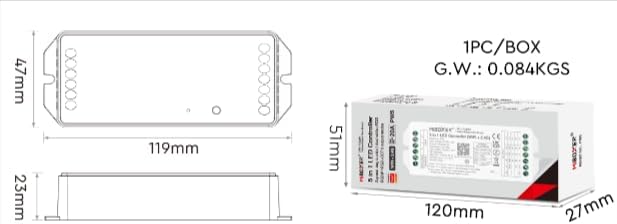
Image: Two diagrams illustrating the physical dimensions of the MiBOXER PW5 controller. The first shows a top-down view with a length of 119mm and width of 47mm. The second shows a side view with a height of 23mm, and also includes package dimensions of 120mm x 51mm x 27mm.
Operace
Switching Output Modes
The PW5 controller supports 5 different output modes. To switch between these modes:
- Stiskněte tlačítko "SOUBOR" button once to cycle through the output modes.
- The indicator light on the controller will change color to reflect the current mode:
- Bílá: Jednobarevná
- Žlutá: Duální bílá
- Červená: RGB
- Zelená: RGBW
- Modrá: RGB+CCT
2.4G RF dálkové ovládání
The controller can be linked to a compatible 2.4G RF remote control (sold separately).
- To link: Power on the controller. Within 3 seconds, press the "ON" button on the remote control 3 times. The LED strip will flash to confirm successful linking.
- To unlink: Power on the controller. Within 3 seconds, press the "ON" button on the remote control 5 times. The LED strip will flash to confirm unlinking.
WiFi and App Control (Tuya Smart)
The PW5 controller integrates with the "Tuya Smart" app for advanced control via WiFi.
- Download the "Tuya Smart" app from your device's app store.
- Zaregistrujte se nebo se přihlaste ke svému účtu Tuya Smart.
- To activate WiFi pairing mode: Long press the "SOUBOR" button for 3 seconds until the indicator flashes quickly.
- In the Tuya Smart app, follow the instructions to add a new device. Select the appropriate lighting device type.
- Once connected, you can control brightness, color, color temperature, saturation, and set up group/multi-zone control.
- The app also supports music rhythm functions.
Voice Control (Alexa, Google Assistant)
After successful integration with the Tuya Smart app, you can link your account to voice assistants like Amazon Alexa or Google Assistant for hands-free control.
- Otevřete aplikaci Alexa nebo Google Home.
- Přejděte do sekce „Dovednosti“ nebo „Spolupracuje s Googlem“.
- Hledat a povolte dovednost/službu „Tuya Smart“.
- Po zobrazení výzvy propojte svůj účet Tuya Smart.
- Discover devices. Your MiBOXER PW5 controller should appear.
- Nyní můžete používat hlasové příkazy, jako například:
- „Alexo, rozsviť světla v obýváku.“
- „Hej Google, zhasni osvětlení kuchyně na modrou.“
- „Alexo, ztlum světla v ložnici na 50 %.“
Údržba
- Udržujte ovladač čistý a bez prachu. K čištění používejte měkký, suchý hadřík.
- Nepoužívejte drsné chemikálie ani abrazivní čisticí prostředky.
- Zajistěte dostatečné větrání kolem zařízení, aby nedošlo k přehřátí.
- Regularly check wiring connections for security and integrity.
Odstraňování problémů
| Problém | Možná příčina | Řešení |
|---|---|---|
| LED diody nesvítí | No power to controller; incorrect wiring; faulty LED strip. | Check power supply connection; verify input/output wiring polarity; test LED strip with another power source. |
| Dálkové ovládání nefunguje | Remote not linked; remote battery low; interference. | Re-link the remote control; replace remote battery; reduce interference sources. |
| Nefunguje ovládání aplikace | Controller not connected to WiFi; incorrect app settings; WiFi signal weak. | Ensure controller is in WiFi pairing mode and connected to your network; check app settings; move controller closer to WiFi router. |
| Incorrect colors or dimming | Wrong output mode selected; incorrect wiring for LED type. | Press "SET" button to cycle to the correct output mode; verify LED strip wiring matches the selected mode. |
Specifikace
| Číslo modelu | PW5 |
| Vstupní objemtage | DC12-24V |
| Výstupní proud | Max 20A |
| Počet kanálů | 5 |
| Konektivita | WiFi, 2.4GHz RF |
| Control Distance (2.4G) | 30 m |
| Provozní teplota | -10 °C až 40 °C |
| Rozměry | 119 mm × 47 mm × 23 mm (přibližně 4.68 × 1.85 × 0.9 palce) |
| Hmotnost položky | 3.2 unce (přibližně 90 g) |
| Výrobce | Miboxer |
Záruka a podpora
Informace o záruce a technickou podporu získáte na oficiálních stránkách MiBOXERu. webnebo se obraťte na prodejce. Uschovejte si doklad o koupi pro případ reklamace.
Pro další pomoc můžete navštívit MiBOXER Store on Amazon.


