Zavedení
This manual provides essential information for setting up, operating, maintaining, and troubleshooting your HP Elite Mini 800 G9 Desktop Computer. This compact and powerful mini PC is designed for business environments, offering high performance in a small form factor.
The HP Elite Mini 800 G9 features an Intel Core i5-12500T processor, 16 GB DDR5 RAM, and a 256 GB SSD, running on Windows 11 Pro. Its small size allows for flexible deployment options, including mounting behind a monitor or discreet placement on a desk.
Co je v krabici
Ověřte, zda jsou v balení přítomny všechny položky:
- Stolní počítač HP Elite Mini 800 G9
- AC adaptér
- Klávesnice
- Myš
Nastavení
Follow these steps to set up your HP Elite Mini 800 G9 Desktop Computer:
1. Vybalení a umístění
Carefully remove the mini PC and all accessories from the packaging. Place the mini PC on a stable, flat surface with adequate ventilation. Ensure no vents are obstructed.
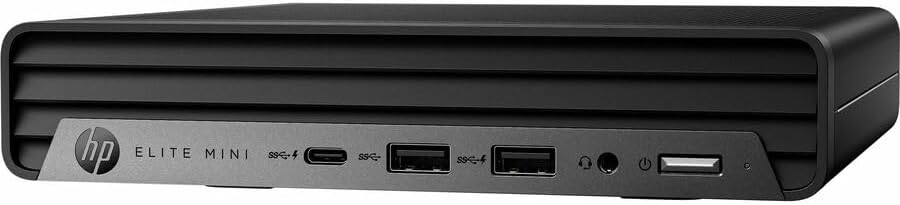
Obrázek: Přední strana view of the HP Elite Mini 800 G9 Desktop PC, highlighting the accessible front ports including USB-C, USB-A, and a headphone jack.
2. Připojení periferií
- Připojení monitoru: Connect your monitor to one of the available video output ports (e.g., DisplayPort, HDMI) on the rear of the mini PC.
- Připojení klávesnice a myši: Plug the included keyboard and mouse into the USB ports on the mini PC.
- Připojení k síti (volitelné): For a wired internet connection, connect an Ethernet cable from your router or network switch to the Ethernet port on the mini PC. Wireless connectivity (Wi-Fi 6) is also available.
- Připojte napájení: Connect the AC adapter to the power input port on the mini PC, then plug the power cord into a wall outlet.
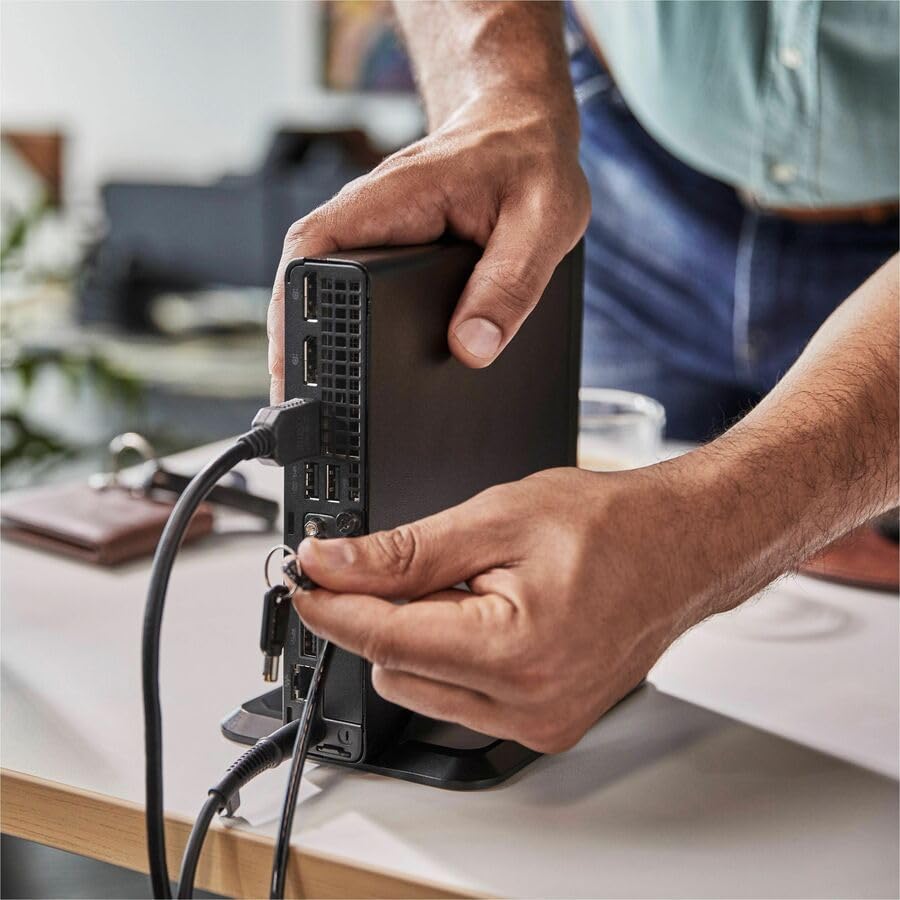
Image: A user connecting various cables, including power and display, to the rear ports of the HP Elite Mini 800 G9. This illustrates the typical connection process for peripherals.
Návod k obsluze
Once your HP Elite Mini 800 G9 is set up, follow these steps for basic operation:
1. Zapnutí
Press the power button located on the front of the mini PC. The power indicator light will illuminate, and the system will begin to boot up. The operating system (Windows 11 Pro) will load automatically.
2. Počáteční nastavení (první použití)
Upon first boot, you will be guided through the Windows 11 Pro setup process. This includes selecting your region, language, accepting terms, and setting up a user account. Follow the on-screen prompts to complete this process.
3. Vypínání
To properly shut down the computer, click the Start tlačítko ve Windows a poté vyberte Moc > Vypněte. Avoid powering off the system by holding the power button, as this can lead to data loss or system corruption.

Image: A professional working at a desk, demonstrating the compact integration of the HP Elite Mini 800 G9, which is mounted discreetly behind a monitor.
Údržba
Regular maintenance helps ensure the longevity and optimal performance of your HP Elite Mini 800 G9 Desktop Computer.
1. Aktualizace softwaru
Udržujte svůj operační systém a ovladače aktuální. Služba Windows Update automaticky zajišťuje aktualizace operačního systému. Aktualizace ovladačů naleznete na oficiálních stránkách podpory HP. webmísto pro váš model.
2. Čištění
- Vnější: Použijte měkký hadřík, který nepouští vlákna dampVnější povrchy omyjte vodou nebo jemným čisticím roztokem.
- Průduchy: Periodically use compressed air to clear dust from the ventilation grilles to prevent overheating. Ensure the system is powered off before cleaning vents.
3. Zálohování dat
Regularly back up important data to an external drive or cloud storage to prevent data loss in case of hardware failure or other issues.
Odstraňování problémů
Tato část se zabývá běžnými problémy, se kterými se můžete setkat u počítače HP Elite Mini 800 G9.
Žádná síla
- Ensure the AC adapter is securely connected to both the mini PC and a working power outlet.
- Ověřte funkčnost elektrické zásuvky zapojením jiného zařízení.
- Check the power button for any damage or obstruction.
Žádné zobrazení na monitoru
- Confirm the monitor is powered on and correctly connected to the mini PC's video output port.
- Ujistěte se, že je na monitoru vybrán správný vstupní zdroj.
- Try connecting the mini PC to a different monitor or using a different video cable if available.
Pomalý výkon
- Zavřete nepotřebné aplikace běžící na pozadí.
- Zkontrolujte a nainstalujte všechny čekající aktualizace systému Windows nebo aktualizace ovladačů.
- Run a disk cleanup and defragmentation (for HDDs, not typically needed for SSDs).
- Prohledejte systém na přítomnost malwaru nebo virů pomocí renomovaného antivirového softwaru.
Specifikace
Detailed technical specifications for the HP Elite Mini 800 G9 Desktop Computer:
| Funkce | Detail |
|---|---|
| Číslo modelu | AS1F8AT#ABA |
| Procesor | Intel Core i5-12500T (12th Gen, Hexa-core, 2 GHz) |
| BERAN | 16 GB DDR5 RAM |
| Skladování | 256 GB SSD |
| Grafika | Grafická karta Intel UHD 770 (integrovaná) |
| Operační systém | Windows 11 Pro |
| Bezdrátové připojení | Wi-Fi 6 (802.11ax), Bluetooth |
| Rozměry (DxŠxV) | 6.9 x 7 x 1.4 palce |
| Hmotnost | 3.13 libry |
| Porty (přední) | USB-C, USB-A, Headphone/Microphone Combo |
| Porty (zadní) | Multiple USB-A, Video Outputs (e.g., DisplayPort, HDMI), Ethernet, Power Input |
Záruka a podpora
Your HP Elite Mini 800 G9 Desktop Computer comes with a standard manufacturer's warranty. For specific warranty terms and conditions, please refer to the documentation included with your product or visit the official HP support webmísto.
Pro technickou pomoc, stažení ovladačů nebo další podporu navštivte stránky podpory HP webmísto: