1. Úvod
The Mastech MS8250D is a high-performance digital multimeter designed for accurate measurement of AC/DC voltage, AC/DC current, resistance, capacitance, frequency, and temperature. It features a 6600-count display, auto/manual ranging, True RMS, Non-Contact Voltage (NCV) detection, diode and continuity testing, and a USB interface for PC connectivity. This manual provides detailed instructions for safe and effective use of the device.
Klíčové vlastnosti:
- 6600-count digital display
- Automatic and Manual Ranging
- Měření True RMS
- Bezkontaktní svtage (NCV) detekce
- Diode and Continuity Tester (buzzer < 50Ω)
- MAX/MIN value recording
- Funkce Data Hold
- Podsvícení displeje
- Automatické vypnutí
- Relativní režim měření
- Indikace slabé baterie
- USB Interface for Windows OS
2. Bezpečnostní informace
VAROVÁNÍ: To avoid electric shock or personal injury, and to avoid damage to the meter or to the equipment under test, read all safety information carefully before using the meter. This device complies with CE, RoHS, and UL safety standards.
- Vždy se ujistěte, že jsou měřicí vodiče v dobrém stavu a správně připojeny.
- Neaplikujte více než jmenovitý objemtage, jak je vyznačeno na elektroměru, mezi svorkami nebo mezi jakoukoli svorkou a uzemněním.
- Buďte opatrní při práci s objtagnad 30 V AC RMS, 42 V peak nebo 60 V DC. Tyto objemytages představují nebezpečí úrazu elektrickým proudem.
- Before measuring current, ensure the circuit is de-energized and the meter is connected in series.
- Před změnou funkcí nebo rozsahů vždy odpojte měřicí vodiče od obvodu.
- Nepoužívejte měřič, pokud se jeví poškozený nebo pokud je jeho pouzdro otevřené.
- Jakmile se zobrazí indikátor slabé baterie, vyměňte baterii, abyste zajistili přesné měření.
- Adhere to the specified measurement categories (CAT III 1000V / CAT IV 600V) for safe operation.
3. Konec produktuview
Familiarize yourself with the components of your Mastech MS8250D Digital Multimeter.

Obrázek 3.1: Přední view of the Mastech MS8250D Digital Multimeter, showing the display, function dial, and input jacks. The display shows "1.987 V", indicating a voltage measurement. The function dial is set to T-RMS. Input jacks are labeled for µA mA, A, VΩHz%, and COM.
Hlavní komponenty:
- LCD displej: Zobrazuje naměřené hodnoty, jednotky a funkční indikátory.
- Volič funkcí: Používá se k výběru požadované měřicí funkce (např. objemtage, Current, Resistance, Diode, Continuity, Temperature).
- Funkční tlačítka:
- DRŽET: Zmrazí aktuální údaj na displeji.
- ROZSAH: Switches between auto and manual ranging.
- REL: Aktivuje režim relativního měření.
- MAX/MIN: Zaznamenává maximální a minimální hodnoty.
- FUNC: Selects sub-functions within a dial position (e.g., AC/DC, Diode/Continuity).
- T-RMS: (Indicated on dial) True RMS measurement.
- NCV: Bezkontaktní svtage detekce.
- Tlačítko podsvícení: Activates display backlight.
- Vstupní konektory:
- COM: Společný terminál pro všechna měření (záporný vodič).
- VΩHz%: Vstup pro svtage, resistance, frequency, capacitance, and diode/continuity measurements (positive lead).
- µA mA: Input for microampere and milliampere current measurements (positive lead). Fused for protection.
- A: Vstup pro ampere current measurements (positive lead). Fused for protection.
Zahrnuté komponenty:
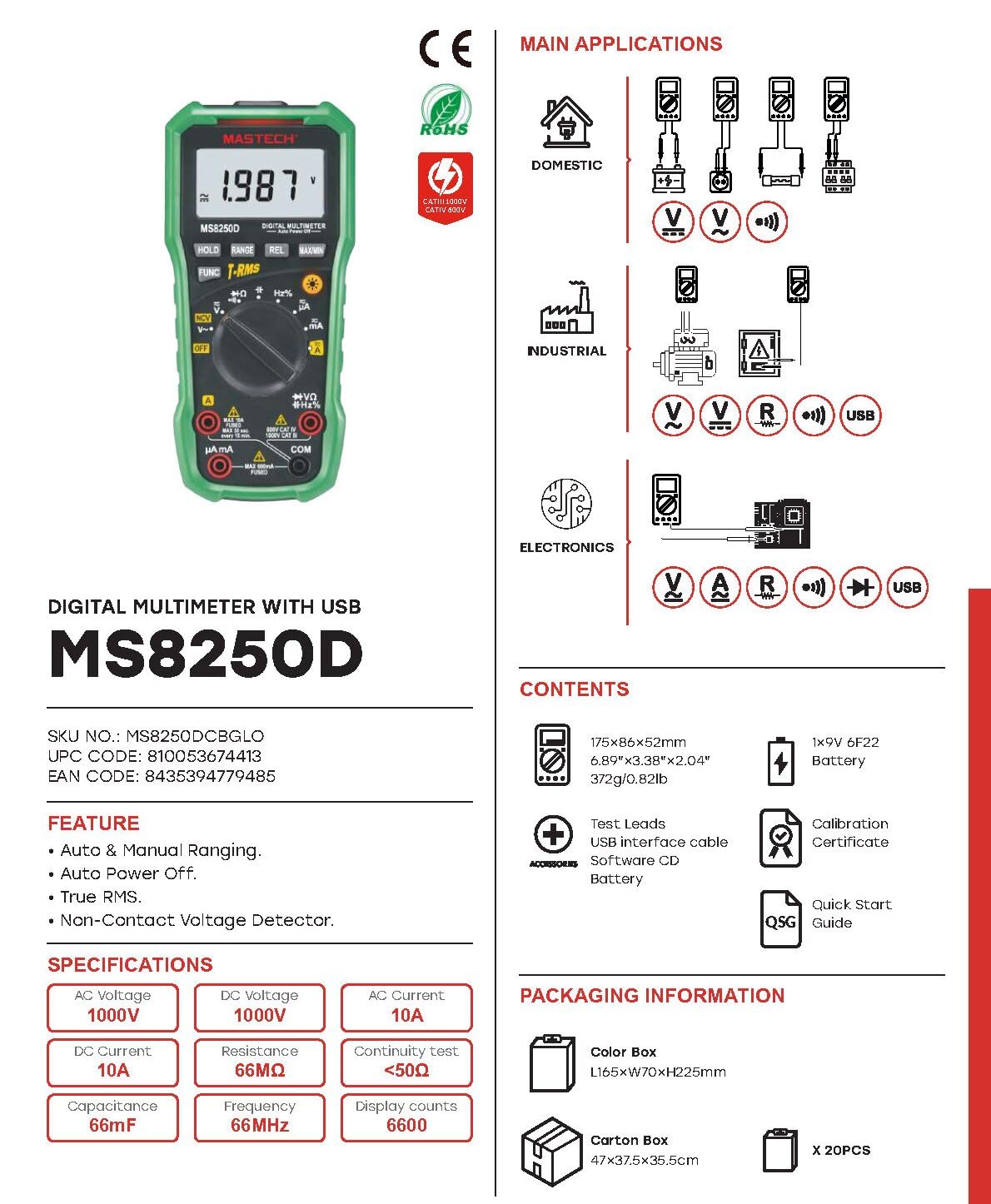
Obrázek 3.2: Diagram showing the Mastech MS8250D Multimeter and its included accessories. The image also illustrates typical applications in domestic, industrial, and electronics settings.
- Digitální multimetr Mastech MS8250D
- Měřicí kabely (červený a černý)
- 1x 9V 6F22 Battery (pre-installed or included separately)
- Kabel rozhraní USB
- Software CD (for Windows OS)
- Kalibrační certifikát
- Rychlý návod
4. Nastavení
4.1 Instalace baterie
The MS8250D requires one 9V 6F22 battery for operation. Two LR44 batteries are also mentioned in specifications, likely for a different internal component or an error in data. For the main power, use the 9V battery.
- Ujistěte se, že je multimetr VYPNUTÝ.
- Najděte kryt přihrádky na baterie na zadní straně měřiče.
- Pomocí šroubováku povolte šroub(y) zajišťující kryt.
- Odstraňte kryt.
- Connect the 9V battery to the battery clips, observing correct polarity (+ and -).
- Vložte baterii do přihrádky.
- Nasaďte kryt prostoru pro baterie a zajistěte jej šroubem (šrouby).
Poznámka: The meter also uses 2 LR44 batteries, which are typically included and pre-installed for specific functions like the backlight or non-contact voltage detection. Refer to the quick-start guide for specific details on these smaller batteries if replacement is needed.
4.2 Připojení měřicích kabelů
Černý měřicí vodič vždy připojte do zdířky COM. Červený měřicí vodič připojte do příslušné vstupní zdířky v závislosti na typu měření:
- Pro svtage, Resistance, Capacitance, Frequency, Diode, and Continuity measurements: Connect the red lead to the VΩHz % zvedák.
- For Current measurements (µA or mA): Connect the red lead to the µA mA zvedák.
- For High Current measurements (A): Connect the red lead to the A zvedák.
Ujistěte se, že jsou měřicí vodiče zcela zasunuty do zdířek.
5. Návod k obsluze
5.1 Zapnutí/vypnutí
To turn the meter ON, rotate the function dial from the "OFF" position to any desired measurement function. To turn the meter OFF, rotate the function dial back to the "OFF" position.
The meter features an Automatické vypnutí function to conserve battery life. It will automatically power off after a period of inactivity. To disable or re-enable this feature, refer to the quick-start guide or the full user manual provided on the software CD.
5.2 Auto Ranging and Manual Ranging
The MS8250D defaults to Automatické nastavení rozsahu, which automatically selects the best measurement range. Press the RANGE přepnout na Manuální rozsah. In manual ranging, each press of the RANGE button cycles through available ranges. To return to auto ranging, press and hold the RANGE tlačítko.
5.3 Měření AC/DC Voltage (V)
- Nastavte volič funkcí na V~ (AC objemtage) nebo V- (DC svtage) pozice.
- Připojte černý testovací vodič k COM zdířku a červený měřicí kabel k VΩHz % zvedák.
- Připojte měřicí sondy k měřenému obvodu nebo součástce.
- Přečtěte si svtage value on the display. The meter will automatically detect AC or DC if the dial is set to the combined V position, or you can use the ZAMĚSTNANEC button to toggle between AC and DC if available on your model.
5.4 Měření střídavého/stejnosměrného proudu (A, mA, µA)
VAROVÁNÍ: Nikdy nepřipojujte měřič paralelně ktagPři měření proudu nepoužívat k zapojení zdroje proudu. Mohlo by dojít k přepálení pojistky nebo poškození měřiče.
- Vypněte napájení obvodu.
- Nastavte volič funkcí na A~ (AC Current), A- (DC Current), mA~, mA-, µA~nebo µA- pozice.
- Připojte černý testovací vodič k COM zvedák.
- Připojte červený testovací kabel k A jack for high current, or µA mA jack for low current.
- Open the circuit where the current is to be measured and connect the meter in series with the load.
- Zapněte napájení obvodu.
- Read the current value on the display. Use the ZAMĚSTNANEC tlačítko pro přepínání mezi střídavým a stejnosměrným proudem v případě potřeby.
5.5 Měření odporu (Ω)
- Nastavte volič funkcí na Ω pozice.
- Připojte černý testovací vodič k COM zdířku a červený měřicí kabel k VΩHz % zvedák.
- Ujistěte se, že testovaný obvod nebo součástka je bez napětí.
- Připojte měřicí sondy napříč součástkou.
- Odečtěte hodnotu odporu na displeji.
5.6 Test diod a test kontinuity
- Nastavte volič funkcí na Dioda/Kontinuita position (often shared with resistance or capacitance).
- Připojte černý testovací vodič k COM zdířku a červený měřicí kabel k VΩHz % zvedák.
- Použijte ZAMĚSTNANEC button to select between Diode Test and Continuity Test.
- Pro test diod: Připojte červenou sondu k anodě a černou sondu ke katodě diody. Na displeji se zobrazí hodnota napětí v dopředném směru.tage drop (typically 0.5V to 0.8V for silicon diodes). Reversing the probes should show "OL" (Open Loop).
- Pro test kontinuity: Connect the probes across the circuit or component. If resistance is less than approximately 50Ω, the buzzer will sound, indicating continuity.
5.7 Měření kapacity (F)
- Nastavte volič funkcí na Kapacita position (often shared with resistance or diode).
- Připojte černý testovací vodič k COM zdířku a červený měřicí kabel k VΩHz % zvedák.
- Před měřením se ujistěte, že je kondenzátor zcela vybitý, aby nedošlo k poškození měřiče.
- Připojte měřicí sondy na svorky kondenzátoru.
- Odečtěte hodnotu kapacity na displeji.
5.8 Měření frekvence (Hz) a pracovního cyklu (%)
- Nastavte volič funkcí na Hz% pozice (často sdílená s vol.tagE).
- Připojte černý testovací vodič k COM zdířku a červený měřicí kabel k VΩHz % zvedák.
- Připojte měřicí sondy ke zdroji signálu.
- The display will show the frequency. Press the ZAMĚSTNANEC button to toggle to Duty Cycle measurement if available.
5.9 Nekontaktní svtage (NCV) Detekce
- Nastavte volič funkcí na NCV pozice.
- Hold the meter with the NCV sensor (usually at the top of the meter) near a live AC voltage zdroj.
- Měřič bude indikovat přítomnost střídavého proudu.tage through an audible beep and/or visual indicator (e.g., LED).
5.10 USB Interface (Windows OS)
The MS8250D includes a USB interface for connecting to a computer running Windows OS. This allows for data logging and real-time monitoring of measurements. Install the provided software from the CD and follow the on-screen instructions for driver installation and software usage.
6. Údržba
6.1 Čištění
Otřete pouzdro měřiče čističemamp hadříkem a jemným čisticím prostředkem. Nepoužívejte abrazivní prostředky ani rozpouštědla. Před použitím se ujistěte, že je měřič zcela suchý.
6.2 Výměna baterie
When the low battery indicator appears on the display, replace the 9V battery immediately to ensure accurate readings. Follow the steps in Section 4.1 Battery Installation.
6.3 Výměna pojistky
If the meter fails to measure current, the fuse may be blown. Fuses are located inside the meter. To replace a fuse:
- Ensure the meter is turned OFF and all test leads are disconnected.
- Otevřete kryt prostoru pro baterie (a případně i hlavní pouzdro, v závislosti na provedení).
- Opatrně vyjměte starou pojistku.
- Replace with a fuse of the exact same type and rating (e.g., F600mA/250V for mA/µA range, F10A/250V for A range). Refer to the meter's internal markings or the full manual for specific fuse ratings.
- Znovu sestavte měřič a ujistěte se, že jsou všechny šrouby utažené.
VAROVÁNÍ: Never use a fuse with a different rating or bypass the fuse. This can damage the meter and pose a serious safety hazard.
7. Řešení problémů
| Problém | Možná příčina | Řešení |
|---|---|---|
| Měřič se nezapne. | Vybitá baterie. | Vyměňte 9V baterii. |
| Zobrazuje se „OL“ (přetížení). | Měření překračuje zvolený rozsah nebo maximální kapacitu měřiče. | Switch to a higher range (if in manual ranging) or ensure the measurement is within the meter's limits. |
| No current reading. | Blown fuse; incorrect lead connection; open circuit. | Check and replace fuse if necessary. Ensure leads are connected correctly (in series). Verify circuit continuity. |
| Nepřesné údaje. | Low battery; poor lead contact; external interference. | Replace battery. Ensure leads are firmly connected. Move away from strong electromagnetic fields. |
| Display shows "USB" but no PC connection. | Drivers not installed; incorrect software settings. | Install drivers from the provided CD. Refer to software manual for connection instructions. |
8. Specifikace
The following table details the technical specifications of the Mastech MS8250D Digital Multimeter.

Obrázek 8.1: Detailed specifications table for the Mastech MS8250D, outlining ranges, resolutions, and accuracies for various measurement functions.
| Funkce | Rozsah | Rezoluce | Přesnost |
|---|---|---|---|
| DC svtage | |||
| 660mV | 0.1mV | ± (0.8 % + 3) | |
| 6.6V/66V/660V/1000V | 1mV/10mV/0.1V/1V | ± (0.5 % + 5) | |
| AC svtage (True RMS) | |||
| 660mV | 0.1mV | ± (1.5 % + 5) | |
| 6.6V/66V | 1 mV/10 mV | ± (1.2 % + 5) | |
| 660V/1000V | 0.1V/1V | ± (1.0 % + 3) | |
| Stejnosměrný proud | |||
| 660 uA/6600 uA/66 mA/660 mA | 0.1µA/1µA/10µA/0.1mA | ± (1.0 % + 5) | |
| 10A | 10 mA | ± (2.0 % + 5) | |
| Střídavý proud (True RMS) | |||
| 660 uA/6600 uA/66 mA/660 mA | 0.1 uA/1 uA/0.01 mA/0.1 mA | ± (1.5 % + 5) | |
| 10A | 10 mA | ± (3.0 % + 5) | |
| Odpor | |||
| 660Ω / 6.6kΩ / 66kΩ / 660kΩ / 6.6MΩ | 0.1Ω / 1Ω / 10Ω / 100Ω / 1kΩ | ± (0.8 % + 5) | |
| 66 MΩ | 10kΩ | ± (1.5 % + 5) | |
| Kapacita | |||
| 6.6nF/66nF/660nF/6.6µF/66µF | 1pF/10pF/0.1nF/1nF/10nF | ± (4.0 % + 5) | |
| 600 µF | 1 µF | ± (3.0 % + 5) | |
| 6.6 mF/66 mF | 1µF/10µF | ± (4.0 % + 5) | |
| Frekvence | |||
| 66Hz/660Hz/6.6kHz/66kHz | 0.01 Hz / 0.1 Hz / 1 Hz / 10 Hz | ± (1.5 % + 5) | |
| 660kHz/6.6MHz/66MHz | 0.1kHz / 1kHz / 10kHz | ± (1.5 % + 5) | |
| Pracovní cyklus | |||
| 0.1%~99.9% | 0.1 % | ± (2.0 % + 5) | |
Obecné specifikace:
- Zobrazit: 6600 počtů
- Zdroj napájení: 1x 9V 6F22 Battery (main power), 2x LR44 batteries (auxiliary, e.g., backlight)
- Automatické vypnutí: Ano
- True RMS: Ano
- Bezkontaktní svtage (NCV) Detector: Ano
- Volumen otevřené diodytage: 3.2V
- Bzučák kontinuity: < 50Ω
- MAX/MIN: Ano
- Pozastavení dat: Ano
- Zobrazení slabé baterie: Ano
- Podsvícení displeje: Ano
- USB rozhraní: Yes (Windows OS)
- Hodnocení bezpečnosti: CAT III 1000V / CAT IV 600V
- Přesnost měření: 0.4% (general, specific accuracies per function in table)
- Provozní svtage (Min): 3.2 voltů
- Hodnocení horní teploty: 50 stupňů Celsia
- Rozměry (D x Š x V): 20 x 15 x 25 cm
- Hmotnost položky: 1 kg
- Materiál: Akrylonitrilbutadienstyren (ABS)
- Barva: Modrý
- Výrobce: MASTECH
- Země původu: Tchaj-wan
- certifikace: CE, RoHS, UL
9. Záruka a podpora
Mastech products are designed for reliability and durability. For specific warranty information, please refer to the warranty card included with your product or contact Mastech customer support directly. Typically, Mastech offers a limited warranty against defects in materials and workmanship.
For technical support, troubleshooting assistance, or warranty claims, please contact your authorized Mastech dealer or visit the official Mastech webstránky pro kontaktní informace.
Doba dostupnosti náhradních dílů v EU: 1 rok


