Zavedení
Thank you for choosing the Mastech MS8233D Digital Multimeter. This manual provides essential information for the safe and effective operation, maintenance, and troubleshooting of your device. Please read this manual thoroughly before use and keep it for future reference.
Bezpečnostní informace
VAROVÁNÍ: Abyste předešli úrazu elektrickým proudem nebo zranění osob, přečtěte si před použitím tohoto produktu všechny bezpečnostní informace a pochopte je.
- Před měřením se vždy ujistěte, že multimetr je ve správném režimu a rozsahu.
- Neaplikujte více než jmenovitý objemtage, as marked on the meter, between terminals or between any terminal and earth ground. The MS8233D has a Safety Rating of CATII 600V.
- Buďte opatrní při práci s objtagnad 30 V AC RMS, 42 V peak nebo 60 V DC. Takové napětítages představují nebezpečí úrazu elektrickým proudem.
- Během měření držte prsty za bariérami sondy.
- Do not use the meter if it is damaged or if the case is open. Inspect the meter and test leads before use.
- Pro zajištění přesných údajů ihned vyměňte baterii, jakmile se zobrazí indikátor slabé baterie.
- Nepoužívejte měřič v prostředí s výbušnými plyny, parami nebo prachem.
Klíčové vlastnosti
The Mastech MS8233D Digital Multimeter offers a range of functionalities for various electrical measurements:
- Zobrazit: 2000 měření pro přesné odečty.
- V rozsahu: Auto and Manual Ranging capabilities.
- Test diod: Features a Diode Open Voltage 1.5V.
- Test kontinuity: Audible buzzer for resistance less than 60Ω.
- Pozastavení dat: Freezes the displayed reading for convenience.
- Automatické vypnutí: Šetří výdrž baterie.
- Bezkontaktní svtage Detekce (NCV): Pro identifikaci vodičů pod napětím bez přímého kontaktu.
- Maximální měření: Records the highest value measured.
- Podsvícení displeje: Pro viditelnost za zhoršených světelných podmínek.
- Zobrazení slabé baterie: Indikuje, kdy je nutná výměna baterie.
- Napájení: Operates on 1x 9V 6F22 Battery.
- certifikace: V souladu s RoHS.
- Hodnocení bezpečnosti: CATII 600V.
Obrázek 1: Přední strana view of the Mastech MS8233D Digital Multimeter, highlighting the display, rotary function switch, and input terminals.
Konec produktuview a Komponenty
The MS8233D multimeter is designed for ease of use and durability. Familiarize yourself with its main parts:

Obrázek 2: Přesview of the MS8233D Digital Multimeter, illustrating its physical dimensions, power supply, and typical applications in domestic, industrial, and electronics settings.
- LCD displej: Zobrazuje naměřené hodnoty, jednotky a funkční indikátory.
- Funkce otočného přepínače: Used to select the desired measurement function (e.g., ACV, DCV, Resistance, Diode, Continuity, Temperature, NCV).
- Vstupní konektory: Terminals for connecting test leads.
- COM Jack: Společný (záporný) vstupní terminál pro všechna měření.
- Zdířka VΩmA: Pozitivní vstupní svorka pro zvtage, resistance, diode, continuity, and small current measurements.
- 10A konektor: Positive input terminal for high current (up to 10A) measurements.
- Funkční tlačítka: For features like Data Hold, Backlight, and Range selection.
Nastavení
Instalace baterie
The MS8233D requires one 9V 6F22 battery for operation. To install or replace the battery:
- Ujistěte se, že je multimetr vypnutý, a odpojte všechny měřicí vodiče od vstupních svorek.
- Najděte kryt přihrádky na baterie na zadní straně měřiče.
- Use a screwdriver to loosen the screw(s) on the battery cover and remove the cover.
- Connect the new 9V battery to the battery clips, observing the correct polarity.
- Vložte baterii do přihrádky a nasaďte kryt, který zajistíte šroubem (šrouby).
Poznámka: The meter includes a low battery indicator. Replace the battery promptly when this indicator appears to maintain measurement accuracy.
Návod k obsluze
Before making any measurement, ensure the test leads are properly connected and the function switch is set to the desired range.
Měření DC Voltage (DCV)
- Insert the red test lead into the VΩmA jack and the black test lead into the COM jack.
- Set the rotary switch to the desired DCV range (e.g., 200mV, 2V, 20V, 200V, 600V). If unsure, start with the highest range or use auto-ranging if available.
- Connect the test probes across the component or circuit to be measured, observing polarity.
- Přečtěte si svtage hodnota na LCD displeji.
Měření AC Voltage (ACV)
- Insert the red test lead into the VΩmA jack and the black test lead into the COM jack.
- Set the rotary switch to the desired ACV range (e.g., 2V, 20V, 200V, 600V).
- Připojte měřicí sondy k měřené součástce nebo obvodu.
- Přečtěte si svtage hodnota na LCD displeji.
Measuring DC/AC Current (DCA/ACA)
CAUTION: Never connect the meter in parallel to a voltagzdroj při měření proudu. Mohlo by dojít k poškození měřicího přístroje a obvodu.
- For currents up to 200mA, insert the red test lead into the VΩmA jack. For currents up to 10A, insert the red test lead into the 10A jack. Insert the black test lead into the COM jack.
- Set the rotary switch to the desired DC or AC current range (e.g., 200µA, 2000µA, 20mA, 200mA, 10A).
- Otevřete obvod, kde má být měřen proud, a zapojte měřič sériově se zátěží.
- Odečtěte aktuální hodnotu na LCD displeji.
Measuring Resistance (Ω)
- Insert the red test lead into the VΩmA jack and the black test lead into the COM jack.
- Set the rotary switch to the desired Resistance range (e.g., 200Ω, 2kΩ, 20kΩ, 200kΩ, 2MΩ, 20MΩ).
- Před měřením odporu se ujistěte, že je obvod nebo součástka bez napětí.
- Připojte měřicí sondy napříč součástkou.
- Odečtěte hodnotu odporu na LCD displeji.
Test diod
- Insert the red test lead into the VΩmA jack and the black test lead into the COM jack.
- Set the rotary switch to the Diode symbol (usually shared with Continuity).
- Připojte červenou sondu k anodě a černou sondu ke katodě diody.
- Na displeji se zobrazí hlasitost vpředtage drop. Reverse the probes; the display should show 'OL' (Open Loop) for a good diode.
Test kontinuity
- Insert the red test lead into the VΩmA jack and the black test lead into the COM jack.
- Set the rotary switch to the Continuity symbol (usually shared with Diode).
- Připojte měřicí sondy k obvodu nebo součástce.
- If the resistance is below approximately 60Ω, the buzzer will sound, indicating continuity. The display will also show the resistance value.
Bezkontaktní svtage (NCV) Detekce
- Set the rotary switch to the NCV function.
- Move the top part of the meter (NCV sensor area) close to the conductor suspected of having AC voltage.
- Měřič vydá zvukový signál a indikátor NCV se rozsvítí, pokud je napětí ACtage je detekováno.
Funkce Data Hold
Stiskněte tlačítko „HOLD“ pro zmrazení aktuální hodnoty na displeji. Dalším stisknutím zrušíte pozastavení a obnovíte měření v reálném čase.
Funkce podsvícení
Press the 'LIGHT' button to turn on the display backlight. Press it again to turn it off. The backlight may automatically turn off after a short period to conserve battery.
Údržba
Čištění
Otřete pouzdro měřiče čističemamp hadříkem a jemným čisticím prostředkem. Nepoužívejte abrazivní prostředky ani rozpouštědla. Před použitím se ujistěte, že je měřič zcela suchý.
Výměna baterie
Refer to the 'Battery Installation' section under 'Setup' for instructions on replacing the 9V battery. Always replace the battery when the low battery indicator is displayed to ensure accurate readings and proper operation.
Výměna pojistky
The MS8233D is equipped with internal fuses to protect against overcurrent. If the current measurement function stops working, the fuse may need replacement. Fuse replacement should only be performed by qualified personnel. Use only fuses of the specified type and rating (e.g., F200mA/250V for mA range, F10A/250V for 10A range).
Odstraňování problémů
| Problém | Možná příčina | Řešení |
|---|---|---|
| Žádný displej nebo tlumený displej | Vybitá nebo vybitá baterie | Vyměňte 9V baterii. |
| Nesprávné údaje | Nesprávná volba funkce/rozsahu; špatné připojení měřicího kabelu; slabá baterie | Verify function and range; check test lead connections; replace battery. |
| Měření proudu nefunguje | Spálená pojistka | Replace the appropriate fuse (refer to Maintenance section). |
| 'OL' (Overload) displayed | Measurement exceeds selected range; open circuit (for continuity/resistance) | Select a higher range; check for open circuit. |
| Žádný pípnutí pro signalizaci kontinuity | Resistance too high; open circuit | Check for continuity; ensure resistance is below 60Ω. |
Specifikace
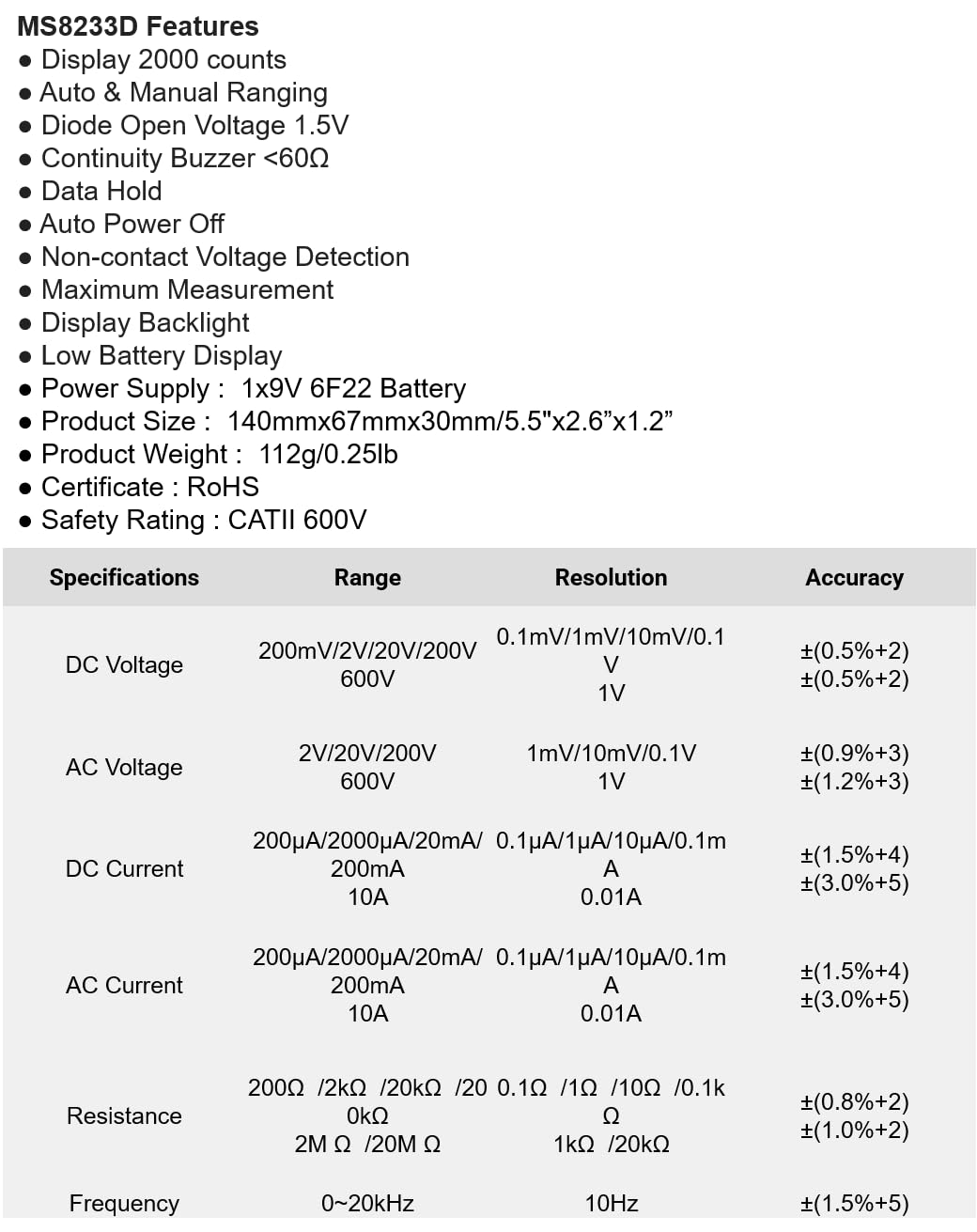
The following table details the measurement ranges, resolutions, and accuracies for the Mastech MS8233D Digital Multimeter:

Figure 3: Comprehensive specifications for the MS8233D, outlining measurement capabilities and precision.
| Funkce | Specifikace |
|---|---|
| Zobrazit | 2000 počítá |
| DC svtage | 200mV / 2V / 20V / 200V / 600V |
| AC svtage | 2V / 20V / 200V / 600V |
| Stejnosměrný proud | 200µA / 2000µA / 20mA / 200mA / 10A |
| AC proud | 200µA / 2000µA / 20mA / 200mA / 10A |
| Odpor | 200 Ω / 2 kΩ / 20 kΩ / 200 kΩ / 2 MΩ / 20 MΩ |
| Frekvence | 0-20 kHz |
| Volumen otevřené diodytage | 1.5V |
| Bzučák spojitosti | <60Ω |
| Napájení | 1x 9V 6F22 baterie |
| Rozměry produktu | 140 mm x 67 mm x 30 mm (5.5" x 2.6" x 1.2") |
| Hmotnost produktu | 112 g (0.25 lb) |
| Hodnocení bezpečnosti | CATII 600V |
| Certifikace | CE, RoHS |
Záruka a podpora
Informace o záruce a technickou podporu naleznete v dokumentaci dodané s vaším nákupem nebo se obraťte přímo na prodejce/výrobce. Uschovejte si účtenku jako doklad o koupi pro případné reklamace.


