1. Úvod
Thank you for choosing the De'Longhi Rivelia EXAM440.35.BG Automatic Coffee Machine. This appliance is designed to provide a premium coffee experience with ease of use and customizable options. Please read this manual carefully before using the appliance to ensure proper operation, maintenance, and safety.
2. Důležité bezpečnostní pokyny
Při používání elektrických spotřebičů vždy dodržujte základní bezpečnostní opatření, abyste snížili riziko požáru, úrazu elektrickým proudem a zranění osob.
- Před použitím si přečtěte všechny pokyny.
- Nedotýkejte se horkých povrchů. Použijte rukojeti nebo knoflíky.
- Abyste zabránili požáru, úrazu elektrickým proudem a zraněním, neponořujte kabel, zástrčky nebo zařízení do vody nebo jiné kapaliny.
- Když je jakýkoli spotřebič používán dětmi nebo v jejich blízkosti, je nutný pečlivý dohled.
- Vytáhněte zástrčku ze zásuvky, když ji nepoužíváte a před čištěním. Před nasazením nebo sejmutím dílů a před čištěním spotřebiče nechte vychladnout.
- Neprovozujte žádný spotřebič s poškozenou šňůrou nebo zástrčkou nebo poté, co spotřebič nefunguje správně nebo byl jakýmkoliv způsobem poškozen. Vraťte spotřebič do nejbližšího autorizovaného servisního střediska ke kontrole, opravě nebo seřízení.
- Použití příslušenství, které není doporučeno výrobcem spotřebiče, může způsobit požár, úraz elektrickým proudem nebo zranění.
- Nepoužívejte venku.
- Nenechávejte kabel viset přes okraj stolu nebo pultu ani se dotýkat horkých povrchů.
- Neumisťujte na horký plynový nebo elektrický hořák nebo do jeho blízkosti nebo do vyhřáté trouby.
- Vždy nejprve zapojte zástrčku do spotřebiče a poté zapojte kabel do zásuvky. Pro odpojení vypněte jakýkoli ovládací prvek a poté vytáhněte zástrčku ze zásuvky.
- Nepoužívejte spotřebič k jinému než určenému použití.
- Při likvidaci horké páry buďte velmi opatrní.
3. Konec produktuview
The De'Longhi Rivelia EXAM440.35.BG is a compact automatic coffee machine featuring a 3.5-inch color touchscreen, a manual milk frother, and the innovative Bean Switch System for easily changing coffee bean varieties.

Obrázek 3.1: Přední view of the De'Longhi Rivelia EXAM440.35.BG coffee machine in Sand Beige.
Klíčové komponenty:
- 3.5" Full-Touch Color Display: For intuitive control and personalized coffee routines.
- Bean Switch System: Two interchangeable 250g bean containers for different coffee varieties.
- Ruční napěňovač mléka: For preparing creamy milk foam for lattes and cappuccinos.
- Nádrž na vodu: Odnímatelná, objem 1.4 litru.
- Odkapávací miska a nádoba na sedlinu: For collecting excess water and used coffee grounds.
- Výpust kávy: Nastavitelná výška pro různé velikosti košíčků.

Obrázek 3.2: The De'Longhi Rivelia series, showcasing various color options including Sand Beige.
4. Počáteční nastavení
4.1 Vybalení a umístění
- Opatrně vyjměte stroj z obalu.
- Umístěte stroj na stabilní, rovný povrch, mimo dosah stříkající vody a zdrojů tepla.
- Zajistěte kolem stroje dostatečný prostor pro větrání a přístup ke komponentům.
4.2 Plnění vodní nádrže
- Vyjměte nádržku na vodu z boku stroje.
- Naplňte nádržku čerstvou studenou vodou z kohoutku po značku MAX.
- Replace the water tank securely into the machine.
4.3 Filling the Bean Container (Bean Switch System)
The Rivelia features two interchangeable bean containers. You can switch between them to enjoy different coffee varieties.
- Lift the lid of a bean container.
- Pour fresh coffee beans into the container. Do not overfill.
- Place the filled bean container onto the machine's bean hopper. Ensure it is seated correctly.
- To switch beans, simply lift the current container, replace it with another filled container, and the machine will detect the change.

Obrázek 4.1: The Bean Switch System with two interchangeable bean containers.

Obrázek 4.2: Illustration of filling the bean container with fresh coffee beans.
4.4 První použití a cyklus oplachování
Before making your first coffee, perform a rinsing cycle to clean the internal circuits.
- Zapojte stroj do elektrické zásuvky.
- Zapněte stroj pomocí tlačítka napájení.
- Follow the on-screen instructions for the initial setup, including language selection and water hardness.
- The machine will automatically perform a rinsing cycle. Place a container under the coffee spouts and hot water spout to collect the water.
- Jakmile je cyklus oplachování dokončen, je stroj připraven k použití.
5. Provoz
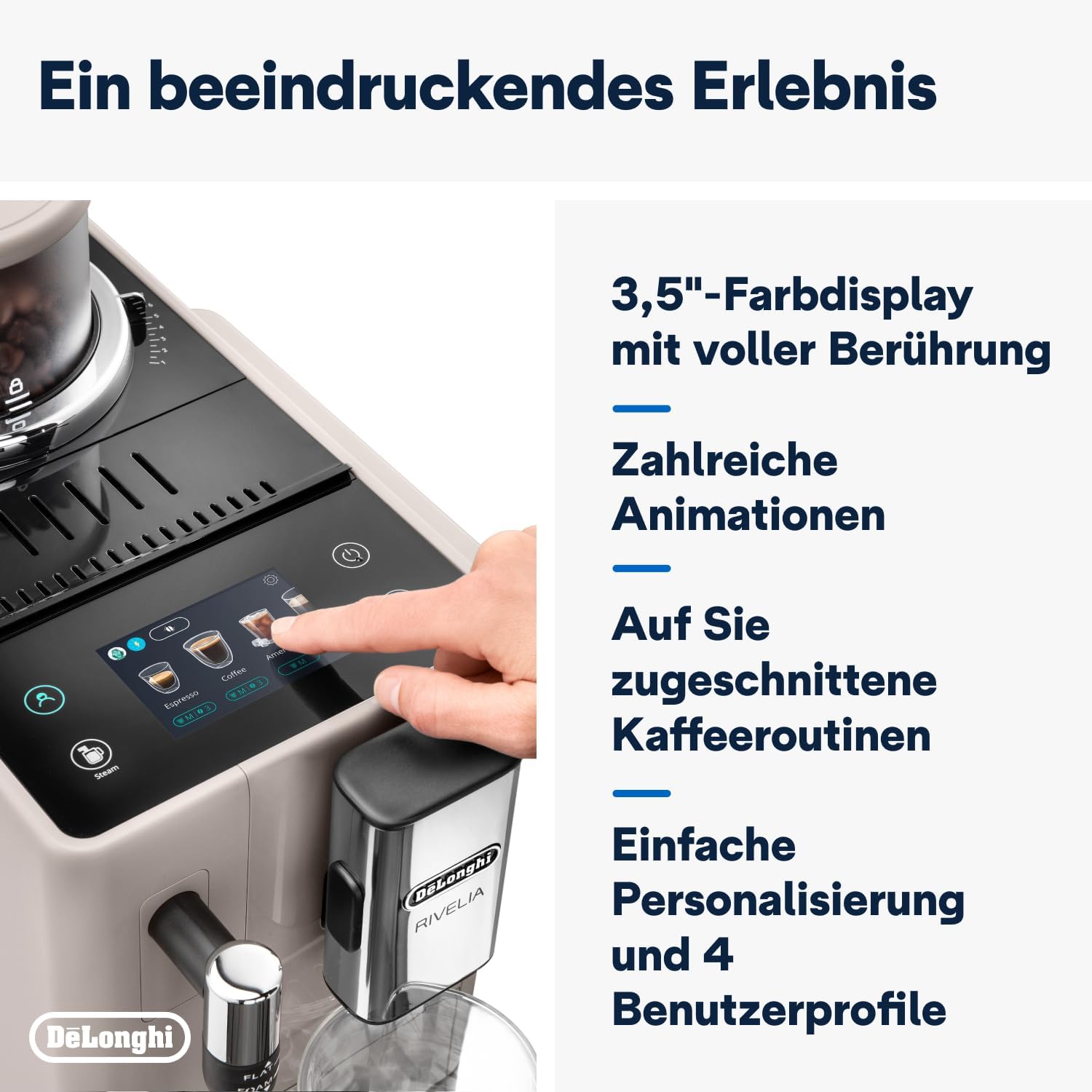
5.1 Using the 3.5" Full-Touch Color Display
The intuitive touchscreen allows you to select beverages, customize settings, and manage user profiles.

Obrázek 5.1: The 3.5-inch full-touch color display in use, showing beverage selection.
- Výběr nápojů: Swipe through the menu to choose from 8 pre-programmed coffee recipes.
- Přizpůsobení: Adjust coffee strength, temperature, and volume for each drink.
- Uživatel Profiles: Create up to 4 personalized user profiles to save your favorite settings. The machine adapts its menu based on your routine.
- Technologie Bean Adapt: This technology automatically adjusts grinding parameters, dosage, and brewing temperature to optimize extraction for the selected coffee bean variety.
5.2 Příprava kávových nápojů
- Ensure the water tank is filled and a bean container is in place.
- Umístěte šálek pod výpusti kávy.
- Vyberte si požadovaný nápoj z nabídky na dotykové obrazovce.
- Adjust settings (strength, volume) if desired.
- Press the "Start" icon to begin brewing.

Obrázek 5.2: A selection of coffee drinks, including espresso, americano, and milk-based beverages.
5.3 Použití ručního napěňovače mléka
The integrated steam wand allows you to manually froth milk for creamy cappuccinos and lattes.
- Naplňte džbán s mlékem studeným mlékem (mléčným nebo rostlinným).
- Umístěte parní trysku do mléka, těsně pod hladinu.
- Aktivujte funkci páry pomocí dotykové obrazovky.
- Move the jug up and down to create desired foam texture.
- Jakmile se napění, vypněte funkci páry a ihned vyčistěte trysku.

Obrázek 5.3: Demonstrating the manual milk frother for creating creamy milk foam.
5.4 Výdej horké vody
The machine can also dispense hot water for teas or other hot beverages.
- Place a cup under the hot water spout (usually the steam wand).
- Select the hot water function from the touchscreen.
- Press "Start" to dispense hot water.
6. Čištění a údržba
Pravidelné čištění zajišťuje optimální výkon a prodlužuje životnost vašeho kávovaru.
6.1 Denní čištění
- Odkapávací miska a nádoba na sedlinu: Denně vyprázdněte a propláchněte. Stroj vás upozorní, kdy je třeba vyprázdnit nádobu na sedlinu.
- Nádrž na vodu: Denně oplachujte a doplňujte čerstvou vodou.
- Výpustky kávy: Vymazat s reklamouamp tkanina.
- Napěňovač mléka: Po každém použití otřete parní tryskuamp cloth and purge steam briefly to clear any milk residue.
6.2 Týdenní úklid
- Spařovací jednotka: Remove the brew unit (refer to the machine's internal instructions for removal) and rinse it thoroughly under running water. Allow it to air dry before reinserting.
- Nádoby na fazole: Empty and clean the bean containers, especially when switching bean types, to prevent oil buildup.
6.3 Odvápnění
The machine will indicate when descaling is required. Use only De'Longhi descaling solution and follow the on-screen instructions precisely. Descaling regularly prevents limescale buildup and maintains coffee quality.
7. Řešení problémů
This section addresses common issues you might encounter with your De'Longhi Rivelia EXAM440.35.BG.
| Problém | Možná příčina | Řešení |
|---|---|---|
| Stroj se nezapne. | Není zapojené; zásuvka je vadná. | Zkontrolujte připojení napájecího kabelu; zkuste jinou zásuvku. |
| "Fill Water Tank" message appears, but tank is full. | Nádrž na vodu není správně vložena; problém se senzorem. | Remove and reinsert the water tank firmly. Ensure the float in the tank moves freely. |
| Káva je příliš slabá nebo vodnatá. | Příliš hrubé nastavení mletí; nedostatečné dávkování kávy; stará kávová zrna. | Adjust grind setting finer; increase coffee strength via menu; use fresh beans. |
| Napěňovač mléka nepění. | Ucpaná parní tryska; mléko není dostatečně studené; nesprávný druh mléka. | Clean steam wand thoroughly; use cold milk; ensure milk is suitable for frothing. |
| Touchscreen unresponsive or scratched. | Dočasná softwarová závada; fyzické poškození. | Restart the machine. If scratched, contact customer support for service options. Avoid abrasive cleaners. |
8. Technické specifikace
| Funkce | Detail |
|---|---|
| Značka | De'Longhi |
| Číslo modelu | EXAM440.35.BG |
| Barva | Písková béžová |
| Rozměry (D x Š x V) | 43 x 24.5 x 38.5 cm |
| Hmotnost | 9.8 kg |
| Kapacita vodní nádrže | 1.4 litrů |
| Moc | 1450 wattů |
| svtage | 240 voltů |
| Materiál | Kov |
| Speciální funkce | 4 uživatel profiles, 8 coffee beverages, Bean Switch System, Integrated steam wand, Coffee routines, Bean Adapt Technology |
| Automatické vypnutí | Ano |
Obrázek 8.1: Rozměry výrobku: 245 mm (šířka) x 430 mm (hloubka) x 385 mm (výška).
9. Záruka a podpora
9.1 Informace o záruce
Your De'Longhi Rivelia EXAM440.35.BG coffee machine comes with a standard manufacturer's warranty. Please refer to the warranty card included in your product packaging for specific terms and conditions, including the warranty period and coverage details. Keep your proof of purchase for warranty claims.
9.2 Zákaznická podpora
For technical assistance, spare parts, or service, please contact De'Longhi customer support. You can find contact information on the official De'Longhi webna webu nebo v dokumentaci dodané se spotřebičem.
- Online podpora: Navštivte oficiální prodejnu De'Longhi webweb s nejčastějšími dotazy, průvodci řešením problémů a registrací produktů.
- Telefonická podpora: Contact numbers are typically listed in your warranty booklet or on the brand's webmísto.