1. Úvod
This manual provides essential information for the proper setup, operation, and maintenance of your Eyoyo EM07C 7-Inch Mini HDMI Monitor. Please read this manual thoroughly before using the product to ensure optimal performance and safety.

Image 1.1: Eyoyo EM07C 7-Inch Mini HDMI Monitor with included remote control and stand.
2. Obsah balení
Ověřte, zda jsou všechny níže uvedené položky součástí balení. Pokud některé položky chybí nebo jsou poškozené, kontaktujte zákaznickou podporu.
- 1 x 7" Small Monitor
- 1 x Adjustable Stand & Stand-Sticker
- 1 x HDMI kabel
- 1 x BNC kabel
- Kabel 1 x AV
- 1 x Dálkový ovladač
- 1 x napájecí adaptér
- 1 x Uživatelská příručka (tento dokument)

Image 2.1: All items included in the Eyoyo EM07C monitor package.
3. Specifikace
| Funkce | Detail |
|---|---|
| Číslo modelu | EM07C |
| Velikost obrazovky | 7 palce |
| Rezoluce | 1024 x 600 Pixels (SVGA) |
| Poměr stran | 16:9 |
| Jas obrázku | 400 XNUMX Candela |
| Kontrastní poměr | 500:1 |
| Viewúhel | 160° |
| Vstupní rozhraní | HDMI, VGA, BNC, USB, AV |
| Celkový počet portů USB | 1 (USB 2.0 support) |
| svtage | 12 voltů |
| Rozměry produktu | 1.3 x 7.2 x 4.9 palce |
| Hmotnost položky | 2 libry |
| Výrobce | Eyoyo |
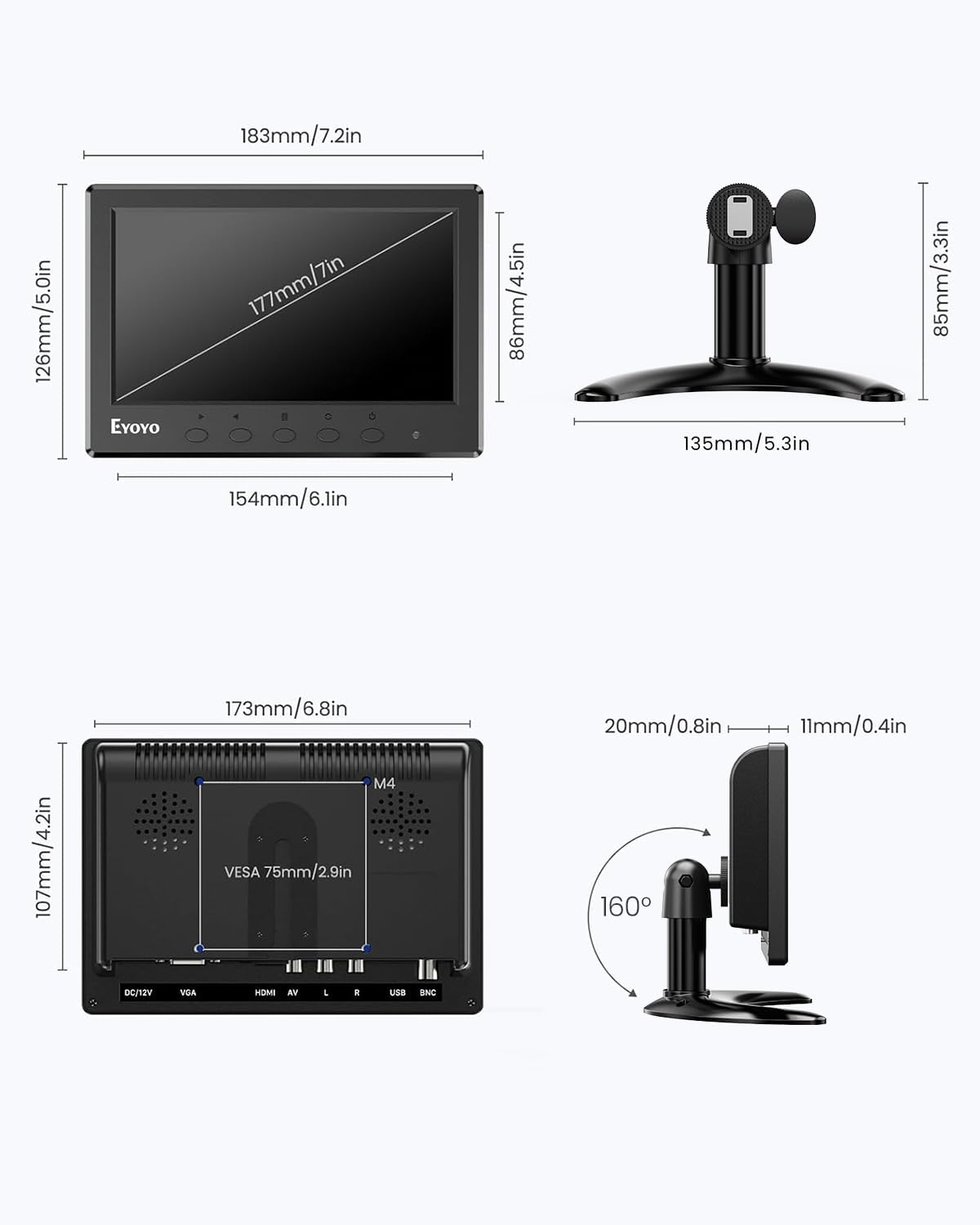
Image 3.1: Physical dimensions of the monitor and stand.
4. Nastavení
4.1 Sestavení stojanu
The monitor can be used with the included desktop stand or mounted using a VESA 75mm mount (not included).
- Attach the adjustable stand to the monitor's rear mounting point.
- Zajistěte stojan utažením šroubu.
- Upravte viewing angle and height as desired.
- For added stability, apply the provided stand-sticker to the base of the stand.

Image 4.1: Visual guide for monitor stand installation.

Image 4.2: Two installation options: desktop stand and VESA wall mount.
4.2 Připojení k zařízením
The monitor supports multiple input interfaces for broad compatibility.
- HDMI vstup: Connect to PCs, laptops, Raspberry Pi, DVD players, game consoles (PS4, Xbox), and TV boxes using the provided HDMI cable.
- VGA vstup: Connect to computers and laptops using the provided VGA cable.
- BNC vstup: Primarily for analog CCTV security cameras using the provided BNC cable. Note: BNC can only connect analog cameras. TVI/CVI/AHD coaxial HD cameras require a converter adapter (not included).
- AV vstup: Connect to DVD players, VCD players, and TV boxes using the provided AV cable.
- Vstup USB: Supports USB 2.0 for media playback from U Disks. Audio, video, visuals, and files must reside in an initial folder for recognition.
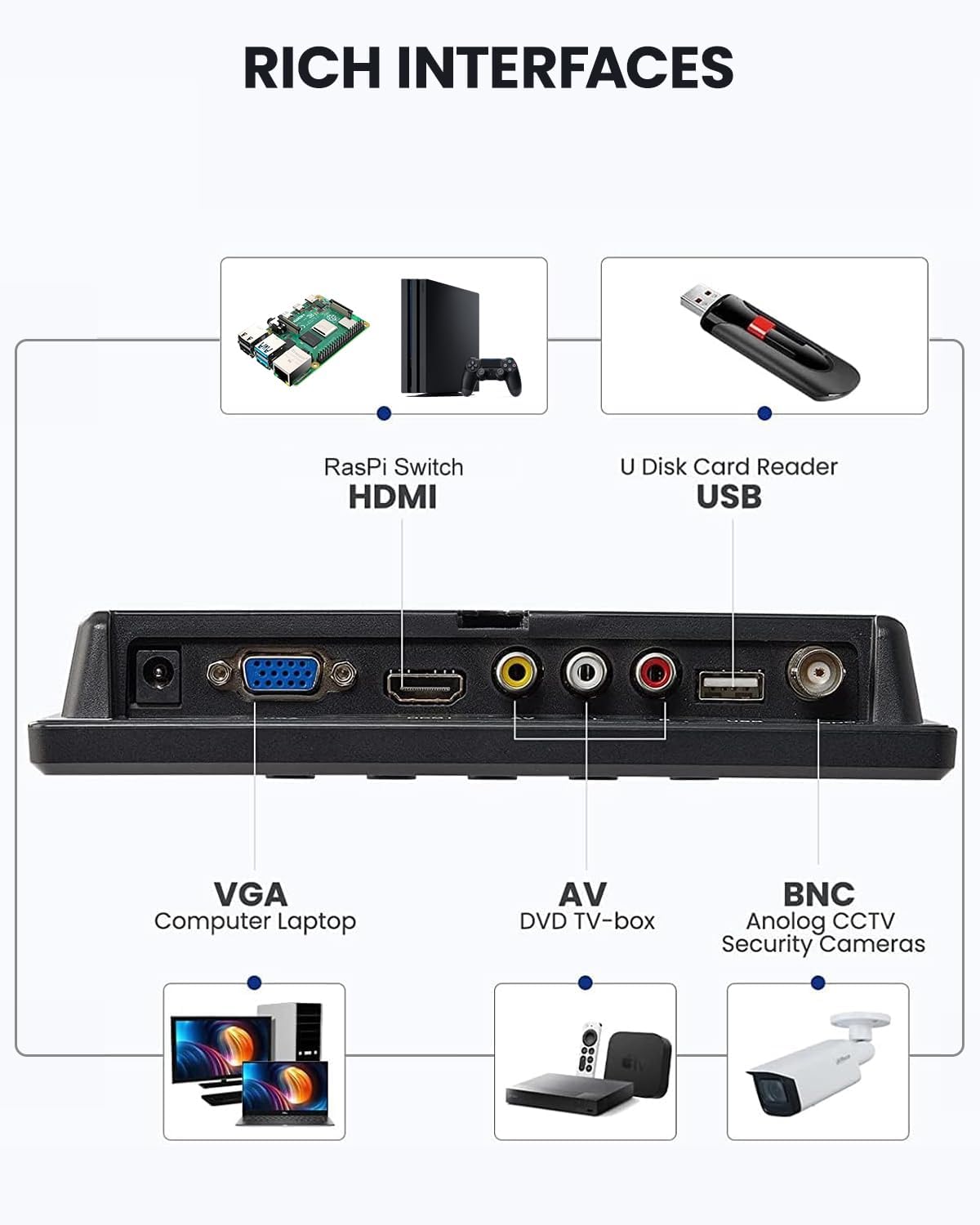
Obrázek 4.3: Konecview of the monitor's rich input interfaces.
Video 4.1: A demonstration of connecting the Eyoyo 7" Mini Security Camera Monitor to various devices and its features.

Image 4.4: BNC input compatibility details for analog CCTV.
5. Návod k obsluze
5.1 Zapnutí/vypnutí
Connect the power adapter to the DC 12V port on the monitor and plug it into a power outlet. Press the power button on the monitor or the remote control to turn the device on or off.
5.2 Výběr vstupního zdroje
Use the "AV1/AV2" button on the monitor or the "SELECT" button on the remote control to cycle through available input sources (HDMI, VGA, BNC, AV, USB).
5.3 Navigace v menu a nastavení
Access the On-Screen Display (OSD) menu by pressing the "MENU" button on the monitor or remote. Use the arrow buttons (or +/- buttons on the monitor) to navigate and "ENTER" to confirm selections.
- Nastavení obrazu: Adjust brightness, contrast, color, sharpness, and tint.
- Nastavení zvuku: Control volume and select sound modes. The monitor features dual built-in speakers.
- Volby zobrazení: Adjust aspect ratio (16:9, 4:3), enable image mirror/flip functions (vertical/horizontal inversion).
- Jazyk: Vyberte požadovaný jazyk nabídky.

Image 5.1: Image Mirror Functionality for various applications.
Video 5.1: A demonstration of connecting the monitor to a computer via Type-C and VGA, and navigating the OSD menu.

Image 5.2: Key display features of the 7-inch IPS monitor.
6. Údržba
- Čištění: K čištění obrazovky monitoru a krytu použijte měkký, suchý hadřík.asing. Avoid using liquid cleaners or aerosol sprays directly on the screen.
- Skladování: Monitor skladujte na chladném a suchém místě mimo dosah přímého slunečního záření a extrémních teplot.
- Zacházení: Handle the monitor with care to prevent damage to the screen or internal components.
7. Řešení problémů
- Bez signálu:
- Ujistěte se, že je napájecí adaptér bezpečně připojen a monitor je zapnutý.
- Verify that the input cable (HDMI, VGA, BNC, AV) is correctly connected to both the monitor and the source device.
- Select the correct input source using the "AV1/AV2" or "SELECT" button.
- Check the resolution settings of your source device to ensure compatibility with the monitor (1024x600).
- Žádný zvuk:
- Zkontrolujte nastavení hlasitosti na monitoru i zdrojovém zařízení.
- Ensure the audio cables (for AV input) are correctly connected.
- For USB media playback, ensure audio files are in a recognized format and located in the root directory or an initial folder.
- Image Distortion/Poor Quality:
- Adjust picture settings (brightness, contrast, color, sharpness) in the OSD menu.
- Ensure the cable connections are secure and not damaged.
- Zkuste jiný kabel, pokud je k dispozici.
- Dálkové ovládání nefunguje:
- Ujistěte se, že jsou baterie správně vloženy a nejsou vybité.
- Point the remote directly at the monitor's infrared receiver.
- Remove any obstructions between the remote and the monitor.
8. Záruka a podpora
Eyoyo provides a 365-day warranty for this product. For technical assistance, troubleshooting, or warranty claims, please contact Eyoyo customer service.
Eyoyo Customer Service:
- Online support is available 7 days a week, 24 hours a day.
- Refer to the official Eyoyo website or your purchase platform for specific contact details.


Image 8.1: Eyoyo brand commitment to customer service and warranty.


