1. Úvod
This manual provides detailed instructions for the installation, operation, and maintenance of the Fortin EVO-AUDT1 Stand-Alone Add-On Remote Start Car Starter System. This system is designed to provide convenient remote engine starting capabilities for compatible Audi Key-Port Vehicles. Please read this manual thoroughly before attempting any installation or operation to ensure proper functionality and safety.
2. Konec produktuview
The Fortin EVO-AUDT1 is an all-in-one universal data bypass and interface module preloaded for specific Audi vehicles. It integrates seamlessly with your vehicle's existing electronics to enable remote start functionality using your original factory key fob.
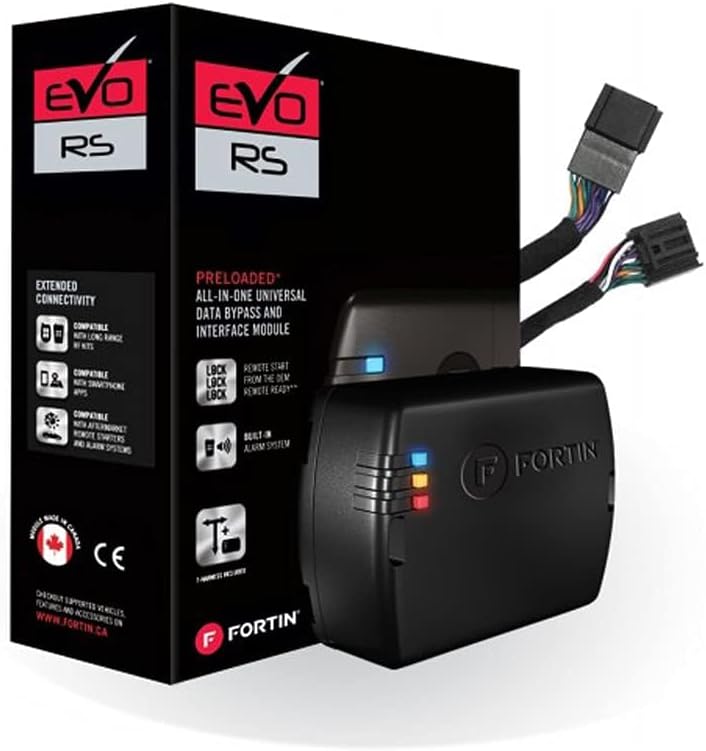
Image: The Fortin EVO-AUDT1 system includes the main module and a preloaded T-Harness for simplified installation, shown here with its retail packaging.
3. Bezpečnostní informace
- Always ensure the vehicle is in Park (P) or Neutral (N) with the parking brake engaged before attempting remote start.
- Do not remote start the vehicle in an enclosed area such as a garage, as exhaust fumes can be dangerous.
- Keep hands and clothing clear of moving engine parts when the engine is running.
- Installation should only be performed by qualified technicians to prevent damage to the vehicle's electrical system.
- Disconnect the vehicle's battery before beginning installation to avoid electrical shorts.
4. Obsah balení
Před zahájením instalace ověřte, zda jsou všechny komponenty přítomny:
- Fortin EVO-AUDT1 Module
- Preloaded T-Harness for Audi Key-Port Vehicles
- Instalační příručka (tento dokument)
5. Nastavení a instalace
Professional installation is highly recommended for this product due to the complexity of vehicle electrical systems. Incorrect installation can lead to vehicle damage or system malfunction.
5.1 Kroky před instalací
- Kompatibilita vozidla: Confirm your Audi vehicle's year, make, and model are compatible with the EVO-AUDT1 system. Refer to the Fortin webweb s nejaktuálnějším seznamem kompatibility.
- Programování modulu: The EVO-AUDT1 module comes preloaded. However, it may require specific programming or firmware updates using a Fortin Flash Link Updater (sold separately) to match your exact vehicle's specifications. Connect the module to a computer with internet access and use the Fortin software to ensure the latest firmware is installed and configured correctly for your vehicle.
- Sbírejte nástroje: Ensure you have all necessary tools, including wire strippers, electrical tape, zip ties, and a multimeter.
5.2 Fyzická instalace
- Odpojit baterii: Odpojte záporný pól baterie vašeho vozidla.
- Access Ignition Harness: Locate and access the vehicle's ignition harness, typically found behind the steering column or dashboard.
- Připojení T-kabelu: Connect the provided T-Harness to the vehicle's ignition harness. The T-Harness is designed for a plug-and-play connection, minimizing the need for wire cutting or splicing. Ensure all connections are secure.
- Připojovací modul: Plug the EVO-AUDT1 module into the T-Harness.
- Bezpečné zapojení: Route and secure all wiring away from moving parts, heat sources, and sharp edges using zip ties.
- Znovu připojte baterii: Znovu připojte baterii vozidla.
5.3 Module Initialization/Programming (In-Vehicle)
After physical installation, the module needs to be initialized with the vehicle. The exact steps may vary slightly depending on your vehicle model and the module's firmware version. Typically, this involves a sequence of key turns and button presses. Refer to the specific vehicle guide available on the Fortin website for precise instructions for your Audi model.
General Initialization Sequence (Example - refer to specific guide for your vehicle):
- Insert the vehicle's key into the ignition.
- Turn the ignition to the ON position (do not start the engine).
- Observe the LED indicators on the Fortin module for specific flashing patterns.
- Follow the prompts (e.g., turn key OFF, open/close door, press brake pedal) as indicated by the module's LED feedback or the specific vehicle guide.
- Once initialization is complete, the module's LED will typically show a solid green or blue light.
6. Návod k obsluze
The Fortin EVO-AUDT1 system utilizes your vehicle's original factory key fob for remote start functionality.
6.1 Dálkové startování vozidla
To remote start your Audi vehicle:
- Ensure the vehicle is locked and all doors, hood, and trunk are closed.
- Press the LOCK button on your factory key fob three (3) times consecutively within 3 seconds.
- The vehicle's parking lights will flash, and the engine will start after a short delay.
- The engine will run for a preset duration (typically 15 minutes) or until the remote start is cancelled.
6.2 Cancelling Remote Start
To cancel a remote start session:
- Press the LOCK button on your factory key fob three (3) times consecutively within 3 seconds while the engine is running via remote start.
- Alternatively, unlock the vehicle using the key fob, open any door, or turn the ignition to the ON position.
6.3 Nastupování do vozidla po dálkovém startování
To enter and drive the vehicle after a remote start:
- Unlock the vehicle using your factory key fob.
- Enter the vehicle. Do NOT press the brake pedal until the key is in the ignition and turned to the ON position.
- Insert the key into the ignition and turn it to the ON/RUN position.
- Press the brake pedal. The remote start will disengage, and the vehicle will transfer to normal key operation.
7. Údržba
The Fortin EVO-AUDT1 module is designed to be maintenance-free. However, consider the following:
- Ensure the module and wiring remain securely mounted and free from moisture or excessive heat.
- Avoid exposing the module to extreme temperatures or direct water contact.
- Do not attempt to open or modify the module, as this will void the warranty.
8. Řešení problémů
If you experience issues with your Fortin EVO-AUDT1 system, refer to the following common problems and solutions:
| Problém | Možná příčina | Řešení |
|---|---|---|
| Dálkové startování se neaktivuje. | Doors, hood, or trunk are open; vehicle not in Park; low battery; incorrect key fob sequence; module not properly initialized. | Ensure all vehicle entry points are closed and locked. Verify vehicle is in Park. Check vehicle battery. Re-attempt key fob sequence. Re-initialize module if necessary. |
| Engine starts but immediately shuts down. | Brake pedal pressed; door opened before key inserted; module programming issue; vehicle security system interference. | Ensure brake pedal is not pressed until key is in ignition. Follow proper entry sequence. Verify module programming is correct for your vehicle. Consult a professional installer. |
| Module LEDs are not active. | No power to module; loose connection; faulty module. | Check all wiring connections. Verify power supply to the module. If problem persists, contact Fortin support. |
For advanced troubleshooting or issues not covered here, please contact Fortin technical support or a certified installer.
9. Specifikace
| Funkce | Detail |
|---|---|
| Výrobce | Fortin |
| Značka | Fortin |
| Hmotnost položky | 12.6 unce |
| Rozměry balení | 6.14 x 6.1 x 2.87 palce |
| Číslo modelu položky | EVO-AUDT1 |
| Číslo dílu výrobce | EVO-AUDT1 |
| ASIN | B07KCVBQGD |
| Datum první dostupnosti | 9. listopadu 2018 |
10. Záruka a podpora
Fortin products are covered by a manufacturer's warranty against defects in materials and workmanship. For specific warranty terms and conditions, please refer to the warranty information provided with your product or visit the official Fortin webmísto.
For technical support, installation assistance, or warranty claims, please contact Fortin directly:
- Fortin Webmísto: www.fortin.ca
- Viz webstránky s kontaktními informacemi, častými dotazy a dalšími zdroji.


