Zavedení
Thank you for choosing the OldShark Dash Cam. This 1080P Full HD dashboard camera is designed to provide reliable and high-quality video recording of your journeys, enhancing driving safety and providing crucial evidence in case of incidents. Equipped with a 3-inch display, 170° wide-angle lens, G-Sensor, and loop recording, it's an essential companion for every driver.
Please read this manual thoroughly before operating the device to ensure proper usage and to maximize its performance and lifespan.
Obsah balení
Po vybalení se prosím ujistěte, že balení obsahuje všechny následující položky:
- OldShark Dash Cam Unit
- Nabíječka do auta
- Sací držák
- 32GB Micro SD karta
- USB datový kabel
- Uživatelská příručka (tento dokument)

Image: All components included in the OldShark Dash Cam package, neatly laid out.
Vlastnosti produktu
- Ultra HD Video Recording: Captures clear 1080P Full HD video, ensuring detailed footage even in challenging light conditions.
- 170° Super Wide Angle Lens: Nabízí rozsáhlé pole view, minimizing blind spots and capturing more of the road.
- Vestavěný G-senzor: Automaticky detekuje náhlé nárazy nebo kolize a uzamkne aktuální videozáznam.tage to prevent overwriting, serving as crucial accident evidence.
- Bezproblémové nahrávání smyčky: Přepíše nejstarší odemčený footage, když je paměťová karta plná, což zajišťuje nepřetržitý záznam bez ručního zásahu.
- 24hodinový monitor parkování: Records short video clips when vibrations are detected while the vehicle is parked, offering surveillance even when you're away.
- Super noční vidění: Equipped with F1.6 large aperture, WDR (Wide Dynamic Range), and HDR (High Dynamic Range) technology for enhanced clarity in low-light conditions.
- Snadná instalace: Simple plug-and-play setup with included suction mount and car charger.
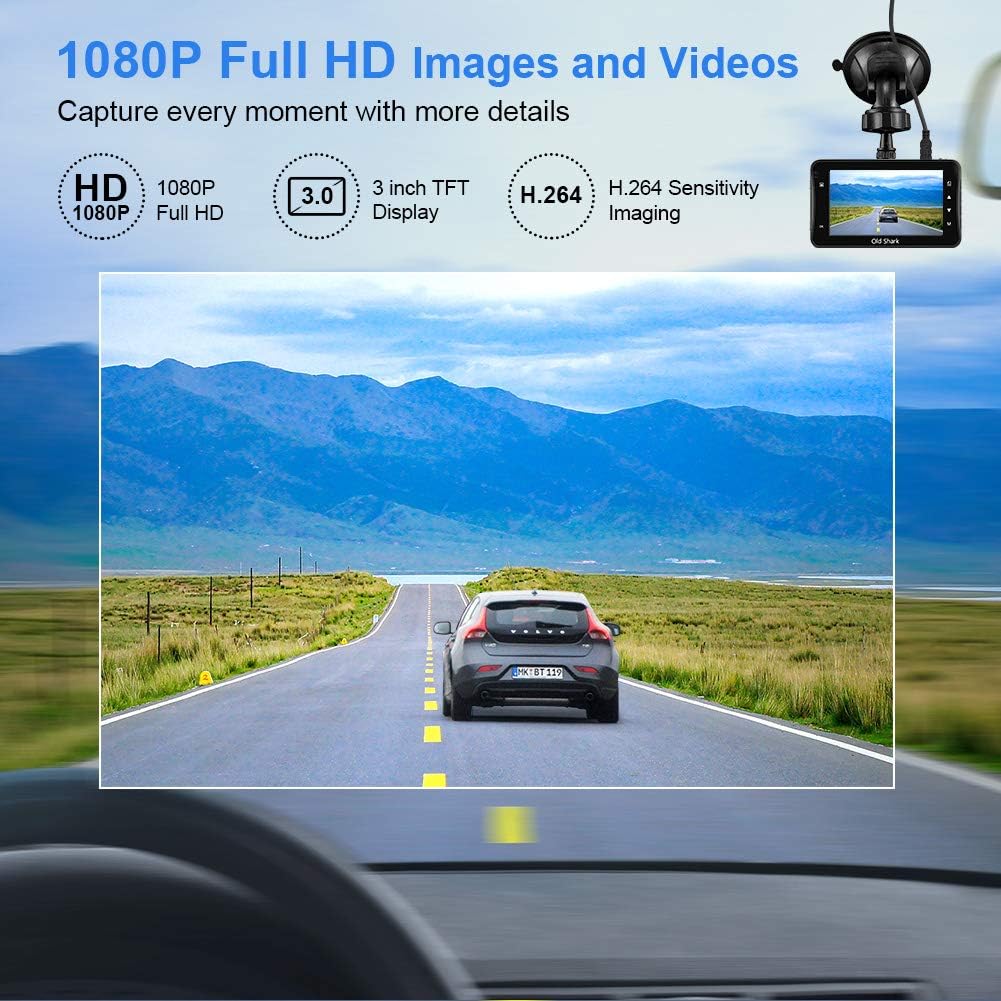
Image: Visual representation of the dash cam's 1080P Full HD video capabilities and display features.

Image: The G-Sensor feature, which automatically locks video footage during an impact to secure accident evidence.

Image: The 24-Hour Parking Monitor feature, which activates recording upon detecting vibrations while parked.

Image: The Super Night Vision capability, demonstrating improved low-light performance with its F1.6 aperture.

Image: The 170° wide-angle lens providing a broad view, s examples of recorded footage during day and night.
Průvodce nastavením
1. Montáž Dash Cam
- Vyčistěte oblast čelního skla, kam chcete namontovat palubní kameru. Ujistěte se, že je bez prachu a mastnoty.
- Připevněte přísavný držák k jednotce palubní kamery.
- Pevně přitlačte přísavku k čelnímu sklu a zajistěte ji přepnutím páčky. Umístěte kameru tak, abyste zajistili jasný obraz. view vozovky, aniž by vám to bránilo ve výhledu za jízdy.
2. Vložení Micro SD karty
- Locate the Micro SD card slot on the side of the dash cam.
- Insert the provided 32GB Micro SD card into the slot until it clicks into place. Ensure the card is inserted correctly with the gold contacts facing the back of the camera.
- For optimal performance, it is recommended to format the SD card within the dash cam's settings before first use and periodically thereafter.
3. Zapnutí
- Připojte nabíječku do auta ke vstupnímu portu napájení palubní kamery.
- Zapojte druhý konec autonabíječky do zásuvky zapalovače cigaret ve vozidle.
- The dash cam will automatically power on and begin recording when your vehicle's ignition is turned on. It will also power off automatically when the ignition is turned off.

Image: The OldShark Dash Cam, showing its compact design, the included suction mount for windshield attachment, and the 32GB Micro SD card for storage.
Návod k obsluze
Základní operace
- Zapnutí/vypnutí: The camera powers on/off automatically with the car ignition. You can also manually power it on/off by pressing and holding the Power button.
- Záznam: Once powered on, the dash cam automatically starts loop recording. A red flashing dot or similar indicator on the screen confirms recording is active.
- Zastavit nahrávání: Press the OK button to stop recording. Press it again to resume.
- Přepínání režimů: Use the Mode button to switch between Video Recording, Still Photo, and Playback modes.
- Přehrávání: In Playback mode, use the Up/Down buttons to navigate through recorded files. Press OK to play a selected video.
Navigace v nabídce
- Press the Menu button to access settings.
- Use the Up/Down buttons to scroll through menu options.
- Press OK to select an option or confirm a setting.
- Press Menu again to exit the menu.
Klíčové funkce
- Nahrávání ve smyčce: Set the duration for video segments (e.g., 1, 3, 5 minutes). When the card is full, the oldest unlocked file bude přepsán.
- Citlivost G-senzoru: Adjust the sensitivity of the G-Sensor (Low, Medium, High). A higher sensitivity means the camera will lock footage more easily upon detecting bumps or impacts.
- Parkovací monitor: Enable this feature to allow the dash cam to automatically record a short video when it detects a vibration while the car is parked and turned off.
- Detekce pohybu: When enabled, the camera will start recording automatically if it detects movement in front of the lens while parked.
- Datum/čas svamp: Ensure the correct date and time are set in the menu for accurate timestampna vašich nahrávkách.
Údržba
- Čištění: K čištění objektivu a obrazovky fotoaparátu používejte měkký, suchý hadřík. Nepoužívejte abrazivní čisticí prostředky ani rozpouštědla.
- Péče o SD kartu: Regularly format the Micro SD card (at least once a month) within the dash cam's settings to maintain optimal recording performance and prevent data corruption. Use only high-quality Class 10 or higher Micro SD cards.
- Teplota: Avoid exposing the dash cam to extreme temperatures (very hot or very cold) for extended periods, as this can affect battery life and component integrity.
- Aktualizace firmwaru: Check the official OldShark website periodically for any available firmware updates to ensure your dash cam has the latest features and bug fixes.
Odstraňování problémů
| Problém | Řešení |
|---|---|
| Palubní kamera se nezapne. | Ensure the car charger is securely connected to both the dash cam and the vehicle's cigarette lighter. Check if the vehicle's cigarette lighter is receiving power. Try a different power source if available. |
| Nahrávání se neočekávaně zastaví. | Check if the Micro SD card is full. Format the SD card. Ensure you are using a Class 10 or higher SD card. Reduce G-Sensor sensitivity if it's triggering too often. |
| Video footage je rozmazané nebo nejasné. | Clean the camera lens and your car's windshield. Ensure the protective film has been removed from the lens. Check video resolution settings. |
| Dash cam freezes or becomes unresponsive. | Press the reset button (if available, usually a small pinhole) or disconnect and reconnect the power. Format the Micro SD card. |
| Date and time are incorrect. | Go to the system settings menu and manually set the correct date and time. Save the settings. |
Specifikace
| Funkce | Detail |
|---|---|
| Název modelu | GS505 |
| Číslo modelu položky | A1OS-GS505-T032 |
| Rozlišení záznamu videa | 1080p Full HD |
| Úhel objektivu | 170° široký úhel |
| Velikost displeje | 3 palců |
| Speciální funkce | G-Sensor, Loop Recording, Parking Guard, Motion Detection, Auto On/Off, Time Stamp, Screensaver, Night Vision (F1.6 Aperture) |
| Technologie připojení | USB |
| Typ montáže | Sací držák |
| Rozměry produktu | 3.46 x 1 x 0.59 palce |
| Hmotnost položky | 4.4 unce |
| Výrobce | Old Shark |
Informace o záruce
OldShark products are manufactured with high-quality standards. For specific warranty terms and conditions, please refer to the warranty card included in your product packaging or contact OldShark customer support. The warranty typically covers manufacturing defects for a specified period from the date of purchase.
Uschovejte si prosím doklad o koupi jako doklad o koupi pro případné reklamace.
Zákaznická podpora
If you encounter any issues or have questions regarding your OldShark Dash Cam that are not covered in this manual, please do not hesitate to contact our customer support team.
For the most up-to-date contact information and support resources, please visit the official OldShark store on Amazon or their official webmísto.
Online zdroje:
- OldShark Amazon Store: Navštivte obchod


