1. Úvod
Thank you for choosing the HMF FS-20A Electronic Biometric Safe. This safe is designed to provide secure storage for your valuables using advanced fingerprint recognition technology and a robust electronic locking system. Please read this manual carefully before operating the safe to ensure proper use, optimal performance, and safety.
Uschovejte tento návod pro budoucí použití.
2. Bezpečnostní pokyny
- Nouzové klíče: Always keep the emergency override keys in a secure location, separate from the safe itself. Never store them inside the safe.
- Bezpečnost baterie: Use only the specified type and size of batteries. Do not mix old and new batteries, or different types of batteries. Remove batteries if the safe will not be used for an extended period.
- Umístění: Ensure the safe is installed on a stable surface or securely mounted to a wall as instructed.
- Děti: Uchovávejte trezor a jeho klíče mimo dosah dětí.
- vlhkost: Avoid placing the safe in areas with high humidity or direct exposure to water.
3. Obsah balení
Zkontrolujte prosím obsah balení, abyste se ujistili, že jsou přítomny všechny položky:
- HMF FS-20A Electronic Biometric Safe
- Nouzové klíče pro přepínání mezi polohami (2x)
- Externí bateriový box
- Baterie AA (4x)
- Montážní šrouby (2x)
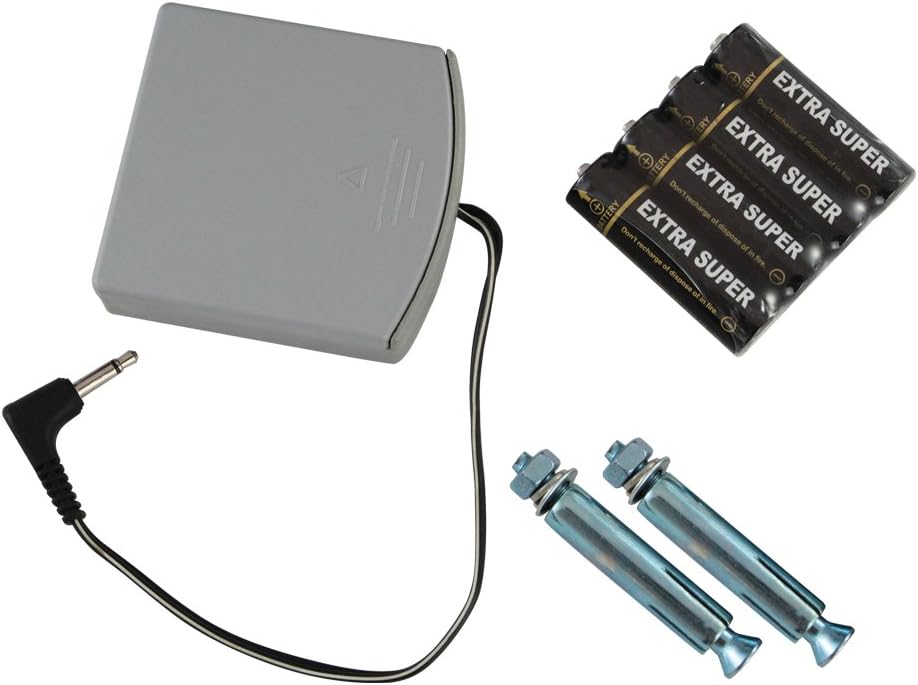
Obrázek 3.1: Included accessories for the HMF FS-20A safe, featuring an external battery box, four AA batteries, and two mounting bolts for installation.
4. Nastavení
4.1 První otevření
Upon receiving your safe, it will be in a locked state. To open it for the first time:
- Locate the emergency keyhole, usually concealed behind a cover on the front panel.
- Vložte jeden z dodaných nouzových klíčů do klíčové dírky a otočte jím ve směru hodinových ručiček.
- While holding the key turned, rotate the handle to open the safe door.

Obrázek 4.1: The HMF FS-20A safe with its door open, revealing the internal compartment and the electronic biometric locking system on the door panel.
4.2 Instalace baterie
The safe requires 4 AA batteries for its electronic system. The battery compartment is typically located on the inside of the safe door.
- Open the safe door using the emergency key (if not already open).
- Najděte kryt přihrádky na baterie na vnitřní straně dvířek.
- Sejměte kryt a vložte 4 baterie typu AA, dbejte na správnou polaritu (+/-).
- Nasaďte kryt prostoru pro baterie.
- You should hear a beep, indicating the safe is powered on.
4.3 Montáž trezoru
The HMF FS-20A safe can be securely mounted to a wall or floor. This provides additional security against theft. Mounting hardware is included.
- Choose a suitable location for mounting. Ensure the surface is strong enough to support the safe's weight and contents.
- Open the safe door. Locate the pre-drilled mounting holes on the back or bottom of the safe.
- Position the safe and mark the drilling points on the wall or floor through the mounting holes.
- Drill pilot holes at the marked locations using an appropriate drill bit for your wall/floor material.
- Align the safe with the drilled holes and secure it using the provided mounting bolts. Tighten firmly.

Obrázek 4.2: Rear panel of the HMF FS-20A safe, illustrating the two pre-drilled holes designed for secure mounting to a wall or floor surface.
5. Návod k obsluze
5.1 Registrace otisků prstů
The safe allows you to register multiple fingerprints for convenient access. Refer to your specific model's internal instructions for the exact programming button location (often a small button inside the safe door near the battery compartment).
- With the safe door open, press the internal programming button (usually a red or green button). The indicator light on the fingerprint scanner will illuminate.
- Place the pad of the finger you wish to register firmly on the fingerprint scanner.
- Lift your finger and repeat the scan approximately 3-5 times, slightly adjusting the angle each time, until the safe confirms successful registration (e.g., a long beep or green light).
- Chcete-li zaregistrovat další otisky prstů, opakujte kroky 1–3 pro každý prst.
- Test all registered fingerprints before closing the safe door.

Obrázek 5.1: A user's finger positioned on the biometric sensor of the HMF FS-20A safe, demonstrating the interaction point for fingerprint recognition.
5.2 Opening with Fingerprint
Otevření trezoru pomocí registrovaného otisku prstu:
- Place a registered finger firmly and completely on the fingerprint scanner.
- If the fingerprint is recognized, the indicator light will turn green, and you will hear a beep. The lock mechanism will disengage.
- Within a few seconds, rotate the handle clockwise to open the safe door.
- If the fingerprint is not recognized, the indicator light may turn red, and you will hear an error beep. Try again, ensuring your finger is clean and properly positioned.
5.3 Otevření nouzovým klíčem
In case of battery failure, forgotten fingerprints, or electronic malfunction, the safe can be opened using the emergency override key:
- Locate the emergency keyhole cover on the front panel and remove it.
- Insert the emergency key into the keyhole and turn it clockwise.
- While holding the key turned, rotate the handle to open the safe door.
- Once open, you can replace the batteries if needed.
6. Údržba
6.1 Výměna baterie
When the batteries are low, the safe will typically indicate this with a warning light or a series of beeps during operation. Replace all 4 AA batteries promptly to ensure continuous functionality.
- Otevřete dveře trezoru.
- Odstraňte kryt bateriového prostoru.
- Vyjměte staré baterie a zlikvidujte je zodpovědně.
- Vložte 4 nové baterie typu AA a dbejte na správnou polaritu.
- Nasaďte kryt prostoru pro baterie.
Using the External Battery Box: If the internal batteries are completely depleted and you cannot open the safe with your fingerprint, connect the external battery box to the emergency power port on the safe's front panel. This will provide temporary power to open the safe, allowing you to replace the internal batteries.
6.2 Čištění
Pro zachování vzhledu a funkčnosti vašeho trezoru:
- Vnější povrch otřete měkkým, damp hadříkem. Nepoužívejte abrazivní čisticí prostředky ani rozpouštědla.
- Gently clean the fingerprint scanner surface with a soft, lint-free cloth to ensure optimal recognition.
7. Řešení problémů
| Problém | Možná příčina | Řešení |
|---|---|---|
| Trezor se neotevírá otiskem prstu. | Fingerprint not registered, finger dirty/wet, incorrect placement, low batteries. | Ensure finger is clean and dry. Reposition finger firmly on scanner. Re-register fingerprint if necessary. Replace batteries. Use emergency key. |
| No power/Safe is unresponsive. | Vybité nebo nesprávně vložené baterie. | Replace all 4 AA batteries, ensuring correct polarity. Use the external battery box for temporary power. |
| Dveře se správně nezavírají. | Obstruction in the door frame, locking bolts misaligned. | Check for any objects blocking the door. Ensure the safe is on a level surface or securely mounted. |
| Nouzový klíč nefunguje. | Key not fully inserted, wrong key, lock mechanism jammed. | Ensure the key is fully inserted and turned correctly. Do not force the key. Contact customer support if issues persist. |
8. Specifikace
| Funkce | Detail |
|---|---|
| Model | FS-20A (Manufacturer ID: 49121) |
| Rozměry (V x Š x H) | Cca. 19.99 cm x 30.99 cm x 19.99 cm |
| Hmotnost | Přibl. 7.02 kg |
| Materiál | Legovaná ocel |
| Typ zámku | Electronic Biometric (Fingerprint) with Emergency Key Override |
| Zdroj napájení | 4x AA baterie (součástí balení) |
| Typ montáže | Wall Mountable (mounting hardware included) |
| Speciální funkce | Portable design, External Battery Box for emergency power |
9. Záruka a podpora
HMF products are manufactured to high-quality standards. For warranty information or technical support, please refer to the documentation provided with your purchase or visit the official HMF webUschovejte si doklad o koupi pro případné reklamace.
If you encounter issues not covered in this manual, please contact HMF customer service for assistance.