1. Úvod
The Mastech MS6612 is a digital luxmeter designed for measuring illuminance. It features a large LCD display with backlight and a bar graph for easy reading. This device offers automatic and manual range switching, data hold, peak value measurement, relative value measurement, and zero calibration functions. It is capable of measuring up to 200,000 Lux or 20,000 Foot-Candles (Fc).
2. Bezpečnostní informace
Please read and understand all safety instructions before operating the device. Failure to follow these instructions may result in injury or damage to the meter.
- Do not operate the meter in environments with explosive gas, vapor, or dust.
- Avoid exposing the meter to extreme temperatures or high humidity.
- Pokud se glukometr delší dobu nepoužívá, vyjměte baterie, abyste zabránili jejich vytečení.
- Nepokoušejte se opravovat ani upravovat měřič. Veškerý servis svěřte kvalifikovanému personálu.
- Udržujte měřič čistý a suchý.
3. Konec produktuview
The Mastech MS6612 Digital Luxmeter consists of a main unit with an LCD display and control buttons, and a silicon photoelectric diode sensor for light detection.
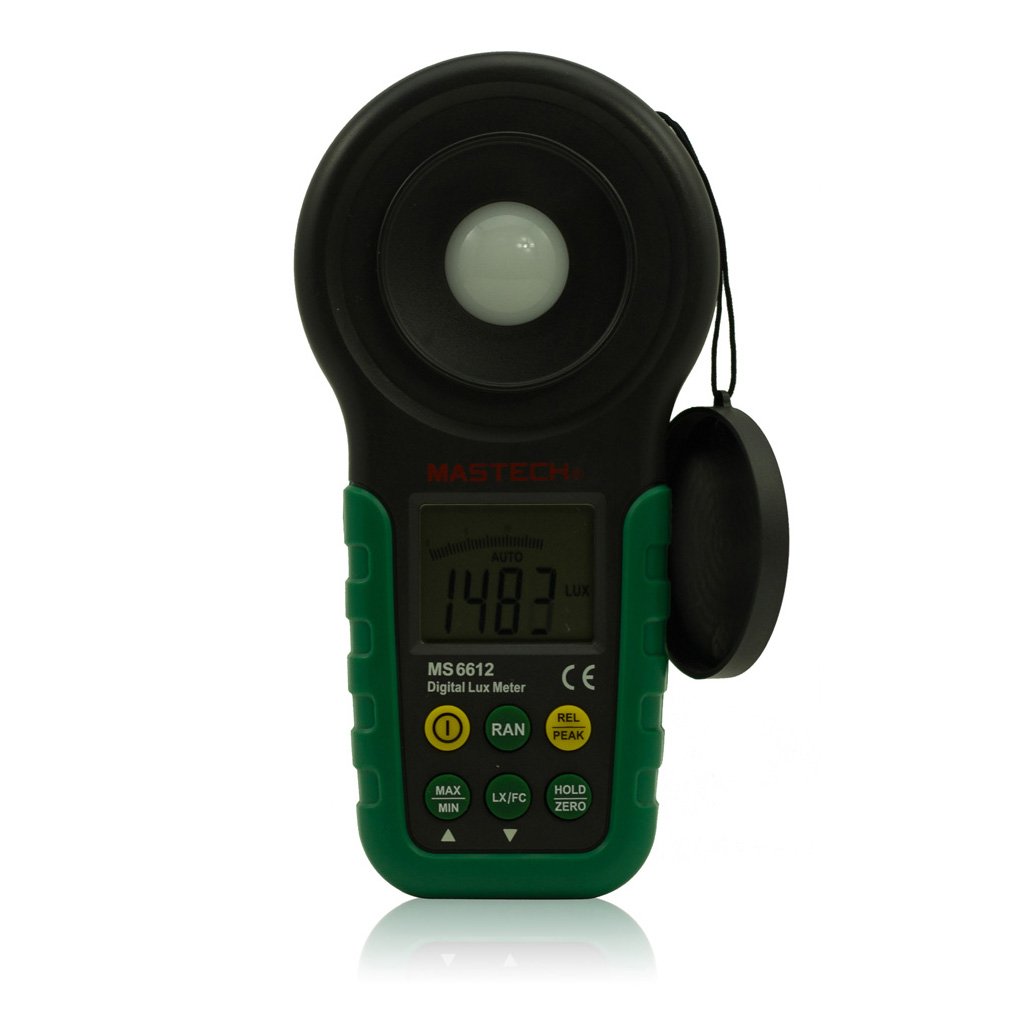
Obrázek 1: Přední view of the Mastech MS6612 Digital Luxmeter. This image shows the main body of the device, including the large LCD screen, control buttons, and the light sensor located at the top.
Klíčové komponenty:
- LCD displej: 3½ digits with analog bar display for clear readings.
- Ovládací tlačítka: For various functions such as power, range, hold, peak, relative, zero, unit conversion, and mute.
- Světelný senzor: Silicon photoelectric diode for accurate light measurement.
- Přihrádka na baterie: Located at the rear for a 9V battery.
4. Nastavení
4.1 Instalace baterie
- Najděte kryt přihrádky na baterie na zadní straně měřiče.
- Use a screwdriver (if necessary) to open the battery compartment.
- Insert one 9V (IEC 6LR61) battery, observing the correct polarity (+/-).
- Nasaďte zpět kryt prostoru pro baterie a zajistěte jej.
Note: A low battery indicator will appear on the display when the battery needs replacement.
5. Návod k obsluze
5.1 Zapnutí/vypnutí
- Stiskněte tlačítko MOC tlačítko pro zapnutí měřiče.
- Stiskněte tlačítko MOC znovu stiskněte tlačítko pro vypnutí měřiče.
- The meter features an automatic power-off function, which will turn off the device if no keys are operated for more than 10 minutes.
5.2 Základní měření
- Zapněte měřič.
- Point the light sensor towards the light source to be measured.
- The illuminance value will be displayed on the LCD. The meter automatically selects the appropriate range.
5.3 Range Switching (Auto/Manual)
The MS6612 supports both automatic and manual range switching.
- In auto-ranging mode, the meter automatically selects the best measurement range.
- Stiskněte tlačítko RANGE button to switch between auto and manual ranging modes. In manual mode, you can cycle through available ranges.
- If the measured value exceeds the current range in manual mode, the LCD will display "OL" (Overload).
5.4 Funkce Data Hold
Zmrazení aktuální hodnoty na displeji:
- Stiskněte tlačítko DRŽET button. The "HOLD" indicator will appear on the display.
- Stiskněte tlačítko DRŽET button again to release the data hold and resume live measurement.
5.5 Maximum/Minimum Value Measurement
Na view the maximum or minimum illuminance recorded during a measurement session:
- Stiskněte tlačítko MAX/MIN button. The display will show the maximum recorded value.
- Stiskněte MAX/MIN again to cycle to the minimum recorded value.
- Stiskněte MAX/MIN a third time to exit this mode and return to live measurement.
5.6 Peak Value Measurement
This function captures the highest instantaneous illuminance value.
- Stiskněte tlačítko VRCHOL button to activate peak measurement. The "PEAK" indicator will appear.
- The display will show the highest illuminance detected since activating the function.
- Stiskněte VRCHOL znovu pro ukončení tohoto režimu.
5.7 Měření relativní hodnoty
This function allows you to set a reference point and measure the difference from that point.
- In a stable light environment, press the REL button. The current reading becomes the reference, and the display will show "0".
- Subsequent measurements will show the difference (positive or negative) from this reference value.
- Stiskněte REL again to exit relative measurement mode.
5.8 Zero Calibration Function
To ensure accuracy, especially in low light conditions, perform a zero calibration.
- Place the light sensor in a completely dark environment (e.g., cover it with an opaque cap).
- Stiskněte tlačítko NULA button. The display should read "0.00".
- This calibrates the meter to account for any residual sensor output in darkness.
5.9 Unit Conversion (Fc/Lux)
The meter can display measurements in Lux or Foot-Candles (Fc).
- Stiskněte tlačítko JEDNOTKA button to toggle between Lux and Fc units.
- The selected unit will be indicated on the LCD.
- Konverze: 1 Fc = 10.764 Lux; 1 Lux = 0.09290 Fc.
5.10 Touch Tone and Mute Function
The meter may emit a touch tone when buttons are pressed. This can be muted.
- Refer to the specific button on your device for muting the touch tone.
6. Údržba
6.1 Čištění
- Otřete c měřičeasing s měkkým, damp tkanina. Nepoužívejte abrazivní čisticí prostředky nebo rozpouštědla.
- Keep the light sensor clean and free from dust or smudges to ensure accurate readings. Use a soft, lint-free cloth.
6.2 Výměna baterie
Replace the 9V battery when the low battery indicator appears on the display. Follow the steps in Section 4.1 for battery installation.
6.3 Skladování
- If storing the meter for an extended period, remove the battery to prevent leakage and potential damage.
- Měřič skladujte na chladném a suchém místě, mimo dosah přímého slunečního záření a extrémních teplot.
7. Řešení problémů
| Problém | Možná příčina | Řešení |
|---|---|---|
| Měřič se nezapne. | Vybitá nebo nesprávně nainstalovaná baterie. | Check battery polarity, replace battery. |
| Na obrazovce se zobrazí „OL“. | Measurement value exceeds current range (manual mode). | Switch to a higher range or enable auto-ranging. |
| Nepřesné údaje. | Dirty sensor, uncalibrated zero, or incorrect range. | Clean sensor, perform zero calibration, ensure correct range. |
| Indikátor slabé baterie. | Baterie je vybitá. | Vyměňte 9V baterii. |
8. Specifikace
| Parametr | Hodnota |
|---|---|
| Rozsahy měření | 20, 200, 2000, 20000, 200000 luxů 20, 200, 2000, 20000 Fc |
| Zobrazit | 3½ digits, max reading of 1999, with analog bar display |
| Senzor | Křemíková fotoelektrická dioda |
| Measured Spectral Range | 320~730nm |
| Sampsazba ling | ≥2 times/s |
| Provozní teplota | -10~50 °C, max 80% RH (Non-Condensed) |
| Skladovací teplota | -10~50 °C, max 80% RH (Non-Condensed, removing batteries) |
| Provozní prostředí | Vnitřní použití |
| Výška | 2000 m nejvyšší |
| Napájení | 1 x 9V, IEC 6LR61 battery |
| Životnost baterie | Přibl. 200 hodin |
| Rozměry (VxŠxH) | 190 mm x 89 mm x 42.5 mm (7.48 x 3.50 x 1.67 palce) |
| Hmotnost (bez baterií) | Cca. 360 g (12.7 oz) |
| Hmotnost (s bateriemi) | Cca. 420 g (14.8 oz) |
Převod jednotek osvětlení:
- 1 Foot-Candle (Fc) = 10.764 Lux
- 1 Lux = 0.09290 Foot-Candle (Fc)
9. Záruka a podpora
Mastech products are designed for reliability and performance. For specific warranty information, please refer to the warranty card included with your purchase or visit the official Mastech website. For technical support or service inquiries, please contact Mastech customer service through their official channels.
Uschovejte si prosím účtenku jako doklad o koupi pro případ reklamace.


