1. Produttu Finituview è Funzioni chjave
The Plugable USBC-PDMON is a 15.6-inch Full HD (1920x1080) IPS portable monitor designed for enhanced productivity on the go. It features 100W Power Delivery pass-through charging and a 3x USB-C 10Gbps hub, making it a versatile solution for expanding your workspace.

Image: The Plugable USBC-PDMON portable monitor in use, showcasing its slim design and the protective case functioning as a stand.
Funzioni chjave:
- Schermu IPS Full HD (1920x1080) di 15.6 pollici: Provides crisp, clear visuals with wide viewing angles and up to 300 nits brightness.
- 100W Power Delivery Pass-Through: Allows charging of your laptop, smartphone, or tablet (up to 85W output) while using the monitor.
- Integrated 3x USB-C 10Gbps Hub: Expands connectivity with two 10Gbps USB-C ports for data transfer or connecting peripherals.
- Portable è Ligeru: Weighing 1.85lbs (with cover), it's ideal for travel and mobile workstations.
- Protective Case/Stand: The included cover protects the screen and conveniently folds into a stand for various viewl'anguli.
- Compatibilità Universale: Works with Mac, Windows, Chrome, iPad, iPhone, and Android devices equipped with full-featured USB-C or Thunderbolt ports.
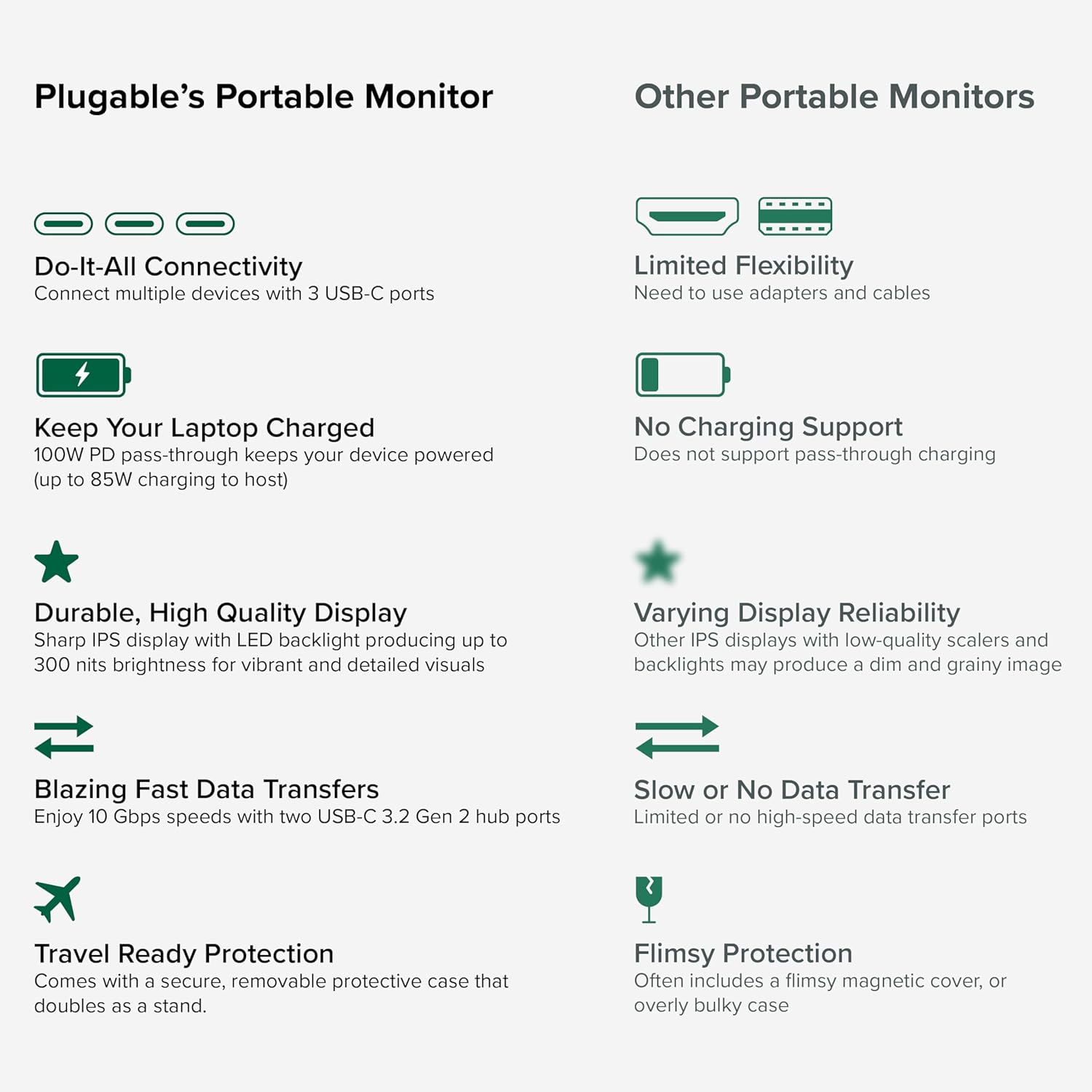
Image: A comparison highlighting the superior connectivity, charging support, display quality, data transfer speeds, and travel-ready protection of the Plugable monitor.
2. Ciò chì hè inclusu
Verificate u cuntenutu di u pacchettu per assicurà chì tutti l'articuli sò presenti:
- 1920x1080 IPS Travel Display with Protective Case/Stand
- 1 Meter USB-C Host Cable
- Guida Quick Start
3. Setup Guide
Follow these steps to set up your Plugable portable monitor:
- Unpack u Monitor: Carefully remove the monitor and its accessories from the packaging.
- Pone u Stand: The protective cover doubles as a stand. Fold the cover to create a stable base for the monitor. The built-in magnets will help secure it in place.
- Cunnette vi à u vostru Dispositivu: Use the included 1-meter USB-C host cable to connect the monitor to your laptop, smartphone, or tablet. Ensure your device has a full-featured USB-C port that supports video output (DisplayPort Alternate Mode) and Power Delivery.
- Power the Monitor (Optional/Recommended): For optimal performance and to utilize the pass-through charging feature, connect a USB-C power adapter (not included) to the monitor's dedicated power input port. This will also allow the monitor to charge your host device (up to 85W).
- Configurazione di Visualizazione: Your device should automatically detect the monitor. You may need to adjust display settings (e.g., extend, mirror, resolution) in your operating system's display settings.

Image: Visual instructions on how to correctly fold the protective cover to form a stable stand for the monitor.

Image: An illustration demonstrating the power flow when the monitor is used as a hub, providing 85W charging to the connected laptop from a 100W input.
Cumpatibilità:
U monitor hè cumpatibile cù una larga gamma di sistemi operativi è dispositivi:
- Piattaforme supportate: Mac, Windows, Chrome OS, Android.
- Cunnessione à l'ospite: USB-C, USB4, Thunderbolt.
- Sistemi cumpatibili: MacBooks, Dell XPS, Lenovo ThinkPad, Apple iPhone 15/16+, Samsung Galaxy S24, Google Pixel 8, iPads with USB-C, Samsung Galaxy Tab, Lenovo Tab.

Image: A visual guide to the monitor's broad compatibility across different operating systems and popular devices like laptops, phones, and tablets.
4. Operating Instructions
Once connected, your Plugable portable monitor is ready for use. Here are some operational tips:
Modi di Visualizazione:
- Estendi a visualizazione: Use this mode to expand your desktop workspace across both your primary device and the portable monitor.
- Mirror Display: This mode duplicates your primary device's screen onto the portable monitor, useful for presentations or sharing content.
Cuntrolli di Monitor:
The monitor features control buttons on the side for adjustments:
- Luminosità Su/Ghjuca: Adjust the screen brightness to your preference.
- Modu di culore: Cycle through preset color modes (Cool, Normal, Warm, sRGB, and User) to optimize visual appearance.
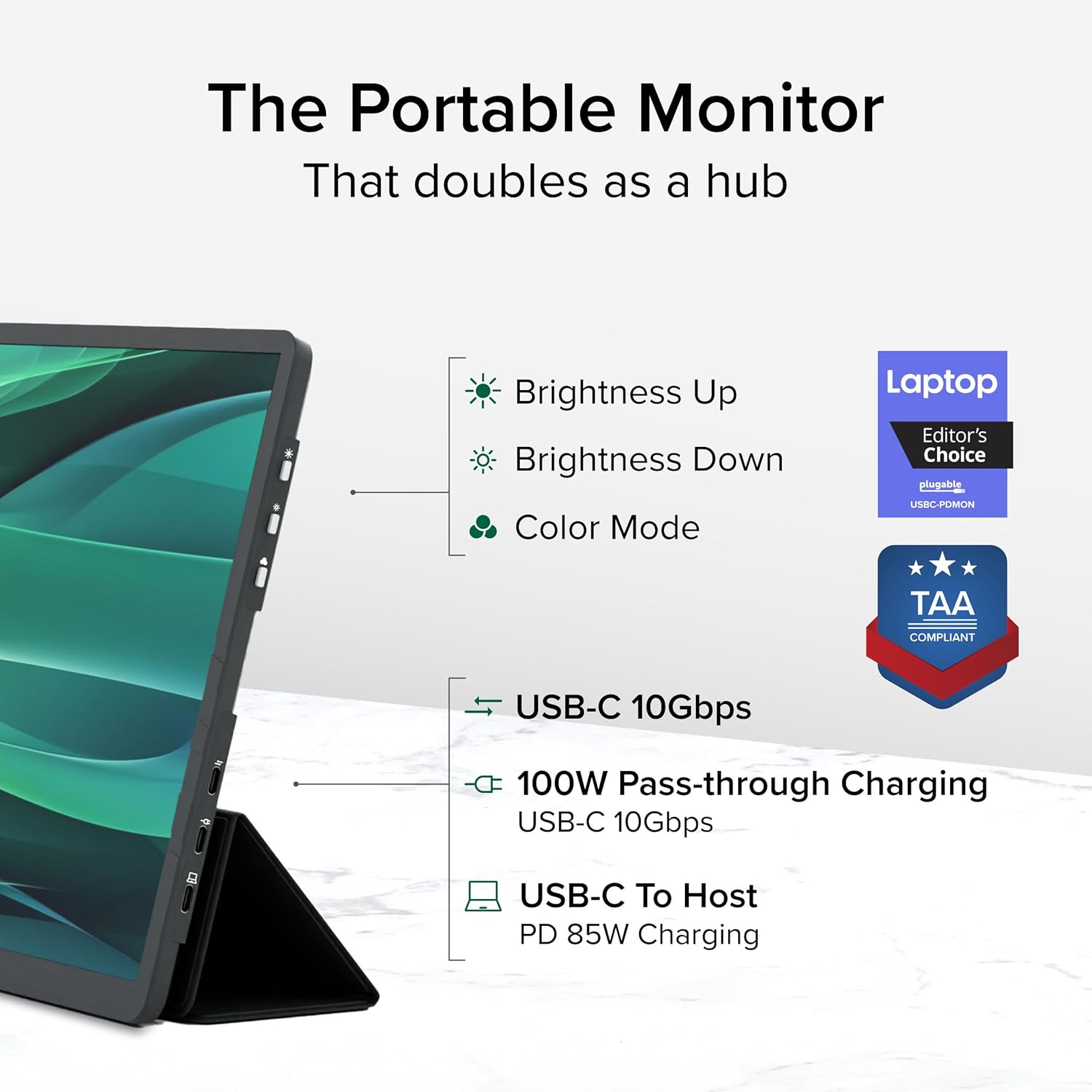
Imagine: Un dettagliu view of the monitor's side, indicating the location of the brightness controls, color mode button, and the three USB-C ports for host connection, power delivery, and data hub functionality.
USB-C Hub Functionality:
The monitor acts as a hub, providing additional USB-C ports for your peripherals:
- Connect USB-C devices such as external drives, keyboards, or mice to the available 10Gbps USB-C ports on the monitor.
5. Mantenimentu
To ensure the longevity and optimal performance of your Plugable portable monitor, follow these maintenance guidelines:
- Pulizia di u screnu: Aduprate un pannu morbidu, senza pelucchi dampened with water or a screen-cleaning solution. Avoid harsh chemicals, abrasive materials, or direct spraying onto the screen.
- Pulizia di u corpu: Asciugate l'esternu di u monitor cù un pannu dolce è asciuttu.
- Conservazione: When not in use, always use the protective cover to prevent scratches and damage to the screen. Store in a cool, dry place away from direct sunlight and extreme temperatures.
- Trattamentu: Maneghjà u monitor cun cura. Evitate di fà lu cascà o di sottumettelu à forti impatti.
6. Risoluzione di prublemi
If you encounter issues with your Plugable portable monitor, refer to the following common problems and solutions:
No Display or "No Signal" Message:
- Verificate a cunnessione di u cable: Ensure the USB-C cable is securely connected to both the monitor and your host device. Try unplugging and re-plugging the cable.
- Verify USB-C Port Capability: Confirm that your device's USB-C port supports video output (DisplayPort Alternate Mode). Not all USB-C ports have this capability.
- Potenza esterna: If your host device cannot provide sufficient power, connect an external USB-C power adapter to the monitor's power input port.
- Riavvia i dispositi: Try restarting your laptop, smartphone, or tablet.
Schermu sfarfallante o instabile:
- Alimentazione elettrica: Ensure the monitor is receiving adequate power. Connect an external USB-C power adapter if not already in use.
- Qualità di Cavu: Use the included high-quality USB-C cable. A different or lower-quality cable might cause instability.
- Actualizazioni di i driver: Ensure your host device's graphics drivers are up to date.
No Charging or Slow Charging:
- Valutazione di l'adattatore di alimentazione: Ensure the external USB-C power adapter connected to the monitor is rated for at least 100W to provide 85W pass-through charging to your host device.
- Cumpatibilità di u cable: Verify the USB-C cable supports Power Delivery.
If these steps do not resolve your issue, please contact Plugable support for further assistance.
7. Specificazioni
Detailed technical specifications for the Plugable USBC-PDMON portable monitor:
| Feature | Specificazione |
|---|---|
| Size Screen | 15.6 inch |
| Risoluzione | FHD 1080p (1920 x 1080 Pixel) |
| Tecnulugia di visualizazione | IPS |
| Rapportu d'aspettu | 16: 9 |
| Luminosità di l'imagine | 300 Candela (nits) |
| Superficie di u schermu | Matte |
| Total Ports USB | 3 (USB-C) |
| Consegna di energia | 100W Pass-Through (85W to host) |
| Velocità di trasferimentu di dati | 10Gbps (USB-C hub ports) |
| Pesu di l'articulu | 1.85 liri |
| Dimensioni di u produttu | 0.42 x 14.21 x 8.46 inch |
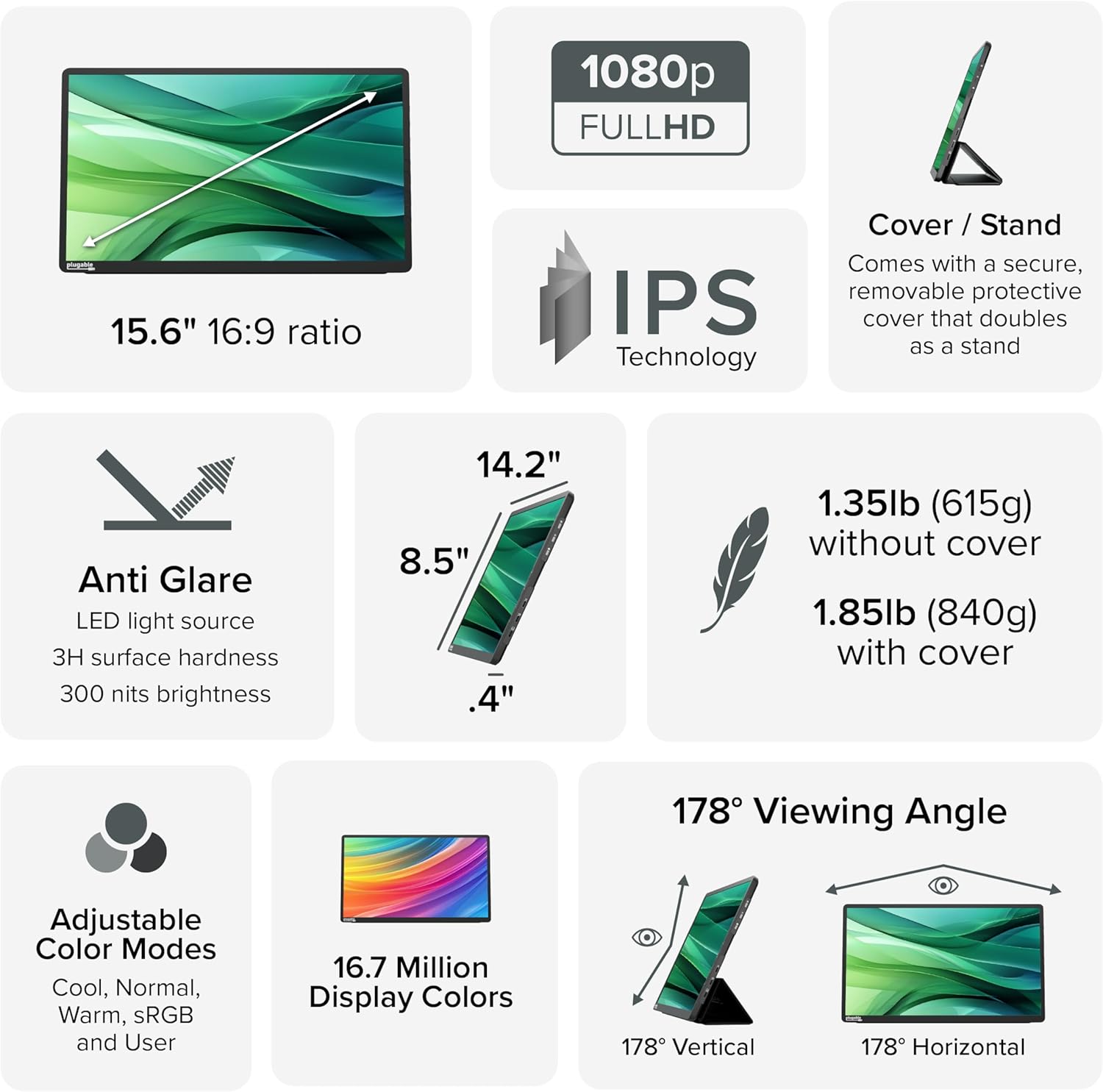
Image: A comprehensive infographic summarizing the monitor's technical specifications, such as screen size, resolution, IPS technology, anti-glare properties, weight, and viewl'anguli.
8. Garanzia è Support
The Plugable USBC-PDMON portable monitor is designed with reliability at its core and built to meet the demands of both IT departments and home offices.
- Supportu per a vita: Includes lifetime support from our North American team of connectivity experts.
- Garanzia: Backed by a 2-Year Warranty.
For technical assistance or warranty claims, please visit the official Plugable websitu o cuntattate direttamente a so squadra di supportu.


