Introducció
Welcome to the user manual for your TCL FLIP 4 5G (T440W) flip phone. This guide provides essential information to help you get started, understand your device's features, and troubleshoot common issues. Please read this manual thoroughly to ensure proper use and optimal performance of your phone.
Què hi ha a la caixa
Your TCL FLIP 4 5G package includes the following items:
- Telèfon
- Bateria
- Carregador
Producte acabatview
The TCL FLIP 4 5G is designed for straightforward communication with modern conveniences. It features a classic flip design with dual displays and large, tactile buttons for ease of use.
Característiques principals:
- Pantalla dual: A 1.77-inch external display for notifications and a 3.2-inch internal display with adjustable text size, colors, and brightness.
- Easy Navigation Keyboard: Large tactile keypad with intuitive shortcut keys for quick access to contacts and messages.
- Connectivitat 5G: Reliable 5G network support for fast communication.
- Càmera de 5 MP: Capture photos and videos of important moments.
- Veu HD: Ensures clear call quality.
- Bateria de llarga durada: Designed to keep you connected for extended periods.
- Sistema operatiu: Powered by KaiOS.
Disseny del dispositiu:
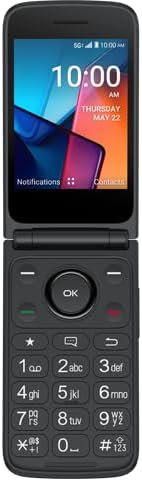
Figura 1: Davant view of the TCL FLIP 4 5G phone when open, displaying the internal screen and the physical keypad.
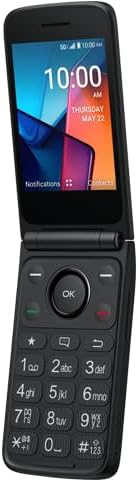
Figura 2: En angle view of the TCL FLIP 4 5G phone in its open position, highlighting the screen and keypad layout.
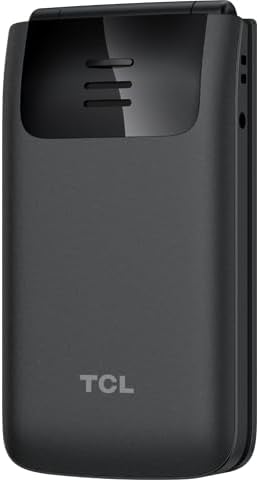
Figura 3: posterior view of the TCL FLIP 4 5G phone when closed, showing the external display, camera, and TCL branding.
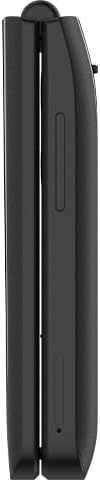
Figura 4: lateral view of the closed TCL FLIP 4 5G phone, illustrating the device's slim profile i botons laterals.
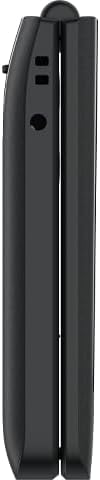
Figura 5: Costa oposada view of the closed TCL FLIP 4 5G phone, showing additional ports or buttons.
Configuració
1. Installing the Battery and SIM Card:
- Traieu suaument la tapa posterior del telèfon.
- Insert your SIM card(s) into the designated slot(s). Ensure the gold contacts face downwards and the notched corner is correctly aligned.
- Insert the battery into its compartment, aligning the gold contacts on the battery with those in the phone.
- Torneu a col·locar la coberta posterior, prement fermament fins que encaixi al seu lloc.
2. Càrrega del telèfon:
- Connect the charger to your phone's charging port.
- Connecteu el carregador a una presa de corrent.
- Allow the phone to charge completely before initial use. The battery indicator on the screen will show charging status.
Funcionament del teu telèfon
1. Encendre/apagar:
- Per engegar-lo, manteniu premut el botó d'engegada/finalització de trucada fins que la pantalla s'il·lumini.
- To power off, press and hold the Power/End Call button, then select "Power off" from the options.
2. Fer trucades:
- Open the phone to access the keypad.
- Marqueu el número de telèfon desitjat amb el teclat numèric.
- Premeu el botó verd de trucada per iniciar la trucada.
- To end a call, press the Red End Call button or close the phone.
3. Enviament de missatges:
- From the main menu, navigate to "Messages".
- Seleccioneu "Nou missatge" o "Crea un missatge".
- Introduïu el número de telèfon del destinatari o seleccioneu-lo dels vostres contactes.
- Escriviu el vostre missatge amb el teclat.
- Press the "Send" option to transmit the message.
4. Ús de la càmera:
- Accediu a l'aplicació de la càmera des del menú principal.
- Enquadra la teva foto amb la pantalla interna.
- Press the "OK" button or a designated camera button to capture a photo or start/stop video recording.
- Photos and videos are saved to the phone's gallery.
5. Internet and Applications (KaiOS):
- Your phone runs on KaiOS, providing access to essential applications.
- Navigate through the menu to find apps like Web Browser, Weather, News, and more.
- Use the directional keys and "OK" button to interact with applications.
Manteniment
- Keep your phone dry. Liquids can damage the device.
- Feu servir només carregadors i accessoris aprovats.
- Eviteu temperatures extremes.
- Clean the screen and keypad with a soft, dry cloth.
- Do not attempt to disassemble or repair the phone yourself. Refer to authorized service centers.
Resolució de problemes
| Problema | Solució |
|---|---|
| El telèfon no s'encén. | Assegureu-vos que la bateria estigui correctament instal·lada i carregada. Connecteu el carregador i torneu-ho a provar. |
| No es poden fer ni rebre trucades. | Comproveu si la targeta SIM està correctament inserida i activada. Verifiqueu la intensitat del senyal de xarxa. Poseu-vos en contacte amb el vostre proveïdor de serveis si els problemes persisteixen. |
| Mala qualitat de trucada. | Move to an area with better network coverage. Ensure the earpiece/microphone is not obstructed. |
| La bateria s'esgota ràpidament. | Reduce screen brightness, close unused applications, and limit background data usage. |
Especificacions
| Nom del model | TCL Flip 4 5G |
| Número de model de l'article | T440W |
| Marca | TCL |
| Sistema operatiu | KaiOS |
| Screen Size (Internal) | 3.2 polzades |
| Mida de la pantalla externa | 1.77 polzades |
| Resolució | 480 x 320 |
| Capacitat d'emmagatzematge de memòria | 32 GB |
| Tecnologia cel·lular | 5G |
| Operador sense fil | T-Mobile |
| Capacitat de la bateria | 3000 milionsamp Hores |
| Pes de l'article | 6.4 unces |
| Color | Gris |
| Fabricant | TCL |
Garantia i Suport
Per obtenir informació sobre la garantia i l'assistència al client, consulteu la documentació que s'inclou amb la compra o visiteu el lloc web oficial d'assistència de TCL. weblloc web. Conserveu el comprovant de compra per a reclamacions de garantia.


