1. Introducció
The Google Pixel 9a with Gemini is an advanced Android smartphone designed by Google. It integrates the Gemini AI assistant to enhance productivity and creativity. This device features a high-quality camera for exceptional photos, an all-day battery, and a durable design, supported by 7 years of software updates.
2. Primers passos
2.1. Què hi ha a la caixa
- Google Pixel 9a Cell Phone
- 1m USB-C cable (USB 2.0)
- Expulsor de la safata SIM
2.2. Dispositiu acabatview
Familiarize yourself with the physical components of your Pixel 9a smartphone.
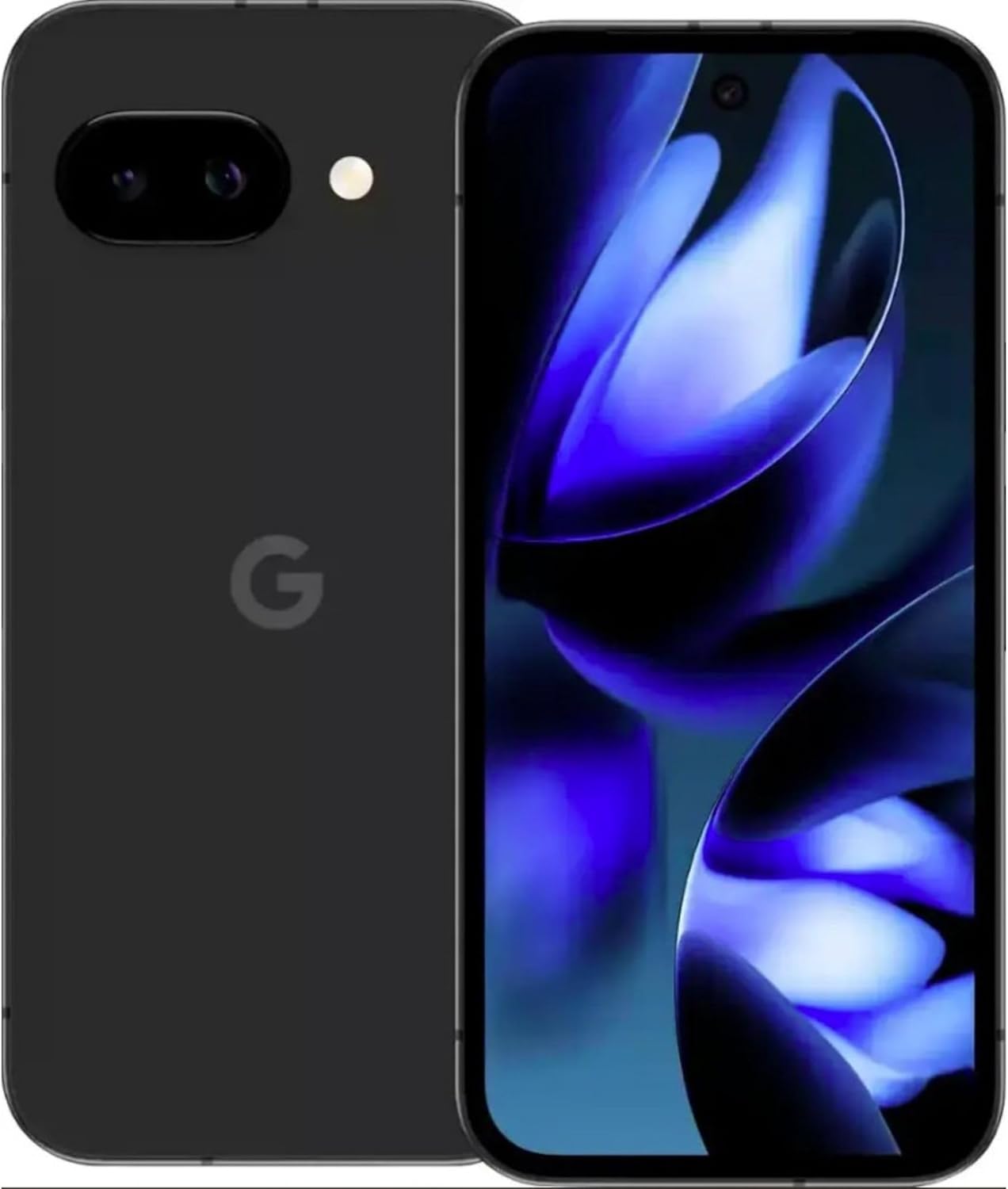
Imatge: Anvers i revers view of the Google Pixel 9a smartphone, showcasinla pantalla i el mòdul de la càmera posterior.

Imatge: Lateral view of the Google Pixel 9a, highlighting the power and volume buttons, and the SIM card tray.

Image: Clear back view of the Google Pixel 9a, showing the camera bar and Google logo.
2.3. Configuració inicial
- Insereix la targeta SIM: Use the provided SIM tray ejector tool to open the SIM tray. Insert your nano-SIM card into the tray and reinsert it into the phone.
- Encès: Press and hold the power button located on the side of the device until the Google logo appears.
- Seguiu les instruccions a la pantalla: The phone will guide you through the initial setup process, including connecting to Wi-Fi, signing in with your Google account, and setting up security features.
- Transferència de dades: If you are upgrading from another device, follow the prompts to transfer your data, apps, and settings.
3. Operating Your Pixel 9a
3.1. Navegació i interfície
The Pixel 9a runs on Android 15. Navigate using gestures or the traditional three-button navigation bar, configurable in Settings > System > Gestures.
3.2. Característiques de la càmera
The Pixel 9a features an advanced camera system. Access the camera app from the home screen or by double-pressing the power button.
- Modes de foto: Switch between various modes like Portrait, Night Sight, Panorama, and more.
- Edició de fotos amb IA: Utilize built-in AI features for enhanced photo editing, including Magic Eraser and Photo Unblur, directly within the Google Photos app.
3.3. Assistent d'IA de Gemini
Gemini is integrated into your Pixel 9a to assist with various tasks.
- Activació: Activate Gemini by saying "Hey Google" or by long-pressing the power button (if configured).
- Capacitats: Use Gemini for quick information retrieval, setting reminders, controlling smart home devices, drafting messages, and more.
3.4. Gestió de la bateria
The Pixel 9a is equipped with an all-day battery. To optimize battery life:
- Bateria adaptativa: Enable Adaptive Battery in Settings > Battery > Adaptive Battery.
- Estalvi de bateria: Use Battery Saver mode for extended usage when needed.
- Càrrega sense fils: The device supports wireless charging. Place it on a compatible Qi-certified wireless charger.
- Càrrega ràpida: Utilize a compatible fast charger for quicker power replenishment.
3.5. Característiques de seguretat
Your Pixel 9a includes robust security measures.
- Desbloqueig de les empremtes digitals: Set up your fingerprint for secure and quick unlocking.
- Desbloqueig facial: Configure face unlock for convenient access.
- Actualitzacions periòdiques: Google provides 7 years of security updates to protect your device from emerging threats.
3.6. Connectivitat
The Pixel 9a supports various connectivity options:
- 5G: Connect to 5G networks for faster data speeds (carrier dependent).
- Wi-Fi 6e: Enjoy enhanced Wi-Fi performance with Wi-Fi 6e compatibility.
- Bluetooth 5: Connect to Bluetooth accessories like headphones and smartwatches.
- NFC: Feu servir NFC per a pagaments sense contacte i emparellament ràpid amb dispositius compatibles.
- Doble SIM: El dispositiu admet la funcionalitat Dual SIM.
4. Cura i Manteniment
- Neteja: Feu servir un drap suau i sense borrissol per netejar el dispositiu. Eviteu materials abrasius o productes químics agressius.
- Resistència a l'aigua i a la pols: The Pixel 9a is water and dust resistant. However, this is not a permanent condition and resistance might decrease as a result of normal wear. Do not intentionally submerge the device.
- Actualitzacions de programari: Regularly install system updates to ensure optimal performance and security.
- Gestió d'emmagatzematge: Netegeu periòdicament els innecessaris filei aplicacions per mantenir la velocitat del dispositiu i alliberar emmagatzematge.
5. Solució De Problemes
If you encounter issues with your Pixel 9a, consider the following common solutions:
- El dispositiu no respon: Premeu i manteniu premut el botó d'engegada durant uns 30 segons per forçar un reinici.
- Bloqueig de l'aplicació: Clear the app's cache and data in Settings > Apps > [App Name] > Storage > Clear Cache/Clear Data. If the issue persists, uninstall and reinstall the app.
- Drenatge de la bateria: Check battery usage in Settings > Battery to identify apps consuming excessive power. Adjust settings or restrict background activity for those apps.
- Problemes de connectivitat: Toggle Wi-Fi or Bluetooth off and on. For cellular issues, ensure your SIM card is properly inserted and contact your carrier if necessary.
- Errors de programari: Ensure your device is running the latest software version. A factory reset (Settings > System > Reset options > Erase all data) can resolve persistent software problems, but remember to back up your data first.
6. Especificacions tècniques
| Característica | Especificació |
|---|---|
| Nom del model | Google Pixel 9a |
| Número de model de l'article | GXQ96 |
| Sistema operatiu | Android 15 |
| Model de CPU | Google Tensor G4 |
| Velocitat de la CPU | 3.1 GHz |
| Mida instal·lada de la memòria RAM | 8 GB |
| Capacitat d'emmagatzematge de memòria | 128 GB |
| Mida de la pantalla | 6.3 polzades |
| Resolució | 1080 x 2400 |
| Potència nominal de la bateria | 4300 mAh |
| Temps de conversa telefònica | 16 hores |
| Tecnologies de connectivitat | 5G + Wifi 6e + Bluetooth 5, Bluetooth, NFC, USB, Wi-Fi |
| Característiques especials | Dual SIM, Fast Charging Support, Gemini AI Assistant, Water & Dust Resistant, Wireless Charging |
| Dimensions del producte | 2.88 x 6.09 x 0.35 polzades |
| Pes de l'article | 6.6 unces (186 grams) |
| Color | Black (Obsidian) |
| Fabricant | |
| Operador sense fil | Desbloquejat |
7. Regulatory and Safety Information
For detailed regulatory compliance, safety, and warranty information, please refer to the official Google Pixel support website or the documentation included with your device. Adhere to all local regulations regarding electronic device usage and disposal.
8. Garantia i Suport
Your Google Pixel 9a is covered by Google's standard warranty. For warranty claims, technical support, or service inquiries, please visit the official Google Pixel Support website or contact Google customer service directly. Keep your proof of purchase for warranty validation.


