1. Introducció
This user manual provides essential information for the setup, operation, and maintenance of your HP 24-inch FHD IPS Monitor. Designed for clarity and user comfort, this monitor features a 1920x1080 resolution, 5ms response time, anti-glare coating, flicker-free technology, and a low blue light mode to reduce eye strain. It includes HDMI and VGA connectivity options and integrated 2W speakers.
2. Informació de seguretat
- Assegureu-vos que el monitor estigui col·locat sobre una superfície estable i plana per evitar caigudes accidentals.
- No bloquegeu les obertures de ventilació. Un flux d'aire adequat és essencial per evitar el sobreescalfament.
- Use only the power adapter and cables provided or approved by HP.
- Avoid exposing the monitor to moisture, rain, or extreme temperatures.
- Desconnecteu el cable d'alimentació de la presa de corrent abans de netejar-lo o si no teniu previst utilitzar el monitor durant un període prolongat.
- No intenteu fer la reparació del monitor vosaltres mateixos. Envieu totes les tasques de manteniment a personal de servei qualificat.
3. Contingut del paquet
Verifiqueu que tots els elements siguin presents al paquet:
- HP 24-inch FHD IPS Monitor
- Suport de monitor (base i coll)
- Cable d'alimentació
- Cable HDMI
- Cable VGA
- Docztorm USB Port Expander (Special Edition Portable Docztorm Data Hub)
- Documentació (Guia de configuració ràpida, Informació de garantia)
4. Producte acabatview
4.1 Davant View
The front of the monitor features the 24-inch IPS display with a sleek, thin-and-light profile and a 3-sided borderless design.

Figura 1: Frontal view of the HP 24-inch FHD IPS Monitor, showcasing la seva pantalla i els seus marcs prims.
4.2 lateral View
El costat view highlights the monitor's slim design and the adjustable stand.

Figura 2: lateral view of the HP 24-inch FHD IPS Monitor, illustrating its thin profile i dempeus.
4.3 Darrera View i Ports
The rear of the monitor provides access to various input and output ports for connectivity.
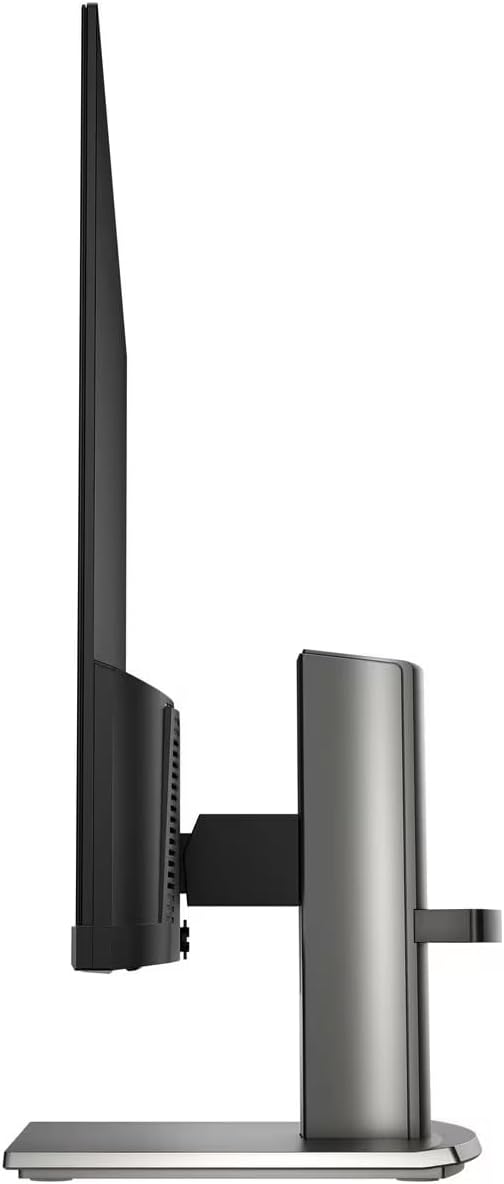
Figura 3: posterior view of the HP 24-inch FHD IPS Monitor, displaying the HDMI, VGA, and audio ports.
Available ports include:
- 1 port HDMI
- 1 port VGA
- Input/Output Audio Jack ports
- Entrada de potència
5. Instruccions de configuració
5.1 Muntatge del suport
- Traieu amb cura els components del monitor i del suport de l'embalatge.
- Fixeu el coll del suport al panell del monitor alineant les pestanyes i prement-lo fins que encaixi al seu lloc.
- Attach the stand base to the stand neck, securing it with the captive screw at the bottom of the base.
- Place the assembled monitor on a stable, level surface.

Figure 4: The HP 24-inch monitor fully assembled on its stand.
5.2 Cables de connexió
- Connexió d'alimentació: Connecteu el cable d'alimentació a l'entrada d'alimentació del monitor i després a una presa de corrent.
- Connexió de vídeo:
- For HDMI: Connect one end of the HDMI cable to the monitor's HDMI port and the other end to your computer's HDMI output.
- For VGA: Connect one end of the VGA cable to the monitor's VGA port and the other end to your computer's VGA output.
- Connexió d'àudio: Si feu servir altaveus o auriculars externs, connecteu-los a la presa de sortida d'àudio del monitor.
- Docztorm USB Port Expander: Connect the Docztorm USB Port Expander to an available USB port on your computer for additional connectivity.
6. Instruccions de funcionament
6.1 Engegada/apagada
Premeu el botó d'engegada situat a la part inferior dreta del monitor per engegar-lo o apagar-lo. L'indicador lluminós d'engegada s'il·luminarà quan el monitor estigui actiu.
6.2 Ajust de la configuració del monitor
Use the OSD (On-Screen Display) menu buttons, typically located on the bottom bezel, to navigate and adjust settings such as:
- Brillantor i contrast: Adjust these to suit your viewmedi ambient.
- Configuració de color: Seleccioneu entre diversos viewing modes or customize color temperature and saturation.
- Selecció d'entrada: Manually switch between HDMI and VGA inputs if auto-switch is off.
- HP Eye Ease (Low Blue Light): This monitor features an always-on low blue light filter that reduces blue light emission without impacting color accuracy, promoting eye comfort.
- Tecnologia sense parpelleig: The monitor is designed to eliminate screen flickering, further reducing eye strain during prolonged use.

Figure 5: Illustration of the HP Eye Ease feature, demonstrating reduced blue light for eye comfort.
6.3 Ajust de la posició del monitor
El suport del monitor permet ajustaments ergonòmics:
- Ajust d'inclinació: The screen can be tilted from -5 to +25 degrees to find your optimal viewangle de ing.
- Ajust d'alçada: The stand offers 3.9 inches of height adjustment for personalized comfort.
7. Manteniment
7.1 Neteja del monitor
- Apagueu sempre el monitor i desconnecteu el cable d'alimentació abans de netejar-lo.
- Utilitzeu un drap suau i sense pelusa dampRenteu-ho amb aigua o un netejador de pantalles no abrasiu.
- No ruixeu el netejador directament sobre la pantalla.
- Eviteu utilitzar productes químics agressius, dissolvents o materials abrasius, ja que poden danyar la pantalla o el dispositiu.asing.
7.2 Atenció general
- Mantingueu el monitor allunyat de la llum solar directa i de fonts de calor.
- Assegureu-vos que hi hagi una ventilació adequada al voltant del monitor.
- Manage cables to prevent tangles and damage.
8. Solució De Problemes
| Problema | Causa possible | Solució |
|---|---|---|
| No hi ha imatge a la pantalla |
|
|
| Mala qualitat d'imatge (borrosa, distorsionada) |
|
|
| No hi ha so dels altaveus |
|
|
9. Especificacions
| Característica | Detall |
|---|---|
| Dimensions del producte | 7.9 x 21.09 x 18.1 polzades |
| Pes de l'article | 7.7 lliures |
| Fabricant | HP |
| Número de model de l'article | HP 24" FHD Monitor |
| Mida de la pantalla de peu | 24 polzades |
| Relació d'aspecte | 16:9 |
| Resolució | 1920 x 1080 píxels (FHD 1080p) |
| Brillantor de la imatge | 300 nits |
| Descripció de la superfície de la pantalla | Mat |
| Temps de resposta | 5 ms |
| Connectivitat | 1 x HDMI, 1 x VGA, Audio Jack |
| Inclinació ajustable | -5 a + graus 25 |
| Característiques especials | Anti Glare, Flicker Free, Low Blue Light, Built-in 2W Speakers |
10. Garantia i Suport
Your HP 24-inch FHD IPS Monitor is covered by a standard manufacturer's warranty. For detailed warranty terms and conditions, please refer to the warranty documentation included in your product package or visit the official HP support weblloc.
For technical assistance, troubleshooting, or to contact customer support, please visit the HP support portal or contact your local HP service center. Ensure you have your monitor's model number and serial number ready when seeking support.