1. Introducció
Gràcies per la compraasing the DREAM TV BLUEPRINT 8K Android Media Player. This device is designed to provide a superior home entertainment experience with its advanced features, including 8K ultra-high-definition video playback, dual-band Wi-Fi, Gigabit LAN, and Google Play integration. This manual will guide you through the setup, operation, and maintenance of your new media player.
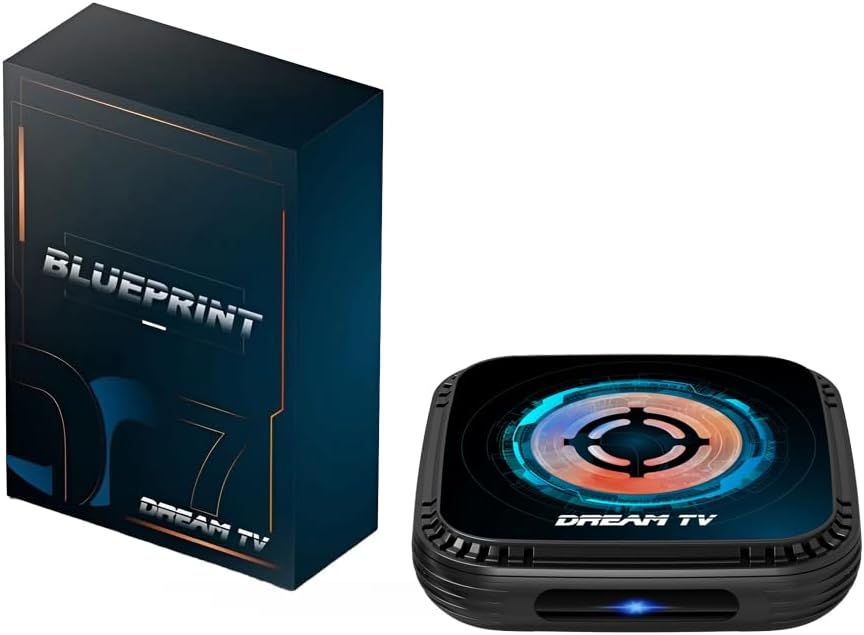
Image 1.1: DREAM TV BLUEPRINT Media Player and Packaging
This image displays the DREAM TV BLUEPRINT media player alongside its product packaging. The device is a compact, black square unit with a distinctive circular design on its top surface, featuring blue and orange accents. The packaging box is also dark-colored with "BLUEPRINT" and "DREAM TV" branding.
2. Producte acabatview i Característiques
The DREAM TV BLUEPRINT is equipped with cutting-edge technology to deliver an immersive media experience. Key features include:
- 8K Ultra-High Definition Playback: Supports next-generation 8K video technology, providing a more vivid and realistic visual experience. Enjoy movies and videos with an immersive visual quality.
- Gigabit Wired LAN Port: Features a 1Gbps wired LAN port for stable, high-speed communication. This ensures smooth streaming and fast transfer of large data files.
- Dual-Band Wi-Fi Support (2.4G / 5G): Equipped with a Wi-Fi module compatible with both 2.4GHz and 5GHz bands. This allows for high-speed communication with less interference, making video viewing comfortable.
- Included Gamepad for Large Screen Gaming: Comes with a wireless game controller. Enjoy action, racing, simulation, and other games comfortably on your living room's large screen.
- Bluetooth Remote Control & HDMI Output: Easy operation with the included Bluetooth remote control. Connects to TVs and projectors via the HDMI port, functioning as a versatile home entertainment terminal.

Image 2.1: Key Features of DREAM TV BLUEPRINT
This image highlights the core features of the DREAM TV BLUEPRINT. Icons represent Bluetooth 5.0+, Wi-Fi 6, AI Smart Technology, 4GB Memory, 8K Ultra-High Definition, Voice Assistant, 64GB Storage, and a Fan System, all surrounding a central image of the media player.

Image 2.2: 8K Decoding Capability
This image emphasizes the 8K decoding support of the device, promising a sharper visual experience. It features a large "8K" graphic with vibrant floral elements, and the media player is shown at the bottom, reinforcing its 8K capability.
3. Guia de configuració
3.1. Contingut del paquet
Abans de començar, assegureu-vos que tots els elements estiguin presents al paquet:
- DREAM TV BLUEPRINT Media Player
- Comandament a distància Bluetooth
- Adaptador d'alimentació
- Manual d'usuari (aquest document)
3.2. Connexió del dispositiu
- Connectar-se al televisor: Use an HDMI cable (not included) to connect the HDMI OUT port on the DREAM TV BLUEPRINT to an HDMI IN port on your television or projector.
- Connecteu-vos a l'alimentació: Plug the power adapter into the DC IN port on the media player, then plug the other end into a wall outlet. The device will automatically power on.
- Connexió de xarxa (opcional):
- Connexió per cable: For the most stable connection, connect an Ethernet cable from your router to the Gigabit LAN port on the media player.
- Connexió sense fil: During initial setup, you will be prompted to connect to a Wi-Fi network. Select your network and enter the password. The device supports both 2.4GHz and 5GHz bands.
3.3. Initial Setup and Remote Pairing
Upon first power-on, follow the on-screen instructions to complete the initial setup. This typically includes:
- Selecció d'idioma: Trieu el vostre idioma preferit.
- Vinculació remota: The Bluetooth remote control may need to be paired. Follow the on-screen prompts, usually involving holding down specific buttons on the remote near the device until pairing is successful.
- Configuració de la xarxa: If not already connected via Ethernet, select and connect to your Wi-Fi network.
- Google Account Login: Log in with your Google account to access Google Play Store and other Google services.
4. Instruccions de funcionament
4.1. Navegació bàsica
Use the directional pad (D-pad) and OK button on the Bluetooth remote control to navigate through the Android TV interface. The Home button will return you to the main screen, and the Back button will go back to the previous screen.
4.2. Accessing Applications
From the home screen, you can access pre-installed applications or download new ones from the Google Play Store. Navigate to the "Apps" section or the Google Play Store icon to browse and install applications.
4.3. Reproducció multimèdia
The DREAM TV BLUEPRINT supports various media formats. You can play local media files from connected USB drives or network storage, or stream content from online services like YouTube (pre-installed) and other streaming apps downloaded from Google Play.
For 8K content, ensure your display supports 8K resolution and that you are using a high-speed HDMI cable capable of 8K transmission.
4.4. Jocs
With the included wireless gamepad, you can enjoy a wide range of Android games available on the Google Play Store. Connect the gamepad via Bluetooth (if not already paired) and launch your favorite games for an enhanced gaming experience on your TV.

Image 4.1: Usage Scenario - Entertainment on the Go
This image illustrates a usage scenario where the DREAM TV BLUEPRINT can be used for entertainment during breaks or while away from home, implying its portability or connectivity features. It shows a person using a smartphone and the media player connected to a larger display, suggesting seamless integration for entertainment.
5. Manteniment
5.1. Neteja
To clean the device, gently wipe the exterior with a soft, dry cloth. Do not use liquid cleaners or abrasive materials, as they may damage the surface.
5.2. Sistema de refrigeració
The DREAM TV BLUEPRINT features an optimized cooling system to ensure stable operation and extend device lifespan. Ensure the ventilation holes are not blocked and the device is placed in a well-ventilated area to prevent overheating.

Image 5.1: Optimized Cooling System
This image illustrates the optimized cooling system of the DREAM TV BLUEPRINT, designed to extend the device's lifespan. It shows a fan and heat sink components, with cool air flowing through the device, emphasizing efficient heat dissipation.
5.3. Actualitzacions de programari
Periodically check for system updates in the device settings. Keeping your software up-to-date ensures optimal performance, security, and access to new features.
6. Solució De Problemes
If you encounter issues with your DREAM TV BLUEPRINT, please refer to the following common solutions:
| Problema | Possible causa/solució |
|---|---|
| Sense poder |
|
| No Signal on TV |
|
| Problemes de connexió Wi-Fi |
|
| El control remot no respon |
|
7. Especificacions
| Característica | Detall |
|---|---|
| Nom del model | PLANTA |
| Número de model de producte | DREAM BOX |
| Marca | HT (komgilk) |
| Color | Negre |
| Factor de forma | Caixa de TV |
| Tipus de controlador | Control remot |
| Serveis d'Internet compatibles | YouTube (and others via Google Play) |
| Resolució | 8K |
| Característica especial | DLNA |
| Tecnologia de connectivitat | HDMI, Dual-Band Wi-Fi (2.4G/5G), Gigabit LAN, Bluetooth |
| Components inclosos | Player, Remote Control, Power Adapter, User Manual |
| Dimensions del producte | 25 x 12 x 5 cm |
| Pes del producte | 412 g |
8. Garantia i Suport
For warranty information and technical support, please refer to the official HT (komgilk) website or contact their customer service directly. Details regarding warranty coverage and support channels are typically provided with your purchase documentation or on the manufacturer's official product page.
For further assistance, you may also visit the product page on Amazon.co.jp: Pàgina de producte d'Amazon