1. Instruccions de seguretat importants
Please read this user manual carefully before using the Bagotte Robot Vacuum and Mop Model A21. Keep this manual for future reference.
- Aquest aparell el poden utilitzar nens a partir de 8 anys i persones amb capacitats físiques, sensorials o mentals reduïdes o amb manca d'experiència i coneixements si han rebut supervisió o instruccions sobre l'ús de l'aparell d'una manera segura i entenen els perills que comporta. .
- Els nens no jugaran amb l'aparell. La neteja i el manteniment dels usuaris no els han de fer els nens sense supervisió.
- Només feu servir l'adaptador de corrent original proporcionat pel fabricant.
- No utilitzeu el robot en entorns amb flames obertes o objectes fràgils.
- Ensure the charging station is placed on a level surface against a wall, with no obstacles within 1 meter on either side and 2 meters in front.
- Before cleaning, remove power cords, small objects, and any items that could entangle the robot.
- No submergiu el robot ni els seus components electrònics a l'aigua.
- Apagueu el robot i desendolleu l'estació de càrrega abans de realitzar qualsevol manteniment o neteja.
2. Contingut del paquet
Verifiqueu que tots els components siguin presents i en bon estat en desembalar-los.

Image: All items included in the Bagotte Robot Vacuum A21 package.
- A21 Robot Vacuum Cleaner * 1
- Charging Station * 1
- Remote Control (2 AAA batteries included) * 1
- Adaptador d'alimentació * 1
- 2-in-1 Water Tank * 1
- Raspalls laterals * 2
- Mop Holder * 1
- Drap de fregona * 2
- Hepa Filters * 1
- Raspall de neteja * 1
- Manual d'usuari * 1
3. Producte acabatview
The Bagotte A21 is a 3-in-1 robot vacuum designed for vacuuming, sweeping, and mopping. It features a slim design, powerful suction, and multiple control options.

Image: Bagotte Robot Vacuum A21 main unit and accessories.
Components de la unitat principal
- Portada superior: Botó d'engegada, indicador Wi-Fi.
- Para-xocs davanter: Collision sensors.
- Raspalls laterals: For sweeping edges and corners.
- Rodes motrius: For movement.
- Cubell d'escombraries/dipòsit d'aigua: Integrated unit for dry and wet cleaning.
- Contactes de càrrega: For automatic recharging.
- Bottom Sensors: Cliff sensors to prevent falls.
4. Configuració
4.1 Col·locació de l'estació de càrrega
Place the charging station against a wall on a hard, level surface. Ensure there are no obstacles within 1 meter (3.3 feet) to the left and right, and 2 meters (6.6 feet) in front of the charging station. This allows the robot to return for charging without obstruction.

Image: Robot vacuum returning to its charging station.
4.2 Càrrega inicial
Connect the power adapter to the charging station and plug it into a wall outlet. Place the robot onto the charging station, ensuring the charging contacts align. For first-time use, charge the robot for at least 6 hours to ensure the battery is fully conditioned.
4.3 Instal·lació dels raspalls laterals
Attach the side brushes to the corresponding posts on the bottom of the robot until they click into place. Ensure the brushes are securely fastened.
4.4 Installing the 2-in-1 Water Tank/Dustbin
To use the mopping function, fill the water tank with clean water. Attach the mop cloth to the mop holder, then slide the mop holder onto the water tank. Insert the combined 2-in-1 water tank/dustbin unit into the back of the robot until it clicks securely.

Image: Components for 3-in-1 cleaning functionality.
5. Instruccions de funcionament
5.1 Encès/Apagat
- Encès: Premeu i manteniu premut el botó d'engegada del robot durant uns segons fins que s'encengui l'indicador lluminós.
- Apagar: Press and hold the power button for a few seconds until the indicator light turns off.
5.2 modes de neteja
The robot offers four cleaning modes to suit different needs:

Image: Illustration of different cleaning modes.
- Neteja automàtica: El robot neteja automàticament seguint un patró sistemàtic.
- Neteja de punts: The robot cleans a specific area in a spiral pattern for concentrated cleaning.
- Neteja de vores: El robot neteja les parets i les vores dels mobles.
- Neteja manual: Control the robot's direction using the remote control or app.
5.3 Control d'aplicacions (aplicació intel·ligent Tuya)
Download the Tuya Smart app from your smartphone's app store. Follow the in-app instructions to connect your robot to your home's 2.4GHz Wi-Fi network. The app allows for advanced control and scheduling.
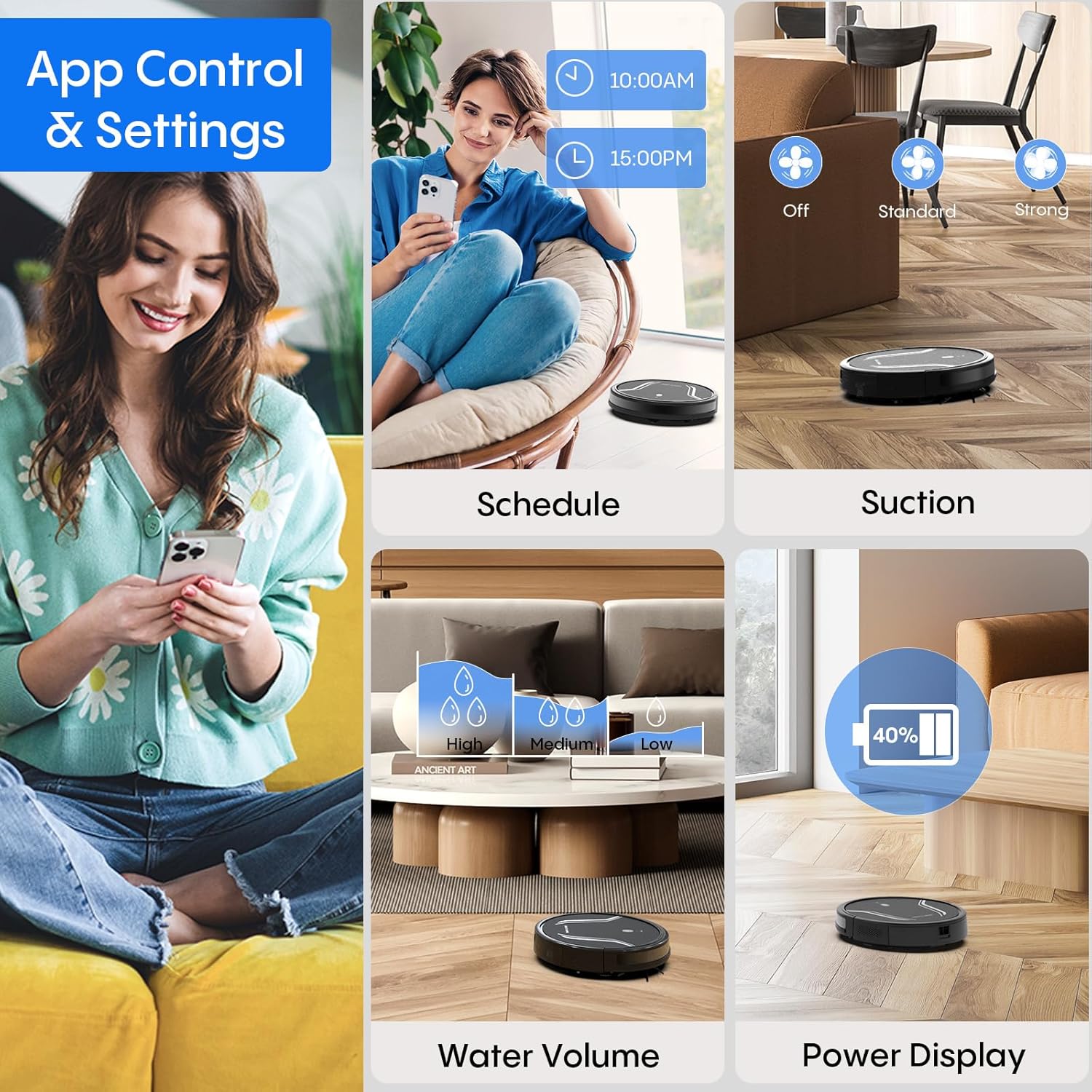
Image: App control interface for the robot vacuum.
- Programació: Estableix hores específiques perquè el robot netegi automàticament.
- Modes de neteja: Select desired cleaning modes.
- Potència d'aspiració: Adjust suction levels (e.g., Standard, Strong).
- Volum d'aigua: Control water flow for mopping (e.g., Low, Medium, High).
- Estat de la bateria: Monitor the robot's battery level.
- Find My Robot: Locate the robot if it gets stuck or lost.
5.4 Control remot
Use the included remote control to manually direct the robot, start/pause cleaning, select cleaning modes, and send it back to the charging station.
5.5 Control per veu (Alexa/Assistent de Google)
Once connected to the Tuya Smart app, you can link your robot to Amazon Alexa or Google Assistant for voice commands. For example, say "Alexa, turn on the robot."

Image: Robot vacuum controlled via voice command.
5.6 Recàrrega automàtica
When the battery level is low, the robot will automatically return to its charging station to recharge. You can also manually send it back using the app or remote control.
6. Manteniment
Un manteniment regular garanteix un rendiment òptim i allarga la vida útil del teu robot aspirador.
6.1 Buidar el contenidor d'escombraries
Press the release button to remove the 2-in-1 water tank/dustbin unit. Open the dustbin cover and empty its contents into a trash bin. It is recommended to empty the dustbin after each cleaning cycle.
6.2 Neteja de filtres
Remove the HEPA filter and sponge filter from the dustbin. Tap them gently to remove dust. The filters are not washable and should be replaced every 3-6 months, depending on usage.
6.3 Neteja dels raspalls laterals
Periodically check the side brushes for tangled hair or debris. Carefully remove any obstructions. If brushes are worn or damaged, replace them with new ones.
6.4 Neteja dels sensors
Wipe the cliff sensors (located on the bottom of the robot) and the charging contacts (on both the robot and charging station) with a clean, dry cloth. This ensures proper navigation and charging.
6.5 Cleaning Mop Cloth and Water Tank
After each mopping session, remove the mop cloth and wash it thoroughly. Allow it to air dry completely before reattaching. Empty any remaining water from the water tank and rinse it out. Ensure the water tank is dry before storage.
7. Solució De Problemes
Si teniu problemes amb el vostre robot aspirador, consulteu els següents problemes i solucions habituals:
| Problema | Causa possible | Solució |
|---|---|---|
| El robot no s'encén | Bateria baixa; el botó d'engegada no s'ha premut correctament | Carregueu el robot; premeu i manteniu premut el botó d'engegada fins que l'indicador s'encengui. |
| El robot no carrega | Charging contacts are dirty; Charging station not powered | Clean charging contacts on both robot and station; Ensure power adapter is plugged in. |
| El robot s'enganxa sovint | Too many obstacles; Cliff sensors are dirty | Netegeu la zona de neteja de cables solts i objectes petits; Netegeu els sensors de penya-segat. |
| Mal rendiment de neteja | Dustbin full; Filters clogged; Side brushes worn | Empty dustbin; Clean or replace filters; Clean or replace side brushes. |
| La funció de fregar no funciona | Water tank empty; Mop cloth not attached; Water flow setting too low | Fill water tank; Attach mop cloth correctly; Adjust water flow setting in the app. |
| No es pot connectar a la Wi-Fi | Incorrect Wi-Fi password; Not 2.4GHz network; Robot too far from router | Verify password; Ensure router is 2.4GHz; Move robot closer to router during setup. |
8. Especificacions
| Característica | Detall |
|---|---|
| Número de model | A21 |
| Dimensions del producte | 15 x 12.5 x 4 polzades |
| Pes de l'article | 7.24 lliures |
| Potència d'aspiració | Fins a 5000Pa |
| Capacitat de caixa de pols | 250mL (integrated with water tank) |
| Capacitat del dipòsit d'aigua | 200mL (integrated with dust box) |
| Mètodes de control | App, Remote Control, Voice Control (Alexa/Google Assistant) |
| Compatibilitat Wi-Fi | Només 2.4 GHz |
| Funcions automàtiques | Auto-recharge, Obstacle avoidance, Fall prevention |
9. Garantia i Suport
Bagotte provides a 12-month service warranty for the Robot Vacuum and Mop Model A21. For technical support, warranty claims, or any questions regarding your product, please contact Bagotte customer service through the official weblloc web o la vostra plataforma de compra.
Please have your model number (A21) and purchase information ready when contacting support.


