1. Introducció
Gràcies per la compraasing the iFFALCON 40S55T 40-inch Full HD Google TV. This manual provides essential information for the safe and efficient use of your television. Please read it thoroughly before operating the device and retain it for future reference.
The iFFALCON 40S55T is a tunerless smart TV designed for streaming content, offering a Full HD display, Google TV operating system, Chromecast built-in, and Dolby Audio for an immersive entertainment experience.
2. Informació de seguretat
Seguiu sempre les precaucions de seguretat bàsiques quan utilitzeu aquest televisor per reduir el risc d'incendi, descàrrega elèctrica i lesions.
- No exposeu el televisor a la pluja o la humitat.
- No obriu el televisor casing; demaneu totes les tasques de manteniment a personal qualificat.
- Assegureu-vos una ventilació adequada al voltant del televisor.
- Mantingueu el televisor allunyat de la llum solar directa, de fonts de calor i de camps magnètics forts.
- Use only the power cord and accessories supplied by the manufacturer.
- Desendolleu el televisor durant tempestes o quan no l'utilitzeu durant períodes prolongats.
3. Contingut del paquet
Verifiqueu que tots els elements siguin presents a la caixa:
- iFFALCON 40S55T 40-inch Full HD Google TV
- Control remot
- Moble per a TV (2 peces)
- Cargols per a suport de TV
- Cable d'alimentació
- Targeta de garantia
- Manual d'instruccions (aquest document)
4. Configuració
4.1 Fixació del suport de TV
- Col·loqueu amb cura el televisor cap per avall sobre una superfície suau i plana per evitar que es faci malbé la pantalla.
- Alineeu cada peça del suport amb les ranures corresponents de la part inferior del televisor.
- Fixeu els suports amb els cargols proporcionats. Assegureu-vos que estiguin ben ajustats.
4.2 Connexió de potència
Connecteu el cable d'alimentació a l'entrada d'alimentació del televisor i després endolleu-lo a una presa de corrent. El televisor entrarà en mode d'espera.
4.3 Initial Setup (Google TV & Network)
En engegar-lo per primera vegada, el televisor us guiarà pel procés de configuració inicial de Google TV. Això inclou:
- Selecció de la llengua.
- Connexió a una xarxa Wi-Fi.
- Signing in with your Google account to access personalized content and apps.
- Acceptació dels termes i condicions.
4.4 Connectivitat
The iFFALCON 40S55T offers various connection options for external devices.

Imatge: Més deview of the TV's connectivity options, including HDMI, USB, Bluetooth, and Wi-Fi.
- Ports HDMI: Connecteu dispositius externs com ara consoles de jocs, reproductors de Blu-ray o descodificadors.
- Port USB: Per connectar dispositius d'emmagatzematge USB per reproduir contingut multimèdia files.
- Wi-Fi: For wireless internet connection to access streaming services and online features.
- Bluetooth: For connecting wireless headphones, speakers, or other Bluetooth-enabled accessories.
4.5 Tunerless Operation
This TV is designed as a tunerless model, meaning it does not have a built-in tuner for terrestrial (over-the-air) broadcasts. To watch terrestrial, BS, or CS broadcasts, an external tuner is required and must be purchased separately.

Image: The iFFALCON 40S55T TV showcasing its smart features, highlighting its tunerless design and ability to enjoy internet video content without an antenna connection.
5. Funcionament del televisor
5.1 Control remotview
The remote control provides access to all TV functions, including power, volume, channel navigation, and smart TV features. It also supports voice search via 'Hey Google'.

Image: The TV remote control, featuring quick access buttons for popular streaming services and a dedicated microphone button for voice commands.
- Botó d'encesa: Encén o apaga el televisor.
- Botons de navegació: Feu servir el botó direccional i el botó D'acord per navegar pels menús.
- Botons de volum/canal: Adjust volume and change channels (if an external tuner is connected).
- Botons de drecera d'aplicacions: Direct access to popular streaming services like Netflix, YouTube, etc.
- Botó del micròfon: Press and hold to activate 'Hey Google' voice search.
5.2 Funcions de Google TV
Your iFFALCON TV runs on Google TV, providing a personalized and integrated entertainment experience.
- Agregació de contingut: Google TV organizes movies, shows, and live TV from all your apps and subscriptions into one place.
- Recomanacions personalitzades: Basat en el vostre viewing history and preferences, Google AI suggests content you might enjoy.
- Cerca per veu: Use the 'Hey Google' feature on your remote to quickly find content, get information, or control smart home devices.
- Chromecast integrat: Easily cast content from your smartphone, tablet, or computer directly to your TV screen.

Image: A smartphone screen mirroring content to the iFFALCON TV, demonstrating the Chromecast built-in feature for enjoying mobile content on a larger display.
5.3 Configuració de la imatge
The TV incorporates advanced image processing technologies to deliver a superior viewexperiència.
- AI PQ Processor: TCL's proprietary AiPQ Processor intelligently adjusts image quality at the pixel level, enhancing clarity, color, and contrast for a vivid and realistic picture.
- Full HD (FHD): Experience sharp and detailed images with Full High Definition resolution, offering 200% more detail than standard HD screens.

Image: A visual comparison illustrating the enhanced detail and clarity provided by Full HD resolution compared to standard HD.
- HDR10/HLG Support: Enjoy a wider range of colors and contrast with HDR10 and HLG compatibility, revealing stunning detail in both bright and dark scenes.

Image: The TV screen showcasing the vibrant and detailed picture quality achieved with HDR10/HLG technology.
- Micro atenuació: This technology analyzes the image in hundreds of separate zones to adjust brightness and darkness independently, enhancing contrast and picture quality.

Image: A visual representation of Micro Dimming technology, illustrating how it enhances contrast and picture depth by adjusting brightness in specific areas of the screen.
5.4 Sound Settings (Dolby Audio)
The TV features Dolby Audio for clear, rich, and immersive sound.
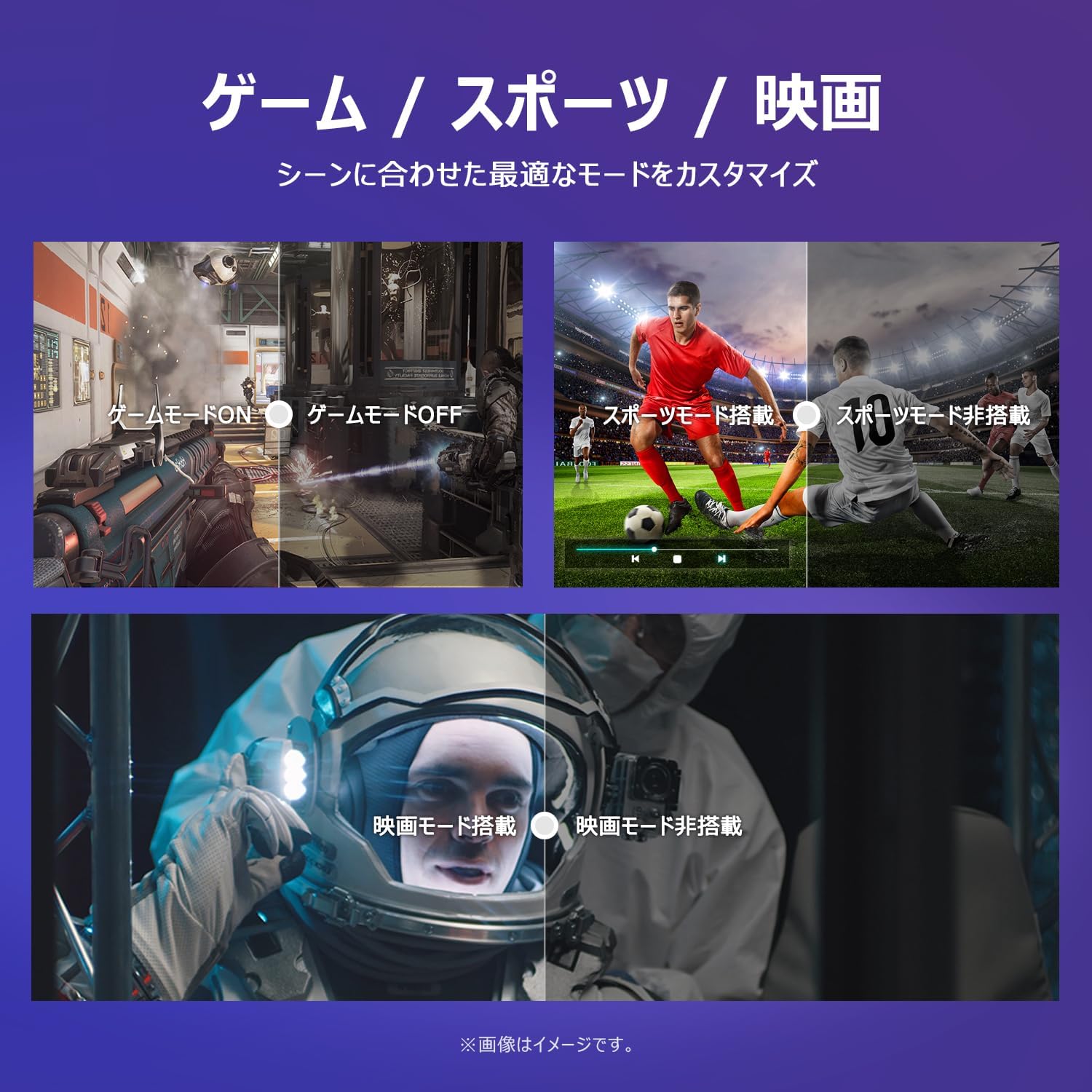
Image: The TV screen with a visual representation of sound, highlighting the immersive audio experience provided by Dolby Audio.
Access the sound settings menu to adjust modes like Standard, Music, Movie, or Custom to suit your preferences.
5.5 Mode de joc
Activate Game Mode for an optimized gaming experience with reduced input lag.
Image: Visual comparisons demonstrating the optimized settings for Game Mode, Sports Mode, and Movie Mode, adapting the TV's performance to different content types.
The TV also offers dedicated Sports Mode and Movie Mode to enhance viewing for specific content types.
5.6 Configuració del sistema
The quick settings menu allows you to customize frequently used system settings and rearrange their order for intuitive and convenient access.

Imatge: A view of the TV's quick system settings interface, illustrating how users can easily access and customize various functions like brightness, picture mode, and network settings.
6. Manteniment
Una cura i un manteniment adequats allargaran la vida útil del vostre televisor.
- Neteja de la pantalla: Netegeu suaument la pantalla amb un drap suau i sense borrissol. Per a les marques difícils, utilitzeu un netejador de pantalles dissenyat específicament per a televisors, aplicant-lo al drap, no directament a la pantalla.
- Neteja de la Casing: Feu servir un drap suau i sec per netejar el televisor.asing. No utilitzeu productes de neteja abrasius ni dissolvents.
- Ventilació: Assegureu-vos que les obertures de ventilació de la part posterior del televisor no estiguin bloquejades per evitar el sobreescalfament.
- Cable d'alimentació: Reviseu regularment el cable d'alimentació per si hi ha algun dany. Si està malmès, poseu-vos en contacte amb el servei d'atenció al client per a la seva substitució.
7. Solució De Problemes
If you encounter issues with your TV, refer to the following common problems and solutions. If the problem persists, contact customer support.
| Problema | Causa possible | Solució |
|---|---|---|
| Sense poder | Cable d'alimentació no connectat; presa de corrent no funciona | Ensure power cable is securely plugged in; Test outlet with another device |
| No hi ha imatge, però hi ha so | Font d'entrada incorrecta; Problema amb el dispositiu extern | Premeu el botó "Entrada" del comandament a distància per seleccionar la font correcta; comproveu les connexions del dispositiu extern |
| No hi ha so, però hi ha imatge | Volum silenciat o massa baix; Problema amb el sistema d'àudio extern | Unmute or increase volume; Check audio cable connections to external sound system |
| El comandament a distància no funciona | Piles esgotades; Obstrucció entre el comandament a distància i el televisor | Canvieu les piles; Traieu qualsevol obstrucció; Assegureu-vos que el comandament a distància estigui apuntat al sensor d'infrarojos del televisor |
| No es pot connectar a la Wi-Fi | Contrasenya incorrecta; Problema amb el router; TV massa lluny del router | Verificar la contrasenya del Wi-Fi; Reiniciar l'encaminador; Acostar el televisor a l'encaminador o utilitzar un extensor de Wi-Fi |
8. Especificacions
Detailed technical specifications for the iFFALCON 40S55T TV:

Image: Dimensional drawing of the iFFALCON 40S55T TV, indicating its physical measurements.
| Característica | Especificació |
|---|---|
| Mida de la pantalla | 40 polzades |
| Tipus de visualització | VA Liquid Crystal |
| Resolució | Full HD (1920 x 1080) |
| Freqüència d'actualització | 60 Hz |
| Relació d'aspecte | 16:9 |
| Relació de contrast | 1000:1 |
| Sistema operatiu | Google TV |
| Sortida d'àudio | 20 Watts (2.1 channels) |
| Ports HDMI | 2 |
| Ports USB | 1 |
| Connectivitat sense fil | Wi-Fi, Bluetooth |
| Dimensions del producte (W x H x D) | 89.2 x 55.8 x 18.4 cm (amb suport) |
| Pes del producte | 4.63 kg |
| Compatible amb muntatge a la paret | Sí |
| Accessoris inclosos | Stand, Remote Control, Warranty Card, Power Cable |
9. Garantia i Suport
Your iFFALCON 40S55T TV comes with a manufacturer's warranty. Please refer to the included warranty card for specific terms, conditions, and duration of coverage.
For technical support, troubleshooting assistance beyond this manual, or warranty claims, please contact iFFALCON customer service. Contact information can typically be found on the warranty card or the official iFFALCON weblloc.
Please have your model number (40S55T) and purchase date ready when contacting support.


