Introducció
Thank you for choosing the UYIKOO BGL13 1080p HD Hidden Camera Glasses. These glasses are designed for discreet video recording and photo capture in Full HD resolution. Featuring a lightweight and durable design, a built-in rechargeable battery, and a 64GB memory card, they are suitable for various activities such as meetings, travel, sports, and outdoor adventures. This manual provides detailed instructions for setup, operation, and maintenance to ensure optimal performance.
Contingut del paquet
Si us plau, verifiqueu que tots els elements que s'enumeren a continuació estiguin inclosos al vostre paquet:
- UYIKOO BGL13 Camera Glasses
- Targeta Micro SD de 64 GB
- Lector de targetes USB
- Restableix el pin
- Cable de càrrega USB
- Manual d'usuari
- Estoig d'emmagatzematge
- Drap de neteja

Image: Contents of the UYIKOO BGL13 Camera Glasses package.
Producte acabatview
The UYIKOO BGL13 glasses integrate a high-definition camera into a discreet, wearable design. Key features include:
- Gravació de vídeo Full HD 1080p: Capture clear videos at 1920 x 1080 pixels.
- Captura de fotos: Take high-resolution JPEG photos.
- Integrated 64GB Memory: Comes with a 64GB Micro SD card, expandable up to 256GB (Class 10 recommended).
- Bateria recarregable: Built-in lithium-ion battery provides up to 75 minutes of continuous recording on a full charge. Supports recording while charging.
- Funcionament amb un sol botó: Simple control for recording videos and taking photos.
- Lleuger i durador: Constructed from high-quality ABS plastic for comfort and longevity.
- Enregistrament en bucle: Sobreescriu automàticament els més antics filequan la targeta de memòria està plena, cosa que garanteix un enregistrament contínuu.

Image: UYIKOO BGL13 Hidden Camera Glasses with camera lens highlighted.

Image: The single button control on the UYIKOO BGL13 Camera Glasses.
Configuració
- Carregueu el dispositiu: Before first use, fully charge the glasses. Connect the USB charging cable to the glasses and a power source (e.g., computer USB port or USB wall adapter). The indicator light will show charging status (refer to the LED indicator section for details).
- Inseriu la targeta Micro SD: Locate the Micro SD card slot on the glasses. Gently insert the provided 64GB Micro SD card into the slot until it clicks into place. Ensure the card is inserted correctly to avoid damage. The glasses support up to 256GB Micro SD cards (Class 10 recommended for optimal performance).

Image: Inserting the Micro SD card into the glasses.
Instruccions de funcionament
Encès/Apagat
- Encès: Press and hold the ON/OFF button for approximately 2 seconds until the indicator light illuminates.
- Apagar: Press and hold the ON/OFF button for approximately 3-5 seconds until the indicator light turns off.
Gravació de vídeo
- Comença a gravar: With the device powered on, press and hold the ON/OFF button for 2 seconds. The indicator light will flash, indicating that video recording has started.
- Atura la gravació: Press the ON/OFF button once. The indicator light will change, and the video file es salvarà.

Image: One-button operation for video recording and photo capture.
Captura de fotografies
- Fer una foto: With the device powered on, press the ON/OFF button once. The indicator light will flash briefly, indicating that a photo has been taken and saved.
Connexió a un ordinador
- Transferència Files: Connect the glasses to your computer using the provided USB cable. The device will be recognized as a removable disk. You can then access and transfer your video and photo files.
- Compatibilitat: Compatible with both Windows and macOS operating systems.
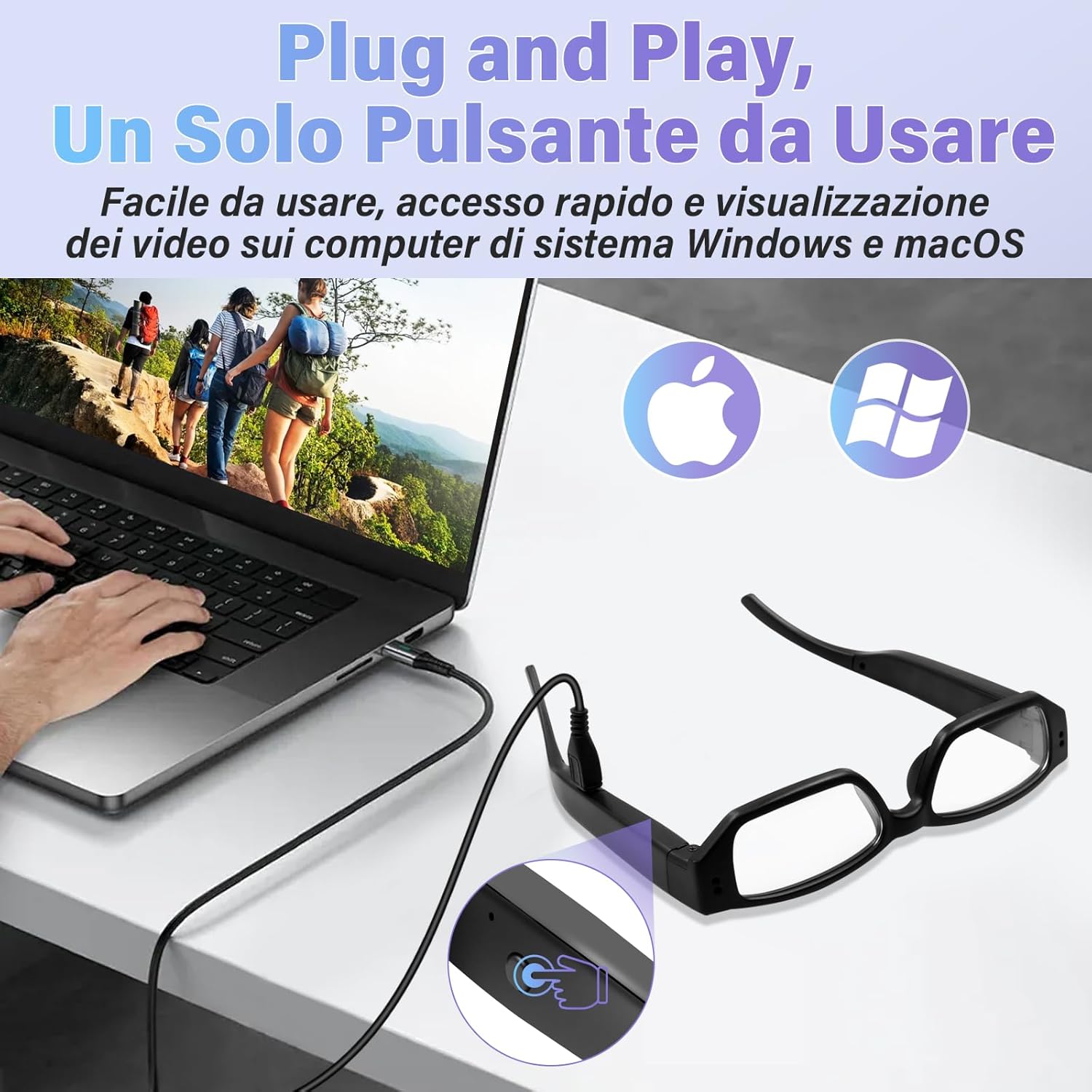
Image: Connecting the glasses to a computer for file accés.
Carregant
The UYIKOO BGL13 glasses feature a built-in rechargeable lithium-ion battery. To charge:
- Connect the USB charging cable to the charging port on the glasses and a standard USB power source.
- The indicator light will typically show red during charging and turn blue (or off) when fully charged. Refer to the specific LED indicator behavior in your detailed manual for precise information.
- A full charge provides approximately 75 minutes of continuous recording.
- The device supports recording while charging, allowing for extended use when connected to a power bank or wall adapter.

Image: Charging the glasses on the go.
Gestió de targetes de memòria
- Capacitat d'emmagatzematge: The glasses come with a 64GB Micro SD card. This provides ample space for numerous video and photo files.
- Expansió: For increased storage, the device supports Micro SD cards up to 256GB. Ensure to use a Class 10 or higher speed card for reliable recording.
- Enregistrament en bucle: When the memory card is full, the device will automatically overwrite the oldest files with new recordings. This ensures continuous operation without manual deletion of files.
- Format: It is recommended to format the Micro SD card periodically to maintain optimal performance and prevent data corruption. This can usually be done via your computer.

Image: Micro SD card slot and battery indicator.

Image: Loop recording functionality.
Manteniment
- Neteja: Use the provided cleaning cloth to gently wipe the lenses and frame. Avoid using harsh chemicals or abrasive materials.
- Emmagatzematge: Store the glasses in the provided storage case when not in use to protect them from dust, scratches, and impacts.
- Temperatura: Eviteu exposar el dispositiu a temperatures extremes, llum solar directa o humitat elevada.
- Exposició a l'aigua: The glasses are not waterproof. Avoid contact with water or other liquids.
- Cura de la bateria: Per allargar la durada de la bateria, eviteu descarregar-la completament amb freqüència. Carregueu el dispositiu regularment, fins i tot si no l'utilitzeu durant períodes prolongats.
Resolució de problemes
| Problema | Causa possible | Solució |
|---|---|---|
| El dispositiu no s'encén. | Bateria baixa; dispositiu bloquejat. | Charge the battery fully. Use the reset pin to press the reset button if the device is unresponsive. |
| No es poden gravar vídeos/fer fotos. | No Micro SD card; Micro SD card full or corrupted; incorrect operation. | Ensure Micro SD card is inserted correctly. Check available space or format the card. Refer to operating instructions for correct button presses. |
| L'ordinador no reconeix el dispositiu. | Faulty USB cable; driver issue; incorrect connection. | Try a different USB port or cable. Ensure the glasses are powered on when connecting. Restart your computer. |
| Mala qualitat de vídeo/fotos. | Dirty lens; insufficient lighting; rapid movement. | Clean the camera lens with the provided cloth. Ensure adequate lighting conditions. Minimize sudden movements during recording. |
Especificacions
- Model: BGL13
- Resolució de vídeo: 1920 x 1080p Full HD
- Format de la fotografia: JPEG
- Format de vídeo: AVI
- Emmagatzematge: Supports Micro SD/SDHC cards up to 256GB (64GB included)
- Tipus de bateria: Polímer de liti
- Durada de la bateria: Aproximadament 75 minuts de gravació contínua
- Temps de càrrega: (Not specified, typically 1-2 hours)
- Dimensions: 13 x 2 x 5 cm (aproximadament)
- Pes: 140 g
- Material: Plàstic ABS d'alta qualitat
- Connectivitat: USB for data transfer and charging
- Característiques especials: Local recording, portable, 64GB card included

Image: Product dimensions and face shape compatibility.
Garantia i Suport
For warranty information and technical support, please refer to the documentation included with your purchase or contact UYIKOO customer service through the retailer where the product was purchased. Keep your proof of purchase for warranty claims.


