1. Introducció
Thank you for choosing the vretti PB821 Portable Thermal Printer. This compact and versatile printer is designed for convenient, inkless printing from various devices, including smartphones, tablets, and laptops. Its portable design makes it ideal for business, office, home, and travel use. This manual provides detailed instructions to help you set up, operate, and maintain your printer for optimal performance.

The vretti PB821 printer is suitable for a wide range of environments, including office, home, travel, and school, demonstrating its versatility.
2. Producte acabatview
2.1 Contingut del paquet
Si us plau, comproveu el contingut del paquet en desempaquetar-lo:
- vretti PB821 Portable Thermal Printer
- Cable de càrrega USB-C
- Manual d'usuari
- Sample Thermal Paper
2.2 Característiques clau
- Impressió sense fil Bluetooth: Connects seamlessly with phones and tablets via the "XLifePro" app (available on App Store and Google Play). Supports various file formats including TXT, PDF, Excel, and Word.
- Portàtil i compacte: Lightweight design for easy transport, fitting into backpacks for business trips, family travel, or study.
- Cost-effective Inkless Printing: Utilizes advanced thermal printing technology, eliminating the need for ink, toner, or ribbons. Only thermal paper is required.
- Impressió d'alta qualitat: Delivers clear prints with a resolution of 203DPI.
- Llarga vida útil de la bateria: Built-in 1500mAh rechargeable battery supports printing up to 223 A4 sheets on a full charge.
- Suport de paper versàtil: Compatible with various thermal paper sizes, including A5, A4, US Letter, and 2-4 inch labels.

The vretti PB821 printer supports multiple paper sizes, including standard US Letter and A4, for diverse printing needs.

The printer features a 1500mAh battery, offering extended printing capability and convenient USB-C charging.

Experience high print clarity with the vretti PB821, ensuring sharp and readable documents.
3. Configuració
3.1 Càrrega inicial
Before first use, fully charge the printer. Connect the supplied USB-C cable to the printer's charging port and a compatible USB power adapter (not included). The charging indicator light will show the charging status.
3.2 App Download (for Bluetooth Printing)
For wireless printing via Bluetooth, download the "XLifePro" app:
- Cerca "XLifePro" on the Apple App Store (for iOS devices) or Google Play Store (for Android devices).
- Descarregueu i instal·leu l'aplicació al vostre telèfon intel·ligent o tauleta.
3.3 Driver Installation (for USB Printing)
For printing via USB from a laptop or desktop computer, you may need to install drivers:
- Visit the official vretti support weblloc: vrettitech.com/pages/p83-support.
- Download the appropriate driver for your operating system (Windows, Mac OS, Linux, Chromebook).
- Seguiu les instruccions a la pantalla per completar la instal·lació del controlador.
4. Instruccions de funcionament
4.1 Connexió mitjançant Bluetooth
To print wirelessly from your mobile device:
- Assegureu-vos que la impressora estigui engegada i completament carregada.
- Open the "XLifePro" app on your smartphone or tablet.
- Navigate to the device connection section within the app.
- Activeu el Bluetooth al vostre dispositiu mòbil i cerqueu els dispositius disponibles.
- Select "PB821" from the list of found devices to establish a connection.

Follow these steps to connect your vretti PB821 printer via Bluetooth using the XLifePro app.
4.2 Connexió mitjançant USB
Per imprimir des de l'ordinador:
- Ensure the printer drivers are installed on your computer (refer to Section 3.3).
- Connect the vretti PB821 printer to your laptop or desktop computer using the supplied USB-C cable.
- The computer should recognize the printer automatically.
- You can now print documents or webpages directly from your computer's applications.

Connect your vretti PB821 printer to your computer via USB for direct printing after driver installation.
4.3 Càrrega de paper tèrmic
The vretti PB821 supports various types and sizes of thermal paper. Ensure you use thermal paper as the printer does not require ink.
- Open the paper compartment cover on the printer.
- Insert the thermal paper, ensuring the printable side (usually the smoother, slightly glossy side) is facing the print head. For folding thermal paper with a black mark, ensure the black mark is facing down.
- Adjust the paper guides to fit the width of your paper snugly.
- Tanqueu bé la tapa del compartiment de paper.
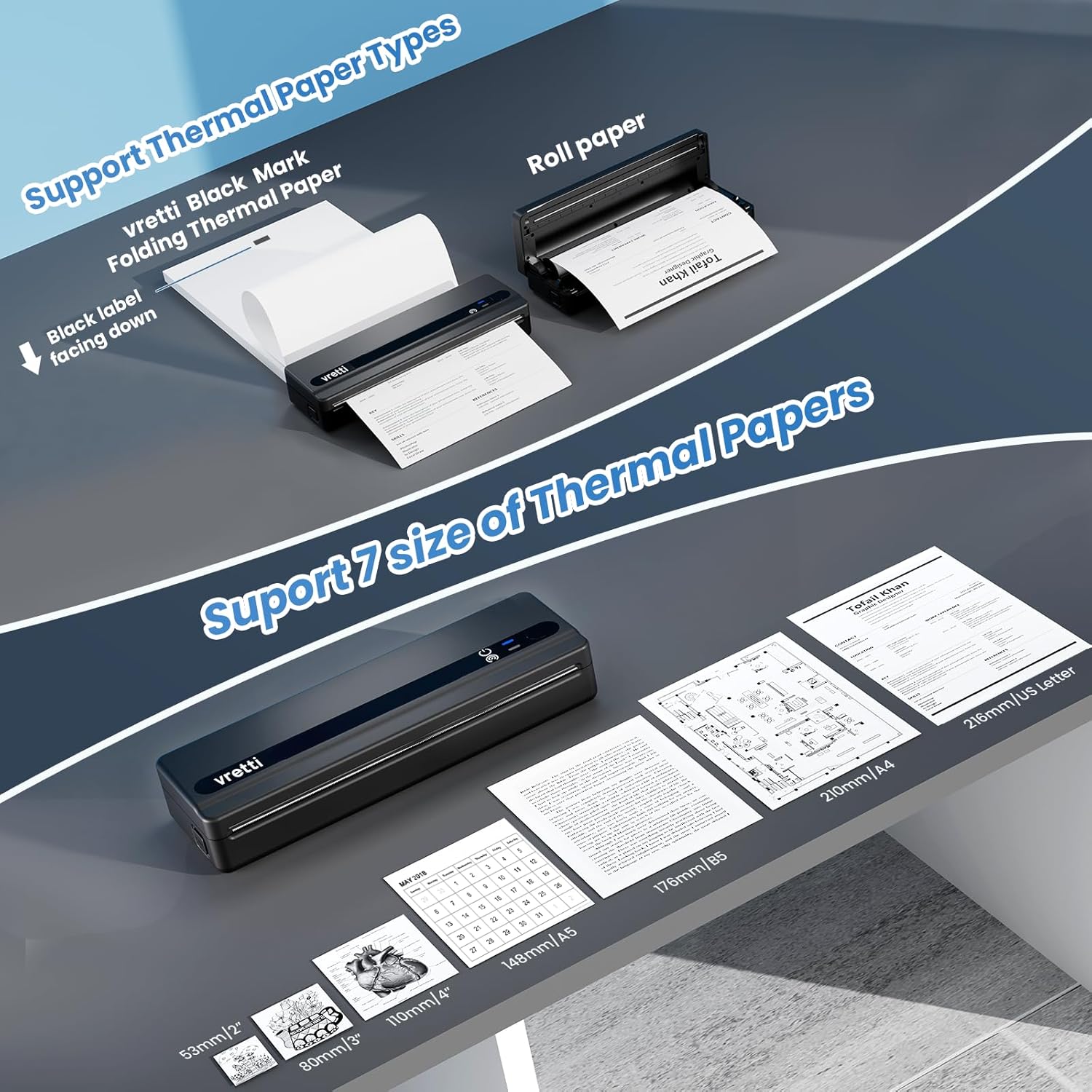
Properly load thermal paper, including folding and roll types, ensuring correct orientation for optimal printing.

The vretti PB821 supports a wide range of paper sizes, from small labels to standard A4 and US Letter documents.
4.4 Impressió de documents
Once connected and paper is loaded:
- Des de l'aplicació: Select the document or image you wish to print within the "XLifePro" app. Adjust print settings (e.g., density, rotation) as needed, then tap the print button.
- Des de l'ordinador: Obriu el document o file in your preferred application (e.g., Word, PDF vieweh, web browser). Select "Print" from the file menu, choose the vretti PB821 as your printer, adjust settings, and click "Print".
5. Manteniment
The vretti PB821 thermal printer requires minimal maintenance due to its inkless design. However, regular cleaning can ensure consistent print quality and extend the printer's lifespan.
- Neteja del capçal d'impressió: If print quality degrades (e.g., faint lines, streaks), gently wipe the print head with a lint-free cloth dampened with isopropyl alcohol. Ensure the printer is off and cool before cleaning.
- Neteja de l'exterior: Use a soft, dry cloth to wipe down the exterior of the printer. Avoid abrasive cleaners or solvents.
- Emmagatzematge: Guardeu la impressora en un lloc fresc i sec, allunyat de la llum solar directa i de temperatures extremes.
6. Solució De Problemes
If you encounter issues with your vretti PB821 printer, please refer to the following common problems and solutions:
| Problema | Causa possible | Solució |
|---|---|---|
| La impressora no s'encén | Bateria baixa; el botó d'engegada no s'ha premut correctament | Charge the printer fully; Press and hold the power button for a few seconds. |
| No es pot connectar mitjançant Bluetooth | Bluetooth off; Printer not discoverable; App issue | Ensure Bluetooth is enabled on both devices; Restart printer and app; Re-pair the device in app settings. |
| Poor print quality (faint, streaks) | Low battery; Dirty print head; Incorrect paper loading | Charge the printer; Clean the print head (see Section 5); Ensure thermal paper is loaded correctly. |
| El paper no s'alimenta | Paper jammed; Paper not inserted correctly; Empty paper compartment | Clear any jammed paper; Re-insert paper, ensuring it's straight and aligned; Load new thermal paper. |
| Impressora no reconeguda per l'ordinador | Drivers not installed; Loose USB connection | Install drivers (Section 3.3); Check USB cable connection; Try a different USB port. |
If the problem persists after trying these solutions, please contact vretti customer support for further assistance.
7. Especificacions
| Característica | Detall |
|---|---|
| Model | PB821 |
| Tecnologia d'impressió | Tèrmica |
| Connectivitat | Bluetooth, USB |
| Resolució d'impressió | 203 DPI |
| Velocitat màxima d'impressió (monocrom) | 30 mm/s |
| Capacitat de la bateria | 1500 mAh |
| Compatibilitat de paper | Thermal paper (plain, folding, roll, sticker) |
| Mides de paper admeses | 2'', 3'', 4'', A4, 8.5''x 11'' US Letter, A5, B5 |
| Dimensions del producte | 25.7 x 7 x 4.7 cm |
| Pes de l'article | 920 g |
| Color | Negre |
| Components inclosos | Printer, USB-C Cable, Sampel Paper |
8. Garantia i Suport
vretti products are designed for reliability and performance. For warranty information and customer support, please refer to the documentation included with your purchase or visit the official vretti website. You can typically find support resources, FAQs, and contact information on the manufacturer's weblloc.
Per obtenir la informació i el suport més recents, visiteu: vrettitech.com


