1. Introducció
This manual provides detailed instructions for the setup, operation, maintenance, and troubleshooting of your Keychron Q6 HE QMK Wireless Custom Mechanical Keyboard. Please read this guide thoroughly to ensure optimal performance and longevity of your device.
The Keychron Q6 HE is a full-size layout wireless QMK custom keyboard featuring Hall Effect Gateron 2.0 magnetic switches, offering advanced customization and a premium typing experience.
2. Contingut del paquet
Verifiqueu que tots els elements siguin presents al vostre paquet:
- Keychron Q6 HE Keyboard
- Keyboard PCB
- Cas
- Placa d'alumini
- Keycaps (Mac & Windows compatible)
- Cable USB-C a USB-C
- Adaptador USB-A a USB-C
- Tirador de commutació
- Extractor de tecles
- Manual d'usuari

Image: Keychron Q6 HE keyboard with included accessories, showcasing the full package contents.
3. Configuració
3.1 Connexió inicial
The Keychron Q6 HE supports three connection modes: 2.4 GHz Wireless, Bluetooth 5.1, and Wired (USB-C).
3.1.1 Connexió per cable
- Connecteu el cable USB-C proporcionat al port USB-C del teclat.
- Connecteu l'altre extrem del cable al port USB de l'ordinador.
- Ensure the mode switch on the back of the keyboard is set to 'Cable' mode.
- El sistema operatiu reconeixerà automàticament el teclat.
3.1.2 Connexió sense fil de 2.4 GHz
- Locate the 2.4 GHz receiver (dongle) included with your keyboard.
- Plug the 2.4 GHz receiver into an available USB port on your computer.
- Set the mode switch on the back of the keyboard to '2.4G' mode.
- The keyboard should automatically connect to the receiver. If not, press and hold the 'Fn' + '4' keys for 4 seconds to initiate pairing.
3.1.3 Connexió Bluetooth
- Set the mode switch on the back of the keyboard to 'Bluetooth' mode.
- To enter pairing mode, press and hold 'Fn' + '1' (for device 1), 'Fn' + '2' (for device 2), or 'Fn' + '3' (for device 3) for 4 seconds until the indicator light flashes rapidly.
- On your computer, smartphone, or tablet, enable Bluetooth and search for 'Keychron Q6 HE'.
- Select the keyboard to pair. The indicator light will stop flashing once connected.
- You can switch between paired Bluetooth devices by pressing 'Fn' + '1', 'Fn' + '2', or 'Fn' + '3' briefly.
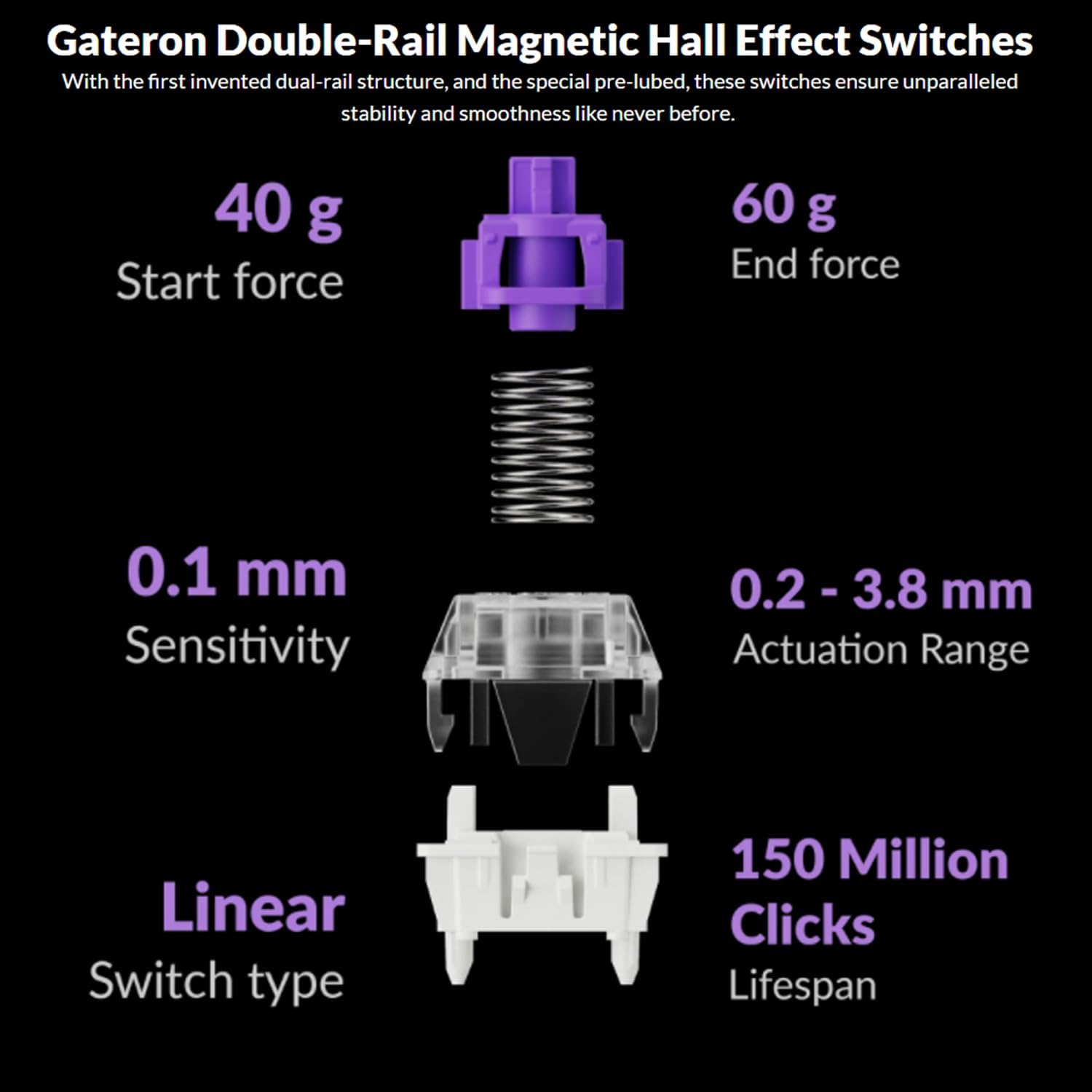
Image: The Keychron Q6 HE keyboard connected to a computer and a tablet, demonstrating its multi-device connectivity.
3.2 Canvi de sistema operatiu
The keyboard has a switch to toggle between Mac and Windows layouts. Ensure this switch, located on the back of the keyboard, is set to your current operating system for correct key mapping.
3.3 Càrrega de la bateria
The keyboard is equipped with a 4000 mAh Lithium Ion battery. Connect the USB-C cable to the keyboard and a power source (computer USB port or USB wall adapter) to charge. The charging indicator light will show the charging status.
4. Instruccions de funcionament
4.1 Funcions bàsiques de les tecles
The Q6 HE features a standard 100% layout. All keys function as labeled. Use the 'Fn' key in combination with other keys for secondary functions (e.g., media controls, backlight adjustments).
4.2 Botó programable
The rotary knob on the top right of the keyboard is programmable. By default, it controls volume (rotate) and media play/pause (press). Its functions can be customized using the Keychron Launcher web aplicació.
4.3 Gateron Magnetic Hall Effect Switches
The Q6 HE utilizes Gateron Double-Rail Magnetic Hall Effect Switches, which allow for dynamic customization of key behavior.

Image: Diagram illustrating the adjustable actuation points of the magnetic switches, ranging from 0.5mm to 3.5mm.
4.3.1 Adjustable Actuation Points
The actuation point (the distance a key needs to travel to register a press) can be adjusted from 0.1 mm to 3.8 mm using the Keychron Launcher web app. This allows for personalized typing and gaming sensitivity.
4.3.2 Rapid Trigger
Rapid Trigger functionality allows a key to reactivate instantly upon reset, without needing to return to its original position. This feature is highly beneficial for competitive gaming and can be configured via the Keychron Launcher.

Image: Detailed breakdown of Gateron Double-Rail Magnetic Hall Effect Switches, showing components and specifications like start force, end force, sensitivity, actuation range, switch type, and lifespan.
4.4 Il·luminació de fons RGB
The keyboard features south-facing RGB LED lights. You can cycle through various lighting effects and adjust brightness using 'Fn' key combinations or through the Keychron Launcher web aplicació.
4.5 Keychron Launcher Web App
The Keychron Launcher is a web-based application for advanced customization. It allows you to:
- Remapeja les claus
- Adjust actuation points for magnetic switches
- Create personalized macro commands
- Set shortcuts and key combinations
- Customize RGB lighting effects

Imatge: Captura de pantalla del llançador Keychron web app interface, showing options for key remapping, actuation point adjustment, and macro creation.
5. Manteniment
5.1 Neteja del teclat
Per netejar el teclat:
- Desconnecteu el teclat de totes les fonts d'alimentació i dispositius.
- Utilitzeu un drap suau i sense pelusa lleugerament dampEsbandiu amb aigua o una solució netejadora suau per netejar les tecles i la carcassa.
- Per a una neteja més profunda, feu servir l'extractor de tecles inclòs per treure les tecles i netegeu-les per sota amb aire comprimit o un raspall petit.
- Eviteu ruixar líquids directament sobre el teclat.
5.2 Commutadors intercanviables en calent
The Q6 HE features hot-swappable magnetic switches, allowing you to replace individual switches without soldering.

Imatge: Primer pla view of the Keychron Q6 HE keyboard with several keycaps and switches removed, highlighting the hot-swappable magnetic switch design.
5.2.1 Substitució d'interruptors
- Use the switch puller to carefully remove the desired switch. Grip the switch firmly and pull straight up.
- Alineeu els pins del nou interruptor amb els forats de la placa de circuit imprès.
- Gently press the new switch into place until it clicks. Ensure it is seated correctly and not bent.
5.3 Cura de la bateria
Per allargar la durada de la bateria:
- Eviteu descarregar completament la bateria amb freqüència.
- Guardeu el teclat en un lloc fresc i sec quan no el feu servir durant períodes prolongats.
- No exposeu el teclat a temperatures extremes.
6. Solució De Problemes
6.1 El teclat no respon
- Mode per cable: Assegureu-vos que el cable USB-C estigui connectat correctament tant al teclat com a l'ordinador. Proveu un port o cable USB diferent.
- Mode de 2.4 GHz: Verify the 2.4 GHz receiver is plugged in and the keyboard is set to '2.4G' mode. Re-pair by holding 'Fn' + '4' for 4 seconds.
- Mode Bluetooth: Check if Bluetooth is enabled on your device and the keyboard is paired. Re-pair if necessary by holding 'Fn' + '1/2/3' for 4 seconds.
- Bateria: Ensure the keyboard battery is charged. Connect it to a power source.
6.2 Les tecles no es registren o s'escrivien dues vegades
- Punt d'accionament: Adjust the actuation point for the affected keys using the Keychron Launcher. A higher actuation point (e.g., 2.0mm or 3.0mm) can help prevent accidental presses or double typing.
- Problema amb el commutador: If a specific key consistently malfunctions, the magnetic switch might be faulty. Consider replacing the hot-swappable switch.
- Firmware: Ensure your keyboard firmware is up to date via the Keychron Launcher.
6.3 RGB Backlight Issues
- Brillantor: Adjust backlight brightness using 'Fn' key combinations.
- Efectes: Cycle through different RGB effects using 'Fn' key combinations.
- Programari: Use the Keychron Launcher to customize and troubleshoot RGB settings.
7. Especificacions
| Número de model | Q6H-P1 |
| Marca | Keychron |
| Tecnologia de connectivitat | Sense fil de 2.4 GHz, Bluetooth 5.1, USB-C amb cable |
| Descripció del teclat | Full-size, Ergonomic |
| Característiques especials | Hall Effect Magnetic Switches, Programmable Knob, Large Battery Capacity, Hot-Swappable |
| Dispositius compatibles | PC, Mac, Smartphone, Tablet, Gaming Console |
| Il·luminació del teclat | RGB (orientat al sud) |
| Material | 6063 Aluminum (Case) |
| Bateria | Ió de liti de 4000 mAh (inclosa) |
| Pes de l'article | 6.49 lliures (aprox. 2.94 kg) |
| Dimensions del paquet | 19 x 8.5 x 3 polzades |

Image: An exploded diagram showing the internal layers and components of the Keychron Q6 HE keyboard, including keycaps, knob, magnetic switches, top case, sound absorbing foam, gaskets, plate, PCB, latex bottom pad, bottom case PET film, bottom case acoustic foam, battery, and silicone gaskets.
8. Informació de la garantia
Keychron products typically come with a limited manufacturer's warranty. For specific warranty terms, conditions, and duration, please refer to the official Keychron weblloc web o la targeta de garantia inclosa amb el producte. Conserveu el comprovant de compra per a reclamacions de garantia.
9. Suport
For further assistance, technical support, or to download the latest firmware and software, please visit the official Keychron weblloc:
You can also visit the Keychron store on Amazon for product information and customer service:


