Introducció
Thank you for choosing the Porodo Lifestyle 4K Digital Camera. This camera is designed to capture your world in stunning detail, offering 4K video recording and high-resolution 50MP images. With features like 16x digital zoom, a flip flash, and a 180° rotating screen, it is ideal for vlogging, photography, and various content creation needs. This manual provides essential information on setting up, operating, and maintaining your camera to ensure optimal performance and longevity.
Informació de seguretat
- Do not expose the camera to extreme temperatures, direct sunlight, or high humidity.
- Eviteu deixar caure la càmera ni sotmetre-la a impactes forts.
- Keep the camera away from water and liquids unless specifically designed for underwater use (this model is not).
- No intenteu desmuntar ni modificar la càmera. Això anul·larà la garantia.
- Use only the specified battery type and charging method.
- Mantenir fora de l'abast dels nens.
Contingut del paquet
Marqueu la casella per als elements següents:
- Porodo Lifestyle 4K Digital Camera
- Bateria recarregable (650 mAh)
- Cable de càrrega tipus C.
- Manual d'usuari (aquest document)
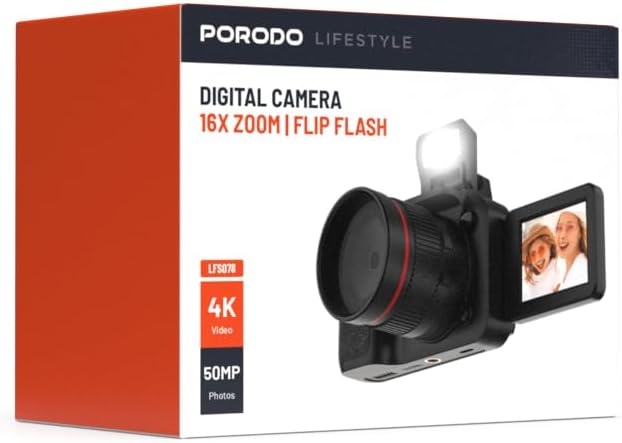
Imatge: Frontal view of the Porodo Lifestyle 4K Digital Camera retail box, showing the camera and key features.

Imatge: Enrere view of the Porodo Lifestyle 4K Digital Camera retail box, displaying product specifications and features.
Producte acabatview
Familiarize yourself with the various parts of your Porodo Lifestyle 4K Digital Camera.

Image: The Porodo Lifestyle 4K Digital Camera shown with its 180° rotating screen flipped open and the integrated flash extended upwards.
- Lent: Component òptic principal per capturar imatges i vídeos.
- Flip Flash: Provides additional illumination in low-light conditions.
- 180° Rotating Screen (2.2'' Display): Permet flexibilitat viewing angles, ideal for vlogging and selfies.
- Botó d'encesa: Encén/apaga la càmera.
- Botó de l'obturador: Captura fotos o inicia/atura la gravació de vídeo.
- Controls de zoom: Adjusts the 16x digital zoom.
- Botons de navegació: Per a la navegació pel menú i l'ajust de la configuració.
- Port de tipus C: Per a càrrega i transferència de dades.
- Ranura per a targeta de memòria: For inserting an SD card (not included).
Configuració
1. Instal·lació i càrrega de la bateria
- Localitzeu la tapa del compartiment de la bateria a la part inferior de la càmera.
- Feu lliscar el pestell per obrir la coberta.
- Insert the provided 650mAh battery, ensuring the contacts align correctly.
- Tanqueu la tapa del compartiment de la bateria fins que faci clic de manera segura.
- Connect the camera to a power source using the Type-C charging cable. The charging indicator will illuminate.
- A full charge takes approximately 2.5 hours. The indicator will change or turn off when charging is complete.
2. Instal·lació de la targeta de memòria
A memory card (SD card, not included) is required to store photos and videos.
- Locate the memory card slot, usually on the side or bottom of the camera.
- Insert the SD card with the metal contacts facing the correct direction (refer to the diagram near the slot if available) until it clicks into place.
- Per treure-la, premeu suaument la targeta fins que surti.
3. Engegada inicial
- Premeu i manteniu premut el botó d'engegada durant uns segons fins que la pantalla s'il·lumini.
- Upon first use, you may be prompted to set the date and time. Use the navigation buttons to adjust and confirm.
Instruccions de funcionament
Basic Photo Mode (50MP)
- Engega la càmera. Normalment, per defecte, estarà en mode foto.
- Frame your shot using the 2.2'' display.
- Press the Shutter button halfway down to focus (if applicable).
- Press the Shutter button fully to capture a 50MP image.

Image: A person holding the Porodo Lifestyle 4K Digital Camera, demonstrating a typical usage scenario for capturing photos.

Imatge: Una altra view of a person holding the Porodo Lifestyle 4K Digital Camera, illustrating the camera's ergonomic design during use.
Basic Video Mode (4K)
- Canvieu la càmera al mode de vídeo (normalment mitjançant un botó dedicat o una opció de menú).
- Press the Shutter button once to start 4K video recording. A recording indicator (e.g., red dot, timer) will appear on the screen.
- Premeu de nou el botó de l'obturador per aturar la gravació.

Image: The Porodo Lifestyle 4K Digital Camera highlighting its 4K video resolution capability.
Using the 16X Digital Zoom
- While in photo or video mode, use the zoom controls (often marked with 'W' for Wide and 'T' for Telephoto) to adjust the 16x digital zoom.
- Premeu 'T' per ampliar i 'W' per allunyar.
Using the Flip Flash
- To activate the flash, manually flip it up from its resting position.
- The camera will automatically use the flash when needed in low-light conditions, depending on your flash settings (e.g., Auto, Fill-in, Red-eye reduction).
- To turn off the flash, gently push it back down until it locks into place.
Using the 180° Rotating Screen
- The 2.2'' display can be rotated 180 degrees.
- Flip the screen out from the side of the camera and rotate it to face forward for selfies or vlogging, or to various angles for creative shots.
- Ensure the screen is securely positioned before shooting.

Image: The Porodo Lifestyle 4K Digital Camera illustrating its 2.2-inch display and 180-degree flip screen functionality.
Reproducció i supressió Files
- Enter Playback mode (usually via a dedicated button or menu option).
- Use the navigation buttons to scroll through your photos and videos.
- Per eliminar a file, select it and press the Delete button (often marked with a trash can icon). Confirm deletion when prompted.
Connexió a un ordinador
- Apagueu la càmera.
- Connect the camera to your computer using the provided Type-C cable.
- Turn on the camera. It should appear as a removable disk drive on your computer.
- You can now transfer photos and videos to your computer.
Manteniment
Neteja de la càmera
- Feu servir un drap suau i sense borrissol per netejar el cos de la càmera.
- For the lens and screen, use a specialized lens cleaning cloth and solution. Do not use abrasive materials.
- Avoid spraying cleaning solutions directly onto the camera. Apply to the cloth first.
Cura de la bateria
- Recharge the battery fully before first use.
- Eviteu esgotar completament la bateria amb freqüència per allargar-ne la vida útil.
- If storing the camera for an extended period, charge the battery to about 50% and remove it from the camera.
Emmagatzematge
- Guardeu la càmera en un lloc fresc i sec, allunyat de la llum solar directa i de temperatures extremes.
- Use a camera bag or case to protect it from dust and scratches.
Resolució de problemes
| Problema | Causa possible | Solució |
|---|---|---|
| La càmera no s'encén. | La bateria està morta o no està instal·lada correctament. | Carregueu la bateria. Assegureu-vos que la bateria estigui inserida amb la polaritat correcta. |
| No es poden fer fotos/vídeos. | La targeta de memòria està plena, no està inserida o està malmesa. | Inseriu una targeta de memòria. Suprimiu els elements innecessaris. files. Formateu la targeta (això esborrarà totes les dades). |
| Images/Videos are blurry. | Lens is dirty. Insufficient light. Camera shake. | Clean the lens. Use the flash or shoot in brighter conditions. Hold the camera steady. |
| Flash not working. | Flash is not flipped up. Flash setting is off. | Ensure the flash is manually flipped up. Check flash settings in the menu. |
| La càmera es congela. | Error de programari. | Traieu i torneu a inserir la bateria per reiniciar la càmera. |
Especificacions
Detailed technical specifications for the Porodo Lifestyle 4K Digital Camera:

Image: Visual representation of the camera's core capabilities: 4K video, 50MP photos, and 16x digital zoom.

Image: A detailed table outlining the technical specifications of the Porodo Lifestyle 4K Digital Camera.
- Nom del model: Porodo Lifestyle 4K Digital Camera – 50MP, 16x Zoom, Flip Flash, 180° Rotating Screen
- Número de model de l'article: 6849108448116
- Marca: Porodo
- Màxim WebResolució d'imatge de càmera: 50 MP
- Resolució de vídeo: 4K (3840x2160)
- Zoom digital: 16X
- Zoom òptic: 1.0
- Visualització: 2.2'' (180° Rotating Screen)
- Capacitat de la bateria: 650mAh (1 P76 battery included)
- Temps de treball: Fins a 3 hores
- Temps de recàrrega: Aproximadament 2.5 hores
- Port de càrrega: Tipus-C
- Tecnologia del sensor fotogràfic: CMOS
- Admet File Formats: JPG (images), AVI (videos)
- Estabilització d'imatge: Digital
- Relació d'aspecte: 16:9, 4:3
- Descripció de la mesura: Punt
- Dimensions del producte: 6 x 13 x 9 cm; 310 g
- País d'origen: Xina
Garantia i Suport
Porodo products are designed with quality and reliability in mind. For warranty information and technical support, please refer to the official Porodo weblloc web o poseu-vos en contacte amb el vostre distribuïdor local.
Assistència en línia: Visita el Porodo Store on Amazon per a informació i actualitzacions del producte.
Opcions de garantia estesa: Additional warranty plans may be available through authorized retailers. Please check with your point of purchase for details.


