1. Introducció
This manual provides detailed instructions for the setup, operation, maintenance, and troubleshooting of your ACASIS DS-0202 14-in-1 USB C Docking Station. Please read this manual thoroughly before using the product to ensure optimal performance and longevity.

Image 1.1: The ACASIS DS-0202 14-in-1 USB C Docking Station, showcasing its compact design and multiple connectivity options including USB-C, USB-A, HDMI, DisplayPort, Ethernet, and card readers.
2. Característiques clau
- Connectivitat 14 en 1: Expands a single USB-C/Thunderbolt 3/4 port into 14 ports, including 2 HDMI, 1 DisplayPort, 3 USB-C 3.1 (10Gbps), 2 USB-A 3.1 (10Gbps), 1 USB 2.0, SD/TF card reader, 1Gbps Ethernet, 3.5mm audio, and 100W Power Delivery.
- Compatibilitat amb triple pantalla: Supports single 4K@60Hz display and triple 4K@30Hz displays (under DP1.4). Windows systems support both MST (Multi-Stream Transport) and SST (Single-Stream Transport) for mirror and extend modes. macOS systems do not support MST.
- Transferència de dades d'alta velocitat: Features 3 USB-C 3.1 and 2 USB-A 3.1 ports, all offering 10Gbps data transfer speeds for rapid file transferències.
- Subministrament d'energia de 100 W: Provides up to 100W Power Delivery through the dedicated USB-C port to charge compatible laptops, tablets, and phones.
- Gigabit Ethernet: Integrated 1000Mbps Ethernet port ensures stable and fast wired network connectivity.
- Connectivitat d'àudio: Includes a 3.5mm audio and microphone port for headset connection.
- SD/TF Card Readers: Built-in SD and TF card slots for convenient data access.
3. Disseny del port
Familiarize yourself with the various ports on the ACASIS DS-0202 docking station:

Imatge 3.1: Detallada view of the docking station's ports, including RJ45 (Ethernet), DisplayPort, HDMI 1, HDMI 2, USB 2.0, USB-A 3.1, PD 3.0 (Max 100W), 3.5mm Audio, and three USB-C 3.1, two USB-A 3.1, SD/TF 3.0 ports.
- Front/Side Ports:
- 3 x USB-C 3.1 (10Gbps)
- 2 x USB-A 3.1 (10Gbps)
- 1 x SD Card Reader (SD 3.0)
- 1 x TF Card Reader (TF 3.0)
- Ports posteriors:
- 1 x RJ45 Gigabit Ethernet (1000 Mbps)
- 1 DisplayPort (4K a 60 Hz)
- 2 x HDMI 2.0 (4K@60Hz)
- 1 x USB 2.0 (480Mbps)
- 1 x USB-A 3.1 (10Gbps)
- 1 x USB-C PD 3.0 (Max 100W input)
- 1 x 3.5mm Audio & Mic In
4. Instruccions de configuració
Before connecting the docking station, ensure your laptop's USB-C port supports Power Delivery, DisplayPort Alt Mode, and Data Transfer. Refer to your laptop's specifications or manufacturer for details.

Image 4.1: USB-C port compatibility check. Ensure your laptop's USB-C port supports Thunderbolt 3/4 or USB-C with Power Delivery, DisplayPort Alt Mode, and Data Transfer for full functionality.
- Connecteu l'adaptador de corrent (opcional però recomanat): If you wish to charge your laptop via the docking station, connect your laptop's USB-C power adapter (up to 100W) to the "PD 100W" USB-C port on the docking station.
- Connectar-se al portàtil: Connect the integrated USB-C cable from the docking station to a compatible USB-C/Thunderbolt 3/4 port on your laptop.
- Connecteu pantalles externes:
- For single or dual monitors: Connect your monitors using HDMI cables to the HDMI 1 and HDMI 2 ports, or a DisplayPort cable to the DP port.
- For triple monitors: Connect your monitors to the HDMI 1, HDMI 2, and DP ports.
Note: Ensure your display cables are securely connected.
- Connecteu els perifèrics: Connect your USB devices (keyboard, mouse, external drives, etc.) to the available USB-A and USB-C data ports.
- Connexió Ethernet (opcional): For a wired network connection, connect an Ethernet cable from your router/modem to the RJ45 port on the docking station.
- Connecteu dispositius d'àudio (opcional): Connecteu els auriculars o els altaveus al connector d'àudio de 3.5 mm.
The docking station is plug-and-play and should be automatically recognized by your operating system. You may need to configure display settings manually.
5. Instruccions de funcionament
5.1 Display Configuration (Windows)
Windows operating systems support both Mirror Mode (SST) and Extend Mode (MST) for multiple displays. You can configure these settings via your display settings.

Image 5.1: Triple display setup examples for Windows, illustrating Mirror Mode (A-BBB) and Extend Mode (A-BCD, A-BC, A-BD) with various monitor arrangements and resolutions.
- Mirror Mode (SST): Totes les pantalles connectades mostren el mateix contingut que la pantalla del portàtil.
- Extend Mode (MST): Each connected display can show different content, extending your desktop across multiple screens.
- Resolució: Supports up to 4K@60Hz for a single display and 4K@30Hz for triple displays (under DP1.4).
To adjust display settings in Windows:
- Right-click on your desktop and select "Display settings".
- Identify and arrange your displays.
- Select the desired display mode (Extend these displays, Duplicate these displays).
- Adjust resolution and orientation as needed.
5.2 Display Configuration (macOS)
macOS systems do not support Multi-Stream Transport (MST). Therefore, when multiple external monitors are connected, they will either mirror each other or extend the laptop display, but cannot extend independently to three unique displays.

Image 5.2: Triple display setup examples for macOS, illustrating Mirror Mode (A-AAA) where all displays show the same content, and Extend Mode (A-BBB) where external displays mirror each other while extending the laptop screen.
- Mode mirall: All connected displays show the same content as your MacBook screen.
- Mode d'ampliació: The external displays will mirror each other, extending your desktop from the MacBook screen. You cannot have three independent extended displays.
- Resolució: Supports up to 4K@30Hz for triple displays.
To adjust display settings in macOS:
- Go to "System Settings" (or "System Preferences" on older macOS versions).
- Select "Displays".
- Arrange your displays and select the desired mode (Mirror Displays or Use as separate display).
5.3 Transferència de dades
The docking station features 3 USB-C 3.1 and 2 USB-A 3.1 ports, all capable of 10Gbps data transfer. Connect your high-speed storage devices to these ports for optimal performance.

Image 5.3: The docking station's 10Gbps USB-C and USB-A ports enable ultra-fast data transfer for large files and high-bandwidth peripherals.
5.4 Lliurament d'energia
The dedicated USB-C PD port supports up to 100W power input. Connect your laptop's power adapter to this port to charge your laptop while using the docking station.

Image 5.4: The 100W Power Delivery port allows for fast charging of your laptop while connected to the docking station, with an example showing 100W input and 85W output to the laptop.
5.5 Gigabit Ethernet
The RJ45 port provides a stable and fast 1000Mbps (1 Gigabit) Ethernet connection. This is ideal for reliable internet access and large file transfers over a local network.

Image 5.5: The Gigabit Ethernet port provides a fast and stable wired network connection, supporting speeds up to 1000Mbps.
5.6 SD/TF Card Readers
Insert your SD or TF (Micro SD) cards into the respective slots for quick access to photos and other data. Both slots can be used simultaneously.
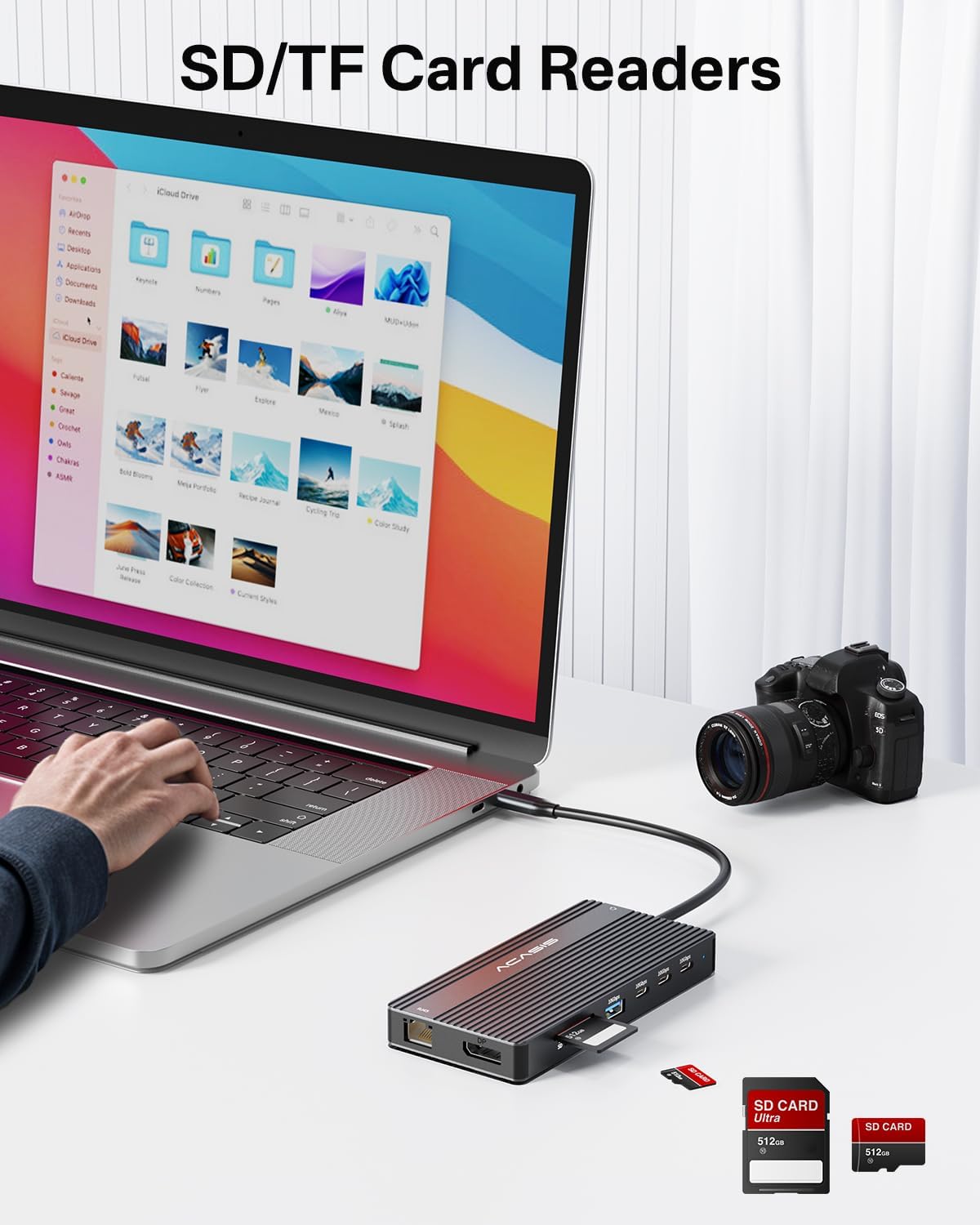
Image 5.6: The integrated SD and TF card readers allow for convenient and fast access to memory card data, useful for photographers and content creators.
6. Manteniment
- Neteja: Use a soft, dry cloth to clean the surface of the docking station. Avoid liquid cleaners or abrasive materials.
- Emmagatzematge: Guardeu l'estació d'acoblament en un lloc fresc i sec, allunyat de la llum solar directa i de temperatures extremes.
- Manipulació: Avoid dropping or subjecting the device to strong impacts. Do not bend the integrated USB-C cable excessively.
- Ventilació: Assegureu-vos que l'estació d'acoblament tingui una ventilació adequada per evitar el sobreescalfament, especialment durant un ús prolongat amb diversos dispositius connectats.
7. Solució De Problemes
| Problema | Causa possible | Solució |
|---|---|---|
| No display output / Flickering screen |
|
|
| El portàtil no es carrega |
|
|
| USB devices not recognized / Slow data transfer |
|
|
| Ethernet connection unstable or not working |
|
|
8. Especificacions
| Característica | Detall |
|---|---|
| Número de model | DS-0202 |
| Marca | ACASIS |
| Connectivitat | USB-C (Host connection) |
| Sortida de vídeo | 2 x HDMI 2.0 (4K@60Hz), 1 x DisplayPort (4K@60Hz) |
| Ports de dades USB | 3 x USB-C 3.1 (10Gbps), 2 x USB-A 3.1 (10Gbps), 1 x USB 2.0 (480Mbps) |
| Ethernet | 1 x RJ45 Gigabit Ethernet (1000 Mbps) |
| Lector de targetes | SD 3.0, TF 3.0 (simultaneous use) |
| Àudio | 1 x 3.5mm Audio & Mic In |
| Lliurament d'energia | USB-C PD 3.0, up to 100W input |
| Dispositius compatibles | Laptops with full-featured USB-C/Thunderbolt 3/4 ports (Dell, HP, Lenovo, ThinkPad, Surface, MacBook, etc.) |
| Sistemes operatius | Windows, macOS, Linux, iPadOS |
| Dimensions del producte | 1 x 1 x 1 polzades (aproximadament) |
| Pes de l'article | 5 unces (aproximadament) |
| Color | Negre |
9. Informació de la garantia
ACASIS products typically come with a standard manufacturer's warranty. For specific warranty terms and conditions, please refer to the warranty card included with your product or visit the official ACASIS weblloc web. Conserveu el rebut de compra com a comprovant de compra per a reclamacions de garantia.
Protection plans are also available for purchase separately:
- Pla de protecció de 3 anys
- Pla de protecció de 4 anys
- Protecció completa (pla mensual)
These plans offer extended coverage beyond the standard manufacturer's warranty.
10. Atenció al client
If you encounter any issues or have questions regarding your ACASIS DS-0202 14-in-1 USB C Docking Station, please contact ACASIS customer support through the following channels:
- Oficial Weblloc: Visita el ACASIS Store on Amazon per obtenir informació sobre el producte i recursos d'assistència.
- Suport per correu electrònic: Refer to your product packaging or the ACASIS weblloc web per obtenir l'adreça electrònica d'assistència més actualitzada.
- Formulari de contacte en línia: Many manufacturers provide a contact form on their weblloc d'assistència tècnica.
When contacting support, please have your product model number (DS-0202) and purchase details ready.


