1. Introducció
This manual provides instructions for the iClever BK08 Foldable Bluetooth Keyboard with Touchpad. Please read this manual thoroughly before using the product to ensure proper operation and to maximize its features. This device is designed for portability and multi-device compatibility, offering a convenient input solution for various operating systems.
2. Contingut del paquet
- iClever BK08 Foldable Bluetooth Keyboard with Touchpad
- Cable de càrrega USB-C
- Bossa de transport
- Suport de suport
- Manual d'usuari (aquest document)
3. Producte acabatview
The iClever BK08 is a compact, tri-fold Bluetooth keyboard featuring an integrated touchpad. Its design prioritizes portability and multi-device functionality, making it suitable for various computing environments.

Figure 3.1: iClever BK08 Foldable Bluetooth Keyboard unfolded, shown with a smartphone on an included stand.
3.1 Característiques clau
- Disseny plegable: Allows for ultra-compact storage and easy transport.
- Panell tàctil integrat: Provides navigation, scrolling, and clicking capabilities, eliminating the need for a separate mouse.
- Connectivitat multidispositiu: Supports pairing with up to three devices, enabling seamless switching.
- Tecles de commutació silencioses de tisora: Designed for comfortable and low-noise typing.
- Construcció duradora: Features a reinforced hinge and metal base for stability.
- Llarga vida útil de la bateria: Offers extended usage on a single charge with USB-C fast charging.

Figure 3.2: The compact dimensions of the iClever BK08 keyboard, highlighting its portability for travel and work.

Figure 3.3: Details of the keyboard's tri-fold mechanism, sturdy hinges, balance feet, and the included multi-angle adjustable stand.
4. Configuració
4.1 Càrrega del teclat
Before initial use, fully charge the keyboard. Connect the provided USB-C cable to the keyboard's charging port and a compatible USB power source. The charging indicator light will illuminate during charging and turn off when fully charged.

Figure 4.1: The keyboard's USB-C charging port and indicators for battery life and charging duration.
4.2 Pairing with Devices (Bluetooth)
The iClever BK08 keyboard can be paired with up to three Bluetooth-enabled devices.
- Unfold the keyboard to power it on. The power indicator light will turn on.
- Premeu el botó Fn key simultaneously with one of the Bluetooth channel keys (Q, W, o E) to select a channel. For exampli, premeu Fn + Q for channel 1.
- Premeu Fn + C to enter pairing mode. The selected channel indicator light will flash rapidly.
- Al dispositiu (telèfon intel·ligent, tauleta, ordinador portàtil), activeu el Bluetooth i cerqueu els dispositius disponibles.
- Select "iClever BK08 Keyboard" from the list of available devices.
- Follow any on-screen prompts to complete the pairing process. The channel indicator light will stop flashing and remain solid when successfully paired.

Figure 4.2: The keyboard's ability to connect to multiple devices across different operating systems.

Figure 4.3: Switching between paired devices with a single tap for seamless workflow.
4.3 Canvi entre dispositius
Once paired with multiple devices, you can switch between them by pressing the Fn tecla juntament amb la tecla del canal Bluetooth corresponent (Q, W, o E).
5. Instruccions de funcionament
5.1 Keyboard Layout and Function Keys
The iClever BK08 features a 65-key layout with scissor switch keys for a comfortable typing experience. It includes dedicated function keys (F1-F12) and special shortcuts accessible via the Fn clau.

Figure 5.1: The internal structure of the scissor switch keys, designed for quiet and precise typing.
5.2 Touchpad Gestures
The integrated touchpad supports various multi-gesture functions for efficient navigation. It includes physical left and right click buttons for traditional mouse functionality.
- One Finger Click: Feu clic amb el botó esquerre.
- Two Fingers Click: Clic dret.
- Slide One Finger: Move cursor.
- One Finger Quick Click to Hold and Drag: Select and move items.
- Two Fingers Move Vertically or Horizontally: Scroll content.
- Two Fingers Pinch In/Out: Zoom in/out (functionality may vary by OS).

Figure 5.2: A user interacting with the multi-gesture touchpad for navigation.
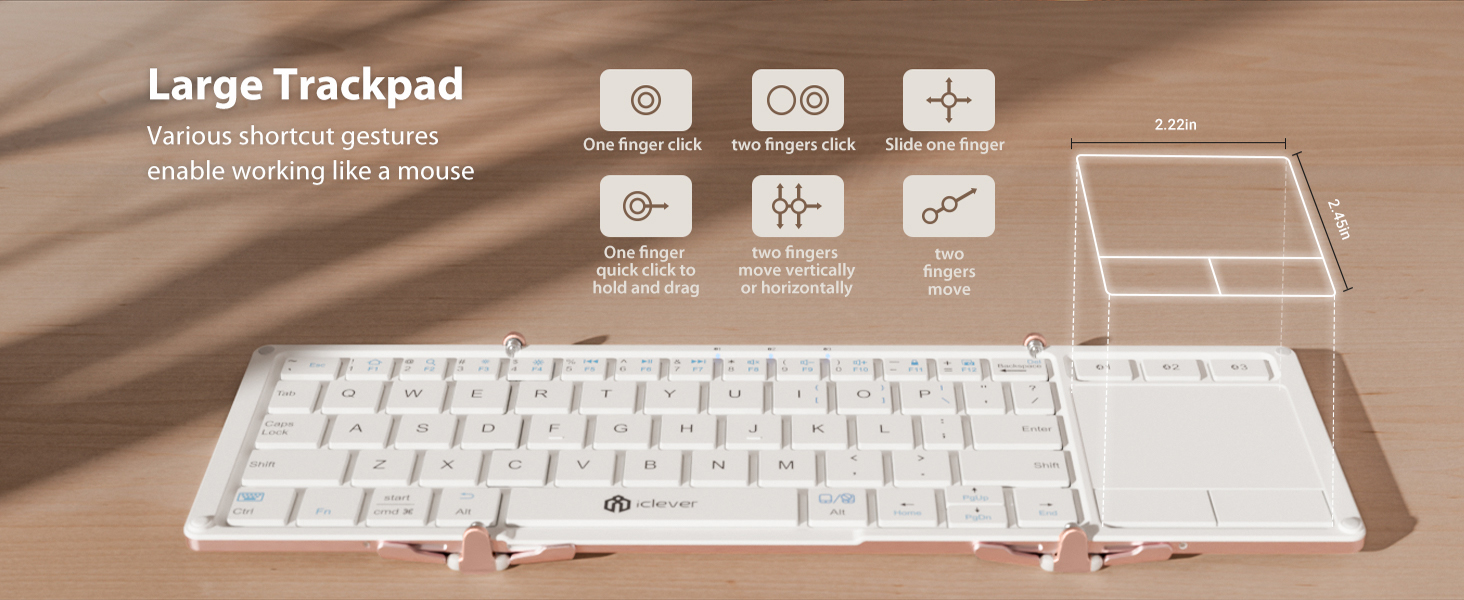
Figure 5.3: Visual guide to common touchpad gestures supported by the keyboard.
5.3 Mode amb cable
The keyboard supports a wired connection via its USB-C port. This allows for direct connection to a device, bypassing Bluetooth, which can be useful for initial setup of new systems or in environments where Bluetooth is restricted. Simply connect the keyboard to your device using the USB-C cable.
6. Manteniment
6.1 Neteja
To clean the keyboard, gently wipe the keys and surface with a soft, damp cloth. Avoid using harsh chemicals or abrasive materials. Ensure the keyboard is powered off and disconnected from any power source before cleaning.
6.2 Cura de la bateria
To prolong battery life, avoid exposing the keyboard to extreme temperatures. Charge the keyboard regularly, even if not in frequent use. The auto-sleep function when folded helps conserve power.
7. Solució De Problemes
- El teclat no es connecta per Bluetooth: Ensure Bluetooth is enabled on your device and the keyboard is in pairing mode (Fn + C). Try restarting both the keyboard and your device.
- El touchpad no respon: Verify the keyboard is fully unfolded and powered on. Ensure the touchpad is not accidentally disabled (check function keys for a touchpad toggle).
- Les tecles no responen: Check battery level and charge if necessary. Ensure the keyboard is properly paired or connected via wired mode.
- Connexió intermitent: Move the keyboard closer to your device to reduce interference. Avoid using the keyboard near other strong wireless signals.
8. Especificacions
| Característica | Detall |
|---|---|
| Dimensions del producte | 6.23 x 3.54 x 0.59 polzades (plegat) |
| Pes de l'article | 7.1 unces |
| Tecnologia de connectivitat | Bluetooth Low Energy (wireless only) |
| Descripció del teclat | 65-key tri-fold Bluetooth keyboard with touchpad, aluminum frame, non-backlit laptop-style keys (<50 dB), 3-device switch |
| Característica especial | Built-in touchpad, pocket-size fold, 3-device switch, USB-C fast charge (210mAh, 2-hour auto-sleep), aluminum frame, lightweight, hotkeys for Windows/Mac |
| Dispositius compatibles | Laptops & Desktops (Windows 10 +), MacBook & iMac (macOS 10.13 +), iPad (10.2/Pro/Air), iPhone (keyboard use only), Android phones & tablets (Android 8 +), Chromebooks |
| Material | Alumini |
9. Garantia i Suport
iClever products are designed for reliability and performance. For warranty information, technical support, or further assistance, please refer to the warranty card included in your package or visit the official iClever weblloc. Conserveu el rebut de compra per a reclamacions de garantia.


